> ## Documentation Index
> Fetch the complete documentation index at: https://docs.regasolutions.io/llms.txt
> Use this file to discover all available pages before exploring further.
# Money
> The three caps and exactly what each one covers, where automatic buying really runs, the total actually debited versus the price on screen, and everything that can spend money when you did not expect it.
rega spends **your** money, on **your** Vinted accounts, with **your** card. This is the one page to read in full before you arm anything: it says who authorises a spend, who bounds it, who refuses it, and why the number shown on a card is never the one that will appear on your bank statement.
**The four sentences to remember.**
1. **Automatic buying runs on our servers.** Closing the tab, closing the browser, shutting the computer down: none of it stops it. **The only thing that stops it is disarming it.**
2. **There are three different caps, and the most visible one is not the one protecting you.** The one that counts is each filter's **« € max »**.
3. **No cap is set to begin with.** An armed filter with no « € max » will buy **whatever the price**.
4. **Count above the displayed price.** On our demo account, an item at **40 €** is announced as **« ≈ 44.09 € delivered »**.
## The three caps
They are named almost the same, they do not protect the same purchases, they are not kept in the same place, and they do not start from the same value. This is the most expensive misunderstanding in the product — here are the three side by side, from the widest to the narrowest.
| | Where you set it | What it bounds | Where it is kept | Starting value |
| ------------------------ | ----------------------------- | ---------------------------------------------------------------------------------------------- | -------------------------------- | ----------------------------- |
| **« Purchase ceiling »** | Settings → **BUYING** | **Every** purchase: your clicks, automatic buying, the verification queue, preparing a carrier | At rega, for the service | **empty** — shown as « none » |
| **« Cap per item »** | Dashboard → **AUTOBUY** panel | Automatic buying **when it runs in this tab** | **In this browser only** | **120 €** |
| **A filter's « € max »** | Filters → a filter's panel | Automatic buying **for that filter**, and nothing else | On your rega account, everywhere | **empty** = no cap |
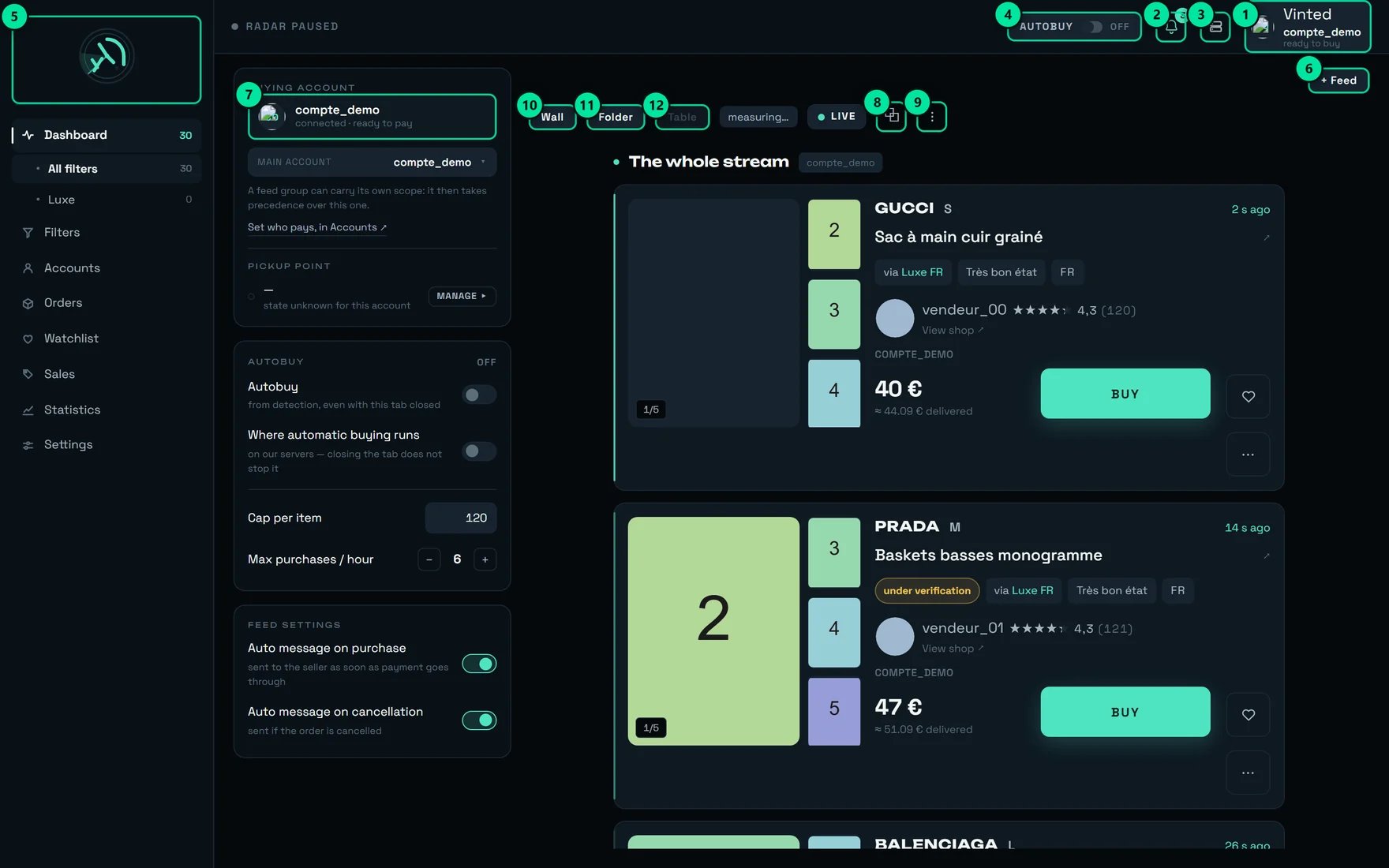
**The dashboard's 120 € « Cap per item » does not protect your automatic purchases.** It only applies to automatic buying **when it runs in the tab**. And it does not run in the tab: it runs **on our servers**, exactly as the screen writes under « Where automatic buying runs » — **« on our servers — closing the tab does not stop it »**.
In that configuration the 120 € field and the **« Max purchases / hour »** stepper at 6 have **no effect on what goes out**. And since they are kept in this browser only, another machine, another browser or a private window brings them back to 120 and 6.
 | # | Control | What it does |
| ----- | --------------------------------------------------------- | --------------------------------------------------------------------------------- |
| **1** | The paying account — here `compte_demo`, « ready to buy » | Says which Vinted account will pay for the **next** purchase. |
| **3** | Administration | REGA staff only — this button does not appear on your account. |
| **4** | The **AUTOBUY** badge | The switch that arms automatic buying. Here `OFF`: « Automatic buying disarmed ». |
### A filter's « € max »: the only one bounding what actually goes out
It lives in each filter's panel, under the hint **« Cap per item — leave empty to impose no cap »**. Left empty, the screen warns you once, in red:
> **« No cap: this filter will buy whatever the price. »**
Once the panel is closed, all that remains on the filter's row is a discreet **« no cap »**. This is why the **« Autobuy first »** sort on the Filters screen is the most useful control gesture in the product: it brings every armed filter to the top, and you read the cap column in one glance.
When you arm a filter, the confirmation reads the value back to you: `Autobuy armed — {nom}` followed by `· ≤ 40 €`, or by `· no cap`. **Read that suffix.** It is the last time the product tells you unprompted.
### « Purchase ceiling » (Settings → BUYING): the universal net
This is the only one that applies to **everything** — including a human click on BUY. Its description: **« Above this amount, the purchase is refused and you are told. Empty = no ceiling. »** It shows **« none »** until it is set.
This setting has a rare property: **once set, it also refuses an item whose price cannot be read**. A cap that let through what it cannot read would not be a cap. Same logic on a filter: if a « € max » is set and the price cannot be read, **the purchase is refused**, not attempted.
On a shop account this field is a **readout, not a control**. You can type in it; it goes back to its previous value with the message `Setting not saved — {cause}`. The reason is simple: this setting is shared by the whole service, and a value set there would refuse everyone's purchases. **Your real cap is each filter's « € max ».**
## Before arming: what rega checks, in order
```mermaid theme={null}
flowchart TD
A["An item is born and
| # | Control | What it does |
| ----- | --------------------------------------------------------- | --------------------------------------------------------------------------------- |
| **1** | The paying account — here `compte_demo`, « ready to buy » | Says which Vinted account will pay for the **next** purchase. |
| **3** | Administration | REGA staff only — this button does not appear on your account. |
| **4** | The **AUTOBUY** badge | The switch that arms automatic buying. Here `OFF`: « Automatic buying disarmed ». |
### A filter's « € max »: the only one bounding what actually goes out
It lives in each filter's panel, under the hint **« Cap per item — leave empty to impose no cap »**. Left empty, the screen warns you once, in red:
> **« No cap: this filter will buy whatever the price. »**
Once the panel is closed, all that remains on the filter's row is a discreet **« no cap »**. This is why the **« Autobuy first »** sort on the Filters screen is the most useful control gesture in the product: it brings every armed filter to the top, and you read the cap column in one glance.
When you arm a filter, the confirmation reads the value back to you: `Autobuy armed — {nom}` followed by `· ≤ 40 €`, or by `· no cap`. **Read that suffix.** It is the last time the product tells you unprompted.
### « Purchase ceiling » (Settings → BUYING): the universal net
This is the only one that applies to **everything** — including a human click on BUY. Its description: **« Above this amount, the purchase is refused and you are told. Empty = no ceiling. »** It shows **« none »** until it is set.
This setting has a rare property: **once set, it also refuses an item whose price cannot be read**. A cap that let through what it cannot read would not be a cap. Same logic on a filter: if a « € max » is set and the price cannot be read, **the purchase is refused**, not attempted.
On a shop account this field is a **readout, not a control**. You can type in it; it goes back to its previous value with the message `Setting not saved — {cause}`. The reason is simple: this setting is shared by the whole service, and a value set there would refuse everyone's purchases. **Your real cap is each filter's « € max ».**
## Before arming: what rega checks, in order
```mermaid theme={null}
flowchart TD
A["An item is born and
matches a filter"] --> B{"Is the AUTOBUY badge
set to ARMED?"}
B -->|no| S1["Nothing goes out.
You buy by hand."]
B -->|yes| C{"Is the filter confirmed,
active, with AUTOBUY ticked?"}
C -->|no| S2["That filter does not buy"]
C -->|yes| D{"Detected less than
2 minutes ago?"}
D -->|no| S3["Too late — the item is
almost always gone"]
D -->|yes| E{"Does the price fit under
the filter's « € max »?"}
E -->|no| S4["Refused, and you are told"]
E -->|yes| F{"A free buying account
in the scope?"}
F -->|no| S5["The item waits for
an account to free up"]
F -->|yes| G["PURCHASE — the money goes"]
style G fill:#1f6f43,color:#fff
style E fill:#7a4b00,color:#fff
```
The dashboard's left panel says so bluntly when it is not: **« no account to buy with — sort this out in Accounts »**. With no buying account, automatic buying **drops everything, silently**: the badge stays on ARMED and nothing ever happens.
Filters screen → **« Autobuy first »** sort → open each filter at the top of the list and fill in **« € max »**. Set it to the **item price** you accept, not to your total budget (see the next section).
Settings → **BUYING**. Turned off, the purchase **fails** — it does not pause, and it does not ask you anything.
rega never asks for a card number and stores none: it selects the card **already saved at Vinted**. With no usable card the payment is refused cleanly — no debit, but the item is lost.
Arm the AUTOBUY badge (confirmation: **« Autobuy armed »**), wait for a matching detection, and **check that a purchase row appears**. The ARMED badge on its own proves nothing.
## Where automatic buying runs, and what really stops it
The AUTOBUY panel carries two lines to be read as **statements**, not as settings:
* **« Autobuy »** — **« from detection, even with this tab closed »**
* **« Where automatic buying runs »** — **« on our servers — closing the tab does not stop it »**
That second line **states a fact**, it does not change it. Its switch looks off in the capture while our servers are indeed the ones buying: there is nothing to toggle there. The line underneath is what tells you the truth.
### What stops an automatic purchase
| What you do | How far the effect reaches |
| ------------------------------------------------------- | --------------------------------------------------------------------------------------------------------- |
| **Disarm the AUTOBUY badge** | **Everything stops.** This is the only clean gesture. Confirmation: « Autobuy disarmed ». |
| Untick AUTOBUY on a filter | That filter only |
| Deactivate a filter | That filter only |
| Leave a filter as a draft | That filter only — **and there is no way around it**: an unconfirmed filter never buys, whatever you tick |
| Empty the feed's account group | Nobody pays any more — this is a **deliberate refusal**, not a fallback onto some other account |
| Close the tab, close the browser, shut the machine down | **No effect.** Buying carries on. |
| Reboot, come back the next day | **No effect.** The armed state is kept. |
**An AUTOBUY badge left on ARMED on a Friday evening buys all weekend.** That is the intended behaviour — it is the whole point of the product — but it has to be a decision you made.
Two stops come from Vinted, not from you:
* **If Vinted blocks one of your accounts from buying** (a temporary block, of the order of 24 h), rega **disarms automatic buying for your whole workspace**, deliberately. Carrying on with another account is exactly the move that takes them down one after the other. Read the disarming message before you arm again.
* **If Vinted limits how fast one account may act**, that account is set aside for **15 minutes** and the others carry on.
On a brand-new workspace handed over by link, **arming is temporarily refused** until the workspace has been handed to its owner; the filters, on the other hand, are already in place. Disarming is always possible.
## The total actually debited
Three numbers travel through rega and **they do not mean the same thing**.
```mermaid theme={null}
flowchart TD
P["PRICE ON THE CARD
40 €
the item alone"] --> T["≈ ESTIMATED TOTAL
« ≈ 44.09 € delivered »
+ buyer protection
+ ~3.50 € estimated delivery"]
T --> D["TOTAL DEBITED
the real one — known only
once the purchase has gone"]
D --> S["« SPENDING » TILE
item prices only,
cancellations included"]
style D fill:#1f6f43,color:#fff
style S fill:#7a4b00,color:#fff
```
| The number | What it contains | Where you see it |
| --------------------- | ---------------------------------------------------------------------------------- | ---------------------------------------------------------- |
| **The price** | The item **alone**, in the listing's currency | In bold on the card |
| **The estimate** | Item + buyer protection + estimated delivery | The « ≈ … € delivered » line, under the price |
| **The total debited** | **The real one**: item + delivery + buyer protection | On the purchase row, under the label **« total debited »** |
| **The Spending tile** | The **sum of item prices** — no postage, no protection, **cancellations included** | Statistics screen |
On our demo account, the first two cards in the stream show **40 €** → **« ≈ 44.09 € delivered »** and **47 €** → **« ≈ 51.09 € delivered »**. That is **+4.09 €** in both cases.
**The practical rule: count about 4 € above the displayed price.** The estimate adds a deliberately modest delivery — better to under-estimate by a euro than to inflate the total. What has been measured: real postage at **2.89 €**, and buyer protection taking an item from **10.00 € to 11.20 €**.
Direct consequence for your caps: **all three caps compare the ITEM price, never the total.** A « € max » at 100 € therefore lets through a purchase debited at around 108 €. Set them to the item price you accept, not to your budget.
The estimate's tooltip says it itself: **« Estimated total price: item + delivery (about €3-4). The exact postage depends on the carrier chosen at purchase. »** And the final amount's tooltip: **« Amount actually debited (item + delivery + buyer protection). »**
**Do not read the « Spending » tile as a bank statement.** Its tooltip writes it in plain words: **« Sum of the ITEM PRICES of every order, whatever its state. Postage and buyer protection are not included. »** So it **under-states** your statement on every order, and it **also counts cancelled orders**. For a real total, add up the « total debited » values on your purchase rows.
**rega never converts a currency** — it does not have the day's rate. A British listing's amount stays in pounds, and the total debited stays in the currency of the account that paid. Two numbers in two currencies on the same row is correct: they are not two versions of the same amount.
## At the moment of payment
On a card in the stream, the purchase row first shows **« item price — total not confirmed yet »**, then switches to **« total debited »** as soon as Vinted has returned the real amount. Here is what can happen in between.
```mermaid theme={null}
flowchart TD
A["The purchase goes out"] --> B{"Does your bank ask
for a confirmation?"}
B -->|no| OK["DEBITED — item
+ delivery + protection"]
B -->|yes| C["« 🔐 VALIDATE THE PAYMENT » banner
+ immediate notification"]
C -->|"you confirm"| OK
C -->|"15 minutes without confirming"| KO["Purchase lost · NO debit"]
A -->|"connection drops while paying"| U["« TO CHECK » — outcome unknown"]
U --> V["Go and look in Orders
BEFORE clicking again"]
style OK fill:#1f6f43,color:#fff
style U fill:#7a4b00,color:#fff
```
**An interrupted payment is NEVER replayed.** When the connection drops exactly while paying, nobody knows whether Vinted debited or not. Replaying would risk a **double debit** — rega never does. That is why the « Retry » button **does not appear** on a row with an unknown outcome, and why the sentence shown is: **« Outcome unknown: tracking stops here. Check in Orders BEFORE retrying — a payment may still go through. »**
**A 3-D Secure confirmation that never happens is not a failure, and costs nothing.** After a quarter of an hour without confirmation the purchase is simply **not valid**: the item is lost, **no euro left your account**. The notification goes out the very moment the link exists — title **« Bank confirmation required »**, body **« Your bank is asking for a confirmation — without it, the purchase will not complete. »** Keep it enabled and accept the alert on your phone.
## The pick-up point: two things not to confuse
Both carry the words « pick-up point ». One is **mandatory and free**, the other is **optional and paid for**.
**Settings → BUYING. On from the start. Leave it on.**
Its description: « rega chooses the collection point during the purchase. Turned off, the purchase fails for want of a pick-up point — leave it on. »
**Turned off, the purchase FAILS** — it does not pause, and **nothing asks anybody anything**. The refusal you get is: « No pick-up point could be selected for this order. »
**Accounts screen. A REAL purchase of a few euros. Optional.**
The note under the button hides nothing: « A real purchase of a few euros, once. » And the panel explains why: « No point kept. Vinted only keeps one after a first purchase actually paid with this carrier — once, a few euros. »
**Without it, the purchase still goes through** — about **1.3 seconds** slower.
**The gain from preparing is not additive — and that is counter-intuitive.** It is the **seller** who chooses which carriers are offered, not you. Preparing a second carrier does not make your purchases faster still: it widens the **share** of your purchases that gain those \~1.3 seconds. One account, one prepared carrier, and you already have most of the benefit.
Two gestures to do **in the right order**: rank your pick-up points **before** an account's first paid purchase. That purchase is what fixes the point every later purchase will reuse without a second thought.
The « Preferred carrier at the pick-up point » setting warns you itself: **« A carrier other than the default one may cost a little more. »** A preference, on the other hand, **never** makes a purchase fail: if the seller does not offer your carrier, rega takes what is available.
## What can spend money when you did not expect it
When you click BUY on an item Vinted is still checking, the card shows **« Under verification — the purchase starts as soon as it is verified »**. The item joins the queue, and **the purchase goes out on its own** the moment Vinted clears it — possibly days later, **with no further click from you**.
Giving up is set at **96 hours**, adjustable in Orders under **« Give up after »**, and each row shows the time remaining. **Empty this queue before a weekend** if you do not want a surprise on Monday.
It is not a simulation. It is a real purchase, bounded to a few euros, from a real seller, leaving you a real parcel to collect. Once per account and per carrier, and that is all.
The limit is **2 simultaneous purchases per account**. With several buying accounts, your simultaneous spending window is therefore **2 × the number of accounts**. This is not a queue: they are parallel spends.
The armed state is copied along with the workspace. That is exactly why arming is refused until the workspace has been handed to its owner — but **the first thing to do after the handover is still to check the AUTOBUY badge**, and every filter's « € max ».
The button replays the original purchase, on the **next account** in your rotation. It is deliberately **absent** in every ambiguous case: unknown outcome, bank confirmation still open, item already gone. When it is not there, it is because it should not be.
The account is **committed at click time**, so before the outcome is known. The tooltip says it: « Account committed at click time: it is reserved before the purchase completes. In rotation, a failed purchase has therefore already used its turn. » This is intended — an account that has just failed is the worst placed to try again.
## Our advice
Open every armed filter and fill in **« € max »**. It is the only cap consulted by the automatic buying that actually runs, and the only one that follows you from one browser to another.
Caps compare the item price. Take \~4 € off your total budget to get the « € max » to type: budget 100 € → « € max » at 96.
Once a week: Filters screen, **« Autobuy first »** sort, and read the cap column. A **« no cap »** row is a decision, not an oversight — check that it really is one.
The ARMED badge proves nothing. Wait for a matching detection and check that a **purchase row** appears. With no buying account attached, the engine drops everything **silently**.
Orders → **« Being checked »**. Remove what you no longer want: those items can buy themselves during the following four days.
A bank confirmation not done within 15 minutes loses the item. Keep purchase notifications on and accept the alert on your phone.
It only counts item prices, and it includes cancelled orders. For a real total, add up the **« total debited »** values on your purchase rows.
The \~1.3 s gain does not add up. Prepare the carrier your sellers offer most often, and stop there.
Do not click again. A payment may still go through, and a second click would risk a double debit. Orders tells the truth; the card in the stream only follows.
Only the AUTOBUY badge and your filters' « € max » follow your account. « Cap per item » and « Max purchases / hour » stay in this browser — and vanish in a private window.
An order can no longer be cancelled once the parcel is on its way. And **two cancellations in 24 h** put you in the red zone at Vinted: rega warns you, it does not forbid it.
It is the only setting in Settings which, turned off, makes a purchase **fail** — and it fails **after** the item has been reserved, so at the worst possible moment.
## What surprises people
Both are correct. The badge states **your intent**: "I authorise automatic buying." The « Where automatic buying runs » line states **who carries it out** — our servers. It is not a handbrake.
This is not a failure, it is freshness. Past that delay the item is almost always gone: going ahead would burn one of your account's buying attempts for nothing. rega prefers to refuse cleanly.
Deliberate, and just as well: without it, ticking AUTOBUY would immediately buy everything you were looking at. Automatic buying only works on what is **born after** you armed.
If the price cannot be read, the cap **refuses**. That is the plain sense of a guardrail: one that lets through what it does not understand protects nothing.
While Vinted has not finished checking a listing, automatic buying stays away from it. A human click, though, puts the item **in the queue** — and it is that queue that will buy later, on its own.
It is capped and never reaches its end before confirmation. Our real measured purchases took between **5.93 s and 8.8 s**, most of which is time spent at Vinted that nobody can shorten.
Across the failures recorded in production and classified one by one, **59.5 %** were races lost or items already gone, and only **26.2 %** were down to the tool. The screen files each failure under a readable verdict, including **« Race lost, or the item had already gone »**.
The account that counts is the one appearing **on the purchase row**, afterwards: it is the one that paid, and it is **its** address the parcel will go to.
## On a phone
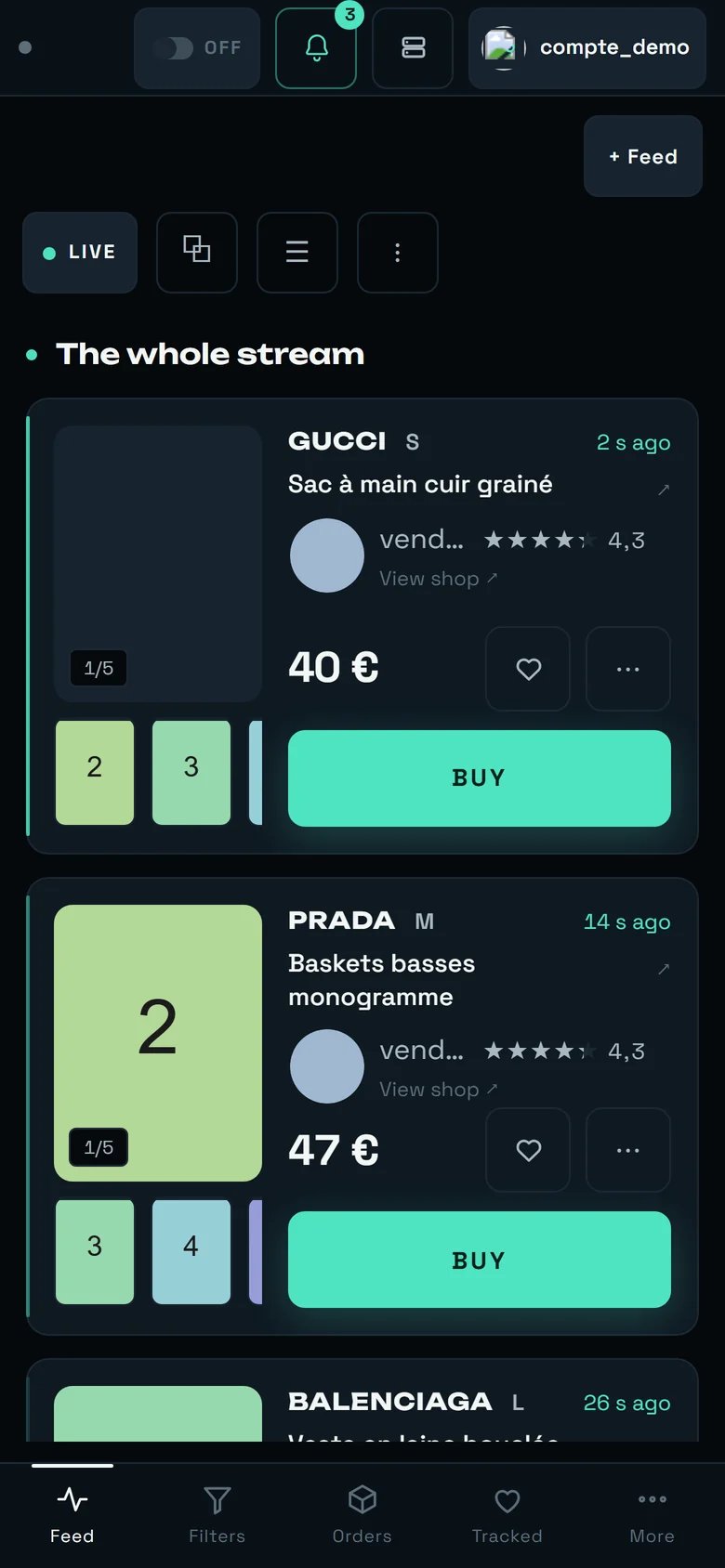 * **The AUTOBUY badge stays reachable**: it is the first item in the header, to the left of the bell. **So you can disarm from anywhere**, and that is the single most important gesture on this page.
* **The left-hand AUTOBUY panel is not shown.** Your filters' « € max » values stay editable from the **Filters** tab in the bottom bar.
* **The « ≈ … € delivered » estimate does not appear on the phone card**: only the item price is there, in large type. Add the \~4 € in your head.
* **The bottom bar replaces the sidebar**: **Feed · Filters · Orders · Tracked · More**. « Orders » is the tab to open after a bank-confirmation notification.
## The limits, said plainly
* **There is no monthly budget and no cumulative spending alert.** Nothing totals your debits to compare them against a threshold. The only usable cap is **per item**, filter by filter.
* **There is no account-wide cap in the interface.** No cap shared by all your filters, and no server-side maximum number of purchases per hour.
* **The Settings « Purchase ceiling » is a readout on a shop account**: it shows, it accepts typing, and it reverts.
* **The dashboard's « Cap per item » does not bound purchases going out from our servers**, and is only kept in the browser where you typed it.
* **Caps bound the item price, never the total debited.** The gap is about 4 € per purchase.
* **The « Spending » tile is not a statement**: no postage, no buyer protection, and cancelled orders are counted in it.
* **The message refusing to arm a workspace still being set up arrives in French**, even when your interface is in English.
* **rega neither collects nor stores any card number.** It selects the card saved at Vinted on the paying account — that is where, and only where, you manage it.
## Where to go next
Each filter's « € max » — the only cap that really bounds your automatic purchases.
The AUTOBUY badge, the paying account, and purchase rows with their « total debited ».
The real outcome of every purchase, and the verification queue to empty before a weekend.
The pick-up point ranking and « PREPARE THIS CARRIER ».
The BUYING tab: automatic pick-up point, preferred carrier, purchase ceiling.
The « Spending » tile — and what it does not count.
* **The AUTOBUY badge stays reachable**: it is the first item in the header, to the left of the bell. **So you can disarm from anywhere**, and that is the single most important gesture on this page.
* **The left-hand AUTOBUY panel is not shown.** Your filters' « € max » values stay editable from the **Filters** tab in the bottom bar.
* **The « ≈ … € delivered » estimate does not appear on the phone card**: only the item price is there, in large type. Add the \~4 € in your head.
* **The bottom bar replaces the sidebar**: **Feed · Filters · Orders · Tracked · More**. « Orders » is the tab to open after a bank-confirmation notification.
## The limits, said plainly
* **There is no monthly budget and no cumulative spending alert.** Nothing totals your debits to compare them against a threshold. The only usable cap is **per item**, filter by filter.
* **There is no account-wide cap in the interface.** No cap shared by all your filters, and no server-side maximum number of purchases per hour.
* **The Settings « Purchase ceiling » is a readout on a shop account**: it shows, it accepts typing, and it reverts.
* **The dashboard's « Cap per item » does not bound purchases going out from our servers**, and is only kept in the browser where you typed it.
* **Caps bound the item price, never the total debited.** The gap is about 4 € per purchase.
* **The « Spending » tile is not a statement**: no postage, no buyer protection, and cancelled orders are counted in it.
* **The message refusing to arm a workspace still being set up arrives in French**, even when your interface is in English.
* **rega neither collects nor stores any card number.** It selects the card saved at Vinted on the paying account — that is where, and only where, you manage it.
## Where to go next
Each filter's « € max » — the only cap that really bounds your automatic purchases.
The AUTOBUY badge, the paying account, and purchase rows with their « total debited ».
The real outcome of every purchase, and the verification queue to empty before a weekend.
The pick-up point ranking and « PREPARE THIS CARRIER ».
The BUYING tab: automatic pick-up point, preferred carrier, purchase ceiling.
The « Spending » tile — and what it does not count.