> ## Documentation Index
> Fetch the complete documentation index at: https://docs.regasolutions.io/llms.txt
> Use this file to discover all available pages before exploring further.
# Winning races
> Why an item gets lost, and everything you can do to lose fewer: the sequence of a purchase and its exit points, what costs seconds, what does not despite appearances, and the exact difference between buying by hand and letting REGA buy.
On Vinted a good deal is not won by eye: it is won by the second. This page does not describe
buttons — it explains **where an item gets lost**, and what you can change to lose fewer.
**The rule that decides everything: the item goes to whoever is charged first, not to whoever opens
the order first.** This was checked live, on two accounts: account A opens an order and does not pay
it, the item stays available, account B pays and takes it. Opening an order **reserves nothing**.
The immediate consequence is a liberating one: **you do not have to be fast.** What has to be fast is
the chain — and it runs without you, on our servers. Your work happens beforehand: prepare the
accounts, arm the right filters, and do not waste the attempts Vinted grants you.
***
## Where the race is run
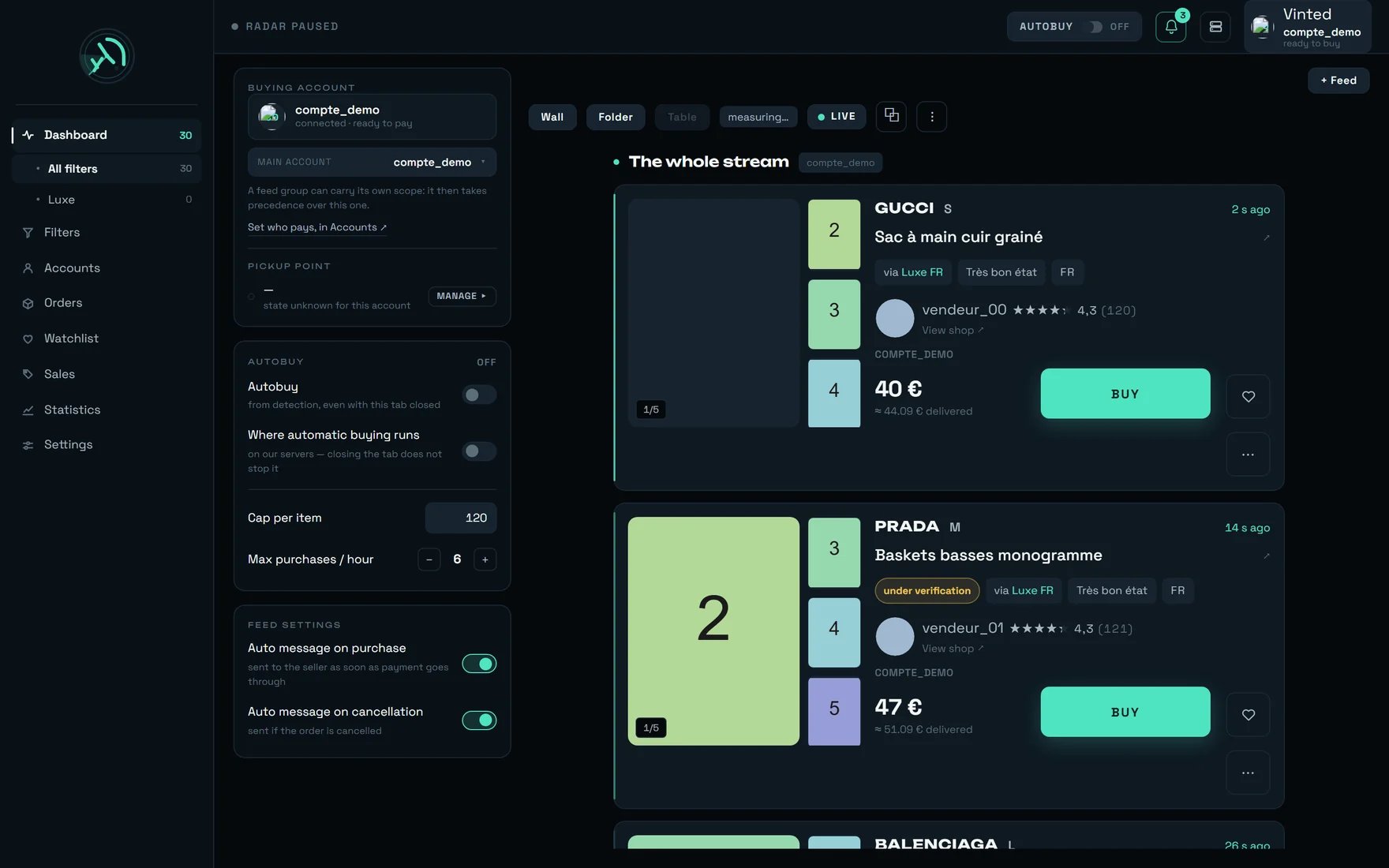 Four markers on this screen matter for a race, and only those.
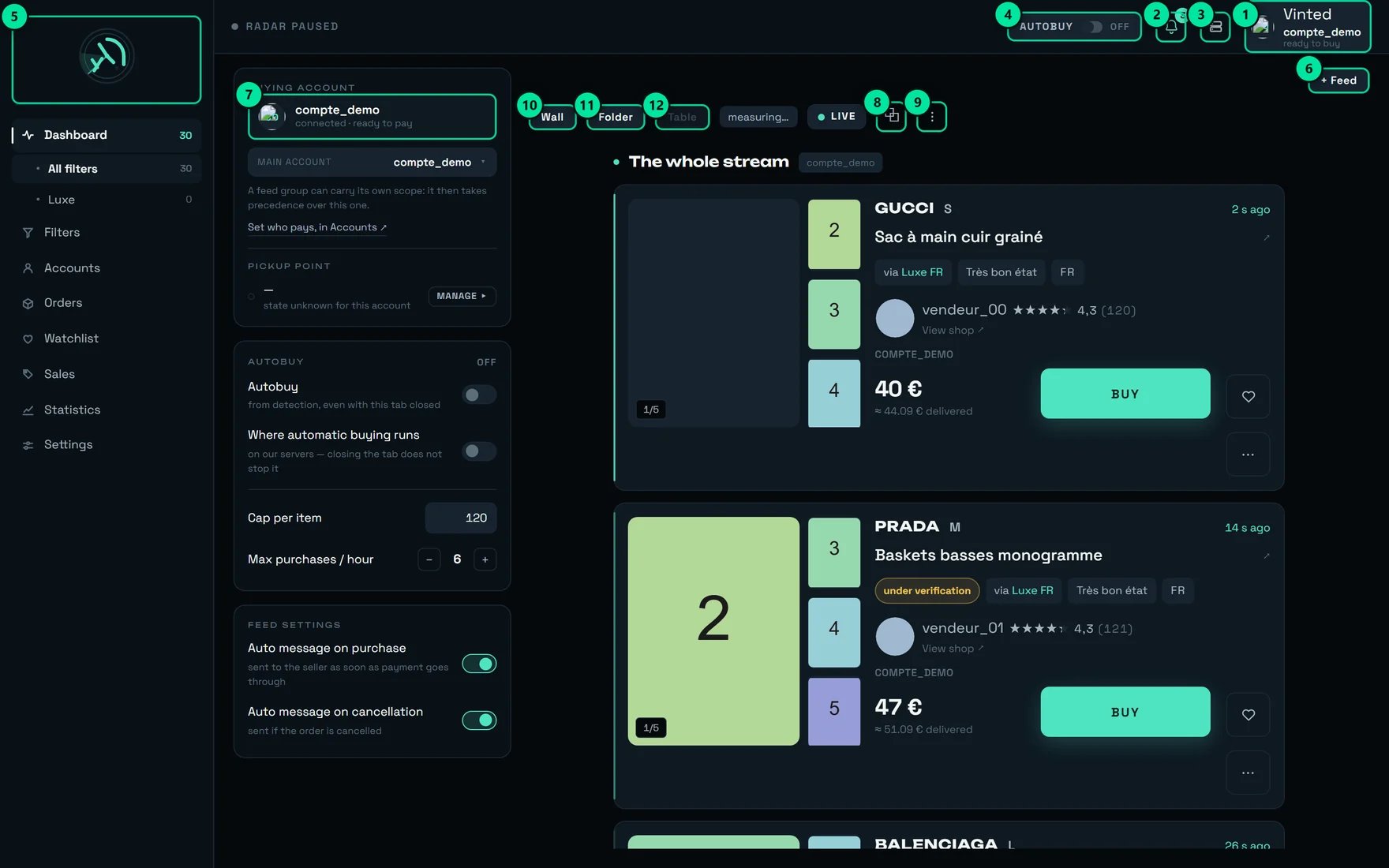 | № | The marker | Why it matters here |
| ----- | ----------------------------------- | ------------------------------------------------------------------------------------------------------------------------------------------------------------------------------------------------------------- |
| **1** | The account pill, top right | Tooltip: “compte\_demo will pay for the next purchase — ready to buy.” This is the account that **pays**, and therefore the address the parcel goes to. A race won with the wrong account is a race half won. |
| **2** | The bell | “3 unread notifications” on our test account. This is where the bank confirmation request arrives — the only moment a race needs your hand. |
| **3** | Administration | REGA staff only — this button does not appear on your account. |
| **4** | The **AUTOBUY** pill, here on “OFF” | Tooltip: “Automatic buying disarmed”. Armed, it makes REGA run in your place, **on our servers**. |
| **9** | **⋮** | “Recent purchases and conversations”. The purchase row shown there is the only truth about what happened: the account actually committed, and the amount charged. |
**Automatic buying runs on our servers.** Once the **AUTOBUY** pill is armed, it survives closing the
tab, closing the browser and shutting down the machine. **The only gesture that stops it is
disarming it.** The “Where automatic buying runs” switch in the left-hand panel **states** that fact
— its description says “on our servers — closing the tab does not stop it” — it is not a setting to
flip.
***
## The sequence of a purchase, and its exit points
A purchase is not a click: it is a chain of steps, each of which can end in an exit. Knowing **where**
a race stopped is knowing whether there is anything to fix — or nothing at all.
```mermaid theme={null}
flowchart TD
A["A listing appears"] --> B["REGA waits for it to become buyable
| № | The marker | Why it matters here |
| ----- | ----------------------------------- | ------------------------------------------------------------------------------------------------------------------------------------------------------------------------------------------------------------- |
| **1** | The account pill, top right | Tooltip: “compte\_demo will pay for the next purchase — ready to buy.” This is the account that **pays**, and therefore the address the parcel goes to. A race won with the wrong account is a race half won. |
| **2** | The bell | “3 unread notifications” on our test account. This is where the bank confirmation request arrives — the only moment a race needs your hand. |
| **3** | Administration | REGA staff only — this button does not appear on your account. |
| **4** | The **AUTOBUY** pill, here on “OFF” | Tooltip: “Automatic buying disarmed”. Armed, it makes REGA run in your place, **on our servers**. |
| **9** | **⋮** | “Recent purchases and conversations”. The purchase row shown there is the only truth about what happened: the account actually committed, and the amount charged. |
**Automatic buying runs on our servers.** Once the **AUTOBUY** pill is armed, it survives closing the
tab, closing the browser and shutting down the machine. **The only gesture that stops it is
disarming it.** The “Where automatic buying runs” switch in the left-hand panel **states** that fact
— its description says “on our servers — closing the tab does not stop it” — it is not a setting to
flip.
***
## The sequence of a purchase, and its exit points
A purchase is not a click: it is a chain of steps, each of which can end in an exit. Knowing **where**
a race stopped is knowing whether there is anything to fix — or nothing at all.
```mermaid theme={null}
flowchart TD
A["A listing appears"] --> B["REGA waits for it to become buyable
at Vinted: 1.3 to 2.8 s"]
B -->|"sold, reserved or withdrawn"| X1["GONE
nothing is even asked"]
B -->|"Vinted is still checking it"| X2["Under verification
queued, the purchase will restart on its own"]
B --> C["The order is opened"]
C -->|"security block at Vinted"| X3["Purchase not completed"]
C --> D{"Pick-up point already
remembered by Vinted?"}
D -->|"yes"| E["Phone and card,
if Vinted asks for them"]
D -->|"no"| D2["Pick-up point is chosen
≈ 1.3 s"]
D2 --> E
E -->|"card or phone missing"| X4["Refused BEFORE any charge
not one euro left the account"]
E --> F["Payment
≈ 6 s, at Vinted"]
F -->|"declined"| X5["One of the ten reasons listed below"]
F -->|"the bank asks for a confirmation"| G["🔐 VALIDATE THE PAYMENT
15 minutes to click"]
G --> H["✓ BOUGHT"]
F --> H
```
What the diagram says, and what to remember from it:
“GONE”, “Under verification”, and the refusal for a missing card or phone: in all three cases
**not one euro left the account**, and in the first two REGA did not even ask Vinted for anything.
An interruption **at the moment of paying**. The outcome there is unknown, so REGA **never**
replays: replaying would risk a double charge. That is the “TO CHECK — OUTCOME UNKNOWN” row.
**A listing is not buyable the moment it is born.** Between the moment it exists and the moment
Vinted accepts a purchase, **1.3 to 2.8 seconds** go by — four measurements, and highly variable with
the time of day: closer to 2.8 s in the morning, closer to 1.2 s in the evening. During that window
**every** attempt is refused, including yours. REGA waits for that switch and tries only once, at the
right instant. Across three births measured, that wait sees the switch **153 ms earlier** (median;
112 · 153 · 421 ms).
***
## What costs seconds
Here, measured, is what actually weighs on a race — and what you can do about each item.
| What it costs | How much | What you can do about it |
| ------------------------------------------------------------------------------ | -------------------- | -------------------------------------------------------------------------------------------- |
| The payment itself | **≈ 6 s**, at Vinted | **Nothing.** That is server time at Vinted, and it cannot be compressed. |
| Choosing a pick-up point the first time | **≈ 1.3 s** | Prepare the carrier once per account (see below). After that it is zero. |
| Setting the bank card | **≈ 1 s** | Save a card and make it the **default** on the Vinted account: the step becomes unnecessary. |
| Finding the seller when the listing comes from somewhere other than the stream | up to **1.57 s** | Nothing to do: from REGA's own stream this costs **0 ms**. |
| Waiting for the item to become buyable | **1.3 to 2.8 s** | Nothing. Vinted decides, and nobody can shorten it. |
End to end, purchases actually measured run from **5.93 s** (the shortest path) to **8.8 s** (the full
path, everything cold). The very first version of the chain took **≈ 9.5 s**.
**The most profitable lever is not speed: it is not being refused.** A purchase that takes 6 seconds
and fails because no card is saved costs you more than a purchase that takes 8 seconds and goes
through. On 12 August, a Vinted update stopped pre-selecting the card: **six purchases lost in one evening**, all on
accounts that were otherwise perfectly healthy.
***
## What costs nothing, despite appearances
This is the most useful half of the page: do not spend your energy on any of these.
Stops **nothing**. Automatic buying runs on our servers. Only disarming the **AUTOBUY** pill stops
it.
Freezing stops the screen from **painting**, never detection, never enrichment, never automatic
buying. A “N NEW” counter climbing while you read is not a fault, and nothing is lost.
It carries on detecting, counting and **buying**. An invisible feed is not a switched-off feed. Do
not close one to make room: pin what you want to keep on screen.
Purely visual. The geometry of the screen does not change a purchase by a single millisecond — “the
interface cannot make a purchase faster, it can only avoid slowing it down”.
It is capped at **96 %** and set against a reference of 8 s, while real purchases run from 5.93 s to
8.8 s. **It is not proof of payment** — the proof is the purchase row.
The gain is **not additive**. The **seller** chooses the carrier: preparing one more carrier widens
the **share** of your purchases that gain the \~1.3 s, never the gain itself.
And conversely, three gestures that **cost** you while looking helpful:
* **Clicking again on a “GONE” item.** Vinted limits how often an account may ask to open an order,
and **a refusal uses up that budget**. Three clicks on a sold item are three attempts fewer for the
next one. That is exactly why the “RETRY” button **does not appear** on “GONE”.
* **Clicking on an item that is “Under verification”.** Same budget spent for nothing — and once that
budget is exhausted, the item no longer even enters the queue that was meant to catch it. The
mechanism designed to save you is disarmed by the waste that came before it.
* **Opening the purchase preparation over and over.** Every preparation creates a real unpaid order
with a real seller, and spends the same budget. Keep it for “I am after this exact item”.
***
## By hand, or letting REGA buy
**Both paths are the same path.** A **BUY** click and an automatic purchase go through the same
chain, the same account selection, the same lock, the same payment, the same bank confirmation.
Neither one is “the fast version”.
The only difference that matters is **when the start happens**: automatic buying starts at detection,
your click starts when your eye reaches the card.
| | By hand (**BUY** click) | Automatic (**AUTOBUY** armed) |
| ------------------------------------- | ---------------------------------------------------------------------- | --------------------------------------------------------------------------- |
| What triggers it | your click | the first **armed** filter that accepts the item |
| Start | after your reading time | at detection |
| Freshness required | none | **120 s** — an item detected more than two minutes ago is no longer bought |
| Price cap | the Settings one, if set | the Settings one **and** the filter's “€ max” |
| Purchases in flight per account | 2 | 2 |
| If no account is free | the screen refuses: “A purchase is already under way on this account.” | the job **stays queued** and starts as soon as an account frees up |
| After a rate refusal | nothing | the account is **set aside for a quarter of an hour**, the others take over |
| After a purchase refusal from Vinted | nothing | **all** your automatic buying is disarmed (see below) |
| Condition that cannot be switched off | — | the filter must be **confirmed**: a draft never buys |
| Label on the row | — | **AUTO** badge, tooltip “Triggered by autobuy” |
**An item detected more than two minutes ago is almost always gone.** That is why automatic buying
refuses to take it: this is not a cap, it is freshness. After an outage, nothing will be bought
“late”.
**A single purchase refusal issued by Vinted disarms ALL your automatic buying.** This is deliberate:
when Vinted blocks an account from buying — typically for \~24 h — carrying on with another account is
the gesture that brings them down one after another. The message received from Vinted is kept as it
came: **read it before you re-arm.**
***
## The three ceilings
All three exist, they do not do the same thing, and none is active out of the box except the third.
**No price ceiling is armed by default** anywhere: that is an explicit decision by the tool's owner —
visibility replaces the constraint.
| The ceiling | Where it is set | What it acts on | Out of the box |
| ---------------------- | ---------------------------------------------- | --------------------------------------------------------- | ---------------------------------------------------------------------------------------------- |
| **“Purchase ceiling”** | Settings → **Buying** | **All** purchases, manual and automatic, from any machine | **empty** — “Above this amount, the purchase is refused and you are told. Empty = no ceiling.” |
| A filter's **“€ max”** | Filters screen, “Autobuy on this filter” block | Automatic buying **for that one filter** | empty — “No cap: this filter will buy whatever the price.” |
| **“Cap per item”** | **AUTOBUY** panel on the dashboard | Remembered **in this browser only** | **€120** |
**A ceiling, once set, also refuses an item whose price cannot be read.** That is intended — better to
let a deal go than to be charged an amount nobody could read — but it is a cause of lost races that
nobody suspects. If you set a ceiling, know that you are accepting that refusal too.
**Set your ceilings against the LISTING price, not against your final budget.** All three compare the
displayed price, never the amount charged — which adds buyer protection and postage. While the exact
postage is unknown, the screen shows a total with a “≈” and **€3.50** of estimated shipping.
***
## When it does not go through: reading the screen
**Six failures out of ten are not errors.** Across 42 real failures classified, **25 (59.5 %)** were
lost races or items already gone, and **only 11 (26.2 %)** were down to the tool. The screen files
every failure under a verdict: “Race lost, or the item had already gone”, “Postponed — the purchase
will be retried”, “For us to fix”, “Waiting for something from you”. **React only to the last two.**
```mermaid theme={null}
flowchart TD
A["The purchase did not go through"] --> B{"What does the card say?"}
B -->|"GONE — BOUGHT BY SOMEONE ELSE"| C["Do not click again.
RETRY is not offered, on purpose"]
B -->|"Under verification"| D["Touch nothing.
The purchase restarts on its own, up to 96 h"]
B -->|"TO CHECK — OUTCOME UNKNOWN"| E["Open Orders BEFORE retrying:
a payment may still go through"]
B -->|"🔐 VALIDATE THE PAYMENT"| F["Confirm with your bank.
15 minutes, then the purchase is lost"]
B -->|"RETRY is offered"| G["Read the reason quoted under the button"]
G --> H["Waiting for something from you
→ card, phone, or account"]
G --> I["Race lost, or the item had already gone
→ nothing to fix"]
```
### The ten payment refusals, and what they mean
When Vinted declines a payment, REGA files the real reason under one of these ten sentences. The
first six are lost races; the last four ask something of you.
| The sentence you read | What it means |
| ----------------------------------------------------------------------------------------------------- | --------------------------------------------------------------------- |
| “Item sold or withdrawn.” | Race lost. Nothing to fix. |
| “Another member is currently buying this item.” | Race lost by a hair. |
| “A purchase is already under way for this item.” | You or the automation already started it — do not start a second one. |
| “Item reserved for another member.” | The seller reserved it. Nothing to fix. |
| “The payment did not go through.” | A decline with no usable reason from Vinted. |
| “Too many attempts in a row. Try again in a moment.” | Let it settle: this one passes. |
| “A phone number is required for delivery.” | **Action needed** — save a number on that Vinted account. |
| “The bank card could not be selected for this purchase. Check the card saved on this Vinted account.” | **Action needed** — no usable card. |
| “Payment declined. Check the saved payment method.” | **Action needed**, in principle. ⚠️ See the warning below. |
| “Payment declined by the bank.” | **Action needed** — this one is for your bank, not for us. |
**If you read “Payment declined. Check the saved payment method.” while your card is perfectly valid,
it is probably not your card.** Vinted sometimes returns a generic decline that says nothing about
the cause. Measured on 15 August on one of our accounts: card saved, set as default, not expired —
and that message all the same. Check once, then leave it alone.
### The other sentences you will meet
| The sentence | Where it appears | What it asks of you |
| --------------------------------------------------------------------------------------------------------- | ----------------------------------- | --------------------------------------------------------------------------------------- |
| “This item is no longer available.” | on the card, under the “GONE” label | Nothing. |
| “Vinted is still checking this listing. The purchase will start as soon as it is available.” | under the “VERIFICATION” label | **Nothing at all** — this is a queue entry, not a failure. |
| “Queued — the purchase starts as soon as Vinted verifies the item.” | on the card | Wait. The queue holds for **96 h**. |
| “A purchase is already under way on this account.” | on click | Two purchases in flight per account is the limit. |
| “This account is no longer connected. Reconnect it from the Accounts page.” | on click | Reconnect the account. |
| “Too many requests were sent to Vinted on this account. Wait a few minutes.” | on click | Wait. In automatic mode REGA sets the account aside for a quarter of an hour by itself. |
| “No pick-up point could be selected for this order.” | during the purchase | Check that “Automatic pick-up point” is **on** in Settings. |
| “The purchase could not be completed.” | during the purchase | Nothing specific: the order could not be opened. |
| “Your bank is asking you to confirm this payment.” | notification | **Act, right now.** |
| “Outcome unknown: tracking stops here. Check in Orders BEFORE retrying — a payment may still go through.” | purchase row | Open Orders. Do not click again. |
 | № | The tab | What it tells you about your races |
| ------ | ------------------ | ------------------------------------------------------------------------------------------------------------------- |
| **8** | **Orders** | The real list of what was paid for. This is where an “outcome unknown” is settled. |
| **10** | **Pick-up points** | “Parcels waiting at a pick-up point, grouped by point”. |
| **11** | **Being checked** | “Items being checked by Vinted — the purchase starts as soon as they are cleared”. The queue that buys without you. |
***
## Our advice
A human click always leaves after your reading time; the automation leaves at detection. For the
items you take every single time (a brand, a size, a price), arm the filter and stop clicking. Keep
the click for what needs judgement — condition, photos, seller.
Without that double condition, an armed autobuy would buy **everything** the radar shows. The list
of armed filters is re-read **every 20 s**: after arming a filter elsewhere, let twenty seconds go
by before concluding that “it is not buying”. And until that list has been read, **nothing is
armed** — which is deliberate.
Every refused attempt uses up the budget Vinted grants that account, and it is the same budget that
will serve the next item. What was measured on this point: the old behaviour charged back in **159
times in 8.02 seconds**; there is now a single, immediate attempt. Do not restore by hand what was
removed.
Vinted hides a listing while it checks it — **from 30 minutes to 2 hours**. The purchase **will
restart on its own** once it is cleared, and the queue holds for **96 hours**. On our measurement,
**9 items out of 42** come back on sale. Every manual click during that time only reduces your
chances on the next item.
These are the three refusals that cost you items without ever costing you a euro. A card must be
**saved and set as default** on the Vinted account; the address must exist; a phone number avoids a
flat refusal with the carriers that require one. In the United Kingdom the number is
**mandatory**, and the format matters: `+44777777777` is refused, `+447342748772` goes through.
The **“PREPARE THIS CARRIER”** button (Accounts screen) makes a **real purchase of a few euros**,
once per account and per carrier. It is **optional**: without it the purchase still succeeds, just
\~1.3 s slower. Since the seller chooses the carrier, prepare first the ones you see coming back in
your streams — the gain does not add up, it widens.
Your ranking comes before any automatic strategy, but it is **at the first paid purchase** that it
fixes the point every later purchase will reuse without asking for anything. Setting it afterwards
costs you the point selection every time, until the next purchase through that carrier. A point
remembered this way stays pre-filled for **up to 11.3 days** with no upkeep at all (seven
observations).
The setting says so itself: “rega chooses the collection point during the purchase. Turned off, the
purchase fails for want of a pick-up point — leave it on.” Turned off, **nothing asks you
anything**: the purchase stops on “No pick-up point could be selected for this order.”, and it
stops **after** the item has been reserved. Faced with a purchase that fails for no visible reason,
this is the first box to check.
Bank confirmation is the **only** moment a race needs your hand, and it expires after **15
minutes**. The notification goes out the instant the link exists, with “Bank confirmation required”
and “Your bank is asking for a confirmation — without it, the purchase will not complete.” An
adjustable reminder (from 60 s to 15 min) follows with “Bank confirmation still pending”. Leave
those notifications on, and accept them on your phone.
An account can only carry **2 purchases in flight**. An account that has just failed has **already
used its turn** in the rotation — the tooltip says so: “Account committed at click time: it is
reserved before the purchase completes. In rotation, a failed purchase has therefore already used
its turn.” And in automatic buying, an over-asked account is set aside for a quarter of an hour:
with no second account, that window is a hole in your coverage.
A purchase **never** leaves from an account attached to a country other than the listing's, and
that lock is the only one in the chain that refuses rather than degrades. It is decided on the
currency of the total: the pound means the United Kingdom (28 times out of 28), the dollar the
United States (4 out of 4); the euro means 18 countries, so it constrains nothing. If you open a
British filter, open the account that goes with it.
The missing “RETRY” button is not an oversight: the payment **may still go through**, and a second
click would be a second purchase on an order that may already be paid. The sentence says it
literally — “Check in Orders BEFORE retrying”.
It holds for **96 hours**: four days during which a purchase can leave on its own, with no new
click. **Orders** screen → **Being checked** → remove what you no longer want. “Remove from the
queue” is not a cancellation: nothing was paid, so there is nothing to cancel.
That is a purchase refusal issued by Vinted, and the account concerned is probably blocked from
buying for \~24 h. Re-arming straight away on another account is the gesture that brings them down
one after another. The message received is kept as it came, so that you can judge.
No ceiling is armed out of the box, by explicit decision of the tool's owner. If you set one, it
will also refuse an item whose price cannot be read — and it compares the **listing price**, not
the amount charged. An item listed at **£10** was displayed as **€11.84** in our 14 August
measurement: nothing is converted, because nobody has the exact rate.
Scrolling by more than 40 px freezes the display without saying so, and that is a protection: a
card sliding in under your cursor is an unwanted purchase. To read in peace, pause deliberately
with **PAUSED** — detection and automatic buying carry on throughout.
***
## What surprises people
Checked live: account A opens an order without paying it, the item stays available, account B pays
and takes it. “Being first to open” is worth nothing — only the charge counts.
It simply does not pay it. But it spends the same attempt budget Vinted grants that account.
Believing a dry run to be inert would be wrong.
The ≈ 6 seconds of the payment happen **at Vinted**. Two buyers who left at the same instant do not
arrive in the order they left. Speed improves your odds; it does not guarantee them.
Often the bank approves on its own and the purchase flips to paid without you clicking. Showing the
link straight away forces nothing: it only **offers** the confirmation earlier, in case it turns
out to be needed.
It is a payment nobody confirmed, hence an invalid purchase — and **not one euro left the
account**. Fifteen minutes is how long the order lives at Vinted, not a choice of ours.
The outcome there is **unknown**: replaying would risk a double charge. There is one exception, and
it is proven: when a security block at Vinted intercepts the attempt **before** it arrives, we know
no charge took place — there, and only there, REGA replays **once**.
The account is committed **at reservation time**, hence before the outcome. That is also why “RETRY”
leaves from the **next** account: an account that has just failed is the worst placed to start
again.
Not even when it is saturated. Silently switching to another account would change the **delivery
address** without telling you — that used to happen, and it no longer does. A saturated account
simply moves to the back of the order when there are other candidates, and the wait is shown when
it is on its own.
“No restriction” and “no account” are not the same thing. Confusing them would let any account pay
when you deliberately emptied the group. If your automatic purchases stop for no visible reason,
look at the feed's account group first.
A design decision: the internal time of a purchase is not useful information to a buyer, and showing
it would invite the very gestures that lose items. What you see is the result.
The total delivered stays in your account's currency. Nothing is converted on screen: “we do not
have the rate, and inventing it would mean showing a figure nobody measured”.
Across nine real answers, Vinted put a point forward **nine times out of nine**. Replaying those
answers against our own selection rules: **8 wrong selections out of 18**, the worst gap being a
point 1.29 km away chosen while another sat at 0.15 km — **8.6 times further**. And across the 135
points measured, **not one** carried any recommendation from Vinted: the ranking that counts is
yours.
***
## On a phone
| № | The tab | What it tells you about your races |
| ------ | ------------------ | ------------------------------------------------------------------------------------------------------------------- |
| **8** | **Orders** | The real list of what was paid for. This is where an “outcome unknown” is settled. |
| **10** | **Pick-up points** | “Parcels waiting at a pick-up point, grouped by point”. |
| **11** | **Being checked** | “Items being checked by Vinted — the purchase starts as soon as they are cleared”. The queue that buys without you. |
***
## Our advice
A human click always leaves after your reading time; the automation leaves at detection. For the
items you take every single time (a brand, a size, a price), arm the filter and stop clicking. Keep
the click for what needs judgement — condition, photos, seller.
Without that double condition, an armed autobuy would buy **everything** the radar shows. The list
of armed filters is re-read **every 20 s**: after arming a filter elsewhere, let twenty seconds go
by before concluding that “it is not buying”. And until that list has been read, **nothing is
armed** — which is deliberate.
Every refused attempt uses up the budget Vinted grants that account, and it is the same budget that
will serve the next item. What was measured on this point: the old behaviour charged back in **159
times in 8.02 seconds**; there is now a single, immediate attempt. Do not restore by hand what was
removed.
Vinted hides a listing while it checks it — **from 30 minutes to 2 hours**. The purchase **will
restart on its own** once it is cleared, and the queue holds for **96 hours**. On our measurement,
**9 items out of 42** come back on sale. Every manual click during that time only reduces your
chances on the next item.
These are the three refusals that cost you items without ever costing you a euro. A card must be
**saved and set as default** on the Vinted account; the address must exist; a phone number avoids a
flat refusal with the carriers that require one. In the United Kingdom the number is
**mandatory**, and the format matters: `+44777777777` is refused, `+447342748772` goes through.
The **“PREPARE THIS CARRIER”** button (Accounts screen) makes a **real purchase of a few euros**,
once per account and per carrier. It is **optional**: without it the purchase still succeeds, just
\~1.3 s slower. Since the seller chooses the carrier, prepare first the ones you see coming back in
your streams — the gain does not add up, it widens.
Your ranking comes before any automatic strategy, but it is **at the first paid purchase** that it
fixes the point every later purchase will reuse without asking for anything. Setting it afterwards
costs you the point selection every time, until the next purchase through that carrier. A point
remembered this way stays pre-filled for **up to 11.3 days** with no upkeep at all (seven
observations).
The setting says so itself: “rega chooses the collection point during the purchase. Turned off, the
purchase fails for want of a pick-up point — leave it on.” Turned off, **nothing asks you
anything**: the purchase stops on “No pick-up point could be selected for this order.”, and it
stops **after** the item has been reserved. Faced with a purchase that fails for no visible reason,
this is the first box to check.
Bank confirmation is the **only** moment a race needs your hand, and it expires after **15
minutes**. The notification goes out the instant the link exists, with “Bank confirmation required”
and “Your bank is asking for a confirmation — without it, the purchase will not complete.” An
adjustable reminder (from 60 s to 15 min) follows with “Bank confirmation still pending”. Leave
those notifications on, and accept them on your phone.
An account can only carry **2 purchases in flight**. An account that has just failed has **already
used its turn** in the rotation — the tooltip says so: “Account committed at click time: it is
reserved before the purchase completes. In rotation, a failed purchase has therefore already used
its turn.” And in automatic buying, an over-asked account is set aside for a quarter of an hour:
with no second account, that window is a hole in your coverage.
A purchase **never** leaves from an account attached to a country other than the listing's, and
that lock is the only one in the chain that refuses rather than degrades. It is decided on the
currency of the total: the pound means the United Kingdom (28 times out of 28), the dollar the
United States (4 out of 4); the euro means 18 countries, so it constrains nothing. If you open a
British filter, open the account that goes with it.
The missing “RETRY” button is not an oversight: the payment **may still go through**, and a second
click would be a second purchase on an order that may already be paid. The sentence says it
literally — “Check in Orders BEFORE retrying”.
It holds for **96 hours**: four days during which a purchase can leave on its own, with no new
click. **Orders** screen → **Being checked** → remove what you no longer want. “Remove from the
queue” is not a cancellation: nothing was paid, so there is nothing to cancel.
That is a purchase refusal issued by Vinted, and the account concerned is probably blocked from
buying for \~24 h. Re-arming straight away on another account is the gesture that brings them down
one after another. The message received is kept as it came, so that you can judge.
No ceiling is armed out of the box, by explicit decision of the tool's owner. If you set one, it
will also refuse an item whose price cannot be read — and it compares the **listing price**, not
the amount charged. An item listed at **£10** was displayed as **€11.84** in our 14 August
measurement: nothing is converted, because nobody has the exact rate.
Scrolling by more than 40 px freezes the display without saying so, and that is a protection: a
card sliding in under your cursor is an unwanted purchase. To read in peace, pause deliberately
with **PAUSED** — detection and automatic buying carry on throughout.
***
## What surprises people
Checked live: account A opens an order without paying it, the item stays available, account B pays
and takes it. “Being first to open” is worth nothing — only the charge counts.
It simply does not pay it. But it spends the same attempt budget Vinted grants that account.
Believing a dry run to be inert would be wrong.
The ≈ 6 seconds of the payment happen **at Vinted**. Two buyers who left at the same instant do not
arrive in the order they left. Speed improves your odds; it does not guarantee them.
Often the bank approves on its own and the purchase flips to paid without you clicking. Showing the
link straight away forces nothing: it only **offers** the confirmation earlier, in case it turns
out to be needed.
It is a payment nobody confirmed, hence an invalid purchase — and **not one euro left the
account**. Fifteen minutes is how long the order lives at Vinted, not a choice of ours.
The outcome there is **unknown**: replaying would risk a double charge. There is one exception, and
it is proven: when a security block at Vinted intercepts the attempt **before** it arrives, we know
no charge took place — there, and only there, REGA replays **once**.
The account is committed **at reservation time**, hence before the outcome. That is also why “RETRY”
leaves from the **next** account: an account that has just failed is the worst placed to start
again.
Not even when it is saturated. Silently switching to another account would change the **delivery
address** without telling you — that used to happen, and it no longer does. A saturated account
simply moves to the back of the order when there are other candidates, and the wait is shown when
it is on its own.
“No restriction” and “no account” are not the same thing. Confusing them would let any account pay
when you deliberately emptied the group. If your automatic purchases stop for no visible reason,
look at the feed's account group first.
A design decision: the internal time of a purchase is not useful information to a buyer, and showing
it would invite the very gestures that lose items. What you see is the result.
The total delivered stays in your account's currency. Nothing is converted on screen: “we do not
have the rate, and inventing it would mean showing a figure nobody measured”.
Across nine real answers, Vinted put a point forward **nine times out of nine**. Replaying those
answers against our own selection rules: **8 wrong selections out of 18**, the worst gap being a
point 1.29 km away chosen while another sat at 0.15 km — **8.6 times further**. And across the 135
points measured, **not one** carried any recommendation from Vinted: the ranking that counts is
yours.
***
## On a phone
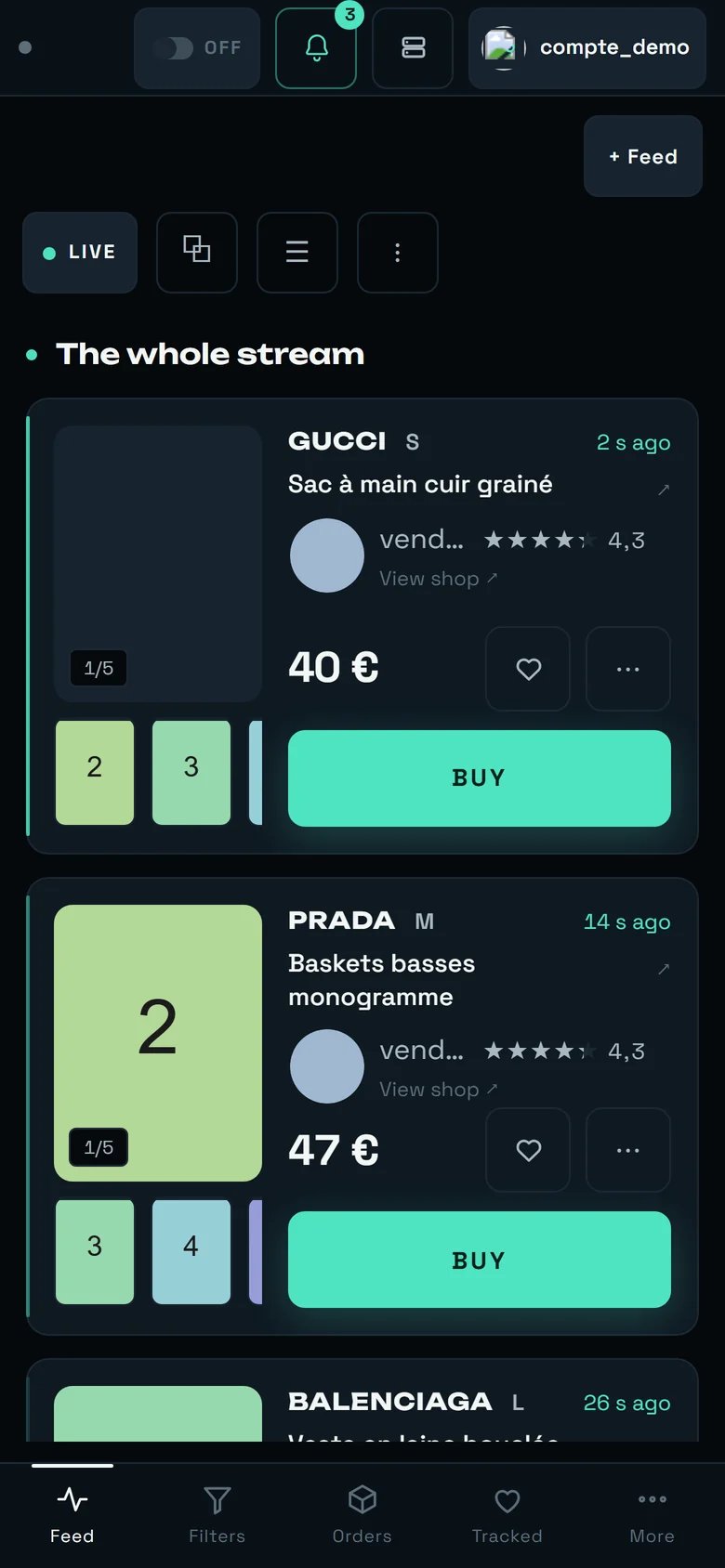 A phone is not where races are won — it is where you avoid losing one.
* **The useful gesture is the bank confirmation.** Fifteen minutes, and a notification that leaves at
once. Accept notifications on the phone you actually carry.
* **BUY takes the full width**, under the photos: it is the one geometry where you cannot hit the
wrong target.
* **A single band**, an imposed layout, no selector — there is no room, and that is accepted.
* **Automatic buying depends on no screen at all**: it runs while your phone is in your pocket.
***
## What we do not promise
Said plainly, so that you do not build your day on it:
* **Nobody can guarantee that a purchase will never be hindered by a Vinted security check.** The
question was asked in exactly those terms, and the answer is **“No.”** When it happens it costs a
few seconds — that is to say, the item.
* **The ≈ 6 seconds of the payment cannot be compressed.** They happen at Vinted.
* **No price ceiling is active out of the box**, anywhere. That is an explicit and repeatedly
reaffirmed decision by the tool's owner.
* **The automatic message sent to the seller after a purchase has no proven delivery.** The content is
certain, the send has never been observed end to end — and we never claim a send we have not
observed.
* **The wait for buyability rests on eight observations, not a hundred.** The rule holds eight times
out of eight; the safety net for the opposite case is still in place precisely for that reason.
***
## Going further
Every control on the screen where you buy, what can refuse it, and the exact wording of the
refusal.
Where automatic buying is armed, filter by filter, and where the “€ max” that counts is set.
Who pays, with which address and which card — and the “PREPARE THIS CARRIER” button.
The “Purchase ceiling”, the “Automatic pick-up point”, and the bank confirmation notifications.
The real history, the verification queue, and where an unknown outcome is settled.
A phone is not where races are won — it is where you avoid losing one.
* **The useful gesture is the bank confirmation.** Fifteen minutes, and a notification that leaves at
once. Accept notifications on the phone you actually carry.
* **BUY takes the full width**, under the photos: it is the one geometry where you cannot hit the
wrong target.
* **A single band**, an imposed layout, no selector — there is no room, and that is accepted.
* **Automatic buying depends on no screen at all**: it runs while your phone is in your pocket.
***
## What we do not promise
Said plainly, so that you do not build your day on it:
* **Nobody can guarantee that a purchase will never be hindered by a Vinted security check.** The
question was asked in exactly those terms, and the answer is **“No.”** When it happens it costs a
few seconds — that is to say, the item.
* **The ≈ 6 seconds of the payment cannot be compressed.** They happen at Vinted.
* **No price ceiling is active out of the box**, anywhere. That is an explicit and repeatedly
reaffirmed decision by the tool's owner.
* **The automatic message sent to the seller after a purchase has no proven delivery.** The content is
certain, the send has never been observed end to end — and we never claim a send we have not
observed.
* **The wait for buyability rests on eight observations, not a hundred.** The rule holds eight times
out of eight; the safety net for the opposite case is still in place precisely for that reason.
***
## Going further
Every control on the screen where you buy, what can refuse it, and the exact wording of the
refusal.
Where automatic buying is armed, filter by filter, and where the “€ max” that counts is set.
Who pays, with which address and which card — and the “PREPARE THIS CARRIER” button.
The “Purchase ceiling”, the “Automatic pick-up point”, and the bank confirmation notifications.
The real history, the verification queue, and where an unknown outcome is settled.