> ## Documentation Index
> Fetch the complete documentation index at: https://docs.regasolutions.io/llms.txt
> Use this file to discover all available pages before exploring further.
# Writing a good filter
> The skill that decides whether you win races: which anchor to set, which criteria cost time, five complete recipes, and how to check that a filter is really working.
A filter is your standing order: “tell me the moment a listing like this one is born on Vinted”.
The radar watches roughly **150 listings being born every second** and shows you only yours.
Knowing how to write a filter means knowing how to describe what you are after **without
describing it too much**, and paying as little time as possible to describe it.
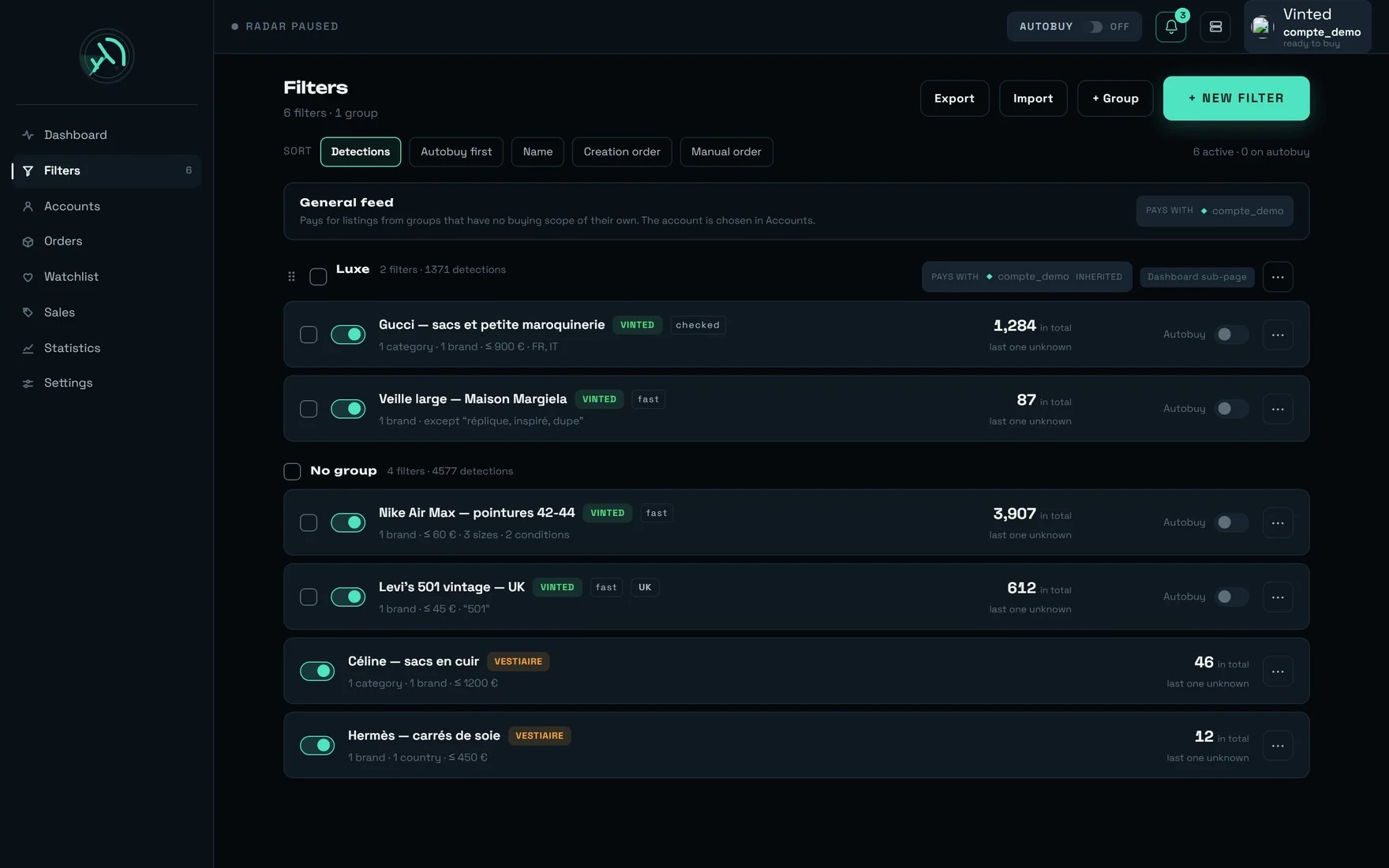
This page is not the guided tour of the screen — that one is [here](/screens/filters). This is
the trade manual: what to fill in, in which order, what it costs, and how to know it works.
**The one thing to understand before anything else.** A filter that is **too wide** makes noise:
you see it, you fix it in two minutes. A filter that is **too narrow** does **nothing** — and
“nothing” is strictly indistinguishable from “there were no listings”. The whole product is built
on that asymmetry: we would rather show you one listing too many than miss one. Write your filters
in the same spirit.
The form says it on its very first line: `Every criterion adds up. What is left blank is not
narrowed.` A field left empty is never an oversight — it is freedom you are giving the radar.
***
## 1. A filter must have an anchor
This is the rule that costs clients the most, and the only one the screen does not remind you of.
The radar recognises a newborn listing by **its title and its brand**. If your filter gives no
grip on either, it has nothing to hold on to.
**Every filter must carry at least one of these four anchors:**
1. a **brand**;
2. a **keyword** of at least **3 characters**;
3. a **category**;
4. a **material** or a **pattern** (these only arrive from a pasted Vinted link).
With none of the four, the filter is saved, it shows up, its switch is green — and **it will never
surface a single listing**. Nothing on screen will tell you.
Three perfectly plausible, perfectly silent filters:
| The filter as written | Why it surfaces nothing |
| ----------------------------------------- | ----------------------------------------------------------------------------------------------- |
| “Condition = New with tags, price ≤ 50 €” | No brand, no word, no category: nothing to hold on to. |
| “Size 38, price 20-80 €” | Same — and size is **not** an anchor. |
| “Keyword: `XL`, price ≤ 30 €” | The word is 2 characters long: it is ignored, and the filter falls back into the previous case. |
**The reflex that saves you**: before saving, read the cost banner at the top of the form. If it
says `No criterion yet: this filter would keep every listing.`, you have no anchor. And if you want
to target a size, use the **size picker**, never the keywords field.
***
## 2. What each criterion costs
Not all criteria are paid for at the same price. Some are settled **with the listing itself** —
instant, free. Others require fetching information that **does not arrive with the listing**: they
delay display.
| What you fill in | What it costs | Effect on detection |
| --------------------------------------------------- | ------------------------------------------- | ------------------------------------------- |
| **Brands** | free | none — it is the best anchor in the product |
| **Keywords / excluded words** | free | none |
| **Min / max price** | free, and MIN PRICE **gives capacity back** | none |
| **Sizes** | free | none |
| **Conditions** | free | none |
| **Origin = `Euro area` or `Any origin`** | free | none |
| **Origin = one precise country or market** | one check | `checked` detection |
| **Categories** | one check | `checked` detection |
| **A category on its own**, with no brand or keyword | the slowest regime | `widened` detection, in batches |
| **Material / pattern** (from a pasted link) | the slowest regime | `widened` detection, in batches |
Each of the three regimes carries a pill on the filter row, and a sentence in the form:
`Immediate detection — this filter's listings show up as soon as they are published.`
`Detection after a check: this filter uses information that does not arrive with the listing. Cards show up after that short delay, never before.`
`This filter's listings do not appear the moment they go live: they arrive in batches, at a regular interval.`
 **Category and origin never add up.** If your filter already carries a category, restricting the
country is **free**: both are settled in one go. The screen says so in plain words —
`This filter already carries a category: restricting the origin adds no delay. Both criteria are
settled together, their costs do not add up.` — and it then shows the **same** figure on both
sides, marked `{delai} shared`, precisely so that you do not count it twice.
**What it is worth, measured.** On 26/07 in production: a category cost **+396 ms**, a precise
origin **+408 ms**, and both together **+399 ms shared** — that is, the price of one. On 14/08,
origin had dropped back to **362 ms** while category climbed to **15.8 s**: that is open work on
our side, and the consequence for you is immediate — **today a category costs a lot and a country
costs almost nothing.**
The cost banner at the top of the form recomputes **on every keystroke** and names the culprits:
`What slows it down: {liste}. Removing these criteria makes detection {rapide}.` Every figure
carries its freshness (`observed {quand}`) and, when there is none, the screen writes
`not measured yet` rather than an invented zero.
***
## 3. A listing's journey, from birth to your feed
This diagram answers almost every question we are asked. Each diamond is a place where **your**
settings decide.
```mermaid theme={null}
flowchart TD
N["A listing is born on Vinted
**Category and origin never add up.** If your filter already carries a category, restricting the
country is **free**: both are settled in one go. The screen says so in plain words —
`This filter already carries a category: restricting the origin adds no delay. Both criteria are
settled together, their costs do not add up.` — and it then shows the **same** figure on both
sides, marked `{delai} shared`, precisely so that you do not count it twice.
**What it is worth, measured.** On 26/07 in production: a category cost **+396 ms**, a precise
origin **+408 ms**, and both together **+399 ms shared** — that is, the price of one. On 14/08,
origin had dropped back to **362 ms** while category climbed to **15.8 s**: that is open work on
our side, and the consequence for you is immediate — **today a category costs a lot and a country
costs almost nothing.**
The cost banner at the top of the form recomputes **on every keystroke** and names the culprits:
`What slows it down: {liste}. Removing these criteria makes detection {rapide}.` Every figure
carries its freshness (`observed {quand}`) and, when there is none, the screen writes
`not measured yet` rather than an invented zero.
***
## 3. A listing's journey, from birth to your feed
This diagram answers almost every question we are asked. Each diamond is a place where **your**
settings decide.
```mermaid theme={null}
flowchart TD
N["A listing is born on Vinted
~150 per second"] --> D{"Is the seller's currency
allowed by
your filters?"}
D -- no --> S2["Dropped for free
~32% of the worldwide flow"]
D -- yes --> F{"Above the lowest MIN PRICE
across all your filters?"}
F -- no --> S3["Dropped for free"]
F -- yes --> T["Brand, title, size and condition
are read — the narrowest step"]
T --> M{"Does one of your filters
match?"}
M -- no --> S4["Ignored"]
M -- yes --> C{"Does that filter carry a CATEGORY
or a PRECISE COUNTRY?"}
C -- no --> OK["CONFIRMED
the card goes out now"]
C -- yes --> W["WAITING
the card is held back
while the check runs"]
W --> V{"Verdict, within
15 s at the latest"}
V -- "agrees" --> OK
V -- "contradicts" --> X["The card will never appear"]
V -- "nothing after 15 s" --> PR["Shown anyway,
origin presumed
OUT of automatic buying"]
OK --> CARTE["The card appears in your feed"]
PR --> CARTE
```
Four practical consequences, and they are worth money:
* **MIN PRICE works before everything else.** It drops listings at no cost, so it gives speed back
to all your other filters. It is the only free lever in the product.
* **The brand decides, never the title.** A brand filter only accepts the brand **declared** by the
seller; a title that says “Prada” on a listing not declared as Prada will not pass. Symmetrically,
a filter **without** a brand does not look at the brand at all: its keywords are its only
criterion.
* **A card can gain a second filter after the fact**, a few hundred milliseconds later. That is not
a display glitch: the second filter was waiting for its check.
* **A card marked “origin presumed” did not get its check** and is **excluded from automatic
buying**. That is deliberate: we would rather show it to you without buying it than hide it.
**The parallel path.** Filters in the `widened` regime (category on its own, material, pattern) do
not follow this journey: they are served by regular passes, **every 4 seconds**, **96 listings**
per pass. The very **first pass shows nothing** — it memorises what is already online, otherwise
you would receive the entire existing catalogue at once.
***
## 4. Where to start: the three-branch question
Before you open the form, answer a single question — **what is my anchor?** Everything else follows.
```mermaid theme={null}
flowchart TD
Q["What I want to watch"] --> A{"Is it one or several
specific BRANDS?"}
A -- yes --> R1["Recipe 1
brand + price — fast regime"]
A -- no --> B{"Is there a WORD
almost always in the title?"}
B -- yes --> R2["Recipe 2
a single keyword — fast regime"]
B -- no --> C{"Is it a whole aisle
with no brand in mind?"}
C -- yes --> R3["Recipe 3
category — widened regime"]
C -- no --> Z["No anchor:
that filter would be silent"]
```
***
## 5. The order that does not waste your work
The form is filled in from top to bottom, but the **efficient order** is not that one. This order
avoids the two most expensive mistakes: retyping a field that got overwritten, and estimating ten
times in a row.
If you start from a search you already run by hand on Vinted, paste its address into
`PASTE A VINTED LINK (OPTIONAL)` then **Analyse** — **before** typing anything by hand. The
analysis replaces what the link talks about and **keeps** the rest; the message lists what was
` — {liste} carried over` and ` · {liste} replaced`. Doing it the other way round loses your
work. A malformed link is refused cleanly: `Link not recognised — fill in the form.`
Set it straight away: it is what determines the regime, and therefore the whole cost banner.
Brand search happens as you type; category search starts at **2 characters** and shows only
**40 results**:
`First {plafond} results out of {total} — narrow the search.`
The most profitable field in the form. See tip no. 1.
MAX PRICE, **Sizes** (leaving `Extend to equivalent sizes` **on**), **Conditions**. None of them
slows anything down.
Write them, choose their mode, then **test them** in `TRY IT ON A TITLE` by pasting a real
listing title. The verdict is reasoned: `This title would be kept.` or
`This title would be rejected: {raisons}.` with the exact reason (`it does not contain “{mots}”`,
`it contains “{mots}”`, `it contains other words (“{mots}”)`).
Pick the chip, **then read the sentence just underneath**:
`Watching Vinted {pays}.`
It is the only thing on screen that says which Vinted shop is really being watched.
If this alert appears —
`No {pays} account is connected: this filter will spot listings, but no purchase can go out. Connect a {pays} account from the Accounts page.`
— sort it out **before** the drop, never during.
`GROUP (DASHBOARD SUB-PAGE)`: a group is a sub-page on the dashboard **and** the unit that
decides which account pays. File it now; it is awkward to fix later.
Estimating takes about fifteen seconds and reads as a **ceiling** (tip no. 8). Once is enough:
it is not a field you refresh on every keystroke.
These are decisions about money and attention, not criteria. See recipe 5.
***
## 6. Five complete recipes
**“I want Prada bags under 400 €, as fast as possible.”** This is the product's ideal filter:
entirely free, immediate detection, and a good candidate for automatic buying.
Tick **Prada**. Nothing else — no category.
`bag` in `contains strictly` mode, so you do not pick up “handbag”. One single word.
`MIN PRICE (€)` = **50**, `MAX PRICE (€)` = **400**. The minimum is not there for your
budget: it is there for speed.
Leave `Euro area` — it is the default, and the only free shortcut.
It must read `Immediate detection`. If it does not, a paying criterion slipped in, and the
banner names it.
Expected result: a **fast** pill on the row, listings shown as soon as they are published.
**“I want vintage leather jackets, whatever the brand.”** Here the keyword **is** the anchor —
and it is the trickiest case in the product.
`leather`, or `vintage`, or `archive` — **not all three**. On a filter with no brand, the
pre-selection looks for what you typed **as it stands** in the title: “tote bag” will not
find “leather tote, shoulder bag”.
`contains` is the default and the widest. Switch to `contains strictly` as soon as the word
is short or common — the screen warns you by itself:
`“{mot}” is very short: in “contains” mode it appears in a great many titles.`
`replica`, `fake`, `bundle`, `damaged`… In `contains` mode, `fake` also catches “fakes” —
which is exactly what you want from an exclusion.
Sizes, conditions, price. They cost nothing and make the filter readable.
Paste three titles copied from Vinted into `TRY IT ON A TITLE`: two you want, one you do not.
Three keywords with no brand is the surest way to write a silent filter. **One word, several
exclusions**: that is the shape that works.
**“I want everything that comes up in Women's handbags.”** This is the slowest setting in the
product, and it is a legitimate choice — as long as you know what you are buying.
Tick the **parent node**, not the leaf:
`{n} categories — sub-categories are included.`
If you tick a child of an existing selection, the screen tells you:
`Already covered — {chemin}`.
Your listings will no longer arrive at publication but **in batches every 4 seconds**, and
the first pass shows nothing.
The banner offers the way out in plain words —
`with a brand or a keyword, this criterion becomes immediate again`. Add a brand or a word
and the filter goes back to immediate detection. If you really want the whole aisle, keep it
as it is and accept the batches.
A whole aisle with no price floor is the filter that slows all the others down.
**Aim at the parent, never at the leaf.** A very deep category forces us to load a **2.39 MB**
page (measured at **3.2 s**) where the fast route answers in **240 ms**. Since sub-categories are
included anyway, aiming at the parent is free — and much faster. The Vinted catalogue holds
**2,920 categories** across **5 levels**, including **235 duplicate titles** (“Other” appears
**14 times**): that is what the breadcrumb next to each result is for.
**“I want to watch the UK.”** The Vinted site being watched is not a separate setting: it is
**deduced** from the origin you pick.
`SELLER'S ORIGIN` → `By market` → **United Kingdom**. (`By market` and `By country` are the
same criterion and cost exactly the same: `Country and region are one and the same criterion
here: the seller's origin, whether chosen by market or country by country. The cost is the
same either way.`)
`Watching Vinted {pays}.` must say **United Kingdom**. If it says France, your filter is
watching the French shop and will drop listings priced in pounds before even looking at
them: it can structurally find nothing.
If the alert `No {pays} account is connected…` shows up, the filter will **spot without ever
buying**. It warns, it does not block.
Estimation is always run against the French shop: on a British filter, its figure is **worth
nothing**. Judge it on its detection counter, not on its estimate.
**Good news, measured on 14/08:** when a currency exists on a single market, the country is known
**the moment the listing is born**, with no check at all — **28 listings out of 28** priced in
pounds were British, **4 out of 4** in dollars were American. So a “United Kingdom” filter is
**fast** today. The euro, on the other hand, covers **18 markets**: that is why “France only”
remains a criterion that has to be checked.
To cover several countries at once, do not write one filter per country by hand: use
**Duplicate by region** from the `⋯` menu:
`{nom} — one copy per ticked country, same criteria, only the seller's country changes.`
**“I want it to buy without me.”** An armed filter must first be a **good fast filter**:
automatic buying never fires on a filter still waiting for its check.
Brand + price + `Euro area`. A category filter is structurally a worse candidate: it has to
be confirmed first, and an item can only be bought for **120 seconds** after it is detected.
`Autobuy on this filter` → `Automatic purchase as soon as it is detected.` The `€ max` field
carries the help `Cap per item — leave empty to impose no cap`; left empty, the screen writes
`No cap: this filter will buy whatever the price.`
On the dashboard. As long as it is on **OFF**, **no** filter buys, armed or not.
The paying account is set by the **scope**, in **Accounts** — not here, and not filter by
filter.
**Automatic buying runs on our servers.** Once the pill is armed, it survives closing the tab,
closing the browser, and shutting your machine down. **The only thing that stops it is disarming
it.**
**The three ceilings, from widest to narrowest** — three different objects:
| Ceiling | Where | Scope |
| -------------------- | ---------------------------------- | ----------------------------------------------------------------------------------------------------------------------------------------------- |
| **Purchase ceiling** | Settings → **BUYING** | **Every** purchase, manual and automatic, on every machine. **Empty by default.** Once set, it also refuses an item whose price cannot be read. |
| **Cap per item** | **AUTOBUY** panel on the dashboard | **120 €** by default, and remembered **in this browser only**. |
| The **filter's** cap | this form | Bounds automatic buying for **this** filter only. |
The lesser-known mirror image: **setting** a ceiling can make you miss an item whose price cannot
be read; not setting one cannot.
***
## 7. Knowing a filter works: the five-minute check
`fast`, `checked` or `widened`. Is it the one you wanted? If a brand + price filter shows
`checked`, a paying criterion slipped in.
`How many listings this filter will surface` → **Estimate**. Fifteen seconds. Keep the figure as
an **upper order of magnitude**.
`Fewer than ~{haut} listings/min — none appeared in {duree}, too rare to be estimated that quickly.`
is **not** a zero. `Refine the estimate (takes longer)` extends the observation up to
**150 seconds**.
`TRY IT ON A TITLE`, with a title copied from Vinted. It is the only check that shows you the
reasoning, not just the result.
The counter on the row is a **total since creation** (`in total`), never a count for today. A
filter created two weeks ago still showing `no detection` is the most reliable signal in the
product.
### The five signals, and what each one does not prove
| Signal | What it proves | What it does not prove |
| --------------------------------- | ----------------------------------------------------------- | ------------------------------------------------------------------------------ |
| **Detection counter** + freshness | The filter has matched something before | Nothing about today: it is a running total |
| **Regime pill** | How fast this filter works | That it has an anchor |
| **Estimate** | The order of magnitude of the pool | The real rate: it **ignores your keywords and your origin** |
| **Try-out on a title** | The text rule exactly as the engine applies it | That the title would have been pre-selected (the multi-word, no-brand case) |
| **Cost banner** | Which criterion slows things down, with a figure and a date | Nothing when it says `not measured yet` — and it says so rather than inventing |
***
## 8. When a filter surfaces nothing
Six mechanisms, all silent. Go through them in this order.
No brand, no keyword, no category, no material/pattern. **By far the most frequent case.** Open
the filter: if all you see is prices, sizes and conditions, add a brand or a word.
`XL`, `42`, `S` are ignored. The filter then falls back into case no. 1. For a size, use the size
picker.
On a filter **without a brand**, the pre-selection looks for what you typed **as one block** in
the title. Keep **one single** keyword — the rarest — and move the others into `EXCLUDED WORDS`
or into a category.
**67 size labels stand for several distinct sizes**; “S” stands for **8**, one per sizing system.
That is why `Extend to equivalent sizes` is **on by default**: `The same label exists in several
sizing systems. Without this option, listings in the right size can be rejected.` Do not switch
it off “to be precise”.
A filter aimed at British sellers whose line says `Watching Vinted France.` is watching the
French shop **and** throwing away listings priced in pounds. **Measured in production on 14/08:
six of a client's filters were in exactly that state, and nothing said so.** Reopen the filter,
pick the origin again, read the line.
A very fine category forces a heavy page to be loaded, often beyond the **15-second** holding
delay. Go up one or two levels: sub-categories are included anyway.
**And if none of the six applies?** Then your filter may simply be rare. A filter at **2 listings
per minute** has a **61% chance of showing nothing in 15 seconds** — which is why the product never
displays “0/min”. Ground truth measured over 180 seconds: “Gucci bags \< 400 €” = **0.0/min**,
“Gucci (everything)” = **2.6/min**, “Women's bags” = **29.3/min**. The first two are
**indistinguishable** over a short window.
***
## 9. When a filter surfaces too much
Noise can be seen, so it can be fixed — but it is not free: **a filter that is too wide slows all
the others down.** Measured: at **4.77 kept listings per second** against a capacity of **4/s**, a
card's display goes from **0.55 s to 15.4 s**. Nothing is lost, nothing fails: everything arrives
too late. And **no error counter moves** when that threshold is crossed.
Tighten in this order — from the freest to the most expensive:
Free, immediate, and it benefits all your filters.
Free. `replica`, `fake`, `bundle`, `for parts`… In `contains` mode, an exclusion also catches the
word's variants.
Free. `“bag” does not keep “handbag”.`
Free.
Paying. It is the last resort, not the first reflex.
If a filter floods both your feed **and** your bell, turn `Notify me` off first: the help warns you
that `No cap is applied: a wide filter will produce a lot of them.` There is no rate limit at all on
notifications — that is your decision, not ours.
***
## 10. Looking after a set of filters
One good filter is not enough: it is the **set** that decides your speed. The header controls exist
for that.
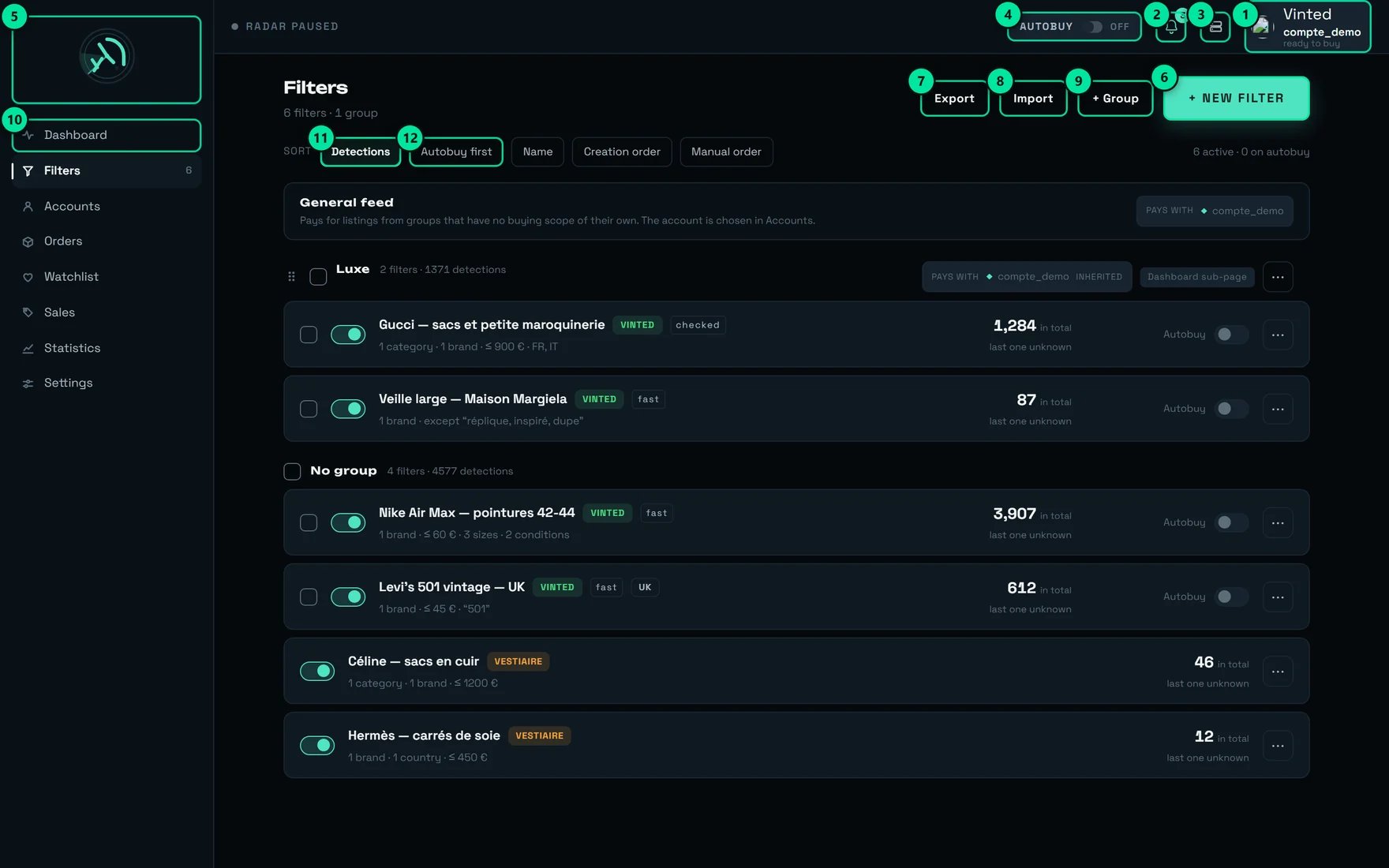 | № | Control | What it is for in maintenance |
| -- | ------------------------------------- | ------------------------------------------------------------------------------------------ |
| 3 | **Administration** | REGA staff only — this button does not appear on your account. |
| 4 | The **AUTOBUY** pill, here on **OFF** | The master switch for automatic buying: while it is disarmed, no filter buys. |
| 6 | **+ New filter** | Asks for the marketplace first, then opens the form. |
| 7 | **Export** | Saves **all** your filters and groups into a dated file. Do this before any clean-up pass. |
| 8 | **Import** | Reads an export file back in. |
| 9 | **+ Group** | Creates a group — hence a dashboard sub-page, and a paying unit. |
| 11 | **Detections** sort | The default sort: your most productive filters first. |
| 12 | **Autobuy first** sort | Armed filters move to the top — the review to run before a drop. |
**The weekly review, in four moves:**
1. Sort by **Detections** and look at **the bottom of the list**: those are your silent candidates.
2. Open each of them and look for its anchor (section 1).
3. Sort by **Autobuy first**: re-read the cap and the origin of every armed filter.
4. **Export** before deleting anything — a deletion from `⋯` is immediate and **without
confirmation**.
**Edit in bulk** exists for repetitive work:
`{n} filters selected — only the fields you turn on will change.`
The brands block is the most useful — `Does not overwrite existing brands: it adds or removes, filter by filter.`
It is the clean way to set a MIN PRICE on thirty filters at once.
A re-imported file **never arms automatic buying on its own** (`Imported filters buy nothing until
you arm it.`) and **does not carry the paying account**: after an import, go and set “who pays” in
**Accounts**. Groups, on the other hand, are merged **by name** — re-importing “Luxe” does not
create a duplicate.
***
## Our tips
### 1. Set a MIN PRICE on **every** filter, even a low one
It is the only free lever in the product, and the most powerful. Measured on **675 real listings**,
the share of the flow left to examine for each floor:
| MIN PRICE | Share of the flow to examine |
| --------- | ---------------------------- |
| none | 100% |
| 10 € | 42% |
| 20 € | 23% |
| 30 € | 14% |
| 50 € | 7% |
| 80 € | 4% |
⚠️ **The radar keeps the lowest MIN PRICE across all your active filters.** A single filter with no
floor cancels the benefit for **all** the others. If you remember one tip from this page, this is
the one.
### 2. One intent per filter
A filter trying to cover “Prada, Miu Miu, and also leather jackets from anyone” will be bad on both
counts. Two well-anchored filters cost less than one hybrid, and there is **no limit on the number
of filters**.
### 3. Stay on `Euro area` until you actually need to tell countries apart
It is the default, and the only free origin shortcut: the seller's currency arrives with the
listing. `Keeps listings whose seller prices in euros. Slightly wider than what can really be bought
from France: it never misses a listing, it lets a few more through. It does not tell countries
apart.` The euro area covers **18 countries**: “France only” is a **different** criterion, and it
has to be checked.
### 4. Never write a category on its own
With no brand and no keyword, it drops into the slowest regime: a silent first pass, then batches
every **4 seconds**. One brand or one word is enough to get out, and the screen offers it to you
itself.
### 5. A filter with no brand deserves **one single** keyword
The rarest, the most discriminating one. The others go into `EXCLUDED WORDS`. Writing three
inclusion words with no brand is the surest way to end up with a silent filter.
### 6. Use the warnings in the keywords field
They are written to save you hours: `“{mot}” is written twice — with no effect.` ·
`“{mot}” is already contained in “{porteur}”: it narrows nothing further.` ·
`“{mot}” is very short…`. A word that narrows nothing is a word that makes you believe you have
tightened.
### 7. Aim at the **parent** category, never at the leaf
Sub-categories are included (`{n} categories — sub-categories are included.`), and a category that
is too deep forces us to load **2.39 MB** instead of answering in **240 ms**. You gain no precision,
you lose speed.
### 8. Read the estimate as a **ceiling**, never as a rate
The estimate **ignores your keywords and your origin**. Estimating “Gucci, bags, keyword *tote*,
France only” actually measures “Gucci, bags” — potentially ten times more. The real rate of a
keyword filter is necessarily **lower** than the figure shown.
### 9. Estimate only once per filter
The **Estimate** button draws on the same capacity as the radar. Hammering it while you type slows
down your own detection — and everyone else's. Once per filter is enough.
### 10. Re-read `Watching Vinted {pays}.` before **every** save
It takes two seconds, and it is the only line that tells you which shop is really being watched. Six
of a client's filters were structurally blind for want of that read.
### 11. To watch another shop, paste its link — it is free
If you already run a search by hand on Vinted, its address contains everything: brands, categories,
prices, sizes, and even the materials and patterns no picker offers. Paste, **Analyse**, then refine.
Sort, page and session parameters are deliberately ignored: copying them has no effect.
### 12. Duplicate by region rather than listing countries
A “Euro area” filter is fast; a “6 precise countries” filter is checked. If you really want to
separate countries, make copies with **Duplicate by region**: you will keep one readable filter per
country, and you will see which one produces.
### 13. Name your filters for the list, not for yourself
The name is never translated and is used for sorting. `PRADA · bags · <400` reads at a glance in a
list of forty rows; “my filter 3” does not. There is **neither search nor pagination** in the list:
at two hundred filters, you scroll.
### 14. File things into groups from day one
A group is a dashboard sub-page **and** the unit that decides which account pays. Deleting a group
does not delete its filters — they simply go back to having no group.
### 15. Before a drop, review the armed filters
Sort by **Autobuy first** and check three things on each row: the regime pill (a `checked` filter
buys later), the cap shown (`no cap` or `≤ 400 €`), and the group's paying account. An item can only
be bought for **120 seconds** after it is detected: whatever is not ready before the drop will not
be ready during it.
***
## What surprises people
* **A category includes all its sub-categories** — on Vinted as with us. Ticking a child on top of
the parent narrows nothing: the screen answers `Already covered — {chemin}`.
* **A card can gain a second filter after the fact.** The first one was confirmed immediately, the
second was waiting for its check.
* **A card may never appear.** If the check has not concluded within **15 seconds**, the card is
shown anyway, marked **origin presumed**, and **excluded from automatic buying**.
* **The default keyword mode is the widest one.** `contains` keeps “handbag” when you write “bag”.
That is deliberate: the widest mode is the one that cannot make you miss a listing.
* **In `contains only` mode, the brand does not count as a foreign word.** A title “Prada bag”
passes a `contains only: bag` filter if Prada is the declared brand.
* **`By market` and `By country` cost exactly the same.** Do not look for a third price:
`Country and region are one and the same criterion here…`
* **On a filter that already carries a category, adding a country is free** — and the screen then
shows the same figure on both sides, marked `{delai} shared`.
* **Changing a filter's price no longer wipes its materials and patterns.** That was a real defect:
a simple price edit used to change the filter's detection regime, without a word.
* **The AUTOBUY badge disappears when you disable the filter, but the arming stays.** Re-enabling it
puts it back in a buying state with no other move.
* **Deleting a filter from `⋯` is immediate and without confirmation.** Only bulk deletion asks for
confirmation, and there is **no undo**.
* **Colour is no longer a criterion** (removed on 31/07). An old filter that carried one lost it on
reload — checked before doing it: **0 filters out of 42** in production carried one.
* **You can tick a great many brands.** Measured on 15/07: about **1,031** brands fit in a single
filter; around **1,062**, Vinted refuses. A filter with several dozen brands is perfectly normal.
***
## On a phone
| № | Control | What it is for in maintenance |
| -- | ------------------------------------- | ------------------------------------------------------------------------------------------ |
| 3 | **Administration** | REGA staff only — this button does not appear on your account. |
| 4 | The **AUTOBUY** pill, here on **OFF** | The master switch for automatic buying: while it is disarmed, no filter buys. |
| 6 | **+ New filter** | Asks for the marketplace first, then opens the form. |
| 7 | **Export** | Saves **all** your filters and groups into a dated file. Do this before any clean-up pass. |
| 8 | **Import** | Reads an export file back in. |
| 9 | **+ Group** | Creates a group — hence a dashboard sub-page, and a paying unit. |
| 11 | **Detections** sort | The default sort: your most productive filters first. |
| 12 | **Autobuy first** sort | Armed filters move to the top — the review to run before a drop. |
**The weekly review, in four moves:**
1. Sort by **Detections** and look at **the bottom of the list**: those are your silent candidates.
2. Open each of them and look for its anchor (section 1).
3. Sort by **Autobuy first**: re-read the cap and the origin of every armed filter.
4. **Export** before deleting anything — a deletion from `⋯` is immediate and **without
confirmation**.
**Edit in bulk** exists for repetitive work:
`{n} filters selected — only the fields you turn on will change.`
The brands block is the most useful — `Does not overwrite existing brands: it adds or removes, filter by filter.`
It is the clean way to set a MIN PRICE on thirty filters at once.
A re-imported file **never arms automatic buying on its own** (`Imported filters buy nothing until
you arm it.`) and **does not carry the paying account**: after an import, go and set “who pays” in
**Accounts**. Groups, on the other hand, are merged **by name** — re-importing “Luxe” does not
create a duplicate.
***
## Our tips
### 1. Set a MIN PRICE on **every** filter, even a low one
It is the only free lever in the product, and the most powerful. Measured on **675 real listings**,
the share of the flow left to examine for each floor:
| MIN PRICE | Share of the flow to examine |
| --------- | ---------------------------- |
| none | 100% |
| 10 € | 42% |
| 20 € | 23% |
| 30 € | 14% |
| 50 € | 7% |
| 80 € | 4% |
⚠️ **The radar keeps the lowest MIN PRICE across all your active filters.** A single filter with no
floor cancels the benefit for **all** the others. If you remember one tip from this page, this is
the one.
### 2. One intent per filter
A filter trying to cover “Prada, Miu Miu, and also leather jackets from anyone” will be bad on both
counts. Two well-anchored filters cost less than one hybrid, and there is **no limit on the number
of filters**.
### 3. Stay on `Euro area` until you actually need to tell countries apart
It is the default, and the only free origin shortcut: the seller's currency arrives with the
listing. `Keeps listings whose seller prices in euros. Slightly wider than what can really be bought
from France: it never misses a listing, it lets a few more through. It does not tell countries
apart.` The euro area covers **18 countries**: “France only” is a **different** criterion, and it
has to be checked.
### 4. Never write a category on its own
With no brand and no keyword, it drops into the slowest regime: a silent first pass, then batches
every **4 seconds**. One brand or one word is enough to get out, and the screen offers it to you
itself.
### 5. A filter with no brand deserves **one single** keyword
The rarest, the most discriminating one. The others go into `EXCLUDED WORDS`. Writing three
inclusion words with no brand is the surest way to end up with a silent filter.
### 6. Use the warnings in the keywords field
They are written to save you hours: `“{mot}” is written twice — with no effect.` ·
`“{mot}” is already contained in “{porteur}”: it narrows nothing further.` ·
`“{mot}” is very short…`. A word that narrows nothing is a word that makes you believe you have
tightened.
### 7. Aim at the **parent** category, never at the leaf
Sub-categories are included (`{n} categories — sub-categories are included.`), and a category that
is too deep forces us to load **2.39 MB** instead of answering in **240 ms**. You gain no precision,
you lose speed.
### 8. Read the estimate as a **ceiling**, never as a rate
The estimate **ignores your keywords and your origin**. Estimating “Gucci, bags, keyword *tote*,
France only” actually measures “Gucci, bags” — potentially ten times more. The real rate of a
keyword filter is necessarily **lower** than the figure shown.
### 9. Estimate only once per filter
The **Estimate** button draws on the same capacity as the radar. Hammering it while you type slows
down your own detection — and everyone else's. Once per filter is enough.
### 10. Re-read `Watching Vinted {pays}.` before **every** save
It takes two seconds, and it is the only line that tells you which shop is really being watched. Six
of a client's filters were structurally blind for want of that read.
### 11. To watch another shop, paste its link — it is free
If you already run a search by hand on Vinted, its address contains everything: brands, categories,
prices, sizes, and even the materials and patterns no picker offers. Paste, **Analyse**, then refine.
Sort, page and session parameters are deliberately ignored: copying them has no effect.
### 12. Duplicate by region rather than listing countries
A “Euro area” filter is fast; a “6 precise countries” filter is checked. If you really want to
separate countries, make copies with **Duplicate by region**: you will keep one readable filter per
country, and you will see which one produces.
### 13. Name your filters for the list, not for yourself
The name is never translated and is used for sorting. `PRADA · bags · <400` reads at a glance in a
list of forty rows; “my filter 3” does not. There is **neither search nor pagination** in the list:
at two hundred filters, you scroll.
### 14. File things into groups from day one
A group is a dashboard sub-page **and** the unit that decides which account pays. Deleting a group
does not delete its filters — they simply go back to having no group.
### 15. Before a drop, review the armed filters
Sort by **Autobuy first** and check three things on each row: the regime pill (a `checked` filter
buys later), the cap shown (`no cap` or `≤ 400 €`), and the group's paying account. An item can only
be bought for **120 seconds** after it is detected: whatever is not ready before the drop will not
be ready during it.
***
## What surprises people
* **A category includes all its sub-categories** — on Vinted as with us. Ticking a child on top of
the parent narrows nothing: the screen answers `Already covered — {chemin}`.
* **A card can gain a second filter after the fact.** The first one was confirmed immediately, the
second was waiting for its check.
* **A card may never appear.** If the check has not concluded within **15 seconds**, the card is
shown anyway, marked **origin presumed**, and **excluded from automatic buying**.
* **The default keyword mode is the widest one.** `contains` keeps “handbag” when you write “bag”.
That is deliberate: the widest mode is the one that cannot make you miss a listing.
* **In `contains only` mode, the brand does not count as a foreign word.** A title “Prada bag”
passes a `contains only: bag` filter if Prada is the declared brand.
* **`By market` and `By country` cost exactly the same.** Do not look for a third price:
`Country and region are one and the same criterion here…`
* **On a filter that already carries a category, adding a country is free** — and the screen then
shows the same figure on both sides, marked `{delai} shared`.
* **Changing a filter's price no longer wipes its materials and patterns.** That was a real defect:
a simple price edit used to change the filter's detection regime, without a word.
* **The AUTOBUY badge disappears when you disable the filter, but the arming stays.** Re-enabling it
puts it back in a buying state with no other move.
* **Deleting a filter from `⋯` is immediate and without confirmation.** Only bulk deletion asks for
confirmation, and there is **no undo**.
* **Colour is no longer a criterion** (removed on 31/07). An old filter that carried one lost it on
reload — checked before doing it: **0 filters out of 42** in production carried one.
* **You can tick a great many brands.** Measured on 15/07: about **1,031** brands fit in a single
filter; around **1,062**, Vinted refuses. A filter with several dozen brands is perfectly normal.
***
## On a phone
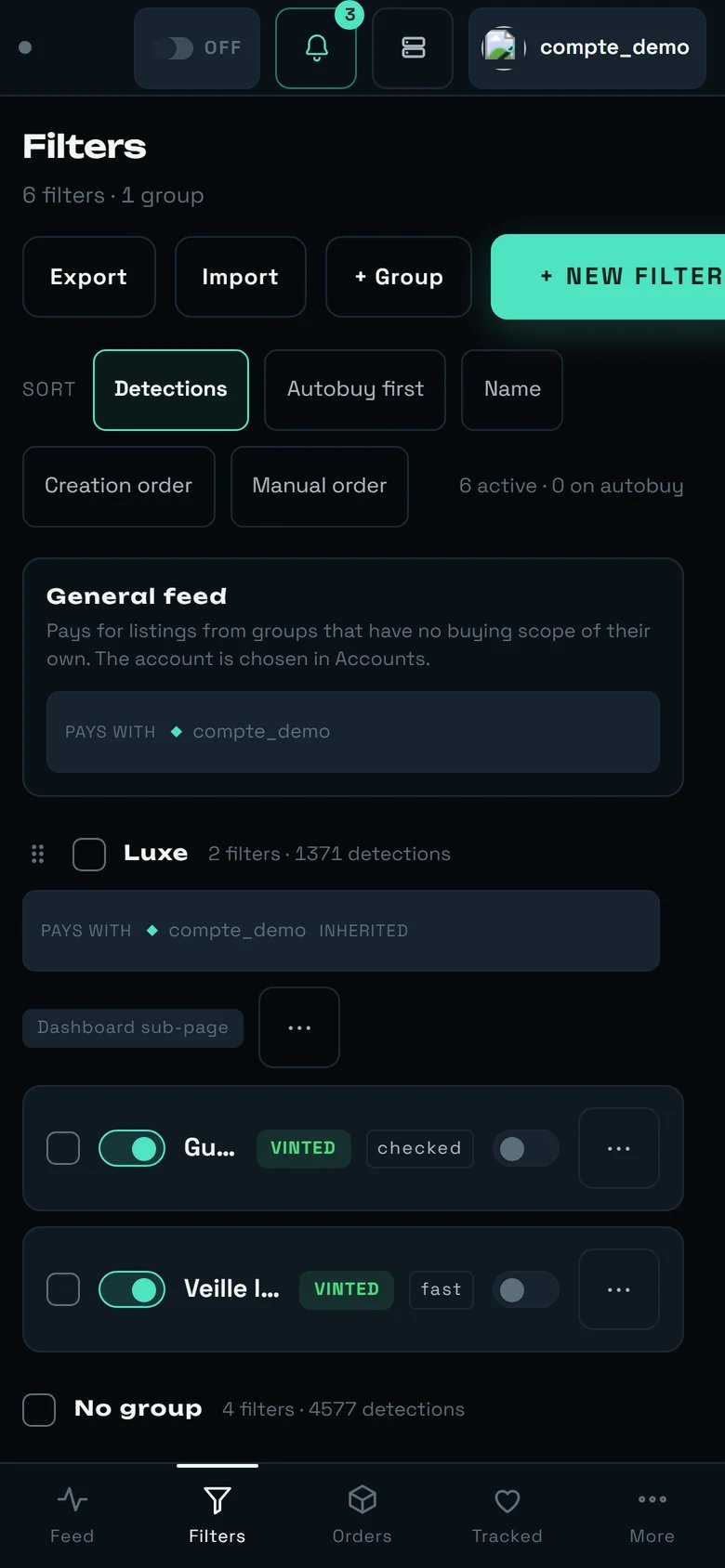 What changes, and what it implies for writing a filter:
* The header buttons and the sorts wrap onto **several lines**.
* A filter row keeps the checkbox, the switch, the name (**truncated**), the marketplace pill, the
regime pill, the Autobuy switch and the `⋯` menu. **The criteria summary, the `in total` counter
and the freshness line do not fit** — so the weekly review is not done on a phone.
* A navigation bar appears at the bottom: **Feed · Filters · Orders · Tracked · More**.
A phone is made for **arming, disarming, enabling, disabling** — one-finger actions, useful on the
move during a drop. To **write** a filter (categories, sizes, try-out on a title), use a large
screen: the form is over 1,600 px tall.
***
## The limits you should know about
We would rather tell you than let you find out on a drop day.
* **Nothing flags a filter with no anchor.** The diagnosis in section 8 is, for now, a manual move.
* **No filter is ever refused for being too wide.** The estimate informs, it does not authorise: a
filter that would surface thousands of listings per minute will be created without a word.
* **The estimate of a non-French filter is worth nothing**: it is always run against the French shop.
* **Materials and patterns have no picker.** They can only be set by pasting a Vinted link that
contains them; the form keeps them and offers to `Remove` them.
* **`≈ {n} listings/min — estimated earlier.` will probably never show up**: the estimate is not
remembered from one session to the next.
* **Category is expensive right now** (15.8 s measured on 14/08, against 362 ms for origin). That is
open work on our side; in the meantime, prefer a brand or a keyword as your anchor.
***
The detail of every control, every badge and every refusal.
Who pays for which group, and which countries you can really buy from.
Where kept listings arrive, and where the AUTOBUY pill is armed.
The “Purchase ceiling” shared by every purchase, and the automatic pick-up point.
What changes, and what it implies for writing a filter:
* The header buttons and the sorts wrap onto **several lines**.
* A filter row keeps the checkbox, the switch, the name (**truncated**), the marketplace pill, the
regime pill, the Autobuy switch and the `⋯` menu. **The criteria summary, the `in total` counter
and the freshness line do not fit** — so the weekly review is not done on a phone.
* A navigation bar appears at the bottom: **Feed · Filters · Orders · Tracked · More**.
A phone is made for **arming, disarming, enabling, disabling** — one-finger actions, useful on the
move during a drop. To **write** a filter (categories, sizes, try-out on a title), use a large
screen: the form is over 1,600 px tall.
***
## The limits you should know about
We would rather tell you than let you find out on a drop day.
* **Nothing flags a filter with no anchor.** The diagnosis in section 8 is, for now, a manual move.
* **No filter is ever refused for being too wide.** The estimate informs, it does not authorise: a
filter that would surface thousands of listings per minute will be created without a word.
* **The estimate of a non-French filter is worth nothing**: it is always run against the French shop.
* **Materials and patterns have no picker.** They can only be set by pasting a Vinted link that
contains them; the form keeps them and offers to `Remove` them.
* **`≈ {n} listings/min — estimated earlier.` will probably never show up**: the estimate is not
remembered from one session to the next.
* **Category is expensive right now** (15.8 s measured on 14/08, against 362 ms for origin). That is
open work on our side; in the meantime, prefer a brand or a keyword as your anchor.
***
The detail of every control, every badge and every refusal.
Who pays for which group, and which countries you can really buy from.
Where kept listings arrive, and where the AUTOBUY pill is armed.
The “Purchase ceiling” shared by every purchase, and the automatic pick-up point.