> ## Documentation Index
> Fetch the complete documentation index at: https://docs.regasolutions.io/llms.txt
> Use this file to discover all available pages before exploring further.
# REGA's vocabulary
> Every word the product shows on screen: what it means exactly, the matching word in the other language, the words that look alike without meaning the same thing, and the page that explains each one in full.
REGA only uses about thirty words, and they are always the same ones. Knowing them changes the way you read the screen: “widened” stops being a fault, “no cap” stops being a detail, and “Already used” stops being a compliment.
This page is the product's dictionary. Every entry gives **the word exactly as it is written on screen** — in English and in French, because REGA switches from one language to the other without moving anything — then what it means, then where it is explained in full.
**How to read this page.** The table below is the index: one word, its translation, one line. The sections that follow are the detail, family by family, with the exact wording of the screen. And the section **“The words that look alike and do not mean the same thing”**, further down, is the one that prevents costly mistakes — it is the only one to read if you read just one.
## The index
| On screen (English) | On screen (français) | What it means | Where it is explained |
| ------------------------------------ | --------------------------------- | ----------------------------------------------------------------------------------- | ------------------------------------------------------- |
| **Radar** | **Radar** | What watches Vinted permanently, for you | [Settings](/screens/settings) |
| **Filter** | **Filtre** | Your standing order: the criteria of an item you want | [Filters](/screens/filters) |
| **Group** | **Groupe** | A folder of filters — it creates a Dashboard sub-page | [Filters](/screens/filters) |
| **Detection** | **Détection** | A listing that has just passed one of your filters | [Filters](/screens/filters) |
| **fast · checked · widened** | **rapide · vérifié · élargi** | A filter's regime: how fast its listings reach you | [Writing a good filter](/how-to/write-a-good-filter) |
| **Market** | **Marché** | The Vinted site being watched, and the sellers an account from that country reaches | [Watching several countries](/how-to/several-countries) |
| **Marketplace** | **Place** | Vinted, or Vestiaire Collective | [Vestiaire Collective](/screens/vestiaire) |
| **the whole stream** | **tout le flux** | Every detection, with no filter restriction | [The dashboard](/screens/dashboard) |
| **Feed** | **Feed** | A band on screen, opened on a filter or a group | [The dashboard](/screens/dashboard) |
| **General feed** | **Feed général** | The band the others inherit their buying settings from | [Accounts](/screens/accounts) |
| **Wall · Folder · Table** | **Mur · Dossier · Tableau** | The three layouts of a feed | [The dashboard](/screens/dashboard) |
| **Watchlist** (phone: **Tracked**) | **Watchlist** (tél. : **Suivis**) | Items set aside, checked every 15 minutes | [The watchlist](/screens/watchlist) |
| **Check** | **Relevé** | A re-reading of a watched item's price and availability | [The watchlist](/screens/watchlist) |
| **AUTOBUY** | **AUTOBUY** | Automatic buying — it runs on our servers | [Money](/how-to/money) |
| **Purchase ceiling** | **Plafond d'achat** | The widest cap: every purchase, everywhere | [Settings](/screens/settings) |
| **Cap per item** | **Plafond par article** | The AUTOBUY panel's cap — kept in this browser only | [Money](/how-to/money) |
| **€ max** | **€ max** | A filter's cap — the one that bounds what actually goes out | [Filters](/screens/filters) |
| **Buying scope** | **Portée d'achat** | Who pays: which account, or which group in rotation | [Accounts](/screens/accounts) |
| **Rotation** | **Rotation** | Moving from one account to the next, purchase after purchase | [Accounts](/screens/accounts) |
| **Ready to buy** | **Prêt à acheter** | An account whose purchase will go through to payment | [Accounts](/screens/accounts) |
| **Being checked** / **Under review** | **En vérification** | Vinted is reviewing the listing — the purchase queues up | [Orders](/screens/orders) |
| **Pick-up point** | **Point relais** | The place where your parcel waits for you | [Orders](/screens/orders) |
| **Automatic pick-up point** | **Point relais automatique** | The setting that lets REGA choose that place during the purchase | [Settings](/screens/settings) |
| **Carrier** | **Transporteur** | Who ships the parcel — the **seller** chooses it | [Accounts](/screens/accounts) |
| **PREPARE THIS CARRIER** | **PRÉPARER CE TRANSPORTEUR** | A real purchase of a few euros that makes the next ones \~1.3 s faster | [Accounts](/screens/accounts) |
| **Order** | **Commande** | A paid purchase, followed through to confirmation | [Orders](/screens/orders) |
| **Sales** | **Ventes** | What sold among the items your filters watch | [Sales](/screens/sales) |
***
## What REGA looks for
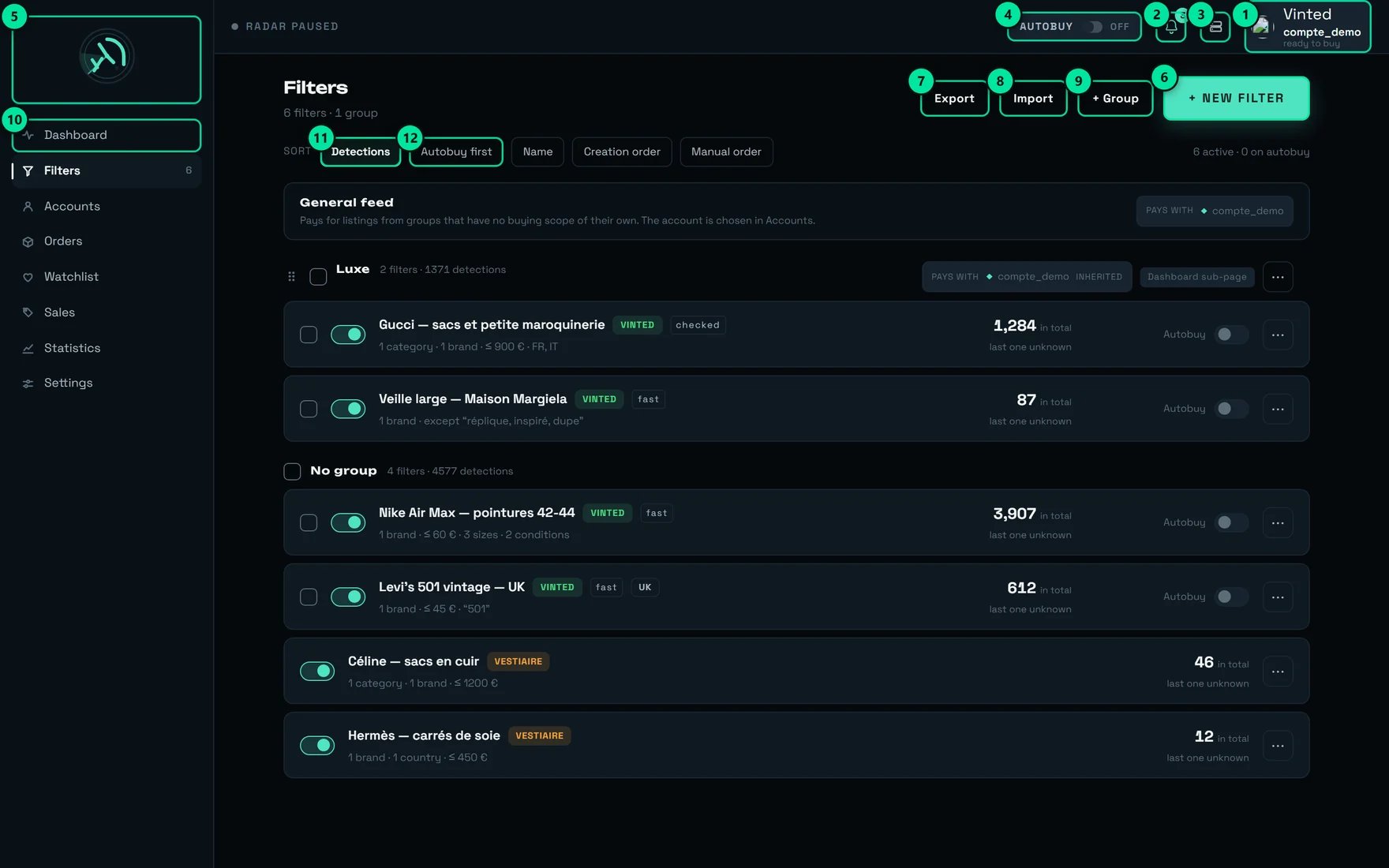 | # | Control | What it does |
| ------ | ---------------------- | -------------------------------------------------------------- |
| **3** | Administration | REGA staff only — this button does not appear on your account. |
| **6** | **+ New filter** | Opens an empty filter card. |
| **9** | **+ Group** | Creates a group, that is, a Dashboard sub-page. |
| **11** | **Detections** sort | Ranks your filters by number of detections. |
| **12** | **Autobuy first** sort | Brings every filter armed for automatic buying to the top. |
What watches Vinted for you, permanently, whether your tab is open or not.
In **Settings → RADAR** it reads in one word: **“Active — the radar is sweeping”** or **“Stopped”**. What it looks for is not a hidden setting: under **“What the radar looks for”**, the answer is two words — **“Your filters.”**
If a screen tells you **“No filter — the radar is looking for nothing.”**, that is not a fault: it is a radar running empty. Write a filter.
Your standing order. You describe the item you want; the radar runs that description against every listing as it is born.
A filter's card says it in one sentence: **“Every criterion adds up. What is left blank is not narrowed.”** In other words, a field left empty is not a mistake — it is an open door.
On its row, a filter carries its detection counter, its regime, and — if it is armed — its cap or the words **“no cap”**.
A **disabled** filter detects nothing at all. The screen writes it on its row: **“disabled”**, and the feed picker adds **“— filter disabled, it detects nothing”**.
→ Everything is in [Writing a good filter](/how-to/write-a-good-filter).
A folder of filters, and a little more than that: **“A group creates a sub-page in the Dashboard and can hold several filters.”** Its row even carries the badge **“Dashboard sub-page”**.
So it is as much a **screen** as it is storage: the name you give it becomes a tab you will read a hundred times a day. Name it like a shop aisle — the example the product offers is **“e.g. Leather goods”**.
Deleting a group deletes no filter: **“The group's filters are kept, they go back to having no group”**.
A listing that has just passed one of your filters. It is the unit of account of the whole product: filters sort by **“Detections”**, the statistics have a **“DETECTIONS”** column, and the matching alert is called **“On every detection”** — **“A notification as soon as a listing passes one of your filters.”**
A detection is **not** a purchase, and not a promise either: it is a listing being shown to you.
On a wide filter, **“Notify me”** is a deliberate trap, and the product warns you: **“No cap is applied: a wide filter will produce a lot of them.”**
The pill every filter row carries. It does not say whether the filter is good — it says **how fast its listings will reach you**, and it is a direct consequence of the criteria you ticked.
| Pill | Français | What the product says, word for word |
| ----------- | ----------- | -------------------------------------------------------------------------------------------------------------------------------------------------- |
| **fast** | **rapide** | “Immediate detection — this filter's listings show up as soon as they are published.” |
| **checked** | **vérifié** | “Detection after a check: this filter uses information that does not arrive with the listing. Cards show up after that short delay, never before.” |
| **widened** | **élargi** | “This filter's listings do not appear the moment they go live: they arrive in batches, at a regular interval.” |
The regime can be **repaired**: the filter's card tells you which of your criteria costs the delay, under `What slows it down: {liste}.`, and how to get out of it — **“with a brand or a keyword, this criterion becomes immediate again”**.
The Vinted site the filter watches, and therefore the sellers it can reach. The product defines it itself: **“A market = what an account from that country sees. Choosing a market keeps the sellers it can reach.”**
On a filter's card, the matching notice is `Watching Vinted {pays}.`, and on its row, a marker `Site: {pays}`.
A market with no account from the same country detects, but does not buy. The screen says so plainly: `No {pays} account is connected: this filter will spot listings, but no purchase can go out.`
→ [Watching several countries](/how-to/several-countries).
The platform itself: **Vinted** or **Vestiaire Collective**. It is the very first question asked when you create a filter — **“Which marketplace?”** — and it is final: **“The two share neither their criteria nor their settings. This choice cannot be changed later.”**
An account group never mixes the two: **“A group rotates purchases between its accounts, so it can only hold accounts from a single marketplace.”**
The French word for it, “place”, has a second, unrelated meaning elsewhere in the product: in **Settings → Subscription**, `{n} seats available.` counts team **seats** (in French, “places” — the product changes word, we do not).
## What REGA shows you
| # | Control | What it does |
| ------ | ---------------------- | -------------------------------------------------------------- |
| **3** | Administration | REGA staff only — this button does not appear on your account. |
| **6** | **+ New filter** | Opens an empty filter card. |
| **9** | **+ Group** | Creates a group, that is, a Dashboard sub-page. |
| **11** | **Detections** sort | Ranks your filters by number of detections. |
| **12** | **Autobuy first** sort | Brings every filter armed for automatic buying to the top. |
What watches Vinted for you, permanently, whether your tab is open or not.
In **Settings → RADAR** it reads in one word: **“Active — the radar is sweeping”** or **“Stopped”**. What it looks for is not a hidden setting: under **“What the radar looks for”**, the answer is two words — **“Your filters.”**
If a screen tells you **“No filter — the radar is looking for nothing.”**, that is not a fault: it is a radar running empty. Write a filter.
Your standing order. You describe the item you want; the radar runs that description against every listing as it is born.
A filter's card says it in one sentence: **“Every criterion adds up. What is left blank is not narrowed.”** In other words, a field left empty is not a mistake — it is an open door.
On its row, a filter carries its detection counter, its regime, and — if it is armed — its cap or the words **“no cap”**.
A **disabled** filter detects nothing at all. The screen writes it on its row: **“disabled”**, and the feed picker adds **“— filter disabled, it detects nothing”**.
→ Everything is in [Writing a good filter](/how-to/write-a-good-filter).
A folder of filters, and a little more than that: **“A group creates a sub-page in the Dashboard and can hold several filters.”** Its row even carries the badge **“Dashboard sub-page”**.
So it is as much a **screen** as it is storage: the name you give it becomes a tab you will read a hundred times a day. Name it like a shop aisle — the example the product offers is **“e.g. Leather goods”**.
Deleting a group deletes no filter: **“The group's filters are kept, they go back to having no group”**.
A listing that has just passed one of your filters. It is the unit of account of the whole product: filters sort by **“Detections”**, the statistics have a **“DETECTIONS”** column, and the matching alert is called **“On every detection”** — **“A notification as soon as a listing passes one of your filters.”**
A detection is **not** a purchase, and not a promise either: it is a listing being shown to you.
On a wide filter, **“Notify me”** is a deliberate trap, and the product warns you: **“No cap is applied: a wide filter will produce a lot of them.”**
The pill every filter row carries. It does not say whether the filter is good — it says **how fast its listings will reach you**, and it is a direct consequence of the criteria you ticked.
| Pill | Français | What the product says, word for word |
| ----------- | ----------- | -------------------------------------------------------------------------------------------------------------------------------------------------- |
| **fast** | **rapide** | “Immediate detection — this filter's listings show up as soon as they are published.” |
| **checked** | **vérifié** | “Detection after a check: this filter uses information that does not arrive with the listing. Cards show up after that short delay, never before.” |
| **widened** | **élargi** | “This filter's listings do not appear the moment they go live: they arrive in batches, at a regular interval.” |
The regime can be **repaired**: the filter's card tells you which of your criteria costs the delay, under `What slows it down: {liste}.`, and how to get out of it — **“with a brand or a keyword, this criterion becomes immediate again”**.
The Vinted site the filter watches, and therefore the sellers it can reach. The product defines it itself: **“A market = what an account from that country sees. Choosing a market keeps the sellers it can reach.”**
On a filter's card, the matching notice is `Watching Vinted {pays}.`, and on its row, a marker `Site: {pays}`.
A market with no account from the same country detects, but does not buy. The screen says so plainly: `No {pays} account is connected: this filter will spot listings, but no purchase can go out.`
→ [Watching several countries](/how-to/several-countries).
The platform itself: **Vinted** or **Vestiaire Collective**. It is the very first question asked when you create a filter — **“Which marketplace?”** — and it is final: **“The two share neither their criteria nor their settings. This choice cannot be changed later.”**
An account group never mixes the two: **“A group rotates purchases between its accounts, so it can only hold accounts from a single marketplace.”**
The French word for it, “place”, has a second, unrelated meaning elsewhere in the product: in **Settings → Subscription**, `{n} seats available.` counts team **seats** (in French, “places” — the product changes word, we do not).
## What REGA shows you
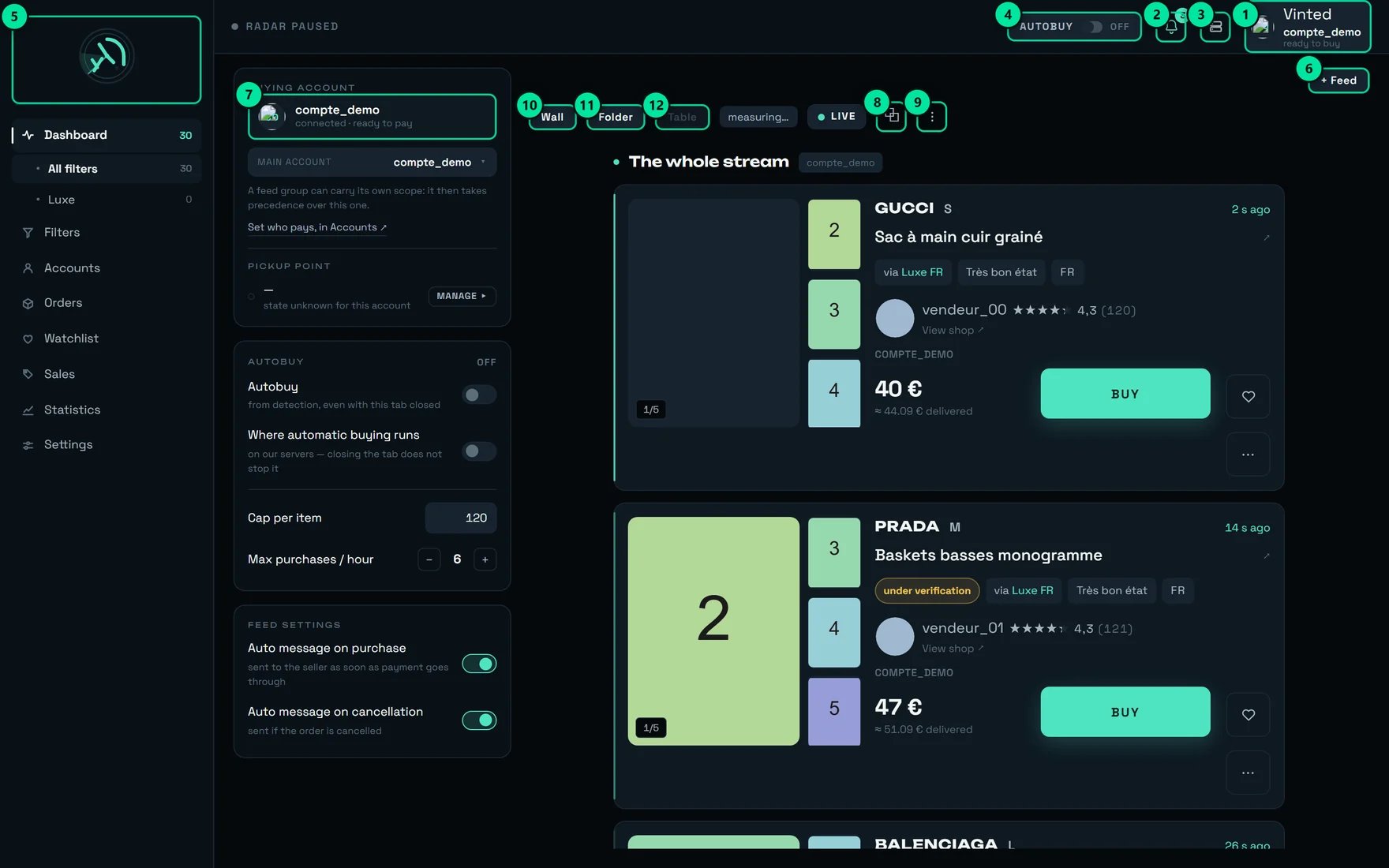 | # | Control | What it does |
| ------ | ------------------------------------------------------- | ----------------------------------------------------------------------------------------------- |
| **1** | The paying account — here `compte_demo`, “ready to buy” | Says which Vinted account will pay for the next purchase. |
| **3** | Administration | REGA staff only — this button does not appear on your account. |
| **4** | The **AUTOBUY** pill, here `OFF` | The automatic-buying switch: “Automatic buying disarmed”. |
| **6** | **+ Feed** | “Open a feed, or go back to the whole stream”. |
| **7** | `compte_demo` — “connected · ready to pay” | Opens this account's delivery address and payment method. |
| **10** | **Wall** | “Many listings at a glance, photo first”. |
| **11** | **Folder** | “One listing at a time, all its details”. |
| **12** | **Table** | Aligns its columns across the full width — it needs **1138 px** of width, side panels deducted. |
Three nested words, and the product never confuses them.
* **“the whole stream”** — all your detections, with no filter restriction. The picker even offers **“Open a feed on the whole stream — no filter restriction”**.
* **A feed** — a **band** on screen, opened on a filter, a group, or the whole stream. You open several side by side, you rename them, you pin them (**“Pin (keep on screen)”**).
* **The “General feed”** — the one the others inherit their buying settings from, as long as they have none of their own.
A feed pushed off screen is not switched off. The product insists, twice: **“There is no room left on screen; it carries on detecting and counting.”** and, on the tab, **“— as a tab: it detects and counts, click to bring it on screen”**.
A feed opened on a **group of filters** becomes a “feed group”, and as such it can carry **its own buying scope** — that is, buy with a different account from the rest.
The **“SCOPE, FEED BY FEED”** table lists them all, with the rule underneath: **“Without a setting of its own, a feed group follows the general feed: it still buys.”**
“It still buys” is the half that surprises: setting nothing on a feed group **does not stop it buying**. It makes it buy like the general feed.
The three layouts of a feed. They change **only** the display: the same detections, presented differently.
| Layout | Français | What it is worth |
| ---------- | ----------- | ---------------------------------------- |
| **Wall** | **Mur** | “Many listings at a glance, photo first” |
| **Folder** | **Dossier** | “One listing at a time, all its details” |
| **Table** | **Tableau** | “Compare several listings line by line” |
**Table** is the only one with a size condition, and it explains it: **“The table aligns seven columns: it is offered only from a 1280 px window upwards.”** Nor does it share the screen: **“The table compares rows aligned across the full width: one feed at a time. Switch to wall or folder to open several.”**
Two close words the product keeps apart consistently.
* **A listing** is the page published by a seller on the marketplace. It is born, it can be hidden, it can disappear. That is what the radar sees: **“Many listings at a glance”**.
* **An item** is the object itself, the one you watch and the one you buy: **“The list of tracked items — sold, withdrawn or still on sale”**, **“No watched item”**, **“Cap per item”**.
Remember it when reading a counter: the statistics count **listing detections**, the watchlist counts **watched items**. They are not the same populations.
The **watchlist** is the list of items you have set aside. You get in through the heart on a card: **“No watched item — the heart on a feed card adds the item here.”** On a phone, the tab is called **“Tracked”** (in French, **“Suivis”**).
A **check** is a re-reading of a watched item's price and availability. The banner announces the rhythm, `one check every {duree}` — in practice **15 minutes**, and an item's card confirms it — `This item is checked about every {cadence} — the same rhythm as every watched item, whatever its age.`
A directly usable consequence: **a price drop shown to you is at most 15 minutes old.** That is fresh enough to trade on.
If the banner shows `checks slowed ×{facteur}`, nothing is lost — it is written: **“None is lost, they are served more slowly”**.
## What buys
Automatic buying. The pill at the top of the screen arms and disarms it, and two lines in the AUTOBUY panel say **where** it runs:
* **“Autobuy”** — **“from detection, even with this tab closed”**
* **“Where automatic buying runs”** — **“on our servers — closing the tab does not stop it”**
That second line **states a fact**, it does not set it. Automatic buying runs on our servers: it survives closing the tab, closing the browser, and switching the machine off. **The only thing that stops it is disarming it** — confirmation: **“Autobuy disarmed”**.
On a filter, the same word comes back under **“Autobuy on this filter”** — **“Automatic purchase as soon as it is detected.”** An armed filter carries the badge **“Automatic purchase armed”**.
They are named almost the same and they do not bound the same purchases. From widest to narrowest:
| The words on screen | Français | Where it is set | What it bounds | Starting value |
| ---------------------- | ----------------------- | ----------------------------- | --------------------------------------------------------------------------------------- | --------------------------- |
| **“Purchase ceiling”** | **Plafond d'achat** | Settings → **BUYING** | **Every** purchase, manual and automatic, on every machine | **empty** — shown as “none” |
| **“Cap per item”** | **Plafond par article** | Dashboard → **AUTOBUY** panel | Automatic buying **when it runs in this tab** — and it is kept **in this browser** only | **€120** |
| **A filter's “€ max”** | **« € max »** | Filters → a filter's card | The automatic buying **of that filter**, and it alone | **empty** = no cap |
The “Purchase ceiling” describes itself: **“Above this amount, the purchase is refused and you are told. Empty = no ceiling.”** Once set, it also refuses an item whose price is **unreadable** — a cap that let through what it cannot read would not be a cap.
A filter's “€ max” is set under the hint **“Cap per item — leave empty to impose no cap”**. Left empty, the screen warns you once, in red: **“No cap: this filter will buy whatever the price.”** After that, all that remains on the row is a discreet **“no cap”**.
→ The full detail is in [Money](/how-to/money).
The setting that answers a single question, and the panel's title asks it as such: **“WHO PAYS FOR PURCHASES”**.
A scope designates either **“One specific account”** (“no rotation”), or **“A group”** (“rotation within the group”), or **“Every account”** (“rotation across all”), or nothing at all — and in that last case it **“Inherits from the general feed”**: “follows the setting above”.
The **“SCOPE, FEED BY FEED”** table shows, feed by feed, the **“Pays with”** column and the **“At the next purchase”** column.
When no account can pay, the scope says so plainly instead of failing later: **“No purchase will go out”**, or **“No account can pay with this setting.”** followed by what to do about it.
An **account group** is something other than a group of filters: **“A group gathers accounts in an ORDER. Deleting a group deletes no account.”**
**Rotation** is moving from one account to the next, in that order: **“When a buying scope designates this group, purchases move from one account to the next, in the order below.”** The rhythm is set under **“SWITCH ACCOUNT EVERY … PURCHASES”** — at 1, that is **“Next account on every purchase.”**
An account that is out of service does not break the round: **“A disconnected account is skipped without shifting the others”**.
To keep an account out of a single feed, do not remove it from the group — the product tells you: **“Excluding an account for a single feed is done in the buying scope: removing it here would remove it for every feed.”**
The **“BUYING ACCOUNT”** panel shows the account that will pay for the **next** purchase, with its state: **“connected · ready to pay”**, or **“not connected — the purchase would fail”**, or else **“no account to buy with — sort this out in Accounts”**.
On an account's card, the same verdict is broken down point by point — Login, Address, Bank card, Phone, Pickup point — and summed up in one line: **“Ready to buy”** (“A purchase started from the radar will go through to payment.”) or `{n} things to sort out before buying` (“A purchase would stop before payment.”).
There is a third state, easy to miss: **“Ready to buy — one setting could still be improved”**. The account will buy; it will simply buy more slowly. Nine times out of ten, it is an unprepared carrier.
Vinted is reviewing the listing. It is **not** a refusal, and it is **not** a withdrawal.
Depending on the screen, the wording shifts slightly but the fact is the same:
* On the feed: **“Under verification — the purchase starts as soon as it is verified”**
* In Orders, the **“Being checked”** tab — **“Items being checked by Vinted — the purchase starts as soon as they are cleared”**
* In Sales: **“The listing is temporarily hidden by Vinted. This is NOT a withdrawal: we keep checking it.”**
* In the watchlist: **“a purchase started now joins the queue”**
A purchase started on an item under review is not lost: it waits, and it goes out on its own as soon as Vinted is done.
## What delivers
The physical place where your parcel waits for you. Two objects carry that name, and confusing them is expensive.
**1. The place.** In Orders, the **“Pick-up points”** tab groups **“Parcels waiting at a pick-up point, grouped by point”**. In Accounts, the section is called **“WHERE YOU COLLECT YOUR PARCELS”**.
**2. The setting.** In **Settings → BUYING**, **“Automatic pick-up point”**: **“rega chooses the collection point during the purchase. Turned off, the purchase fails for want of a pick-up point — leave it on.”**
That setting is **on from the start**, and it must stay that way. Turned off, the purchase **fails** — it does not pause and it does not ask anyone anything. The sentence you will see is: **“No pick-up point could be selected for this order.”**
The choice rule is set just below, under **“Which point”**: **“Nearest”**, **“Usual”** (“The one Vinted puts forward for you”) or **“Cheapest”**.
The **carrier** is who ships the parcel. One sentence on the Accounts screen sets the logic of this whole section: **“It is the seller who chooses the carrier, not you”**.
To **prepare** a carrier is to have Vinted memorise a pickup point for it — and Vinted only memorises one on one condition: **“Vinted only keeps one after a first purchase actually paid with this carrier — once, a few euros.”** The button says what it does: **“PREPARE THIS CARRIER”**, with underneath **“A real purchase of a few euros, once.”**
Each carrier then carries one of three states:
| State | Français | What it is worth at purchase time |
| ---------------- | ---------------- | ------------------------------------------------------------------------- |
| **Ready** | **Prêt** | “the purchase goes straight out — about 1.3 s saved” |
| **Already used** | **Déjà utilisé** | `a point will be chosen on the spot, {gain} more` |
| **To prepare** | **À préparer** | “the point will have to be chosen during the purchase — about 1.3 s more” |
**The gain does not add up.** Preparing a second carrier does not save you 2.6 s: the seller chooses the carrier, so preparing several carriers widens the **share** of your purchases that save those \~1.3 s — never the gain itself.
It is **optional**. With no carrier prepared at all, the purchase still goes through; it is simply \~1.3 s slower, and the screen puts a figure on it: `It works, but it costs {cout} on every purchase.`
An **order** is a paid purchase, followed through to confirmation. Its states, as they are written:
| On screen | Français |
| ------------------------------------ | --------------------------- |
| **Purchase pending** | **Achat en attente** |
| **Label created** | **Bordereau créé** |
| **Dispatched** | **Expédié** |
| **Delivered (to the pick-up point)** | **Livré (au point relais)** |
| **To confirm (48 h)** | **À valider (48 h)** |
| **Completed (confirmed)** | **Terminé (validée)** |
| **Cancelled** | **Annulé** |
| **On hold** | **Suspendu** |
**“Delivered”** means *arrived at the pick-up point*, not *in your hands* — the product writes it in brackets on purpose. And **“To confirm (48 h)”** is a Vinted countdown, not a REGA one.
The **Sales** screen tracks what sold **among the items your filters watch**. Its vocabulary is that of an item leaving the market:
| On screen | Français | What it says |
| ------------------------- | ------------------------- | -------------------------------------------------------- |
| **Tracked** | **Suivi** | Still on sale, we keep checking it |
| **Sold** | **Vendu** | It carries Vinted's sale marker |
| **Removed by the seller** | **Retiré par le vendeur** | The seller took it back |
| **Gone** | **Disparu** | It is no longer there, with no decidable cause |
| **Archived** | **Archivé** | Filed away — “held without limit” |
| **Kept** | **Retenus** | What you set aside by hand, “never touched by archiving” |
**“Sold” and “Removed” cannot always be told apart.** The product does not hide it: the last price read **“is not a confirmed sale amount (a sale and a withdrawal produce the same signal)”**. The **“Sold”** tab therefore only shows sales **“carrying Vinted's sale marker — no caveat”**.
## Where each word comes in
The same item, from the moment a seller publishes it to your pick-up point — with, at each step, the word the product uses.
```mermaid theme={null}
flowchart TD
A["A seller publishes a listing"] --> B["The RADAR sees it"]
B --> C{"Does a FILTER keep it?"}
C -->|no| X["It is never shown to you"]
C -->|yes| D["DETECTION — a card lands in the FEED"]
D --> E{"AUTOBUY armed on that filter?"}
E -->|no| F["You buy by hand,
| # | Control | What it does |
| ------ | ------------------------------------------------------- | ----------------------------------------------------------------------------------------------- |
| **1** | The paying account — here `compte_demo`, “ready to buy” | Says which Vinted account will pay for the next purchase. |
| **3** | Administration | REGA staff only — this button does not appear on your account. |
| **4** | The **AUTOBUY** pill, here `OFF` | The automatic-buying switch: “Automatic buying disarmed”. |
| **6** | **+ Feed** | “Open a feed, or go back to the whole stream”. |
| **7** | `compte_demo` — “connected · ready to pay” | Opens this account's delivery address and payment method. |
| **10** | **Wall** | “Many listings at a glance, photo first”. |
| **11** | **Folder** | “One listing at a time, all its details”. |
| **12** | **Table** | Aligns its columns across the full width — it needs **1138 px** of width, side panels deducted. |
Three nested words, and the product never confuses them.
* **“the whole stream”** — all your detections, with no filter restriction. The picker even offers **“Open a feed on the whole stream — no filter restriction”**.
* **A feed** — a **band** on screen, opened on a filter, a group, or the whole stream. You open several side by side, you rename them, you pin them (**“Pin (keep on screen)”**).
* **The “General feed”** — the one the others inherit their buying settings from, as long as they have none of their own.
A feed pushed off screen is not switched off. The product insists, twice: **“There is no room left on screen; it carries on detecting and counting.”** and, on the tab, **“— as a tab: it detects and counts, click to bring it on screen”**.
A feed opened on a **group of filters** becomes a “feed group”, and as such it can carry **its own buying scope** — that is, buy with a different account from the rest.
The **“SCOPE, FEED BY FEED”** table lists them all, with the rule underneath: **“Without a setting of its own, a feed group follows the general feed: it still buys.”**
“It still buys” is the half that surprises: setting nothing on a feed group **does not stop it buying**. It makes it buy like the general feed.
The three layouts of a feed. They change **only** the display: the same detections, presented differently.
| Layout | Français | What it is worth |
| ---------- | ----------- | ---------------------------------------- |
| **Wall** | **Mur** | “Many listings at a glance, photo first” |
| **Folder** | **Dossier** | “One listing at a time, all its details” |
| **Table** | **Tableau** | “Compare several listings line by line” |
**Table** is the only one with a size condition, and it explains it: **“The table aligns seven columns: it is offered only from a 1280 px window upwards.”** Nor does it share the screen: **“The table compares rows aligned across the full width: one feed at a time. Switch to wall or folder to open several.”**
Two close words the product keeps apart consistently.
* **A listing** is the page published by a seller on the marketplace. It is born, it can be hidden, it can disappear. That is what the radar sees: **“Many listings at a glance”**.
* **An item** is the object itself, the one you watch and the one you buy: **“The list of tracked items — sold, withdrawn or still on sale”**, **“No watched item”**, **“Cap per item”**.
Remember it when reading a counter: the statistics count **listing detections**, the watchlist counts **watched items**. They are not the same populations.
The **watchlist** is the list of items you have set aside. You get in through the heart on a card: **“No watched item — the heart on a feed card adds the item here.”** On a phone, the tab is called **“Tracked”** (in French, **“Suivis”**).
A **check** is a re-reading of a watched item's price and availability. The banner announces the rhythm, `one check every {duree}` — in practice **15 minutes**, and an item's card confirms it — `This item is checked about every {cadence} — the same rhythm as every watched item, whatever its age.`
A directly usable consequence: **a price drop shown to you is at most 15 minutes old.** That is fresh enough to trade on.
If the banner shows `checks slowed ×{facteur}`, nothing is lost — it is written: **“None is lost, they are served more slowly”**.
## What buys
Automatic buying. The pill at the top of the screen arms and disarms it, and two lines in the AUTOBUY panel say **where** it runs:
* **“Autobuy”** — **“from detection, even with this tab closed”**
* **“Where automatic buying runs”** — **“on our servers — closing the tab does not stop it”**
That second line **states a fact**, it does not set it. Automatic buying runs on our servers: it survives closing the tab, closing the browser, and switching the machine off. **The only thing that stops it is disarming it** — confirmation: **“Autobuy disarmed”**.
On a filter, the same word comes back under **“Autobuy on this filter”** — **“Automatic purchase as soon as it is detected.”** An armed filter carries the badge **“Automatic purchase armed”**.
They are named almost the same and they do not bound the same purchases. From widest to narrowest:
| The words on screen | Français | Where it is set | What it bounds | Starting value |
| ---------------------- | ----------------------- | ----------------------------- | --------------------------------------------------------------------------------------- | --------------------------- |
| **“Purchase ceiling”** | **Plafond d'achat** | Settings → **BUYING** | **Every** purchase, manual and automatic, on every machine | **empty** — shown as “none” |
| **“Cap per item”** | **Plafond par article** | Dashboard → **AUTOBUY** panel | Automatic buying **when it runs in this tab** — and it is kept **in this browser** only | **€120** |
| **A filter's “€ max”** | **« € max »** | Filters → a filter's card | The automatic buying **of that filter**, and it alone | **empty** = no cap |
The “Purchase ceiling” describes itself: **“Above this amount, the purchase is refused and you are told. Empty = no ceiling.”** Once set, it also refuses an item whose price is **unreadable** — a cap that let through what it cannot read would not be a cap.
A filter's “€ max” is set under the hint **“Cap per item — leave empty to impose no cap”**. Left empty, the screen warns you once, in red: **“No cap: this filter will buy whatever the price.”** After that, all that remains on the row is a discreet **“no cap”**.
→ The full detail is in [Money](/how-to/money).
The setting that answers a single question, and the panel's title asks it as such: **“WHO PAYS FOR PURCHASES”**.
A scope designates either **“One specific account”** (“no rotation”), or **“A group”** (“rotation within the group”), or **“Every account”** (“rotation across all”), or nothing at all — and in that last case it **“Inherits from the general feed”**: “follows the setting above”.
The **“SCOPE, FEED BY FEED”** table shows, feed by feed, the **“Pays with”** column and the **“At the next purchase”** column.
When no account can pay, the scope says so plainly instead of failing later: **“No purchase will go out”**, or **“No account can pay with this setting.”** followed by what to do about it.
An **account group** is something other than a group of filters: **“A group gathers accounts in an ORDER. Deleting a group deletes no account.”**
**Rotation** is moving from one account to the next, in that order: **“When a buying scope designates this group, purchases move from one account to the next, in the order below.”** The rhythm is set under **“SWITCH ACCOUNT EVERY … PURCHASES”** — at 1, that is **“Next account on every purchase.”**
An account that is out of service does not break the round: **“A disconnected account is skipped without shifting the others”**.
To keep an account out of a single feed, do not remove it from the group — the product tells you: **“Excluding an account for a single feed is done in the buying scope: removing it here would remove it for every feed.”**
The **“BUYING ACCOUNT”** panel shows the account that will pay for the **next** purchase, with its state: **“connected · ready to pay”**, or **“not connected — the purchase would fail”**, or else **“no account to buy with — sort this out in Accounts”**.
On an account's card, the same verdict is broken down point by point — Login, Address, Bank card, Phone, Pickup point — and summed up in one line: **“Ready to buy”** (“A purchase started from the radar will go through to payment.”) or `{n} things to sort out before buying` (“A purchase would stop before payment.”).
There is a third state, easy to miss: **“Ready to buy — one setting could still be improved”**. The account will buy; it will simply buy more slowly. Nine times out of ten, it is an unprepared carrier.
Vinted is reviewing the listing. It is **not** a refusal, and it is **not** a withdrawal.
Depending on the screen, the wording shifts slightly but the fact is the same:
* On the feed: **“Under verification — the purchase starts as soon as it is verified”**
* In Orders, the **“Being checked”** tab — **“Items being checked by Vinted — the purchase starts as soon as they are cleared”**
* In Sales: **“The listing is temporarily hidden by Vinted. This is NOT a withdrawal: we keep checking it.”**
* In the watchlist: **“a purchase started now joins the queue”**
A purchase started on an item under review is not lost: it waits, and it goes out on its own as soon as Vinted is done.
## What delivers
The physical place where your parcel waits for you. Two objects carry that name, and confusing them is expensive.
**1. The place.** In Orders, the **“Pick-up points”** tab groups **“Parcels waiting at a pick-up point, grouped by point”**. In Accounts, the section is called **“WHERE YOU COLLECT YOUR PARCELS”**.
**2. The setting.** In **Settings → BUYING**, **“Automatic pick-up point”**: **“rega chooses the collection point during the purchase. Turned off, the purchase fails for want of a pick-up point — leave it on.”**
That setting is **on from the start**, and it must stay that way. Turned off, the purchase **fails** — it does not pause and it does not ask anyone anything. The sentence you will see is: **“No pick-up point could be selected for this order.”**
The choice rule is set just below, under **“Which point”**: **“Nearest”**, **“Usual”** (“The one Vinted puts forward for you”) or **“Cheapest”**.
The **carrier** is who ships the parcel. One sentence on the Accounts screen sets the logic of this whole section: **“It is the seller who chooses the carrier, not you”**.
To **prepare** a carrier is to have Vinted memorise a pickup point for it — and Vinted only memorises one on one condition: **“Vinted only keeps one after a first purchase actually paid with this carrier — once, a few euros.”** The button says what it does: **“PREPARE THIS CARRIER”**, with underneath **“A real purchase of a few euros, once.”**
Each carrier then carries one of three states:
| State | Français | What it is worth at purchase time |
| ---------------- | ---------------- | ------------------------------------------------------------------------- |
| **Ready** | **Prêt** | “the purchase goes straight out — about 1.3 s saved” |
| **Already used** | **Déjà utilisé** | `a point will be chosen on the spot, {gain} more` |
| **To prepare** | **À préparer** | “the point will have to be chosen during the purchase — about 1.3 s more” |
**The gain does not add up.** Preparing a second carrier does not save you 2.6 s: the seller chooses the carrier, so preparing several carriers widens the **share** of your purchases that save those \~1.3 s — never the gain itself.
It is **optional**. With no carrier prepared at all, the purchase still goes through; it is simply \~1.3 s slower, and the screen puts a figure on it: `It works, but it costs {cout} on every purchase.`
An **order** is a paid purchase, followed through to confirmation. Its states, as they are written:
| On screen | Français |
| ------------------------------------ | --------------------------- |
| **Purchase pending** | **Achat en attente** |
| **Label created** | **Bordereau créé** |
| **Dispatched** | **Expédié** |
| **Delivered (to the pick-up point)** | **Livré (au point relais)** |
| **To confirm (48 h)** | **À valider (48 h)** |
| **Completed (confirmed)** | **Terminé (validée)** |
| **Cancelled** | **Annulé** |
| **On hold** | **Suspendu** |
**“Delivered”** means *arrived at the pick-up point*, not *in your hands* — the product writes it in brackets on purpose. And **“To confirm (48 h)”** is a Vinted countdown, not a REGA one.
The **Sales** screen tracks what sold **among the items your filters watch**. Its vocabulary is that of an item leaving the market:
| On screen | Français | What it says |
| ------------------------- | ------------------------- | -------------------------------------------------------- |
| **Tracked** | **Suivi** | Still on sale, we keep checking it |
| **Sold** | **Vendu** | It carries Vinted's sale marker |
| **Removed by the seller** | **Retiré par le vendeur** | The seller took it back |
| **Gone** | **Disparu** | It is no longer there, with no decidable cause |
| **Archived** | **Archivé** | Filed away — “held without limit” |
| **Kept** | **Retenus** | What you set aside by hand, “never touched by archiving” |
**“Sold” and “Removed” cannot always be told apart.** The product does not hide it: the last price read **“is not a confirmed sale amount (a sale and a withdrawal produce the same signal)”**. The **“Sold”** tab therefore only shows sales **“carrying Vinted's sale marker — no caveat”**.
## Where each word comes in
The same item, from the moment a seller publishes it to your pick-up point — with, at each step, the word the product uses.
```mermaid theme={null}
flowchart TD
A["A seller publishes a listing"] --> B["The RADAR sees it"]
B --> C{"Does a FILTER keep it?"}
C -->|no| X["It is never shown to you"]
C -->|yes| D["DETECTION — a card lands in the FEED"]
D --> E{"AUTOBUY armed on that filter?"}
E -->|no| F["You buy by hand,
or the heart sends it to the WATCHLIST"]
E -->|yes| G{"Is the price under the “€ max”?"}
G -->|no| Y["Refused, and you are told"]
G -->|yes| H["The BUYING SCOPE
designates the account that pays"]
F --> H
H --> I["The PICK-UP POINT is chosen
— already set if the CARRIER is ready"]
I --> J["ORDER — it appears in Orders"]
style D fill:#1d4e6f,color:#fff
style J fill:#1f6f43,color:#fff
style G fill:#7a4b00,color:#fff
```
## The words that look alike and do not mean the same thing
This is the most useful section on the page. Every line is a confusion with a real cost.
| The group of… | Where | What it does |
| ------------- | ---------------------------------------------- | -------------------------------------------------------- |
| **filters** | Filters screen, **+ Group** | Creates a **Dashboard sub-page** and files filters in it |
| **accounts** | Accounts screen, **New account group** | Gathers accounts **in an ORDER**, for rotation |
| **feed** | Dashboard, a band opened on a group of filters | Can carry **its own buying scope** |
The only thing they share is the word. A group of filters buys nothing; a group of accounts detects nothing.
They carry the **same hint** — “Cap per item” — in two different places, and they are not the same caps.
* The one in the **AUTOBUY panel** starts at **€120** and is only kept **in this browser**. Another machine, another browser, a private window: it goes back to 120.
* The one on a **filter's card** — the **“€ max”** field — follows your REGA account everywhere, and that is the one that bounds that filter's automatic buying.
The control gesture: Filters screen → **“Autobuy first”** sort → re-read the caps column row by row. Anything showing **“no cap”** will buy whatever the price.
* **“Automatic pick-up point”** (Settings → BUYING) is **on from the start** and **required in practice**: turned off, the purchase fails — **“No pick-up point could be selected for this order.”**
* **“PREPARE THIS CARRIER”** (Accounts screen) is **optional**: it is a real purchase of a few euros that saves \~1.3 s on later purchases with that carrier.
One prevents a failure, the other saves seconds. Never replace the first with the second.
* A **detection** is a **discovery**: a listing that is born and passes a filter. It arrives once, and it is timestamped.
* A **check** is a **re-reading**: REGA reopens an item you already watch to see its price and availability, every 15 minutes.
The statistics count the former. The watchlist counts the latter.
* **“Table”** is a **feed layout**, next to “Wall” and “Folder”.
* **“Dashboard”** is also the name of a **tab on the Sales screen** — “The tracking aggregates”.
* **“Dashboard”** is the name of the **home screen** in the sidebar, in English as in French. On a phone, that same screen is called **“Feed”**.
Three uses, one word. Context is enough to tell them apart — provided you know they exist.
* In filters and accounts, **“marketplace”** means Vinted or Vestiaire Collective. In French, the product says **“place”**.
* In **Settings → Subscription**, `{n} seats available.` counts team **seats**. In French, the product says **“places”** — the same word as marketplace.
English lifts an ambiguity that French carries. That is a good reason to know both columns of this page.
* **“Being checked”** — Vinted is reviewing a **listing**. The purchase queues up and goes out on its own.
* **“Check”** — a **login step** for an account, on the Accounts screen.
* **“To confirm (48 h)”** — the state of a **delivered order** that you have to confirm on Vinted.
Three completely different moments in the life of a purchase.
## Which “group” do you need?
```mermaid theme={null}
flowchart TD
A["You want to group something"] --> B{"Group what?"}
B -->|"Filters"| C["Filters screen → + Group"]
B -->|"Accounts"| D["Accounts screen → New group"]
C --> E["You get a Dashboard sub-page"]
D --> F["You get a rotation ORDER"]
E --> G["Open a feed on it:
it becomes a “feed group”"]
G --> H["It can then carry
its own buying scope"]
F --> H
```
## Our advice
Filters screen → **“Autobuy first”**. Every armed filter comes to the top. Re-read the caps column: each **“no cap”** is a filter that will buy whatever the price. It is the most profitable control gesture in the product, and it takes thirty seconds.
**“widened”** is not a fault: it is the price of a criterion that does not arrive with the listing. Open the filter, read `What slows it down: {liste}.`, then add a brand or a keyword — the product announces the way out itself: **“with a brand or a keyword, this criterion becomes immediate again”**.
A group creates a **Dashboard sub-page**: its name becomes a tab you will read a hundred times a day. “Leather goods” or “Sneakers 42” read at a glance; “Group 2” never does.
That counter, on an account's card, is the only one that predicts a failure **before** it costs you an item. Until it reads **“Ready to buy”**, the sentence beside it is final: **“A purchase would stop before payment.”**
Both look reassuring; only one is. **“Already used”** means Vinted did **not** offer a point again at the last purchase: `a point will be chosen on the spot, {gain} more`. Only **“Ready”** saves those \~1.3 s.
The seller chooses — so preparing widens the **share** of your purchases that save time, never the gain. Look at your recent orders, spot the carrier that keeps coming back, prepare that one first.
On a small screen, the bottom bar keeps only four tabs, and they change name: **Feed**, **Filters**, **Orders**, **Tracked**. They are exactly the same screens as Dashboard, Filters, Orders and Watchlist. The rest lives under **“More”**.
Changing REGA's language moves **nothing**: not your filters, not your caps, not your scopes. If an English word leaves you in doubt, switch, read the French word, switch back. It is also what makes the product usable by a French-speaking employee without duplicating anything.
## What surprises people
The word describes **how** listings arrive, not how many: **“they arrive in batches, at a regular interval”**. A “widened” filter keeps no more and no fewer items than a “fast” one — it shows them in waves instead of showing them at birth.
Opening one feed too many does not switch it off. The product writes it twice: **“There is no room left on screen; it carries on detecting and counting.”** Your counters stay right even when the band is no longer visible.
You would expect *nothing set* to mean *nothing goes out*. It is the opposite: **“Without a setting of its own, a feed group follows the general feed: it still buys.”**
Not the filters — **“The group's filters are kept, they go back to having no group”** — and not the accounts: `Group deleted — {nom} · the accounts are kept`. A group is storage, not a container.
When a price is unreadable, a cap that is set **refuses** the purchase instead of attempting it. That is deliberate: a cap that let the unknown through would not be a cap. Conversely, a filter with **no** cap has nothing to check — and buys.
The item exists, it simply cannot be bought yet. A purchase started now **joins the queue** and goes out on its own: **“the purchase starts as soon as they are cleared”**. Many buyers walk away at that moment — you do not have to.
The product refuses to guess: **“a sale and a withdrawal produce the same signal”**. That is why there is a **“Gone”** status, and why the **“Sold”** tab only shows what carries Vinted's sale marker, **“no caveat”**.
On a large screen, the sidebar says **“Dashboard”** and the button says **“+ Feed”**, in French as in English — because a feed is an object of the product, not a translation. But the phone tab says **“Feed”** in English and **“Flux”** in French. Both words point at the same screen.
## On a phone, the words get shorter
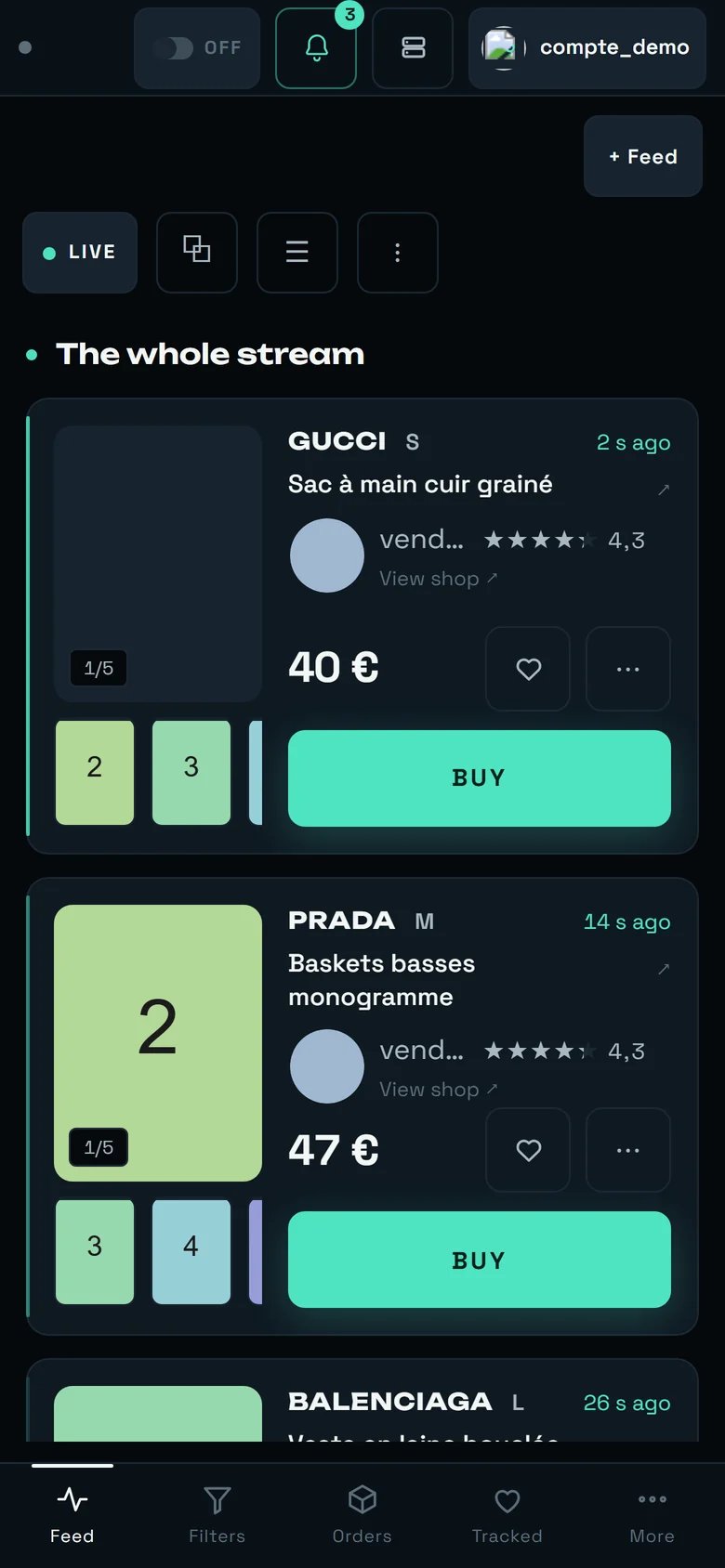 Below **900 px** wide, the sidebar disappears and gives way to a bottom bar of four tabs. The labels there are **shorter** — it is the only place in the product where the vocabulary changes word for the same screen.
| On a computer | On a phone | Français (phone) | Same screen |
| -------------- | ------------ | ---------------- | ---------------------- |
| **Dashboard** | **Feed** | **Flux** | yes |
| **Filters** | **Filters** | **Filtres** | yes |
| **Orders** | **Orders** | **Achats** | yes |
| **Watchlist** | **Tracked** | **Suivis** | yes |
| **Statistics** | **Stats** | **Stats** | yes — under **“More”** |
| **Settings** | **Settings** | **Réglages** | yes — under **“More”** |
The four remaining screens — **Accounts**, **Sales**, **Stats**, **Settings** — live under the **“More”** button, in a sheet titled **“NAVIGATION”**.
Two feed layouts are not offered on a small screen, and the refusal is written: **“On a phone there is only one layout.”** → [REGA on your phone](/how-to/on-your-phone).
## The limit of this glossary
This dictionary covers the **Vinted** vocabulary, that of the eight main screens. **Vestiaire Collective has its own**, and it does not overlap: there you **“Arm the radar”** instead of arming an AUTOBUY pill, you count **“watch rounds”** (“One round = one full read of what is new on Vestiaire.”) and **“listings seen”**, and you read a **“usual delay”** that exists nowhere else.
Do not carry a word from one marketplace to the other: the choice of marketplace is made when a filter is created, and **“This choice cannot be changed later.”**
Where “regime”, “criterion” and “anchor” turn into a method.
The three caps, exactly what each covers, and everything that can spend.
Buying scope, rotation, prepared carriers, “Ready to buy”.
Feeds, layouts, the AUTOBUY panel, the paying account.
The other marketplace, and its own vocabulary.
What disappears below 900 px, and the four short words.
Below **900 px** wide, the sidebar disappears and gives way to a bottom bar of four tabs. The labels there are **shorter** — it is the only place in the product where the vocabulary changes word for the same screen.
| On a computer | On a phone | Français (phone) | Same screen |
| -------------- | ------------ | ---------------- | ---------------------- |
| **Dashboard** | **Feed** | **Flux** | yes |
| **Filters** | **Filters** | **Filtres** | yes |
| **Orders** | **Orders** | **Achats** | yes |
| **Watchlist** | **Tracked** | **Suivis** | yes |
| **Statistics** | **Stats** | **Stats** | yes — under **“More”** |
| **Settings** | **Settings** | **Réglages** | yes — under **“More”** |
The four remaining screens — **Accounts**, **Sales**, **Stats**, **Settings** — live under the **“More”** button, in a sheet titled **“NAVIGATION”**.
Two feed layouts are not offered on a small screen, and the refusal is written: **“On a phone there is only one layout.”** → [REGA on your phone](/how-to/on-your-phone).
## The limit of this glossary
This dictionary covers the **Vinted** vocabulary, that of the eight main screens. **Vestiaire Collective has its own**, and it does not overlap: there you **“Arm the radar”** instead of arming an AUTOBUY pill, you count **“watch rounds”** (“One round = one full read of what is new on Vestiaire.”) and **“listings seen”**, and you read a **“usual delay”** that exists nowhere else.
Do not carry a word from one marketplace to the other: the choice of marketplace is made when a filter is created, and **“This choice cannot be changed later.”**
Where “regime”, “criterion” and “anchor” turn into a method.
The three caps, exactly what each covers, and everything that can spend.
Buying scope, rotation, prepared carriers, “Ready to buy”.
Feeds, layouts, the AUTOBUY panel, the paying account.
The other marketplace, and its own vocabulary.
What disappears below 900 px, and the four short words.