> ## Documentation Index
> Fetch the complete documentation index at: https://docs.regasolutions.io/llms.txt
> Use this file to discover all available pages before exploring further.
# When something refuses
> The sentence you read on screen, what actually happened behind it, and the one action that fixes it — for every purchase, payment, account and delivery refusal.
REGA never serves you a sentence at random: every refusal is **classified** before it is displayed,
and the same situation always produces the same sentence. This page is the dictionary of those
sentences.
**Use it by the sentence, not by intuition.** Find the exact wording on screen, look it up in the
tables below, do what the third column says. The sentences quoted here are the product's own, to the
character.
**A refusal is almost never a fault.** Out of 78 real purchase attempts in production (31/07), 42
failed — and **25 of them (59.5%) were simply races lost, or items that had already gone**. Only 11
(26.2%) were down to the tool, 4 (9.5%) were postponed purchases, 1 was waiting for something from
you, and 1 stayed unidentified.
***
## Where a refusal is read
Three places, from the most immediate to the most complete.
The **BUY** button becomes **PURCHASE UNDER WAY…**, then **✓ BOUGHT**, **GONE — BOUGHT BY
SOMEONE ELSE**, **FAILED — SEE THE DETAIL** or **TO CHECK — OUTCOME UNKNOWN**. The layout never
shifts.
The right-hand panel of the dashboard: one row per purchase, with **the account committed**, the
total and the refusal sentence. It is not a history — it only covers this session.
The full history, plus the **Being checked** tab: the items waiting for Vinted's green light.
This is where you go to check before retrying anything.
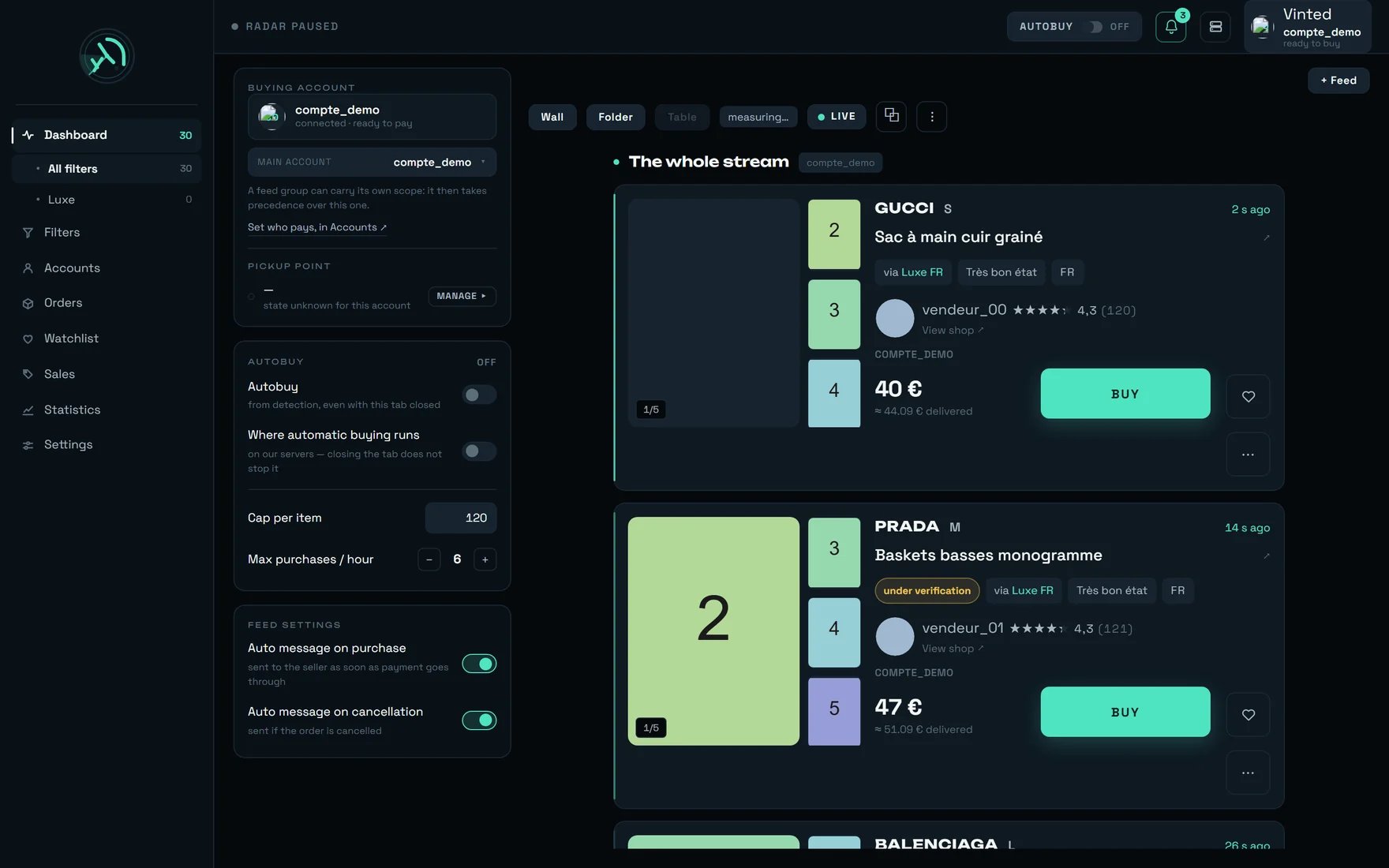 ### The Orders screen, marker by marker
 | № | Control | What it tells you |
| -- | ------------------------------------ | ------------------------------------------------------------------------------------------------------------------------------------------------------------ |
| 1 | The account indicator, top of screen | Who will pay for the next purchase. On our demo account: "compte\_demo will pay for the next purchase — ready to buy." |
| 4 | The **AUTOBUY** badge | Here on **OFF** — tooltip "Automatic buying disarmed". No automatic purchase will go out. |
| 6 | The **↻** button | "Read again now" — reads your orders from Vinted again. Use it before concluding "I have received nothing". |
| 10 | The **Pick-up points** tab | "Parcels waiting at a pick-up point, grouped by point". |
| 11 | The **Being checked** tab | "Items being checked by Vinted — the purchase starts as soon as they are cleared". **The first place to open when a purchase seems never to have gone out.** |
The **Administration** button visible at the top of the screenshot: REGA staff only — this button
does not appear on your account.
***
## The route of a purchase, and where it can stop
A purchase always crosses the same stages, in the same order. Knowing **where** it stopped is nearly
always enough to know what to do.
```mermaid theme={null}
flowchart TD
A["Purchase started — BUY click or armed filter"] --> B{"Can any account pay?"}
B -- no --> X1["No account available to pay"]
B -- yes --> C{"Is the item still on sale?"}
C -- "gone" --> X2["This item is no longer available"]
C -- "Vinted still checking" --> X3["Queue — up to 96 h"]
C -- yes --> E{"Address, pick-up point,
| № | Control | What it tells you |
| -- | ------------------------------------ | ------------------------------------------------------------------------------------------------------------------------------------------------------------ |
| 1 | The account indicator, top of screen | Who will pay for the next purchase. On our demo account: "compte\_demo will pay for the next purchase — ready to buy." |
| 4 | The **AUTOBUY** badge | Here on **OFF** — tooltip "Automatic buying disarmed". No automatic purchase will go out. |
| 6 | The **↻** button | "Read again now" — reads your orders from Vinted again. Use it before concluding "I have received nothing". |
| 10 | The **Pick-up points** tab | "Parcels waiting at a pick-up point, grouped by point". |
| 11 | The **Being checked** tab | "Items being checked by Vinted — the purchase starts as soon as they are cleared". **The first place to open when a purchase seems never to have gone out.** |
The **Administration** button visible at the top of the screenshot: REGA staff only — this button
does not appear on your account.
***
## The route of a purchase, and where it can stop
A purchase always crosses the same stages, in the same order. Knowing **where** it stopped is nearly
always enough to know what to do.
```mermaid theme={null}
flowchart TD
A["Purchase started — BUY click or armed filter"] --> B{"Can any account pay?"}
B -- no --> X1["No account available to pay"]
B -- yes --> C{"Is the item still on sale?"}
C -- "gone" --> X2["This item is no longer available"]
C -- "Vinted still checking" --> X3["Queue — up to 96 h"]
C -- yes --> E{"Address, pick-up point,
phone, card: all there?"}
E -- "one is missing" --> X4["Refused BEFORE any charge"]
E -- "all there" --> F["Payment at Vinted"]
F -- refused --> X5["One of the ten payment refusal sentences"]
F -- "the bank wants a confirmation" --> G["15 minutes to confirm"]
G -- "not confirmed" --> X6["Purchase not valid — no charge"]
G -- confirmed --> H["✓ Charged — item + delivery + buyer protection"]
F -- accepted --> H
```
**The four exits on the left cost nothing.** A refusal for address, pick-up point, phone or card
happens **before** any money moves: you lose the item, never a euro.
***
## Triage in 30 seconds
**GONE**, **VERIFICATION**, **TO CHECK**, **FAILED**, **REMOVED**: each calls for a different
action, and two of them call for **none**.
It is reproduced identically. If you cannot find it, it comes from Vinted rather than from REGA —
the screen then copies it out as it stands.
Clicking again almost never rescues a purchase. On an item that has gone, it is actively
counter-productive: see the advice below.
A transaction may have gone through after tracking stopped. Retrying would risk a second purchase.
The button REGA offers you is already the result of that triage:
```mermaid theme={null}
flowchart TD
S["A purchase row did not conclude"] --> Q{"What does the badge say?"}
Q -- "GONE" --> R1["No button — retrying would only eat into the account's allowance"]
Q -- "VERIFICATION" --> R2["'Remove from the queue' — nothing was paid, there is nothing to cancel"]
Q -- "TO CHECK" --> R3["No button — go and read Orders BEFORE retrying"]
Q -- "FAILED" --> R4["'Retry' — the account is assigned again by the server"]
```
***
## Refusals, situation by situation
### 1 — Nobody can pay
The most common family on a new workspace, and the quickest to fix.
| What you read | What happened | What you do |
| ---------------------------------------------------------------------------------------------------------------- | ---------------------------------------------------------------- | ---------------------------------------------------------------------------------------------------- |
| "No account available to pay. Connect a Vinted account in Accounts." | No Vinted buying account is attached to your workspace. | Accounts → **Add an account**. That account is the one that will pay, with its card and its address. |
| "no account to buy with — sort this out in Accounts" | The dashboard's left panel finds nobody within the buying scope. | Check the scope: **an emptied group refuses**, it never falls back on another account. |
| `{compte} is not connected — the purchase would be refused. Connect it from Accounts.` | The named account exists but its connection has dropped. | Accounts → reconnect it. Nothing else to change. |
| "This account is no longer connected. Reconnect it from the Accounts page." | Same cause, seen from a purchase already started. | Same. The purchase itself is lost. |
| "Account not connected." · "No account set up." | Short forms of the same state. | Same. |
| "No connected account within this scope." | Every account in the chosen scope is offline. | Reconnect one, or widen the scope. |
| "A purchase is already under way on this account." | At most two purchases can run at the same time on one account. | Wait, or let another account pay. This is not an error. |
| "No delivery address on this account — a purchase cannot go through without one. It is set in the Accounts tab." | The Vinted account has no saved address. | Fill it in **before** the next drop, not during it. |
**An emptied account group falls back on nothing.** REGA tells "no restriction" apart from "no
account": confusing the two would let any account pay when you deliberately emptied the group. If
your automatic purchases stop for no visible reason, look there first.
### 2 — The item can no longer be bought
| What you read | What happened | What you do |
| ------------------------------------------------------------------------------------------------------------------------------------------------------------------------ | ------------------------------------------------------------ | --------------------------------------------------------------------------------------------- |
| **GONE** · "GONE — BOUGHT BY SOMEONE ELSE" | Withdrawn, reserved, or paid for by someone else before you. | **Nothing.** REGA does not even offer "Retry" — see advice no. 1. |
| "This item is no longer available." | Same situation, seen from the server. | Nothing. |
| "Item sold or withdrawn." | Vinted refused the payment for that reason. | Nothing. |
| "Another member is currently buying this item." | Another buyer had the order open. | Nothing. Opening an order **does not reserve** the item: it goes to whoever is charged first. |
| "Item reserved for another member." | The seller reserved it. | Nothing. |
| **deleted** — "This listing no longer exists on Vinted: it was deleted or withdrawn. This is not a sale — a sold item keeps its page. The purchase will not go through." | The listing has disappeared from Vinted. | Nothing. Do not count it as a sale. |
| "A purchase is already under way for this item." | An order from this account was already open on this item. | Wait for its outcome rather than opening a second one. |
### 3 — Vinted is still checking the listing
**This is not a failure.** A new listing can stay under verification for **30 minutes to 2 hours**.
REGA queues the item and buys on its own as soon as Vinted allows it.
| What you read | What happened | What you do |
| ------------------------------------------------------------------------------------------------------------------------------------------------------------------------------------ | ---------------------------------------------------------------------- | --------------------------------------------------------------- |
| "Vinted is still checking this listing. The purchase will start as soon as it is available." | The item exists but is not transactable yet. | **Nothing.** Let the queue work. |
| "Queued — the purchase starts as soon as Vinted verifies the item." | Same, seen from the card. | Nothing. |
| **under verification** — "Vinted is verifying this item: the transaction is not authorised yet. If it passes verification it becomes buyable again; if it fails it will be deleted." | The marker carried by the card. | Nothing. |
| "Waiting — the purchase will start as soon as Vinted checks the item" | The row in Orders → **Being checked**. | Nothing, or **Remove from the queue** if you no longer want it. |
| "Removed or rejected at the check" | Vinted rejected the listing; it will not come back. | Nothing. |
| "Given up (not checked in time)" | The item was never cleared within the set delay (**96 h** by default). | Nothing. The delay is set in Orders, field **Give up after**. |
| "Remove from the queue" — "Stop waiting for this item's verification: it leaves the queue and the purchase will not start. Nothing was paid, there is nothing to cancel." | You take back control. | Click it if the item no longer interests you. |
**A queued purchase can go out up to 96 hours later, with no further click from you.** Empty the
"Being checked" queue before a weekend or a time away.
### 4 — Delivery is blocking
| What you read | What happened | What you do |
| -------------------------------------------------------------------------------------------------------------------------------------------------------------- | ------------------------------------------------------------- | ------------------------------------------------------------------ |
| "No pick-up point could be selected for this order." | No usable point, or automatic selection was **switched off**. | Settings → BUYING: switch **Automatic pick-up point** back on. |
| "A phone number is required for delivery." | The carrier requires a number; the Vinted account has none. | Save one on the account, once and for all. **No charge was made.** |
| "Number expected in international format, for example +33612345678." | The number typed is in the wrong format. | Type it again with the country code. |
| "Saving a number needs an open purchase. Prepare a targeted item (or run a dry run), then come back: that is what avoids opening an order just for a setting." | A number can only be set inside an open order. | Do exactly what the sentence says. |
| "Number saved. It will be confirmed on the next purchase, when Vinted sends it back to us." | Success — Vinted will remember it. | Nothing. Later purchases pre-fill it. |
| "Pick-up point not recorded for this order — the platform does not give it back after the purchase." | Vinted does not return the pick-up point afterwards. | Open the order on Vinted. **This is not data lost on our side.** |
| "Chosen `{quand}`. A point can close: check it before you travel." | The point was recorded correctly. | Check its opening hours before going to collect. |
**"Automatic pick-up point" is on by default — leave it on.** The setting's own text says it plainly:
"rega chooses the collection point during the purchase. Turned off, the purchase fails for want of a
pick-up point — leave it on." **Nothing asks anybody anything**: switched off, the purchase fails,
and it fails after the item has been reserved.
### 5 — The payment was refused
Ten possible refusals, all **classified** before display. None of them triggers an automatic second
attempt.
| What you read | What happened | What you do |
| ----------------------------------------------------------------------------------------------------- | --------------------------------------------- | --------------------------------------------------------- |
| "Item sold or withdrawn." | The race was lost. | Nothing. |
| "Another member is currently buying this item." | Another buyer was faster. | Nothing. |
| "A purchase is already under way for this item." | Duplicate on the same item. | Wait for the first one's outcome. |
| "Item reserved for another member." | Seller's reservation. | Nothing. |
| "A phone number is required for delivery." | See the Delivery section. | Save the number. No charge. |
| "The bank card could not be selected for this purchase. Check the card saved on this Vinted account." | No usable card, or the card could not be set. | Save a **default** card on the Vinted account. No charge. |
| "Payment declined. Check the saved payment method." | Vinted did point at the payment method. | Here it really is the card: check it on Vinted. |
| "Payment declined by the bank." | Bank refusal. | Talk to your bank, or use another card. |
| "Too many attempts in a row. Try again in a moment." | Too many payments in a row. | Wait a few minutes. |
| "The payment did not go through." | A refusal **with no detail given by Vinted**. | Do not assume it is your card. |
**"The payment did not go through" does not point at your card.** That was the case until 15/08: a
generic refusal from Vinted sent the client off to check a perfectly valid card — measured on an
account whose card was saved, set as default and not expired. Since then, only a genuine
payment-method refusal carries the sentence "Check the saved payment method."
### 6 — The bank asks for a confirmation
| What you read | What happened | What you do |
| ---------------------------------------------------------------------------------------------------------------------------------- | -------------------------------------------------- | ------------------------ |
| "Your bank is asking you to confirm this payment." | Your bank requires a confirmation. | **Open it and confirm.** |
| **🔐 VALIDATE THE PAYMENT** — "Your bank is asking for validation — open it and confirm the payment" | The link is exposed **immediately**, with no wait. | Click it. |
| Notification "Bank confirmation required" — "Your bank is asking for a confirmation — without it, the purchase will not complete." | Sent at the very moment the button appears. | Same. |
| Notification "Bank confirmation still pending" — "Started `{n}` min ago. Without confirmation, the purchase will not complete." | A reminder, if you turned it on. | Same. |
**You have 15 minutes.** REGA watches for the confirmation every 10 seconds for 900 seconds, then
concludes: the purchase is **not valid**, and **no euro left your account**. Stay reachable for
about a quarter of an hour after a purchase, and keep purchase notifications on.
### 7 — Vinted is holding this account back
| What you read | What happened | What you do |
| ----------------------------------------------------------------------------------------------------- | ---------------------------------------------------------------- | ---------------------------------------------------------------------------------------------- |
| "Too many requests were sent to Vinted on this account. Wait a few minutes." | Vinted limited this account's pace. | Wait. In automatic buying the account is **set aside for 15 minutes** and the others carry on. |
| "Vinted asked for a security check on this account. It will resume automatically." | A security check by Vinted. | **Nothing.** It resumes on its own. |
| "The connection to Vinted failed. A new attempt is under way." | A passing network incident. | Nothing. |
| "The connection to Vinted did not go through. This is not your password: try again in a few minutes." | A temporary refusal on Vinted's side, not a credentials problem. | Try again later. Do not change your password. |
| "A confirmation code is expected for this account." | Vinted is asking for its confirmation code. | Enter it in Accounts. |
| "Automatic buying is not available on this server." | Automatic buying is not served here. | Write to us. |
**A single purchase refusal from Vinted disarms ALL your automatic buying**, and that is deliberate:
carrying on with another account is exactly what makes them fall one after the other. The message
received is kept as it stands — **read it before arming again.**
### 8 — Your REGA access
| What you read | What happened | What you do |
| -------------------------------------------------------------------------------------------------------------------------------- | ------------------------------------------------------ | ------------------------------------------------- |
| "Sign in to carry on." | Your REGA session has expired. | Sign in again. |
| "E-mail address or password is incorrect." | Credentials refused. | Check them, or ask for a reset link. |
| "Too many attempts. Try again in `{n}` minutes." | Too many sign-in tries. | Wait for the announced delay. |
| "Incorrect code. Check the time on your phone, or use a recovery code." | Verification code refused — usually the phone's clock. | Fix the time, or use a recovery code. |
| "Your subscription is suspended. Your data is kept; the service resumes as soon as the account is settled." | Subscription awaiting settlement. | Settle it: **nothing is lost**. |
| "This subscription has ended. Your data is kept for a few days — you can send us a bespoke request." | Subscription finished. | Write to us. |
| "Your workspace is not active yet: choose a plan to begin. Everything is ready, there is nothing to set up again." | Workspace prepared but not activated. | Choose a plan. Your filters are already in place. |
| "This device already receives the notifications of another REGA workspace. Remove it from that workspace before adding it here." | The phone is attached elsewhere. | Remove it from the other workspace first. |
### 9 — A setting was not saved
REGA **never** writes a money setting optimistically: if the server did not confirm, the control does
not move and the previous value comes back.
| What you read | What happened | What you do |
| --------------------------------------------------------------------------------------- | ------------------------------------------------------------ | -------------------------------------------------------------------------------- |
| "Setting not saved — the server did not answer" | The AUTOBUY badge could not be written. | Try again. **The badge did not move**: your real state is the one displayed. |
| "Setting not saved — `{cause}`" | A setting in Settings was refused. | Read the cause. Some settings belong to the service and are shared: write to us. |
| "Stale setting — the state has changed since you last read it." | Someone — or another tab — changed the same thing meanwhile. | Reload, then make the change again. |
| "Setting out of date — who pays changed elsewhere. The screen shows the current state." | The paying account changed from another screen. | Nothing: the screen is already up to date. |
| "Main account unreadable — the server is not answering. Nothing changed." | The read failed. | Try again. |
| "Server unreachable — the filter list cannot be read right now." | The list could not be read. | Try again. Your filters are not lost. |
***
## The screen's four verdicts
Every failure is filed under one of four verdicts. It is the fastest reading on the whole screen:
the verdict tells you **whether there is anything to do at all**.
| Verdict | What it means | Measured share (42 failures, 31/07) |
| ------------------------------------------ | ---------------------------------- | ----------------------------------- |
| "Race lost, or the item had already gone" | You lost the race. Nothing to fix. | **25 — 59.5%** |
| "Postponed — the purchase will be retried" | REGA will pick it up on its own. | 4 — 9.5% |
| "For us to fix" | Our business. | 11 — 26.2% |
| "Waiting for something from you" | A card, a number, a reconnection. | 1 — 2.4% |
| "Cause not identified" | Not classifiable. | 1 — 2.4% |
And the named causes behind those verdicts: "Another buyer paid first", "The item had already gone",
"Vinted was still checking the listing", "Too many requests sent to Vinted on this account", "The
bank confirmation was not done in time", "This account must verify its phone number", "The payment
did not go through — Vinted gave no detail", "This account was no longer connected", "Network
problem", "The purchase was cancelled before payment".
***
## What is NOT a fault
A new workspace is empty **everywhere**, and each screen says so in its own words:
* Filters — "No filter — the radar is looking for nothing."
* Stream — "Waiting for the stream — check that the radar is running." then "No recent detection on this source — the radar is sweeping."
* RECENT PURCHASES — "No purchase in this session — the full history is in Orders."
* Orders — "Reading orders…" then "No order on this scope."
* Being checked — "No item being checked."
* Watchlist — "No watched item — the heart on a feed card adds the item here."
* Sales — "No sale yet on this filter."
* Stats — "**No event in this period.** The blocks below show their structure with absent values — these are not zeros."
Note that last one: REGA tells **"—" (no measurement)** apart from **"0" (a measurement of zero)**.
They are not the same information.
The table aligns its columns across the full width. The screen says so: "The table aligns seven
columns: it is offered only from a 1280 px window upwards."
And it often needs a good deal more: measured, **at a 1920 px window the display area only offers
1004 px** while the table requires **1138** — panels and margins take the rest. Fold away or close
whatever eats the width, or detach the stream into its own window with **⧉**.
Two neighbouring refusals, also correct: "The table compares rows aligned across the full width: one
feed at a time. Switch to wall or folder to open several." and "On a phone there is only one layout."
The seller's country **decides which site is watched**. The filter dialog writes it under your
choices: "Watching Vinted `{pays}`."
If no account from that country is connected, an alert appears — and it **warns without blocking**:
"No `{pays}` account is connected: this filter will spot listings, but no purchase can go out.
Connect a `{pays}` account from the Accounts page."
A filter that detects a lot and never buys is nearly always that one. **Read the "Watching Vinted"
line after every change of origin.**
The badge paints **your intention**. The "Where automatic buying runs" line **states a fact**, it is
not something you set: "on our servers — closing the tab does not stop it".
Automatic buying runs on our servers. It survives closing the tab, closing the browser, and shutting
down your machine. **The only action that stops it is disarming the badge.**
Several conditions, all normal, prevent an automatic purchase:
* **The filter is a draft.** An unconfirmed filter never buys, whatever you tick.
* **The card carries "category unverified".** The screen says it: "The `{quoi}` of this item could not be verified in time. The card is shown so nothing is missed — it may therefore not match the filter, and automatic buying holds off."
* **The item was detected more than 2 minutes ago.** This is not a ceiling, it is freshness: an item detected several minutes ago is nearly always gone.
* **Arming a filter does not buy what is already on screen** — otherwise arming it would instantly buy everything already displayed.
* **The price exceeds the filter's cap**, or a cap is set and the price is unreadable.
**The test that settles it**: arm, trigger a detection, and check that a purchase row appears. The
ARMED badge on its own proves nothing.
"Pick-up point not recorded for this order — the platform does not give it back after the purchase."
Vinted does not return the pick-up point once the order is placed: REGA records it at payment time,
or never. So an order placed **before** you started using REGA will not have one. Open it on Vinted.
It is **capped** and never reaches its end before confirmation. Real purchases measured run from
**5.93 s to 8.8 s**; its internal reference is 8 s. **A full bar would prove nothing**, and a slow
purchase is not a lost purchase: the payment itself is time spent at Vinted.
Three numbers circulate, and they do not say the same thing:
* **the card's price** — the item alone, in the listing's currency;
* **the "≈ incl. tax"** — an estimate: "Estimated total price: item + delivery (about €3-4). The exact postage depends on the carrier chosen at purchase.";
* **the total charged** — "Amount actually debited (item + delivery + buyer protection)."
Before confirmation the purchase row says "item price — total not confirmed yet"; afterwards it says
"total debited". Measured: buyer protection takes 10.00 to 11.20; one real postage measured at €2.89.
Reckon on **about €4 above the displayed price**.
And a foreign currency is **never converted**: we do not have the rate, so we do not invent it.
It is written in its own tooltip: "Sum of the ITEM PRICES of every order, whatever its state.
Postage and buyer protection are not included."
So it **understates** the statement, and it also counts cancelled orders. For a true total, add up
the "total debited" column of the purchase rows.
The confirmation link appears **before** REGA knows whether you need it. Your bank often approves on
its own, and the purchase turns paid without you clicking. Showing the button forces nothing: it
merely offers the confirmation earlier.
***
## Our advice
This is the advice that costs most to ignore. Exactly one point at Vinted is rate-limited, and **a
refusal there still eats the allowance**: retrying three times on a sold item cuts into the pace of
the very account you want to buy the **next** item with. Measured, code before against code after:
**159 attempts in 8.02 s → 1 attempt in 0.00 s**. That is why the "Retry" button does not appear on
GONE.
"Outcome unknown: tracking stops here. Check in Orders BEFORE retrying — a payment may still go
through." The row is never red, and "Retry" is **never** offered: it would be a second purchase on a
transaction that may already have been paid. A payment is never replayed after an interruption at
payment time — the outcome there is unknown, and replaying would risk a double charge.
Those three live **on the Vinted account**, not in REGA, and they are set once and for all. Since
12/08/2026 Vinted no longer pre-selects the card: **six purchases were lost in one evening** for want
of a usable card. In the United Kingdom the phone number is compulsory and its format is strict. A
badly prepared account fails **cleanly** — no charge, but no item either.
Three caps coexist, from the widest to the narrowest:
* **"Purchase ceiling"** (Settings → BUYING) — applies to every purchase, manual and automatic alike. **Empty by default.** Once set, it also refuses an item whose price is unreadable.
* **"Cap per item"** (AUTOBUY panel on the dashboard) — **€120 by default**, and remembered **in this browser only**. Change machine or open a private window and it is back to 120.
* **A filter's cap** ("€ max" in its dialog) — bounds only that filter's automatic buying.
An armed filter with no "€ max" will buy at any price, and the screen tells you only once: "No cap:
this filter will buy whatever the price." In the list, all that remains is a discreet "no cap".
The caps compare the **item price**, never the total. A €100 cap therefore lets through a purchase
charged around €108. Subtract the \~€4 of delivery and buyer protection in your head before typing the
figure.
Your ranking **always** comes ahead of the automatic strategy, but it is **at the first paid
purchase** that it fixes the point every later purchase will reuse without an extra round trip —
**about 1.3 seconds** saved each time. Setting it afterwards costs that time on every purchase until
the next one through that carrier.
That button on the Accounts screen triggers **a real purchase of a few euros**, once per account and
per carrier. Without it the purchase still goes through — simply **\~1.3 s slower**. And since it is
**the seller** who chooses the carrier, preparing several widens the **share** of purchases that gain
that time; it never increases the gain itself.
The bank confirmation expires at **15 minutes**, and the purchase then becomes not valid — no charge,
but the item is lost. Keep purchase notifications on and accept the alerts on your phone: the
confirmation link goes out **at the very moment** the button appears.
Cancelling becomes impossible as soon as the parcel leaves (boundary established on **60 real
orders**). And REGA warns you from **2 cancellations in 24 h**: it is a neutral caution — we warn,
we never forbid. The reason is sent in plain words to the seller.
A purchase refusal from Vinted disarms all your automatic buying. The message received is kept **as
it stands**: read it. Arming again without reading it means risking your accounts falling one after
the other.
***
## What takes people by surprise
* **Opening an order does not reserve the item.** Proved live on two accounts: the first opens its order without paying, the item stays available, the second pays and takes it. **The item goes to whoever is charged first.**
* **A failed purchase has already used its turn in the rotation.** The account is committed on click, so before the outcome: "Account committed on click: it is reserved before the purchase completes. In rotation, a failed purchase has therefore already used its turn."
* **"Retry" starts again on the next account**, not the same one — an account that has just failed is the worst placed. If your scope names one specific account, that same one goes again.
* **The account shown before the purchase is only a forecast.** The one that counts is the one on the **purchase row**, and it is the one that says where the parcel will be sent.
* **The pick-up point follows your delivery address, not the site you use.** A French session delivering to Florence asks for Italian points — that is correct.
* **In "one specific account" mode, REGA will never reach for another account**, however busy: it makes you wait for that account's pace rather than delivering to the wrong address.
* **"deleted" is not "sold".** A sold item keeps its page; a deleted listing disappears.
* **A dry run is not inert**: it does create an order with a real seller, it simply does not pay it.
* **Two purchases can run at once on one account**, not one. With several buying accounts, the simultaneous spending window is two per account.
* **The hourly cap counts only your purchases**, never another client's.
***
## On a phone
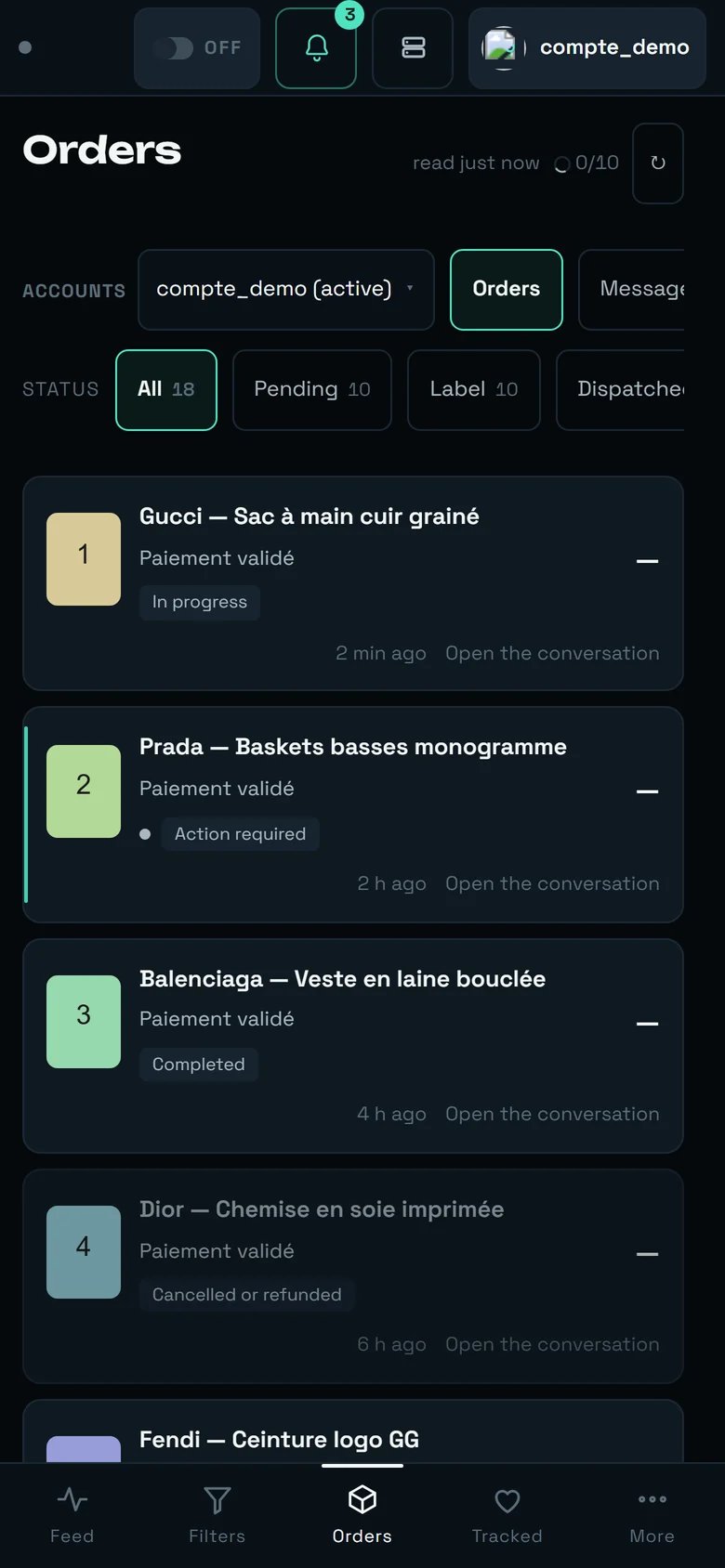 Nothing changes at heart: same sentences, same tabs, same actions. Two practical differences:
* **a single layout** — "On a phone there is only one layout." The Wall, Folder and Table views are not offered;
* **it is the 3-D Secure screen.** Those 15 minutes of confirmation almost always play out on a phone: accept REGA's notifications, that is the only way to be told the instant the link appears.
***
## What this page cannot do
**Some sentences come from Vinted, not from REGA.** When the platform refuses without a usable
reason, the screen copies its answer out as it stands rather than inventing an explanation. Those
sentences are not in the tables above — and they can appear in French on an English screen. That is
not a display fault: it is the original answer, untranslated.
**Nobody can guarantee that a purchase will never be interrupted by a security check from Vinted.**
The question was put to us directly; the honest answer is no. What we do guarantee is that the
interruption is **classified**, **named**, and that it never causes a second charge.
**And the rule that never moves**: a payment is **never** replayed after an interruption at payment
time. The outcome there is unknown, and replaying would risk a double charge. When REGA offers you no
button, it is not an oversight — it is the protection.
Nothing changes at heart: same sentences, same tabs, same actions. Two practical differences:
* **a single layout** — "On a phone there is only one layout." The Wall, Folder and Table views are not offered;
* **it is the 3-D Secure screen.** Those 15 minutes of confirmation almost always play out on a phone: accept REGA's notifications, that is the only way to be told the instant the link appears.
***
## What this page cannot do
**Some sentences come from Vinted, not from REGA.** When the platform refuses without a usable
reason, the screen copies its answer out as it stands rather than inventing an explanation. Those
sentences are not in the tables above — and they can appear in French on an English screen. That is
not a display fault: it is the original answer, untranslated.
**Nobody can guarantee that a purchase will never be interrupted by a security check from Vinted.**
The question was put to us directly; the honest answer is no. What we do guarantee is that the
interruption is **classified**, **named**, and that it never causes a second charge.
**And the rule that never moves**: a payment is **never** replayed after an interruption at payment
time. The outcome there is unknown, and replaying would risk a double charge. When REGA offers you no
button, it is not an oversight — it is the protection.