> ## Documentation Index
> Fetch the complete documentation index at: https://docs.regasolutions.io/llms.txt
> Use this file to discover all available pages before exploring further.

# Accounts

> Connect your Vinted and Vestiaire accounts, check they can go all the way to payment, and decide which one pays for which purchase.

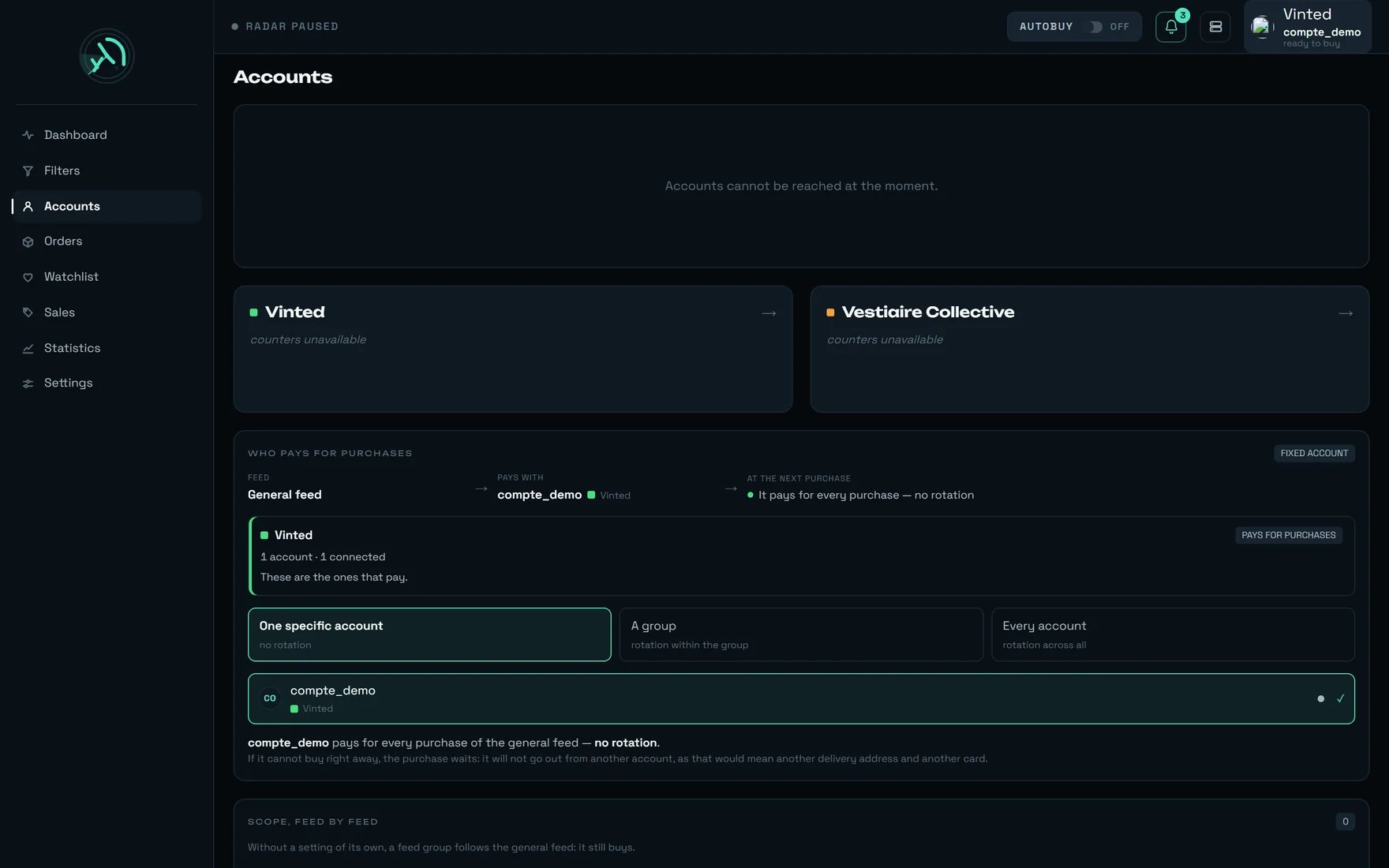
This is where you connect your accounts, where you check they can go **all the way to payment**, and where you name **the one that pays**. Everything that decides the card, the delivery address and the pickup point of a purchase is set on this screen — and nowhere else.

<Frame caption="The Accounts screen: the two doors, and below them the WHO PAYS FOR PURCHASES panel.">
  <img src="https://mintcdn.com/regasolutions/qwd9LpL60q4fWPff/images/comptes-en.webp?fit=max&auto=format&n=qwd9LpL60q4fWPff&q=85&s=049d4e48ab22a0b2c77ab296aa4cd409" alt="rega's Accounts screen: the Vinted and Vestiaire Collective doors, then the WHO PAYS FOR PURCHASES panel" width="1760" height="1100" data-path="images/comptes-en.webp" />
</Frame>

<Note>
  On this capture, the counters of the two doors could not be read: they show `counters unavailable` and the panel `Accounts cannot be reached at the moment.` sits above them. **Nothing is lost, nothing is erased, nothing is written** — the "who pays" setting stays readable just below and keeps applying. This is exactly what you should see in that case: never an invented `0` in place of a figure we do not have.
</Note>

***

## What you see

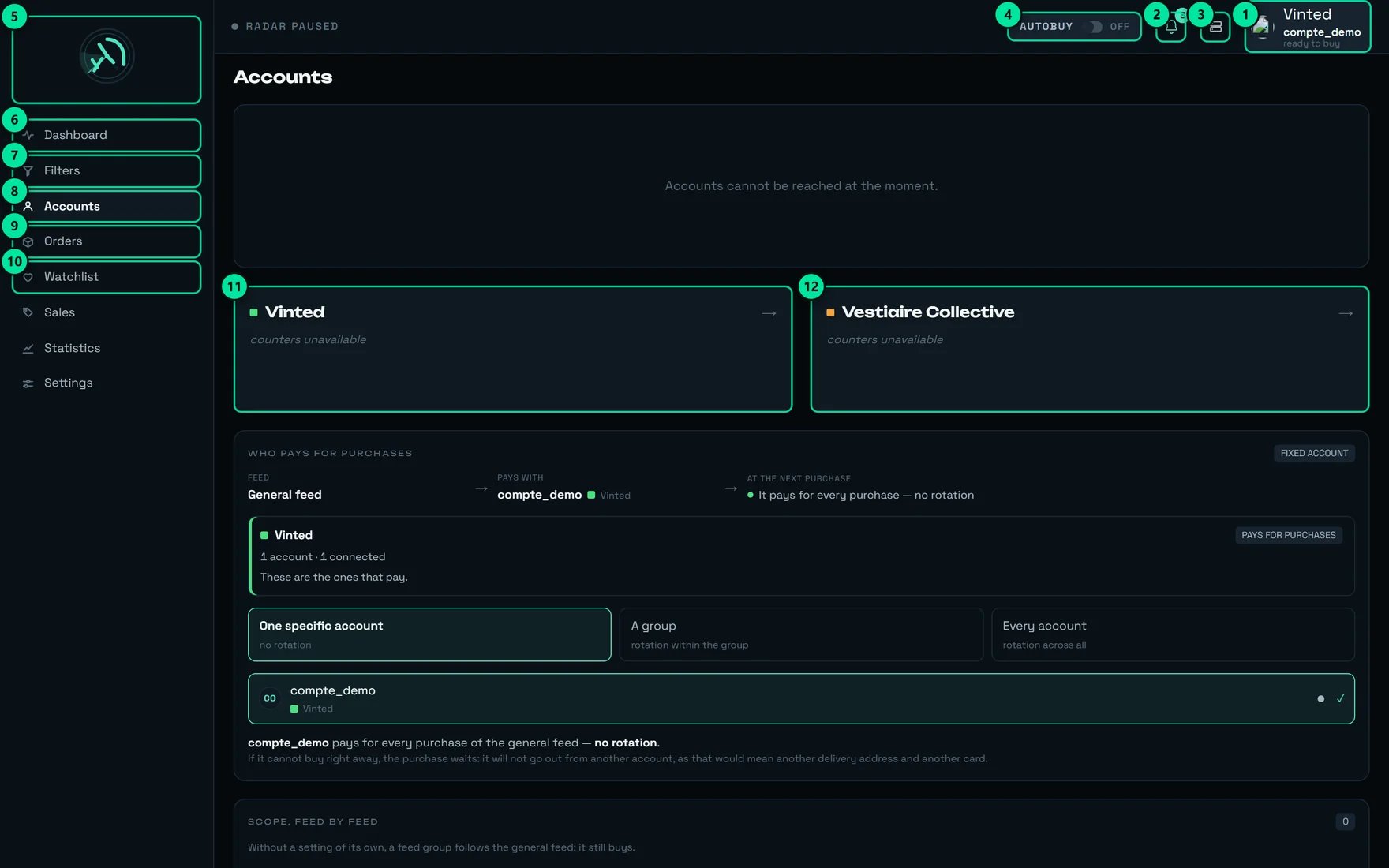
<Frame caption="The same controls, numbered.">
  <img src="https://mintcdn.com/regasolutions/qwd9LpL60q4fWPff/images/comptes-annote-en.webp?fit=max&auto=format&n=qwd9LpL60q4fWPff&q=85&s=50c41ea42c782a719f4596d322a118d5" alt="The Accounts screen annotated, markers 1 to 12" width="1760" height="1100" data-path="images/comptes-annote-en.webp" />
</Frame>

| №  | The control                     | What it does                                                                                                                                |
| -- | ------------------------------- | ------------------------------------------------------------------------------------------------------------------------------------------- |
| 1  | The account, top right          | Says **who will pay for the next purchase**. Its tooltip, on our test account: `compte_demo will pay for the next purchase — ready to buy.` |
| 2  | The bell                        | Unread notifications — here `3 unread notifications`.                                                                                       |
| 3  | `Administration`                | REGA staff only — this button does not appear on your account.                                                                              |
| 4  | `AUTOBUY` / `OFF`               | Arms or disarms automatic buying. Here: `Automatic buying disarmed`.                                                                        |
| 5  | The logo                        | `rega — home`.                                                                                                                              |
| 6  | `Dashboard`                     | The live feed.                                                                                                                              |
| 7  | `Filters`                       | What the radar is looking for.                                                                                                              |
| 8  | `Accounts`                      | The current screen.                                                                                                                         |
| 9  | `Orders`                        | Purchases and what follows them.                                                                                                            |
| 10 | `Watchlist`                     | The items you follow.                                                                                                                       |
| 11 | The `Vinted` door               | Opens the list of Vinted accounts, with its counters.                                                                                       |
| 12 | The `Vestiaire Collective` door | Opens the list of Vestiaire accounts.                                                                                                       |
<Warning>
  **The `AUTOBUY` button arms our servers, not your browser.** Once armed, automatic buying survives closing the tab, closing the browser and shutting down your machine. **The only gesture that stops it is disarming it.** The dashboard panel merely states this, under `Where automatic buying runs`: `on our servers — closing the tab does not stop it`. It is not a switch you set, it is a fact you are reminded of.
</Warning>

***

## The three levels of the screen

```mermaid theme={null}
flowchart TD
    A["Home — two doors<br/>+ WHO PAYS FOR PURCHASES"] --> V["Vinted door"]
    A --> W["Vestiaire Collective door"]
    V --> L["List: accounts, groups,<br/>ACTIVE SCOPE badge"]
    W --> LV["List of Vestiaire accounts"]
    L --> F["A Vinted account page"]
    L --> G["Group window:<br/>order, colour, rotation"]
    L --> N["Add and connect window"]
    LV --> FV["A Vestiaire account page"]
    F --> P["Ready to buy — 5 points"]
    A -. "the WHO PAYS panel disappears<br/>as soon as a door is opened" .- L
```

<Tip>
  **The `WHO PAYS FOR PURCHASES` panel only exists on the home view.** If you are looking for it after opening a door, go back up through `All marketplaces`, at the top of the list. It is the only place in the product where you choose the account that pays: three competing selectors used to exist — in the header, on the dashboard, in the Filters screen — and they contradicted each other. They were removed.
</Tip>

***

## "WHO PAYS FOR PURCHASES"

The panel reads as a sentence, in three cells: `Feed` → `Pays with` → `At the next purchase`.

On our test account it says: **General feed → compte\_demo (Vinted) → `It pays for every purchase — no rotation`**, with the `FIXED ACCOUNT` pill at the top right. When a rotation is in place, the pill becomes `ROTATION` and the third cell says `It pays, then we switch account in 2 purchases` or `It pays, then we move to the next account`. While reading, it says `Reading…` — never a random account.

### The three (or four) modes

| The button                       | Its subtitle                | What it changes                                                            |
| -------------------------------- | --------------------------- | -------------------------------------------------------------------------- |
| `One specific account`           | `no rotation`               | That account pays for everything. If it cannot, the purchase **waits**.    |
| `A group`                        | `rotation within the group` | Purchases rotate between the accounts of the group, in the group's order.  |
| `Every account`                  | `rotation across all`       | Purchases rotate across all declared buying accounts.                      |
| `Inherits from the general feed` | `follows the setting above` | **Only appears on a feed group**: `The general feed inherits from no one.` |

<Warning>
  In `One specific account` mode, the screen warns you in plain words: `If it cannot buy right away, the purchase waits: it will not go out from another account, as that would mean another delivery address and another card.` **This mode never substitutes**, even when the account is saturated. For a drop, prefer `A group` or `Every account`.
</Warning>

### Which mode to choose

```mermaid theme={null}
flowchart TD
    Q1{"Are you going for a drop,<br/>several items at once?"}
    Q1 -- no --> M1["One specific account<br/>the order always arrives<br/>at the same place"]
    Q1 -- yes --> Q2{"Do you want to control<br/>the order of turns?"}
    Q2 -- yes --> M2["A group<br/>rotation in the order<br/>you arranged"]
    Q2 -- no --> M3["Every account<br/>rotation across all"]
    M2 --> R["Set ORDER OF PLAY and<br/>SWITCH ACCOUNT EVERY … PURCHASES"]
    M3 --> R
    M1 --> WT["Accept that the purchase WAITS<br/>if that account is unavailable"]
```

<Steps>
  <Step title="Open the Accounts screen without going through a door">
    The panel sits below the two marketplace tiles. If you are already inside a list, go back up through `All marketplaces`.
  </Step>

  <Step title="Click the mode">
    **There is no "Save" button: every click writes.** The keyboard arrows only move the focus — they do not choose, otherwise walking through a list of accounts would change the payer on every press.
  </Step>

  <Step title="Name the account or the group">
    As long as the intent is incomplete, **nothing is written**, and the screen says so: `Nothing has changed yet — choose the account that will pay.` (or `choose the group that will pay.`) with a `CANCEL` button.
  </Step>

  <Step title="Check ORDER OF PLAY">
    Rank, avatar, `Connected` / `Disconnected`, the `ROTATION` or `NO ROTATION` pill, `Next:` on the one that will pay, and an `EXCLUDE` button on each line. Excluded accounts stay visible under `NOT IN THIS ROUND`, with their cause.
  </Step>
</Steps>

<Info>
  Below the order of play sits a sentence many people read too fast: `Only “next” is certain: what follows shifts if an account becomes unavailable at the moment of purchase.` The displayed order is an **intention**, not a promise.
</Info>

### The two marketplace cards

<Columns cols={2}>
  <div>
    **Vinted — `PAYS FOR PURCHASES`**

    `These are the ones that pay.`

    This card is **always** shown, even with zero accounts. It then says: `No account here — and they are the only ones that can pay today. Connect one from the account list.`
  </div>

  <div>
    **Vestiaire — `DOES NOT PAY YET`**

    `Vestiaire purchases do not go through this setting yet. Their account page stays editable — address, card, pickup point.`

    It only appears if you have Vestiaire accounts.
  </div>
</Columns>

### `SWITCH ACCOUNT EVERY … PURCHASES`

Left empty, the field follows the general setting and carries the `GLOBAL SETTING` pill. Filled in, it wins for this scope. `Escape` restores the previous value, `Enter` confirms. A value below 1 falls back to the applied value — not a silent refusal, a visible return.

### What can refuse a setting

| The situation                         | What the screen shows                                                                                                    |
| ------------------------------------- | ------------------------------------------------------------------------------------------------------------------------ |
| You name a Vestiaire account          | `This account cannot pay yet: Vestiaire purchases do not go through this scope.`                                         |
| Two tabs are setting at the same time | `Setting out of date — the scope changed elsewhere. The screen shows the current state.` — one replay only, never a loop |
| The write fails                       | `Scope not saved`                                                                                                        |
| The read fails                        | `Cannot read who pays right now. Nothing was changed; what is already set still applies.`                                |
| The link is cut                       | `Connection lost — the screen shows the last known state and writes nothing.`                                            |

### When nobody can pay

The panel does not merely announce `No purchase will go out`: it **names the cause and the gesture**. Six distinct admissions exist.

<AccordionGroup>
  <Accordion title="No account is connected.">
    `Connect an account from the account list, then come back to choose who pays.`
  </Accordion>

  <Accordion title="The only connected accounts are Vestiaire accounts…">
    `The only connected accounts are Vestiaire accounts, and they cannot pay from this setting yet.` → `Connect a Vinted account so purchases can go out.`
  </Accordion>

  <Accordion title="The chosen group holds no account able to pay.">
    `Add an account to it in the left-hand column, or choose another group.`
  </Accordion>

  <Accordion title="Every account in this round is excluded.">
    `Put one back in the round, below — an excluded account stays visible, struck through.`
  </Accordion>

  <Accordion title="No account in this round is connected.">
    `Reconnect an account from the account list.`
  </Accordion>

  <Accordion title="“…” cannot pay at the moment.">
    The named account is unavailable: `Reconnect this account, or name another one below.`
  </Accordion>
</AccordionGroup>

### `SCOPE, FEED BY FEED`

One line per feed group, expandable, **only one open at a time**. Without a setting of its own, a feed group carries the `INHERITS` pill and the note `Without a setting of its own, a feed group follows the general feed: it still buys.` At zero: `No feed group. Every feed pays with the general feed's scope.`

The badge on the Filters screen lands directly here and **expands the targeted line** — you do not have to hunt for it.

***

## The left-hand column: accounts and groups

Once a door is open, the list takes the left and the account page the right.

| The element  | What it says                                                   |
| ------------ | -------------------------------------------------------------- |
| The title    | `Vinted accounts` or `Vestiaire accounts`                      |
| The subtitle | `3 accounts · 2 connected` (on the Vestiaire side: `2 usable`) |
| The search   | `Search for an account` — **only appears from 5 accounts up**  |
| The footer   | `+ Group` and `+ ACCOUNT`                                      |

**The states of a line**: `SMS code expected` · `Connecting…` · `Connected` · `Last connection failed` · `No password` · `Disconnected`. Hovering shows the **masked** address, never the whole one.

**A group header** carries its colour, its name, its count, and the `ACTIVE SCOPE` pill, whose tooltip lists the feeds actually paid for (`Buying scope of: …`). Its second line says `2 connected`, or, if none is: `No account connected — this group will buy nothing`, followed by ` · last used: …`. The `⋯` menu offers `Edit the group` (`Name, colour, rotation and accounts`) and `Delete the group`, whose tooltip reassures: **`The accounts are not deleted`**.

<Info>
  **A group is an ORDER, not a permission.** The window says it: `A group gathers accounts in an ORDER. Deleting a group deletes no account.` — and for Vinted it adds: `It pays nothing until a buying scope designates it — that is set at the top of this screen, under “who pays for the purchases”.` **A group without the `ACTIVE SCOPE` badge is decorative.**
</Info>

<AccordionGroup>
  <Accordion title="The Group window, in detail">
    Name, **colour** (`Accent` · `Soft` · `Neutral` · `Subtle` — four intensities, never colours), a `Rotation between the accounts of this group` toggle, a `Change account after N purchases — default value` field, and the `ACCOUNTS OF THE GROUP — ROTATION ORDER` list with its arrows and the `BUYING` pill.

    The toggle explains itself: rotation on, `When a buying scope designates this group, purchases move from one account to the next, in the order below.`; rotation off, `… purchases always start from the first available account — without rotating.`

    Two notes worth reading: `A disconnected account is skipped without shifting the others` and `Excluding an account for a single feed is done in the buying scope: removing it here would remove it for every feed.`

    ⚠️ The `Change account after N purchases` field in this window is **global**, not specific to the group: `1 = next account on every purchase. A scope that sets its own overrides this one.` It is saved separately from the `SAVE` button, and the screen re-reads what the server kept: `Value not kept — we keep 2`.
  </Accordion>

  <Accordion title="What the left-hand column can refuse">
    · A **mixed Vinted + Vestiaire group is refused** — not only by the screen, by the server, with the offending account named.

    · A group's marketplace **never changes** after it is created.

    · Deleting a group that no longer exists: `Deletion refused`. Otherwise `Group deleted — … · the accounts are kept`.

    · A group with no connected member says so in its own window: `None of these accounts is connected: as it stands, this group will buy nothing.`

    · Search with no result: `No account matches.` Empty list: `No account. Add one to get started.`
  </Accordion>
</AccordionGroup>

***

## Adding an account

<Steps>
  <Step title="Click + ACCOUNT, then ADD AND CONNECT">
    The window announces: `The credentials of your Vinted account. rega keeps them to reconnect on its own when the session ends; it will never show them to you again.` then `Vinted will then send a code by SMS, to be entered on the page that opens right after.`
  </Step>

  <Step title="Wait for the verdict — the window does not close on its own">
    It waits up to **90 seconds**. Success: `… — credentials accepted, enter the code received by SMS`. Beyond that: `… — the connection is taking longer than expected, the rest is on its page`.
  </Step>

  <Step title="Enter the SMS code on the account page">
    A four-step strip: `Preparation` · `Check` · `SMS code` · `Connected`. Field `CODE RECEIVED BY SMS`, button `SUBMIT`, then `New code possible in …` and `RESTART — NEW CODE`.
  </Step>

  <Step title="Name it straight away">
    `Name this account` → `This name replaces the address everywhere in rega — lists, groups, messages. It stays with you: the Vinted account is not modified.` A button offers `Use the Vinted username “…”`.
  </Step>
</Steps>

<Warning>
  **If the password is refused, the account is ALREADY saved.** The window stays open with the cause given by Vinted, then: ` The account **has been saved**: correct the password below and start again, or remove it.` Three buttons appear: `Remove this account` · `Later` · `TRY AGAIN`.

  **Use `Remove this account` rather than closing the window.** Closing leaves an unusable line in your list, and the clean removal gesture will no longer be offered in the same place.
</Warning>

<Info>
  Your password will never be shown back to you, and it is not kept in the clear: `Your Vinted password is not kept: it is used to open the connection, then forgotten. Vinted will then send a code by SMS.` If you enter a code out of time: `No code expected — start the connection again`. Wrong code: `Code refused`.
</Info>

***

## An account page

As long as the account is not connected, the page is deliberately bare: `Connect this account to see its profile, its address, its payment methods and its pickup points. The connection needs a code sent by SMS.`

### The "Ready to buy" strip — the five points

It is the most useful summary on the screen, and it triggers **no reading at all**: it makes do with what the page has already loaded.

| The point      | What it shows                              | Its button when missing |
| -------------- | ------------------------------------------ | ----------------------- |
| `Login`        | `logged in` / `to log in`                  | `Log in`                |
| `Address`      | the postcode and the city / `no address`   | `Fill in`               |
| `Bank card`    | `2 saved` / `no card`                      | `Add`                   |
| `Phone`        | `confirmed` / `not verified` / `no number` | `Verify` or `Fill in`   |
| `Pickup point` | `saved (2)` / `chosen at purchase`         | `Prepare`               |

The title switches between `Ready to buy`, `Ready to buy — one setting could still be improved` and `2 things to sort out before buying`. The subtitle settles it, and that is the line to read: `A purchase started from the radar will go through to payment.` **or** `A purchase would stop before payment.`

### Where each of the five points falls during a purchase

```mermaid theme={null}
flowchart TD
    A["An item catches your eye"] --> B["Login<br/>is the account connected?"]
    B --> C["Address<br/>it decides where the parcel goes"]
    C --> D["Pickup point<br/>already saved?"]
    D --> E["Phone<br/>required by some carriers"]
    E --> F["Bank card<br/>placed on the order"]
    F --> G["Payment"]
    B -. missing .-> X["The purchase stops<br/>BEFORE any charge"]
    C -. missing .-> X
    E -. missing .-> X
    F -. missing .-> X
    D -. missing .-> Y["The purchase continues,<br/>simply 1.3 s slower"]
```

<Tip>
  Each button on the strip **scrolls to the panel concerned and outlines it** for a second and a half. It is the shortest path to repairing an account: start from the strip, never from the table of contents.
</Tip>

<Warning>
  **An interrupted payment is never retried automatically.** When the link is cut exactly at payment time, the outcome is unknown — retrying would risk a double charge. rega would rather have you check in **Orders** than pay twice. That is why the four blocking points above matter so much: they make a purchase fail **before** the money moves, which is always the right moment to fail.
</Warning>

### The panels, one by one

<Tabs>
  <Tab title="Address">
    The button says `Replace my address` — **never "edit"**, because Vinted offers no way to edit or delete an address: `Saved on your Vinted account, it will be used for all your orders. Vinted does not allow it to be edited: this one replaces the previous.`

    The window works **in two steps**: `Check` first — `Have Vinted check the address first — checking writes nothing.` — then `REPLACE`. Any edit cancels the check you had obtained.

    The refusals, word for word: `Check the address first — checking writes nothing` · `Incomplete address — street, postcode and city` · `Address refused by Vinted` · `Replacement refused`.

    Without an address: `No address saved on this account. A purchase cannot go through without one.`
  </Tab>

  <Tab title="Card">
    rega **never** needs your card number: `A card is added on Vinted, where your bank validates it: rega never needs your number.` The `ADD A CARD ↗` link opens Vinted.

    Each card shows its brand and its four digits, with the `DEFAULT ON VINTED` and `SELECTED` pills, and a `USE` button (`Use this card for the purchases of this account`) or `STOP IMPOSING` (`Let Vinted choose the card`).

    <Warning>
      If the card you impose is not the one Vinted uses by default, the screen shows: `This card is not the one Vinted uses by default: imposing it adds a step to the purchase. Make it the default on Vinted too to avoid that.` **The free path is on Vinted's side.**
    </Warning>
  </Tab>

  <Tab title="Dry run">
    `CHECK WITHOUT PAYING` takes an item link and builds the whole purchase without paying: `Paste the link of an item: the purchase is built in full and stops before the payment. You will know which card would have been used, and for what total. An order is opened with the seller.`

    Verdict: `Purchase built up to the payment, then stopped. Not a penny spent.` — with the reminder `A trial does not replace your bank's approval: that only comes with the first real payment.`

    The trial returns its verdict within 90 seconds at most; beyond that: `The trial gave no verdict in time — run it again if needed.`
  </Tab>

  <Tab title="Delivery and phone">
    Three modes: `Pickup point` (`The parcel goes to a pickup point. The fastest at checkout when a point is already remembered.`) · `Home delivery` · `Home, otherwise pickup point`. The note is honest: `Applied when the seller offers both. If only one is offered, the purchase uses that one.`

    The phone carries three states — `CONFIRMED` / `NOT VERIFIED` / `UNKNOWN` — plus the `REQUIRED BY THE CARRIER` pill.

    <Warning>
      **Saving a number from rega needs a purchase already open.** Otherwise, an explicit refusal: `Saving a number needs a purchase already open. Prepare an item, or do it directly on Vinted.` with the `Delivery settings ↗` link. Success: `Number saved — confirmed at the next purchase`.

      This is not cosmetic: the SMS login code can work perfectly **and** a purchase still be refused for want of a delivery number. They are two different checks.
    </Warning>
  </Tab>

  <Tab title="Favourites">
    Two toggles — `Add to my Vinted favourites when I follow an item` and `Sync the favourites automatically` (`Your Vinted favourites come back into the watchlist on their own.`) — six frequencies from **15 min to 24 h** (15 min out of the box), and an `Import now` button that returns `3 favourites imported into the watchlist` or `No new favourite — they were already followed`.
  </Tab>
</Tabs>

<Info>
  **`VINTED PROFILE` and `ACCOUNT TRUST`** complete the page: username, name, location, member since, items for sale, followers on one side; a score out of 100 with `RATING PUBLISHED BY VINTED` and `WHAT MAKES UP THE SCORE` on the other. The score is **an in-house indicator**: Vinted publishes none.
</Info>

***

## `WHERE YOU COLLECT YOUR PARCELS`

This is the panel that saves time on every purchase — and the one everybody gets wrong.

The summary announces `2 carriers ready out of 3` (or `No carrier ready for the moment`), then puts a figure on the cost: `A pickup point will be chosen during the purchase, the closest to your address. It works, but it costs 1.3 s on every purchase.` And it names the real decider: `It is the seller who chooses the carrier, not you: as long as MONDIAL is not ready, those purchases will take 1.3 s longer.` When everything is covered: ` — and they are all ready: no purchase will pay the pickup point step.`

| The tile state | What it means                                                                                                                                                       |
| -------------- | ------------------------------------------------------------------------------------------------------------------------------------------------------------------- |
| `Ready`        | Vinted has kept a point for this carrier. The tile writes `Delivered to `, the name of the point, then: `The purchase no longer has to choose a point: 1.3 s less.` |
| `Already used` | `This carrier has already been used, but Vinted did not offer a point again at the last purchase: a point will be chosen on the spot, 1.3 s more.`                  |
| `To prepare`   | `No point kept. Vinted only keeps one after a first purchase actually paid with this carrier — once, a few euros.`                                                  |

### The life of a pickup point

```mermaid theme={null}
stateDiagram-v2
    [*] --> ToPrepare: new account
    ToPrepare --> Ready: a REAL purchase paid through this carrier
    Ready --> AlreadyUsed: Vinted did not offer a point again
    AlreadyUsed --> Ready: a new paid purchase
    Ready --> Ready: nothing to do — holds up to 11.3 measured days
    ToPrepare: To prepare — the purchase will pay 1.3 s
    Ready: Ready — the purchase skips the step
    AlreadyUsed: Already used — a point will be chosen on the spot
```

<Warning>
  **A dry run neither creates nor maintains anything.** Measured: on a fresh account, three successful dry runs had **no** effect on the duration of the step (1365 / 1414 / 1359 ms before, 1445 / 1255 / 1271 ms after); and on **4 observations out of 4**, the kept point ignored the dry run — gaps from 21 seconds to 15 hours, 3 accounts, 3 carriers. The point panel says as much: `Last dry run: … — a dry run never creates the memory, only a paid purchase does.`
</Warning>

### `PREPARE THIS CARRIER` — the only window in the product that spends

<Warning>
  This window triggers **a real, charged purchase**. It explains itself without hedging: `Vinted only keeps a pickup point after a purchase actually paid with this carrier. rega will therefore buy, for real, a cheap item shipped by it — once. After that, every purchase shipped by … will be 1.3 s faster.`

  Two fields — `MAX ITEM PRICE (€)` at **3** out of the box and `MAX TOTAL WITH DELIVERY (€)` at **8** —, a mandatory tick box `I understand that this purchase will be charged`, the reminder `Up to 8 € in total, on account ….`, and the `BUY AND PREPARE` button. Without the tick: `Tick the confirmation — this purchase is real`.
</Warning>

**It is optional.** Without preparation, the purchase still goes through — it is simply \~1.3 s slower on items shipped by that carrier.

<Info>
  **The gain is not additive.** Since it is the seller who picks the carrier, preparing a second carrier does not make a purchase any faster: it **widens the share of your purchases** that gain those 1.3 s. The three carriers targeted out of the box are **MONDIAL, CHRONOPOST and VINTEDGO-SHOP-FR** — a budget of the order of 8 € per carrier and per buying account, once.
</Info>

### The map and the ranking

The map shows the points found around your address, with the legend `The cross ✛ is your delivery address.` Points without an exact position do not disappear: they stay in the list below. If the address could not be located, nothing is approximated: `We could not locate this account's address. No pick-up point is offered: showing none is better than offering points in another town.`

Below the map, `YOUR PICKUP POINTS, IN ORDER`: a ranking you move up, move down, remove, with `PREFER THIS POINT` on a point's panel. `And if this point is closed?` unfolds the chain of fallbacks, each with its reason (`used if the previous one does not suit`).

`REVIEW THE NEARBY POINTS` returns `Pickup points refreshed — 12 found` or `Pickup points already up to date`: a reading is only redone if the previous one is more than **6 hours** old, and never more than once a minute. It costs less than a second and **opens no order** with a seller.

<Tip>
  `This choice does not change the point already kept: it steers the one Vinted will keep next time.` **Rank before you prepare, never after.**
</Tip>

***

## The three ceilings — and which one applies

None of them is set on this screen, but all of them decide the fate of a purchase going out from one of your accounts.

| The ceiling        | Where                          | Its reach                                                 | Out of the box                                                                                 |
| ------------------ | ------------------------------ | --------------------------------------------------------- | ---------------------------------------------------------------------------------------------- |
| `Purchase ceiling` | Settings → `BUYING`            | **All** purchases, manual and automatic, from any machine | **Empty** — `Above this amount, the purchase is refused and you are told. Empty = no ceiling.` |
| `Cap per item`     | AUTOBUY panel on the dashboard | Automatic buying, **remembered in this browser only**     | **120 €**                                                                                      |
| A filter's cap     | The filter window              | Automatic buying **for that filter**                      | Empty — `Cap per item — leave empty to impose no cap`                                          |

<Warning>
  A ceiling that is set also refuses **an item whose price cannot be read**. This is deliberate: better to miss an item than to charge an amount we failed to read. Without a cap, the Filters screen is just as blunt: `No cap: this filter will buy whatever the price.`
</Warning>

<Warning>
  **`Automatic pick-up point` (Settings) is on out of the box — leave it on.** The setting says so itself: `rega chooses the collection point during the purchase. Turned off, the purchase fails for want of a pick-up point — leave it on.` Turned off, the purchase stops on `No pick-up point could be selected for this order.` Nothing asks you anything at purchase time; there is no manual recovery.

  **Not to be confused with `PREPARE THIS CARRIER`**, which is optional and only changes speed.
</Warning>

<CardGroup cols={2}>
  <Card title="Settings" icon="settings" href="/screens/settings">
    `Purchase ceiling`, `Automatic pick-up point`, `Which point`, the two-step cancel confirmation.
  </Card>

  <Card title="Filters" icon="filter" href="/screens/filters">
    The per-filter cap, and the badge that sends you here with the right line expanded.
  </Card>

  <Card title="Orders" icon="package" href="/screens/orders">
    Where you check the outcome of a payment before retrying anything.
  </Card>

  <Card title="Vestiaire Collective" icon="shopping-bag" href="/screens/vestiaire">
    The second marketplace, and what it can do today.
  </Card>
</CardGroup>

***

## Vestiaire Collective accounts

The Vestiaire door opens a list and account pages with six rows: `CONNECTION` · `PROFILE` · `MY VESTIAIRE ACCOUNT` · `ADDRESS BOOK` · `PAYMENT METHODS` · `DELIVERY`, plus the pickup points.

The health strip there is **computed by our servers**: `This account can buy` / `This account will not buy`, with `Everything is in place: address, card, delivery method.` or `One thing is missing: ….` Each of the **five points** carries `Ready` / `To watch` / `Missing` and a `Fix →` button, and sometimes the note `Inferred from what we knew — not checked again.`

A Vestiaire session lasts **30 days**: the page shows `Connection to be renewed before …`. The `⋯` menu additionally offers `Set this account aside` (`It stays on record but will not be used for any purchase`) and `Reactivate this account`, with the `SET ASIDE` pill on the page.

<Warning>
  **No purchase goes out from a Vestiaire account yet.** It appears in `WHO PAYS FOR PURCHASES` — on purpose, so you do not spend ten minutes hunting for the account you just added — but it cannot be chosen there: `This account cannot pay yet: Vestiaire purchases do not go through this scope.`
</Warning>

Three gaps are owned on the Vestiaire side, and said as such: no trust panel, no delivery phone, no favourites sync. Nothing was fabricated "to balance" the Vinted page.

***

## The states of the screen

| The state                      | What you see                                                                                                                                                                                                               |
| ------------------------------ | -------------------------------------------------------------------------------------------------------------------------------------------------------------------------------------------------------------------------- |
| Home, counters in flight       | Two doors, `reading…` in place of the figures — **never a `0`**                                                                                                                                                            |
| Home, server silent            | `Accounts cannot be reached at the moment.` + `counters unavailable` (the opening capture of this page)                                                                                                                    |
| Marketplace with no account    | `TO CONNECT` pill, tooltip `No account on this marketplace — nothing will buy there`                                                                                                                                       |
| Empty list                     | `Start by connecting a Vinted account` + `This is the account that will buy, with its card and its delivery address. Connecting asks for a code sent by SMS.` + `Then create a filter to tell the radar what to look for.` |
| Populated list, nothing chosen | `Choose an account on the left.`                                                                                                                                                                                           |
| List loading                   | `Reading the accounts…`                                                                                                                                                                                                    |
| List unreachable               | `Your accounts cannot be reached at the moment.` — **the list already shown is not cleared**                                                                                                                               |
| Account page loading           | `Reading the account…`                                                                                                                                                                                                     |
| Account page unreadable        | `This account could not be read. It may no longer be connected: resume the saved connection, or reconnect it.`                                                                                                             |
| Banned account                 | `ACCOUNT BANNED` pill + `This account is banned by Vinted. It can still browse the site, but it can neither buy nor sell: do not choose it as a buying account.`                                                           |
| Account set up by REGA         | `CONFIGURATION` pill; removing it answers `This account was set up for you — write to us to remove it`                                                                                                                     |

***

## Our advice

<Tip>
  **1 · Set "who pays" BEFORE creating your filters.** A perfect filter is worth nothing if no scope names an account able to pay, and the panel will tell you bluntly: `No purchase will go out`. The right order is: connect an account → make it `Ready to buy` → name it in `WHO PAYS FOR PURCHASES` → create the filter.
</Tip>

**2 · For a drop, do not stay on `One specific account`.** That mode will **never** go looking for another account, even a busy one: the purchase waits, because changing account would change the delivery address and the card. `A group` or `Every account` absorbs bursts. Keep `One specific account` for what it is really for: an order that must arrive at one precise address.

**3 · Trust `ACTIVE SCOPE`, not the group's "rotation" toggle.** A group can have its rotation armed and pay for nothing at all. The only reliable signal is the `ACTIVE SCOPE` badge, whose tooltip lists the feeds actually paid for. **A group without that badge is decorative.**

**4 · Walk through your account pages before a big day, and aim for `Ready to buy` everywhere.** The five points on the strip are exactly what a purchase checks. A `2 things to sort out before buying` left as is means an account that will fail mid-race, on an item the radar had found for you.

**5 · Make your card the default ON VINTED rather than imposing it here.** A `SELECTED` card that differs from Vinted's default card adds a step to **every** purchase. The panel flags it, but it cannot fix it for you: the free path is on Vinted's side.

**6 · Put a delivery number on every buying account, once and for all.** Some carriers require it, and without it the purchase is refused **cleanly** — not a penny lost, but the item has gone to somebody else. Since rega can only save it on a purchase already open, the simplest route is to set it directly on Vinted, once per account.

**7 · Budget carrier preparation as an investment, and aim for coverage.** Of the order of 8 € per carrier and per buying account, across the three carriers targeted out of the box. What you need is not a perfect carrier: it is the **share** of your purchases that is covered, since the seller is the one who chooses.

**8 · Rank your pickup points BEFORE an account's first purchase.** The ranking steers the point Vinted will keep; it never overwrites a point already kept. Set too late, it only takes effect at the next purchase through that carrier — which may be several days away.

**9 · Maintain nothing.** A kept point holds **up to 11.3 days** without a single gesture (measured over 7 observations), and a dry run changes nothing about that. Re-running trials "to keep it warm" only opens pointless orders with real sellers.

**10 · Name your accounts as you add them.** On a purchase line, in a group, in a message, that name is what tells you **which address the parcel is heading to**. A name like `Main buyer` or `Backup` beats a thousand masked addresses.

**11 · Do not delete a banned account — exclude it.** A banned account can still browse Vinted; it can no longer buy, and a ban can be lifted. `EXCLUDE` in `ORDER OF PLAY` is enough: the account stays in place, ready to take its turn again.

**12 · After a refused addition, click `Remove this account`.** The account is saved **before** the password is tested: closing the window leaves a dead line in your list, and the clean gesture is no longer one click away.

***

## What surprises people

<AccordionGroup>
  <Accordion title="There is no “Save” button in WHO PAYS FOR PURCHASES">
    Every click writes immediately. On the other hand, an **incomplete** intent writes nothing at all and announces it: `Nothing has changed yet — choose the account that will pay.`
  </Accordion>

  <Accordion title="“INHERITS” does not mean “buys nothing”">
    A feed group that inherits **buys**, with the general feed's accounts: `This feed has no scope of its own: its purchases go out with the general feed's`. The two notions were deliberately kept apart — merging them would suggest a purchase that will never go out.
  </Accordion>

  <Accordion title="A Vestiaire account appears in WHO PAYS, but cannot be chosen">
    It is visible **on purpose**: hiding it would have people hunting for ten minutes for the account they just added.
  </Accordion>

  <Accordion title="“Last used” disappears when the page reloads">
    That counter only lives for the life of the tab. There is no history kept behind it — its absence is not lost data.
  </Accordion>

  <Accordion title="An avatar shown as initials is normal">
    Measured in production: **1 account in 4** has a Vinted photo. The others show their initials, and that is the common case.
  </Accordion>

  <Accordion title="A card's expiry date is never shown">
    Vinted publishes it on no card. Better to show nothing than an empty field that would look like a fault.
  </Accordion>

  <Accordion title="REVIEW THE NEARBY POINTS may change nothing">
    A reading is redone at most once a minute, and only if the previous one is more than 6 hours old — otherwise `Pickup points already up to date`. And if there is no reusable prepared purchase for this account, the reading is refused and says so.
  </Accordion>

  <Accordion title="A carrier can be missing from the map while still being offered by the seller">
    Vinted's answer is capped at **15 points in total**, grouped by carrier: across 9 real readings, 6 carried two carriers and 3 only one. A carrier can therefore be squeezed out by the cap.
  </Accordion>

  <Accordion title="“Preferred according to Vinted” does not exist">
    The corresponding flag is empty on all 30 points observed. Only **your** ranking counts.
  </Accordion>

  <Accordion title="The account preselected on opening is not necessarily the first in the list">
    The order of choice is: the server's default account, then the first connected one, then the first in the list — and that choice is frozen once, on opening.
  </Accordion>

  <Accordion title="The screen beats fast, then calms down">
    It refreshes every 1.2 s while something is moving, drops to 8 s after 20 s of quiet, and **stops entirely** if the tab is hidden. It is not frozen: come back to the tab and it starts again.
  </Accordion>

  <Accordion title="Adding an account to a group puts it at the END of the rotation">
    The tooltip spells it out: ` (at the end of the rotation)`. To move it up, go through `Edit the group` and the `Move up in the rotation order` arrows.
  </Accordion>

  <Accordion title="Renaming an account does not touch Vinted">
    The new name spreads to every rega screen within moments; the Vinted account itself is unchanged. Clear it and: `Without a name, the account is shown with its Vinted username, and failing that with its address.`
  </Accordion>

  <Accordion title="A group can hold a member rega no longer knows">
    It is then shown under its raw identifier rather than silently erased. An unusual line beats a disappearance.
  </Accordion>

  <Accordion title="The search field only appears at the 5th account">
    Below that, the list is readable at a glance. Its absence is not a fault.
  </Accordion>
</AccordionGroup>

***

## On the phone

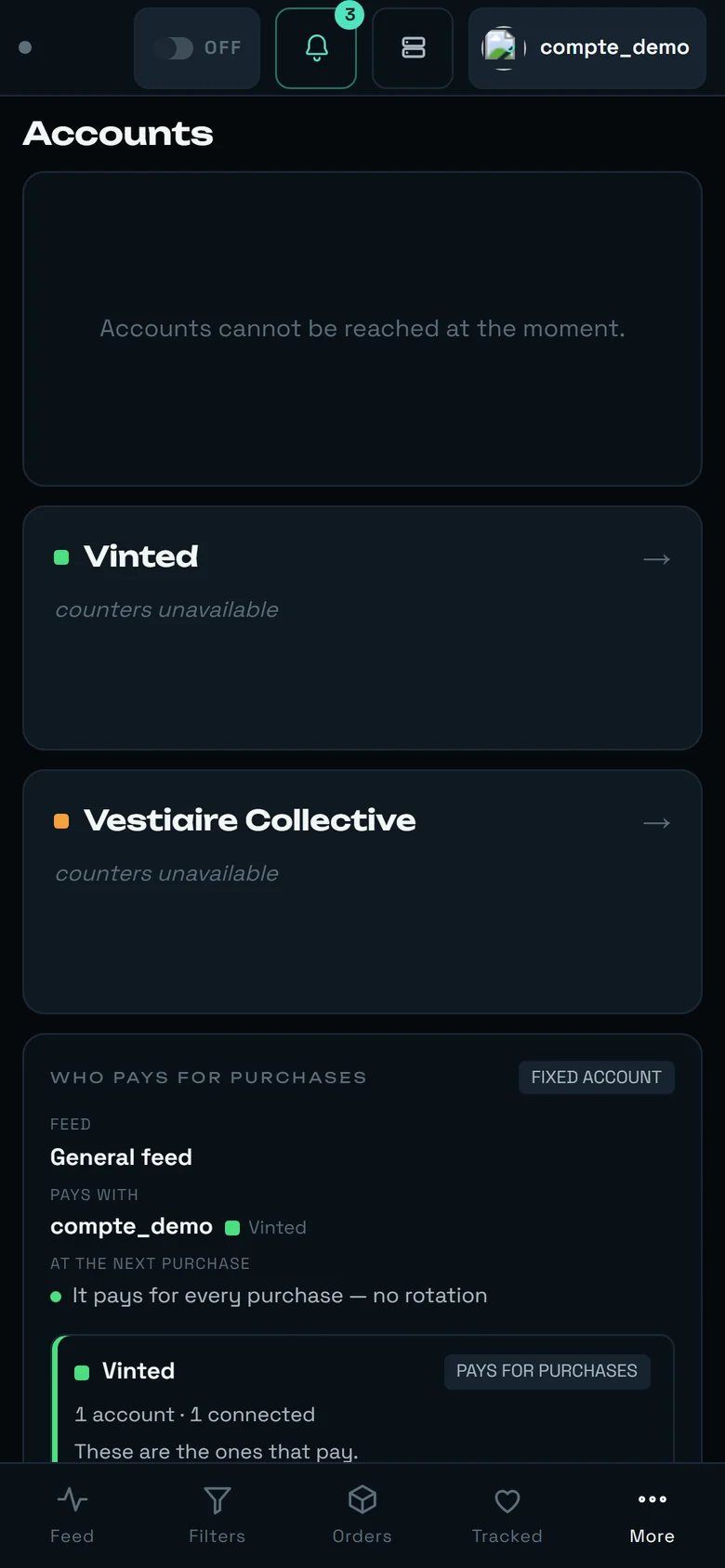
<Frame caption="The Accounts screen on a phone: the doors stack, and the “who pays” sentence reads line by line.">
  <img src="https://mintcdn.com/regasolutions/qwd9LpL60q4fWPff/images/comptes-tel-en.webp?fit=max&auto=format&n=qwd9LpL60q4fWPff&q=85&s=40e701fb8a9d273943f144c903b1d94f" alt="rega's Accounts screen on a phone" width="780" height="1688" data-path="images/comptes-tel-en.webp" />
</Frame>

* **One column at a time.** Below 900 px, the list and the account page no longer sit side by side: the `Back to the list` arrow, at the top of the page, is **the only way back**.
* The scope sentence goes **vertical**: `FEED`, then `PAYS WITH`, then `AT THE NEXT PURCHASE`, one under the other. It reads just as well, it simply takes three lines.
* Below 600 px, fields and buttons go full width, one setting per line.
* Everything that acts is at least **44 px** tall — including the arrows of the pickup point ranking.
* The bottom bar replaces the left-hand navigation: `Feed` · `Filters` · `Orders` · `Tracked` · `More`. **`Accounts` sits under `More`.**
* The pickup point map stays usable, but ranking is markedly more comfortable on a large screen: that is the gesture to do at the desk.

***

## The limits, said plainly

* **You cannot pay with a Vestiaire account yet.** The screen says so in all three modes; no Vestiaire purchase goes out from `WHO PAYS FOR PURCHASES`.
* **There is no card form, and there will not be one.** A card is added on Vinted, where your bank validates it.
* **A Vinted address can neither be edited nor deleted** — Vinted does not offer it. `Replace my address` is the only possible model.
* **The `ACCOUNT TRUST` score is an in-house indicator.** Vinted publishes no trust score; this one is computed from public feedback, verifications and the standing of the account. Its labels are not translated yet.
* **No direct link to a marketplace or to an account page.** The screen holds the open marketplace in the page, not in the address: you cannot bookmark "that account's page".
* **On the Vestiaire page, every point of the health strip shows `Fix →`** — the short label proper to each point is not served yet.
