> ## Documentation Index
> Fetch the complete documentation index at: https://docs.regasolutions.io/llms.txt
> Use this file to discover all available pages before exploring further.
# Settings
> Set what rega does without you — how far it buys, which pick-up point it chooses, what it tells you, what it erases — and manage your own access.
This is the screen where you set **what rega does without you** — how much it buys for, which pick-up point it chooses, what it writes to the seller, what it erases on its own — and where you manage **your own access**: password, two-step verification, subscription, invoices, export and account deletion.
 **Three well-spent minutes.** If you only set one thing today, go to the **Buying** tab and check that **“Automatic pick-up point”** is switched on. It is the only setting on this screen that, when off, makes a purchase **fail**.
## What you are looking at
**Three well-spent minutes.** If you only set one thing today, go to the **Buying** tab and check that **“Automatic pick-up point”** is switched on. It is the only setting on this screen that, when off, makes a purchase **fail**.
## What you are looking at
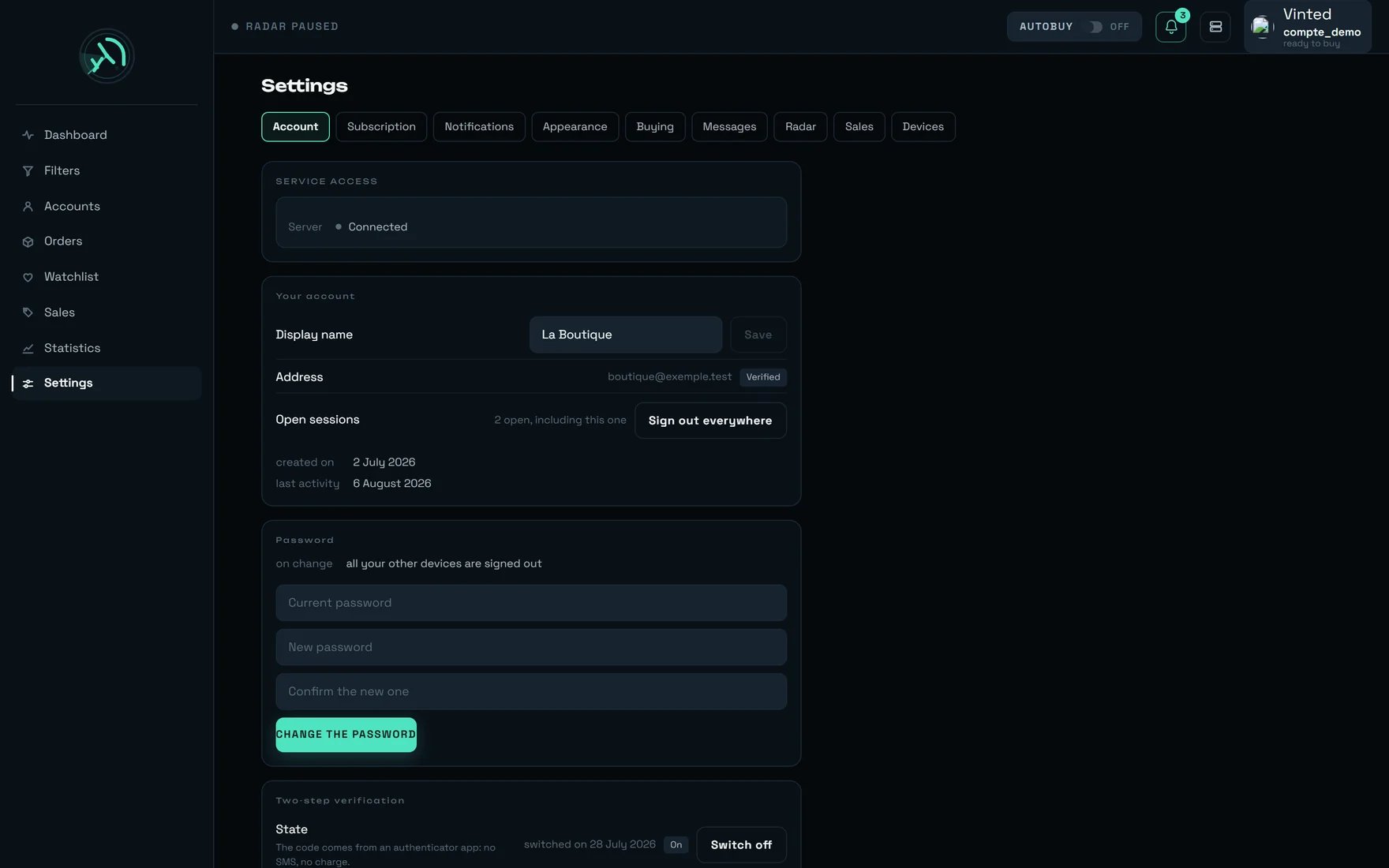
 | # | Control | What it does |
| ------ | -------------------------------------------------------------- | ----------------------------------------------------------------------------------------------------------------------------------------------- |
| **1** | The paying account — here `compte_demo`, marked “ready to buy” | Always says which Vinted account will pay for the **next** purchase. Its tooltip: “compte\_demo will pay for the next purchase — ready to buy.” |
| **2** | The bell | Your notifications. The number is how many are unread — here “3 unread notifications”. |
| **3** | Administration | REGA staff only — this button does not appear on your account. |
| **4** | The **AUTOBUY** pill | Automatic buying. In this capture, `OFF`: “Automatic buying disarmed”. |
| **5** | The rega logo | Takes you back to the home screen. |
| **6** | **Account** tab | Service access, your details, password, two-step verification, sign-in methods, your data. |
| **7** | **Subscription** tab | Your plan, its due date, your billing. |
| **8** | **Notifications** tab | What rega tells you about, and on which devices. |
| **9** | **Appearance** tab | The language, then six display settings. |
| **10** | **Buying** tab | The ceiling, the pick-up point, the carrier. **The tab that costs money.** |
| **11** | **Messages** tab | What rega writes to the seller on your behalf. |
| **12** | **Radar** tab | The radar's state and two settings. |
Markers **1, 2, 4 and 5** are not specific to Settings: they are the landmarks you find at the top of **every** rega screen. Markers **6 to 12** cover the first seven tabs; the last two, **Sales** and **Devices**, are visible to their right in the capture, without a marker — there are **nine** tabs in all.
In this capture the demo account already carries everything you will see on yours: the server “Connected”, a display name (“La Boutique”), a “Verified” address, “2 open, including this one” on the open sessions, and two-step verification “switched on 28 July 2026”.
## Three natures of setting — the only model to remember
Every switch looks alike, but they do not live in the same place. That explains nearly every surprise on this screen.
Theme, density, animations, text size, contrast, accent, and switching on this browser's alerts. **Immediate effect, nothing to wait for** — and nothing follows you to your other screens.
The language, the notifications, the messages to the seller, the delays in the Sales tab, your password. **You find them again wherever you sign in.**
The Buying tab, the Radar tab, “Remember the connection”. Every change goes to rega, **and can come back** if it is not kept.
```mermaid theme={null}
flowchart TD
U["You change a setting"] --> Q{"In which tab?"}
Q -->|"Appearance"| A["This device only —
| # | Control | What it does |
| ------ | -------------------------------------------------------------- | ----------------------------------------------------------------------------------------------------------------------------------------------- |
| **1** | The paying account — here `compte_demo`, marked “ready to buy” | Always says which Vinted account will pay for the **next** purchase. Its tooltip: “compte\_demo will pay for the next purchase — ready to buy.” |
| **2** | The bell | Your notifications. The number is how many are unread — here “3 unread notifications”. |
| **3** | Administration | REGA staff only — this button does not appear on your account. |
| **4** | The **AUTOBUY** pill | Automatic buying. In this capture, `OFF`: “Automatic buying disarmed”. |
| **5** | The rega logo | Takes you back to the home screen. |
| **6** | **Account** tab | Service access, your details, password, two-step verification, sign-in methods, your data. |
| **7** | **Subscription** tab | Your plan, its due date, your billing. |
| **8** | **Notifications** tab | What rega tells you about, and on which devices. |
| **9** | **Appearance** tab | The language, then six display settings. |
| **10** | **Buying** tab | The ceiling, the pick-up point, the carrier. **The tab that costs money.** |
| **11** | **Messages** tab | What rega writes to the seller on your behalf. |
| **12** | **Radar** tab | The radar's state and two settings. |
Markers **1, 2, 4 and 5** are not specific to Settings: they are the landmarks you find at the top of **every** rega screen. Markers **6 to 12** cover the first seven tabs; the last two, **Sales** and **Devices**, are visible to their right in the capture, without a marker — there are **nine** tabs in all.
In this capture the demo account already carries everything you will see on yours: the server “Connected”, a display name (“La Boutique”), a “Verified” address, “2 open, including this one” on the open sessions, and two-step verification “switched on 28 July 2026”.
## Three natures of setting — the only model to remember
Every switch looks alike, but they do not live in the same place. That explains nearly every surprise on this screen.
Theme, density, animations, text size, contrast, accent, and switching on this browser's alerts. **Immediate effect, nothing to wait for** — and nothing follows you to your other screens.
The language, the notifications, the messages to the seller, the delays in the Sales tab, your password. **You find them again wherever you sign in.**
The Buying tab, the Radar tab, “Remember the connection”. Every change goes to rega, **and can come back** if it is not kept.
```mermaid theme={null}
flowchart TD
U["You change a setting"] --> Q{"In which tab?"}
Q -->|"Appearance"| A["This device only —
immediate effect"]
Q -->|"Language"| L["Follows your account —
your e-mails too"]
Q -->|"Buying · Radar · Devices"| S{"Does rega keep it?"}
S -->|yes| OK["Confirmation at the bottom
of the screen"]
S -->|no| KO["“Setting not saved — …”
the old value comes back"]
Q -->|"Sales"| V["rega moves your choice
to the nearest step"]
Q -->|"Messages"| M["Saving an empty list
restores the original messages"]
Q -->|"Account · Subscription"| E["Readings, and actions
that are never replayed"]
```
| Tab | What you set there | Where the setting lives |
| ----------------- | ------------------------------------------------------------------------------------ | ------------------------------------- |
| **Account** | Display name, password, two-step verification, sign-in methods, export, deletion | Your account |
| **Subscription** | Plan, due date, invoices | Read-only |
| **Notifications** | This device, the bank reminder, the seventeen alert types | Your account |
| **Appearance** | **The language** (your account) + theme, density, animations, text, contrast, accent | This device — **except the language** |
| **Buying** | Ceiling, pick-up point, carrier, upkeep | At rega |
| **Messages** | What rega writes to the seller | Your account |
| **Radar** | Start-up, translated descriptions | At rega |
| **Sales** | Automatic archiving and deletion | Your account |
| **Devices** | This device, your Vinted accounts, “Remember the connection” | At rega |
**Switching tabs re-reads the tab you open and throws away the one you leave.** A saved setting is safe; text typed and not saved is not. That is the trap of the **Messages** tab, whose “Save” button stays inactive until something changes — and is therefore easy to forget.
## The BUYING tab — the one that costs money
**Do not touch “Automatic pick-up point”.** It is on out of the box, and the screen says so plainly: “rega chooses the collection point during the purchase. Turned off, the purchase fails for want of a pick-up point — leave it on.”
Turned off, the purchase does not pause and **asks you nothing**: it **fails**, with “No pick-up point could be selected for this order.”, and it fails **after** the item has been reserved. Faced with a purchase that fails for no visible reason, this is the first box to check.
| Setting | What the screen says | Out of the box |
| --------------------------------------------- | ---------------------------------------------------------------------------------------------------------------------------------------------------------------------------------------------------------- | ----------------------------- |
| **Purchase ceiling** | “Above this amount, the purchase is refused and you are told. Empty = no ceiling.” Applies to **all** purchases, manual and automatic alike. Once set, it also refuses an item whose price cannot be read. | empty — “none” |
| **Two confirmations before cancelling** | “The CANCEL button sits where you have just clicked to buy — without this second step, a finger coming back down cancels. A confirmation is asked for in every case.” | on |
| **Automatic pick-up point** | “rega chooses the collection point during the purchase. Turned off, the purchase fails for want of a pick-up point — leave it on.” | on |
| **Which point** *(if the previous one is on)* | “The rule applied when several points fit.” Three choices: **Nearest** · **Usual** (“The one Vinted puts forward for you”) · **Cheapest**. | Nearest |
| **Preferred carrier at the pick-up point** | “Picks this carrier first when the seller offers it. Otherwise the nearest point is kept — a preference never makes a purchase fail.” Vinted Go · Mondial Relay · Chronopost · DPD · “Other (free code)…” | “No preference — the nearest” |
| **Keep pick-up points ready** | “The collection point is already in place when you buy: every purchase is faster.” | off |
| **How often** *(if the previous one is on)* | “Spacing it out costs a few tenths of a second on the day a point has changed; tightening it brings nothing.” From 1 to 24 h. | 1 h |
Every value that is kept is announced at the bottom of the screen: `Purchase ceiling — {montant} €`, “Pick-up point — nearest”, `Preferred carrier — {nom}`, `Upkeep — every {h} h`. Clearing a ceiling gives “Purchase ceiling removed”.
**Input fields are validated when you click away or press Enter**, never as you type: otherwise a ceiling being typed would be worth `1`, then `12`, then `120`, and a purchase would be refused between two keystrokes. **Esc** puts the previous value back.
### Setting up buying in five minutes
It must be **on**. It is the only setting on this screen whose switching off makes a purchase fail, and it fails late — after the item has been reserved.
**Nearest** suits almost everyone. “Cheapest” only means something if your sellers offer several carriers; “Usual” only has an effect **after** you have ranked pick-up points on the Accounts screen.
A preference never makes a purchase fail, but it can cost: “A carrier other than the default one may cost a little more.” Only set one if a carrier genuinely causes you collection trouble.
Open the **Filters** screen, then each armed filter, and fill in its **“€ max”** field. That is the ceiling that follows your account and bounds automatic buying.
A purchase that needs bank confirmation calls you by notification. If no device is switched on, nobody answers — and the confirmation expires.
### The three ceilings, and the one that really acts
There are three of them, in three different places. They do not protect the same purchases — this is the most expensive confusion in the product.
**Settings → BUYING.** The widest: every purchase, manual and automatic, on every machine. **Empty out of the box.**
**AUTOBUY panel on the dashboard.** Worth **€120** out of the box, and remembered **in this browser only** — another machine, a private window, and it is back to €120.
**The filter's dialog, Filters screen.** Bounds automatic buying **for that filter** only — and this is the one to rely on.
```mermaid theme={null}
flowchart TD
D["The radar spots a listing"] --> A{"AUTOBUY pill armed?"}
A -->|no| S1["Nothing goes out"]
A -->|yes| F{"Is the filter armed,
confirmed and active?"}
F -->|no| S2["This filter does not buy"]
F -->|yes| P{"Price ≤ this filter's
“€ max”?"}
P -->|no| S3["Purchase refused"]
P -->|yes| C{"Price ≤ “Purchase ceiling”?
empty out of the box"}
C -->|no| S4["Purchase refused,
and you are told"]
C -->|yes| R{"“Automatic pick-up point”
on?"}
R -->|no| S5["The purchase FAILS —
no pick-up point"]
R -->|yes| OK["Real charge: item + delivery
+ buyer protection"]
```
**The ceilings compare the ITEM price, never the amount actually debited.** The charge adds delivery and buyer protection. So set your ceilings to the **item price** you accept, not to your total budget.
**Automatic buying runs on our servers.** The AUTOBUY pill arms the server: buying survives closing the tab, closing the browser, and shutting the machine down. **The only thing that stops it is disarming it.** The dashboard's “Where automatic buying runs” line — “on our servers — closing the tab does not stop it” — **states** that fact; it is not a switch you set.
### When a setting comes back on its own
Two messages exist, and they do not mean the same thing.
| What you read | What happened |
| ----------------------------------- | ------------------------------------------------------------ |
| “Setting not saved — …” | **Nothing was written.** The old value comes back on screen. |
| “Value refused — setting unchanged” | rega answered, but **did not keep** what you entered. |
On a shop account, **“Purchase ceiling”, “Keep pick-up points ready” and “How often” come back** with “Setting not saved — …”: those three belong to the service and are shared by all its users. The same goes for **“Start with the server”** in the Radar tab.
Treat them as **indicators**, not as commands. **The ceiling that belongs to you is each filter's “€ max”.**
If rega did not answer at all, the whole tab is replaced by a sentence — and **no switch is shown at an invented value**: “Settings unreadable — the rega server is not answering. Nothing has been changed.”
On the **Accounts** screen, the “PREPARE THIS CARRIER” button makes a **real purchase of a few euros**, once per account and per carrier.
It is **optional**: without it the purchase still goes through — about **1.3 seconds** slower. And the gain is **not additive**: it is the **seller** who chooses the carrier, so preparing several carriers widens the **share** of your purchases that gain that time, never the time gained.
Not to be confused with **“Keep pick-up points ready”**, which is a setting on this tab, off out of the box.
The tooltip promises “The one Vinted puts forward for you”. Yet **across the 135 pick-up points measured, not one carried that recommendation**: the ranking used is **yours**, the one you set in **Accounts → Pick-up points**.
As long as you have ranked nothing, “Usual” behaves exactly like “Nearest”. And a point you have ranked by hand **comes before** this setting, whatever it says — so if “Cheapest” never gives you the cheapest, empty that ranking first.
## Notifications tab
Subtitle: “What rega tells you about, and on which devices.”
The **“Switch on for this device”** button. It chains the browser's permission and then the registration, and becomes **“Device switched on ✓”**. If it becomes **“Permission refused”**, the note says where to fix it: “The refusal comes from the browser: allow alerts in its site settings.”
“Send a test” takes **exactly the same path as a purchase alert**, with no shortcut. On success: “Test notification sent — look at the bell.” A test that never arrives is a problem you discover **before** a purchase, not during one.
Five choices: **None · 2 min · 5 min · 10 min · 15 min**. “ONE second notification, this long after the purchase, and only if the confirmation still has not gone through and you have not stopped the reminder. Never repeated.”
Five groups — **Purchases · Detections · Watchlist · Sales · System** — and one switch per type. A setting that does not go through gives “Setting not saved — the server did not answer.”
**Seventeen types are served, and only one ships switched off.**
| Group | Types | Out of the box |
| -------------- | ---------------------------------------------------------------------------------------------------------------------------------------------------------------------------------------------------------------------------------------------------------- | -------------- |
| **Purchases** | Purchase completed (manual) · Bank confirmation required · Purchase failed · Purchase completed (autobuy) · Bank confirmation required (autobuy) · Purchase failed (autobuy) · Purchase completed from the verification queue · Bank confirmation reminder | all on |
| **Detections** | Detection on a followed filter | on |
| **Watchlist** | Price drop · Item sold or withdrawn · Item available again | all on |
| **Sales** | New sale on a followed filter | **off** |
| **System** | Test · System alert · Subscription (trial end, unpaid, data deletion) · New tailored request | all on |
**“New sale on a followed filter” is the only type that ships switched off.** If you follow filters in order to watch sales, switch it on — otherwise the silence is normal, not a fault.
The **“Stop the reminder”** button carried by every confirmation notification **cancels nothing**. The screen says so: “it turns that reminder off. ⚠️ It does not undo the payment — if your bank confirms later, the money leaves your account.” Read it as “stop reminding me”, never as “cancel the purchase”.
The **Detections** group carries the help that explains the most silences: “Only fires for the filters that asked for it — the switch lives on each filter.” There is **no** “notify every detection” switch here: it is in each filter's dialog, on the Filters screen.
Keep **“Bank confirmation required”** and **“Bank confirmation required (autobuy)”** on, and **switch on at least one phone**. A bank confirmation waits for a human hand; without a notification it expires, and the purchase is lost — with no charge, but lost.
## Sales tab — what rega erases on its own
Two delays, three steps each, **served by rega**: **24 h · 48 h · 72 h**. Out of the box: **48 / 48**.
```mermaid theme={null}
flowchart LR
A["The sale leaves Vinted"] --> B["Visible on the Sales screen"]
B -->|"“Archive automatically”
48 h out of the box"| C["Archived —
Archived tab"]
C -->|"“Delete the archived ones”
48 h out of the box"| D["Permanently erased"]
D --> E["And removed
from your statistics"]
```
| Setting | What the screen says |
| ---------------------------- | -------------------------------------------------------------------------------------------------------------------------------------------- |
| **Archive automatically** | “After this delay, the sale moves to the archive — still readable in the Archived tab.” |
| **Delete the archived ones** | “After this delay, the archived sale is permanently erased: no longer readable, and removed from your statistics.” |
| **What you will keep** | The calculated sentence: `Your sales will stay readable for {h} hours (about {j} days) after they leave Vinted, then be permanently erased.` |
| **At the next pass** | A real dry run: `{n} sales will be archived, {sup} will be permanently erased.` or “Nothing to file away or erase for now.” |
**The two windows follow each other: it is their sum that counts.** At 48 / 48, your readable sales history never goes beyond \~4 days — **and neither do your cumulative statistics**, since an erased sale leaves them.
Before dropping to 24 / 24, read the **“At the next pass”** line: it is the only place in the product where you can see an automatic deletion **before** it happens.
There is **no** “never” option, and that is deliberate: an unlimited option would make the deletion guarantee false for everyone. If a value does not land on a step, rega **moves it to the nearest step** instead of refusing — and the screen shows the value rega kept, never yours. While waiting for its answer, it shows “State unavailable at the moment” rather than a number.
## Account tab
Six panels stacked, from the most everyday to the most final.
A single read-only line: “Server” is **“Connected”**, **“Connecting…”** or **“Unreachable”**.
When it says “Unreachable”, a subtitle appears under the screen title: “rega is not answering — appearance and alert settings can still be changed, they live on this device.” That is useful information, not a fault to report: half of this screen keeps working.
* **Display name** — field + “Save”, inactive until something changes. When empty, the line says “not chosen yet — you appear under your address”. On failure: “The name could not be saved.” rega **trims spaces and keeps at most 60 characters**: the name may come back slightly different from what you typed.
* **Address** — your e-mail, with the **“Verified”** chip or the **“Verify the address”** button. The button asks for **no** address: it sends the link to yours, and to yours alone. On failure: “Sending not possible at the moment.”
* **Open sessions** — `{n} open, including this one`, or **“Not measured”**. “Not measured” is not “zero”: it is rega saying it does not know, rather than showing a false number on the very line that serves to spot an unknown session.
* **Sign out everywhere** — opens “Close every session?”: “Every signed-in device will be signed out, **including this one**. Nothing rega has collected is touched, and your sign-in methods stay in place.” Then “All your connections have been closed.” and the page reloads: that is normal, you have just closed your own.
* At the bottom, two facts: **“created on”** and **“last activity”**. They disappear if rega does not know them.
The fact is shown **before** the click: “on change → all your other devices are signed out”. Three fields: “Current password”, “New password”, “Confirm the new one”.
The refusals, in order:
1. an empty field → “Enter your current password and the new one.”
2. the confirmation does not match → “The two new passwords are not the same.” — your browser sees this; rega never receives the confirmation
3. the current password is wrong → “Change refused.”
4. the new one is too weak → rega explains why, for instance that it must be **at least 10 characters**
No composition rules: no capital, no digit, no special character. **A phrase of several words beats a complicated word.** On success — “Password changed.” — the three fields are emptied: a password left on screen is readable by anyone walking past.
“The code comes from an authenticator app: no SMS, no charge.” While it is not armed, the state says: “not switched on — your password alone protects your workspace”. Once armed, it says `switched on {date}`.
```mermaid theme={null}
sequenceDiagram
participant Y as You
participant S as Settings screen
participant R as rega
participant A as Your app
Y->>S: “Switch on”
S->>R: prepare the verification
R-->>S: a QR code, shown ONCE only
Note over R: Nothing is armed.
Closing here has no consequence.
S->>A: you scan the QR code
(or copy the key)
A-->>Y: a six-digit code
Y->>S: you enter the code
alt code refused
R-->>S: “Code refused.”
Note over Y,R: Nothing is armed — you are
NOT locked out.
else code correct
R-->>S: armed + 10 recovery codes
Note over S: Shown ONCE,
never displayed again.
end
```
The second step is not a formality: “**Enter the code showing now.** Without this check, a bad scan would lock you out of your workspace at the next sign-in.” If your app does not scan, the key is written just under the QR code: “Your app does not scan? Enter this key by hand:”.
Then the ten codes: “They will **never be shown again**. Each works once, in place of the six-digit code.” Three buttons — copy, **“Download”**, **“I have kept them”**. The downloaded file repeats the instruction: “Keep them away from your phone: they are for the day you no longer have it.”
After that, the “Recovery codes” line shows `{n} of {total} still valid`, or “none left — losing your phone locks you out of your workspace”.
**Regenerate** gives you ten new ones: “You will get ten new ones, shown once only. **The old ones stop working immediately** — including any you have printed.” **Switch off** is just as blunt: “Your password will become the only thing protecting your workspace — your Vinted accounts included. Your recovery codes will be destroyed.” Both ask for your password.
One “Password” line (**“Active”**, or “no password set”), then one line per service offered by your installation:
| What you see | What it means |
| ------------------------------------ | ------------------------------------------------------------------------- |
| **“Link”** | The service is offered, this account is not linked yet |
| **“Remove”** with `linked on {date}` | The account is linked, you can sign in with it |
| **“Unavailable”** | “not offered on this installation” — clicking explains, it breaks nothing |
The refusal that matters: “This is your only way of signing in. Add a password or another account before removing this one.” rega decides that refusal, not the screen: you cannot lock yourself out by mistake.
And when a linking fails, the most frequent message states **the action**: “This linking link is no longer valid — it comes from a tab or a page that has already been used. Start again from the “Link” button below rather than reloading or going back.”
**Export my data**: “A reusable file: filters, tracked sales, settings, accounts. Passwords are not in it.” On success: “Export saved.”
Under the **“Actions that cannot be undone”** subtitle — set apart by a rule and an indent, with no alarm colour at all, because a permanently red surface stops being read:
“**Delete my account** — erases everything, with no way back”. Two windows that **do not say the same thing**, on purpose:
1. **“Delete your account?”** lists what goes — your filters, tracked sales, watchlist and saved items · your saved marketplace accounts and their credentials · your settings, your notifications and your purchase history in rega · the account itself. Then: “We keep only the **accounting records** — amounts, dates and billing references — for ten years, as the law requires. They contain none of your usage data.”
2. **“Confirm”**: no list any more, just “The deletion is immediate and cannot be undone.”, your password, and “Delete permanently”.
## The other tabs
One number dominates the block: **“left”** then `{n} days` (or `< 1 day`). **It does not appear if rega does not know it** — no invented number.
Under it, the strip of facts: the **plan**, the **state** (**Active · Suspended · Ended · Stopped**) and the due date **with its nature** — “End of trial”, “Next renewal”, “Access until”, “Access stopped on”. The offer is described by rega itself: “standard plan”, `{prix} € / month — full`.
If access is cut, the consequence is written out: “Access stopped. Your data is kept; the service resumes once the account is settled.” And if a deletion is scheduled: `Permanent deletion of your filters, tracked sales and history on {date}.`
**Billing** distinguishes the absences instead of painting them all as faults:
| What you read | What it means |
| --------------------------------------------------------------------------------------------- | ------------------------------------------------------- |
| “No billing on this installation — nothing is charged to you, no bank details are asked for.” | Nothing to pay — not a fault |
| “No payment has ever been asked for this workspace.” | Nothing to pay — not a fault |
| “No invoice for now.” | Empty — not a fault |
| “The billing history cannot be read.” | **This one is a fault** — a “Read again” button appears |
Invoice statuses: **Paid · Pending · Draft · Cancelled · Unpaid**. And if you read “Test mode: these amounts match no real charge.”, none of those amounts has left your account.
**There is no “Resubscribe” button**, and that is a choice: the standard plan is complete, a button would lead to a closed door. For anything about your subscription, write to us.
**The language stands apart**: “This choice follows your account, not this device: your e-mails go out in this language.” The two chips read **Français** and **English** — the name of a language is always written in that language, otherwise you cannot recognise it when you are lost in the other one.
The other six apply **to this device only**: “These settings apply to this device only: they do not follow you to your other screens.”
| Setting | Options | What the screen says |
| --------------------- | ---------------------------------------- | --------------------------------------------------------------------------------------------------------------------------------------------- |
| **Theme** | Dark · Light · System | On “System”, the line states the real state — “Follows the device — currently dark.” — and **follows live** if your machine switches |
| **Density** | Comfortable · Compact | “Compact tightens the margins: more cards on screen.” |
| **Reduce animations** | switch | “Cards arriving, pulses, flashes: everything becomes instant.” |
| **Text size** | Compact · Normal · Large | “Smaller shows more listings at once; larger reads from further away.” |
| **Higher contrast** | switch | “Lightens secondary text and rules.” |
| **Accent colour** | **Radar** · Amber · Violet · Blue · Pink | “The colour that signals a detection or an action. The colours that carry meaning — success, failure, confirmation expected — do not change.” |
No free colour picker: each of the five shades has its variant calibrated to stay readable in both themes. And **none of these settings recolours a success or a failure** — that is guaranteed, not left to chance.
“What rega writes to the seller, on your behalf.” Two lists: **After a purchase** (“Sent to the seller just after payment.”) and **After a cancellation** (“Sent to the seller when you cancel an order.”).
You can write several variants per list: “One variant is picked at random each time.” The variables `{titre}`, `{marque}` and `{prix}` are replaced when sending and **are not translated** — written any other way, they would no longer be replaced.
Buttons: “Add a message”, “Save” (inactive until something changes, with the help “No change to save”), “Restore the default messages” (which answers “These are already the default messages” when there is nothing to do). Saving an **empty** list erases nothing: “No message: on saving, rega will go back to its default messages.”
The state, read-only: “Active — the radar is sweeping” · “Stopped” · **“State unknown”** (rega does not know yet — this is **not** “stopped”) · “Server unreachable”.
Two settings: **Start with the server** (“The radar restarts after a reboot, without anyone opening the application.”) and **Descriptions in French** (“The seller's description is translated into French when an item is opened; otherwise, its original text.”), on out of the box.
Then “What the radar looks for → Your filters.”, with an **“OPEN”** link.
And the admission at the bottom of the tab, which avoids the most common misunderstanding: “**This setting does not start the radar now.**”
“This device”: **System**, **Browser**, **Mode** (“Installed on the home screen” or “Browser tab”) and **Alerts** (Allowed · Blocked · Unavailable · Not allowed yet).
The admission, plainly stated: “rega does not keep the list of devices that have opened it: no remote session can be closed from here.” To close sessions, use **“Sign out everywhere”**, Account tab.
Then your Vinted accounts, with their nickname and **“Connected” / “Disconnected”** — never their address. When empty: “No buying account for now.”
One setting: **Remember the connection** — “Avoids a new SMS code each time an account reconnects.” And a **“Manage the accounts”** link to the Accounts screen.
## The states of the screen
| State | What you see |
| ---------------------------- | ----------------------------------------------------------------------------------------------------------------------------------------------------------------------------------------------------------------------------------------------------------------- |
| **Loading** | Grey blocks at the right size — not switches at an invented value. The page does not jump when the data arrives. |
| **Loading, for a long time** | The blocks settle down and **a sentence** appears, with a way to retry. This is the only place in the product where a waiting sentence exists. |
| **Settings unreadable** | “Settings unreadable — the rega server is not answering. Nothing has been changed.” |
| **rega is not answering** | Under the title: “rega is not answering — appearance and alert settings can still be changed, they live on this device.” |
| **One panel down** | The cause, then a **“Read again”** button — the neighbouring panels stay on screen. For instance “Your subscription cannot be read.”, “Your billing cannot be read.”, “The account details cannot be read.”, “The state of two-step verification cannot be read.” |
| **Empty** | “No invoice for now.”, “No buying account for now.” — **empty is not a fault**, and the screen never confuses the two |
| **Write refused** | “Setting not saved — …” or “Value refused — setting unchanged” |
Data already on screen **is never erased by a failure**: if a re-read fails, you keep looking at what rega had served, rather than a panel emptying itself in front of you.
## Our advice
Faced with a purchase that fails for no reason, check **“Automatic pick-up point”** first. Off, it pauses nothing: it makes the purchase fail, **after** the item has been reserved.
Open each armed filter and fill in its **“€ max”**. The dashboard's “Cap per item” field (€120 out of the box) only lives **in this browser**; the “Purchase ceiling” here does not belong to you.
The ceilings compare the **item price**; the charge adds delivery and buyer protection. Set them to the item price you accept, not to your total budget.
“New sale on a followed filter” is **the only type that ships off**. Without it the silence is normal — many people take it for a fault.
“Send a test” takes the same path as a purchase alert. Do it on the phone you will have in your pocket, not only on the office computer.
Until you have ranked pick-up points in **Accounts**, “Usual” behaves like “Nearest”. And a point ranked by hand **comes before** this setting, whatever it says.
It is a real dry run, and the only way to see an automatic deletion **before** it happens. At 24 / 24 you keep only two days of history — and of statistics.
The panel you leave is thrown away. An automatic message typed and not saved is lost — and the button stays inactive until something changes, which makes it easy to forget.
They are for the day you no longer have it. Only regenerate them once you have destroyed the old paper: the old ones stop working **immediately**, printed copies included.
“Export my data” produces a reusable file, without your passwords. Do it **before** any account deletion: afterwards there is no way back.
It follows your account, **and your e-mails go out in that language**. If an e-mail arrives in the old language, reopen this tab and set the choice again: the second step of the save may have been missed.
It is the only setting on this screen that applies to everyone. If a Vinted account suddenly starts asking for an SMS code on every reconnection, look there first.
## What surprises people
It is written under the setting: “This setting does not start the radar now.” It says what will happen **at the next restart**, not now. The radar is started from the feed screen.
“Purchase ceiling”, “Keep pick-up points ready”, “How often” — and the Radar's “Start with the server” — belong to the service and are shared by all its users. They are shown, they can be typed into, and they come back with “Setting not saved — …”. Nothing is broken: nothing was written.
The entire panel — password included — is replaced by a fault message, even though the reading itself had succeeded. Nothing is lost: the **“Read again”** button puts everything back.
It is rega saying it does not know. Showing “0” on the very line that serves to spot an unknown session would say the opposite of the truth.
That is deliberate: when you do not know where an unknown session came from, you do not want to keep your own along the way. The window says it in bold — “**including this one**” — and the reload that follows is normal.
rega trims spaces and keeps at most 60 characters. The screen adopts **the value it kept**, never your input: what you read back is what is actually saved.
Signing in elsewhere within the following half minute can fail: the code you have just used cannot be used again. Wait for your app to show the next one. This is not a fault, it is the protection against replay.
The screen switches immediately, and the save goes out afterwards without being waited for. If it fails, it costs exactly one thing, but a real one: **the next e-mail goes out in the old language**.
Saving an empty list **restores** rega's original messages, as the line says: “No message: on saving, rega will go back to its default messages.” There is no state in which rega writes nothing to the seller.
On the **Accounts** screen, that button really buys an item of a few euros, once per account and per carrier. Without it the purchase still goes through — about **1.3 seconds** slower. And the gain is not additive: it is the **seller** who chooses the carrier, so preparing several widens the **share** of your purchases that gain that time, never the time gained.
If the connection drops at the moment of paying, the outcome is unknown — replaying would risk a **double charge**. rega does not replay. Go and check in **Orders** rather than clicking again.
“ONE second notification, this long after the purchase, and only if the confirmation still has not gone through and you have not stopped the reminder. Never repeated.” So silence after that reminder does not mean all is well: go and look at the Orders screen.
## On a phone
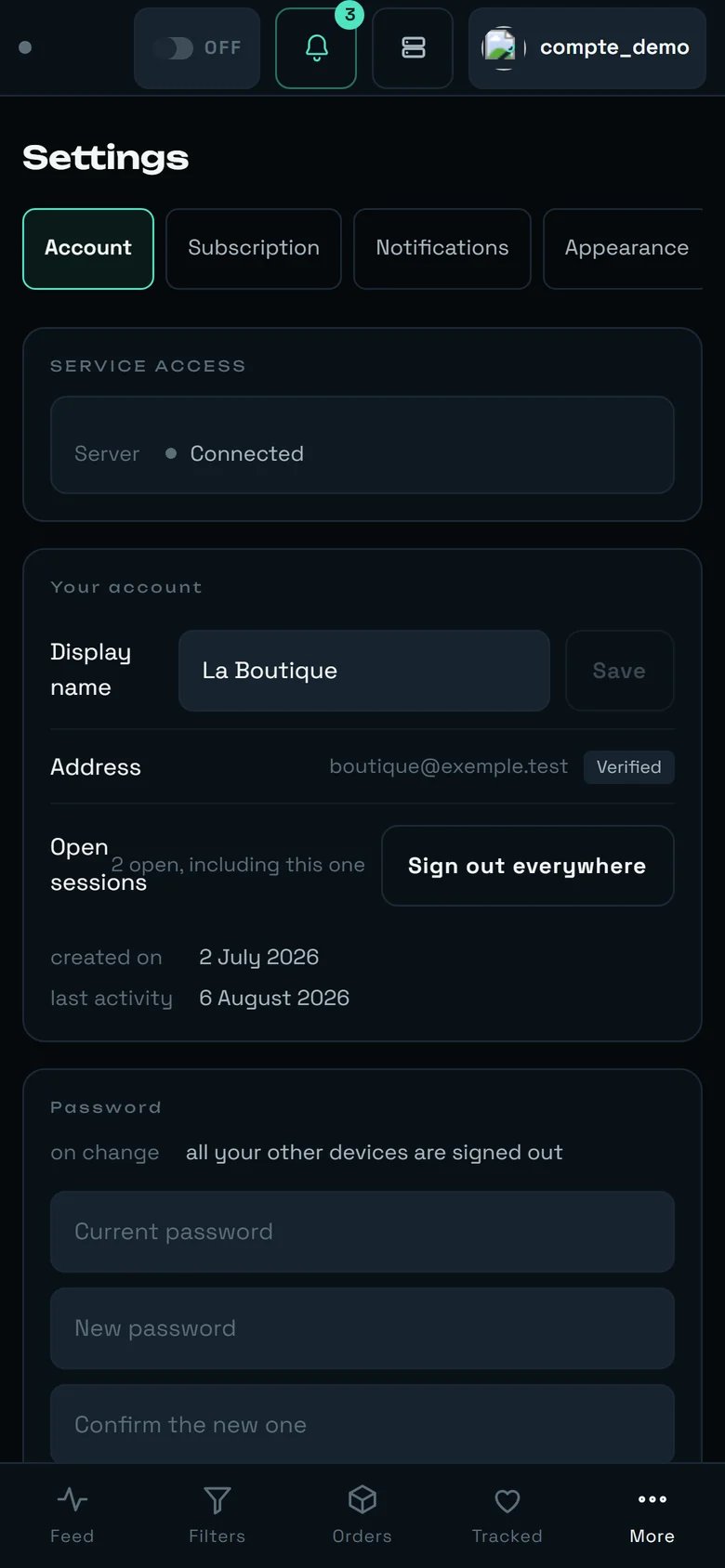 * **The tab bar scrolls horizontally** under your thumb: it is deliberately cut off on the right after “Appearance”. A stack of nine tabs would push the first setting below the fold.
* **The content does not change**: the settings panel is already width-limited on a large screen, so it is the same column, narrower. Long labels simply wrap onto two lines.
* **The bottom bar replaces the side bar**: **Feed · Filters · Orders · Tracked · More** — Settings sits under **“More”**.
* **The header landmarks stay**: the AUTOBUY pill, the bell and its counter, the paying account.
The phone is where the most useful thing on this screen gets done: **“Switch on for this device”**, in the Notifications tab. On iPhone, add rega to the home screen first — the screen tells you: “On iPhone, alerts require adding rega to the home screen (Share → Add to Home Screen), then opening it from there.”
## The limits, stated plainly
* **No device list, no targeted remote sign-out.** The screen says it: “rega does not keep the list of devices that have opened it: no remote session can be closed from here.” The only action available is “Sign out everywhere”, which closes **everything**, you included.
* **Four settings are indicators, not commands** on a shop account: “Purchase ceiling”, “Keep pick-up points ready”, “How often”, “Start with the server”.
* **No “Resubscribe” button.** That is a choice: the standard plan is complete, a button would lead to a closed door.
* **The retention steps are 24 / 48 / 72 h.** There is no “1 week”, and no “never”.
* **The bell keeps at most 400 notifications**: beyond that, the oldest disappear. What really matters lives in Orders and in Sales.
* **The refusal message for service-reserved settings arrives in French**, even when your interface is in English.
* **The small screen has only been measured at standard phone width.** The in-between widths — a tablet in portrait in particular — have not been checked yet.
## Where to go next
This is where your real ceilings live, and the detection notification switch of each filter.
The pick-up point ranking, carrier preparation, and the state of each Vinted account.
The real outcome of every purchase, and the queue of items under verification.
* **The tab bar scrolls horizontally** under your thumb: it is deliberately cut off on the right after “Appearance”. A stack of nine tabs would push the first setting below the fold.
* **The content does not change**: the settings panel is already width-limited on a large screen, so it is the same column, narrower. Long labels simply wrap onto two lines.
* **The bottom bar replaces the side bar**: **Feed · Filters · Orders · Tracked · More** — Settings sits under **“More”**.
* **The header landmarks stay**: the AUTOBUY pill, the bell and its counter, the paying account.
The phone is where the most useful thing on this screen gets done: **“Switch on for this device”**, in the Notifications tab. On iPhone, add rega to the home screen first — the screen tells you: “On iPhone, alerts require adding rega to the home screen (Share → Add to Home Screen), then opening it from there.”
## The limits, stated plainly
* **No device list, no targeted remote sign-out.** The screen says it: “rega does not keep the list of devices that have opened it: no remote session can be closed from here.” The only action available is “Sign out everywhere”, which closes **everything**, you included.
* **Four settings are indicators, not commands** on a shop account: “Purchase ceiling”, “Keep pick-up points ready”, “How often”, “Start with the server”.
* **No “Resubscribe” button.** That is a choice: the standard plan is complete, a button would lead to a closed door.
* **The retention steps are 24 / 48 / 72 h.** There is no “1 week”, and no “never”.
* **The bell keeps at most 400 notifications**: beyond that, the oldest disappear. What really matters lives in Orders and in Sales.
* **The refusal message for service-reserved settings arrives in French**, even when your interface is in English.
* **The small screen has only been measured at standard phone width.** The in-between widths — a tablet in portrait in particular — have not been checked yet.
## Where to go next
This is where your real ceilings live, and the detection notification switch of each filter.
The pick-up point ranking, carrier preparation, and the state of each Vinted account.
The real outcome of every purchase, and the queue of items under verification.