> ## Documentation Index
> Fetch the complete documentation index at: https://docs.regasolutions.io/llms.txt
> Use this file to discover all available pages before exploring further.
# The watchlist
> Set items aside, follow their price and availability every 15 minutes, and buy or offer without leaving the row.
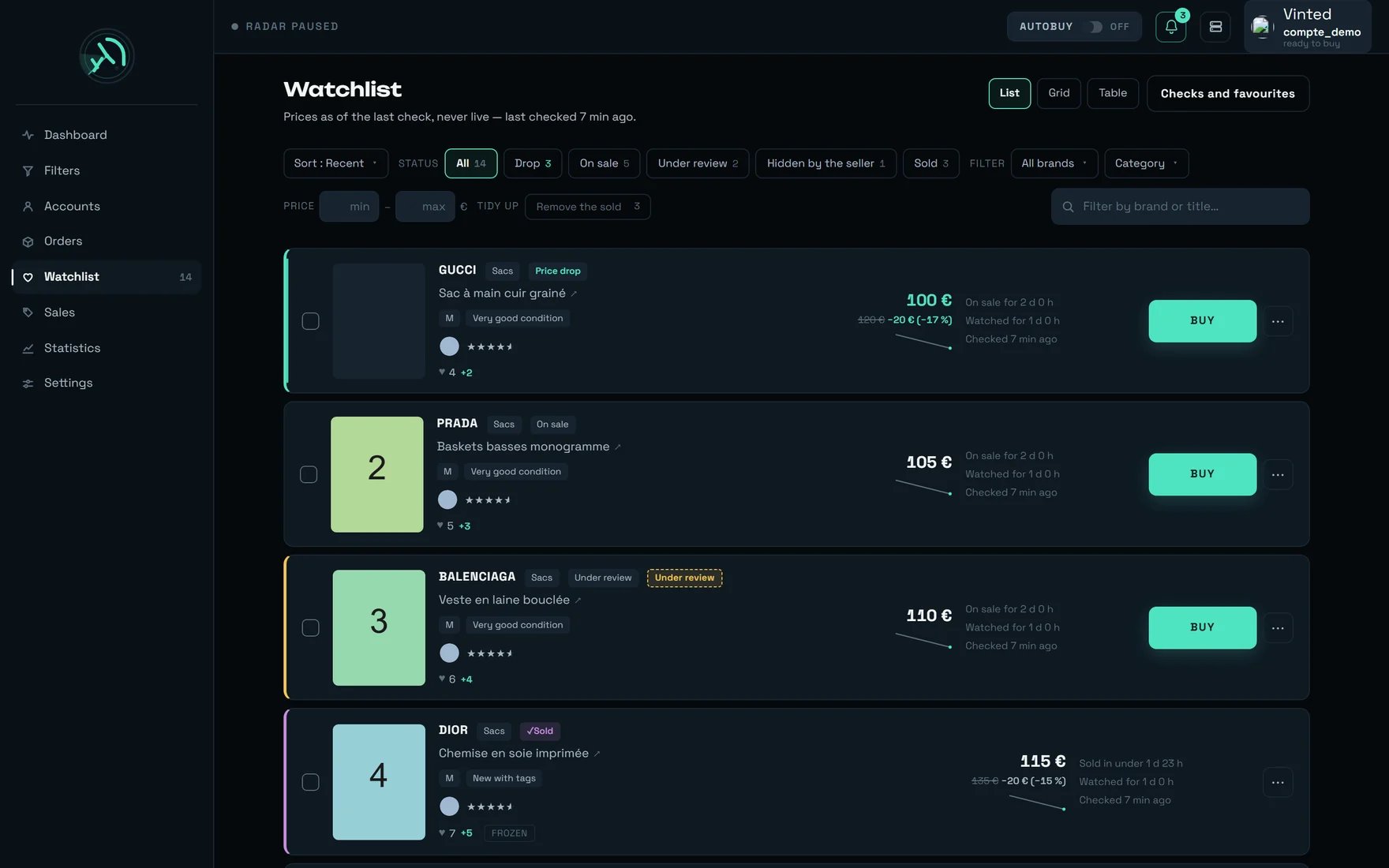
The watchlist is the list of items you have set aside. REGA re-reads their price and availability **every 15 minutes**, warns you when a price falls or a listing leaves, and lets you **buy** or **make an offer** straight from the row.
The subtitle says it before anything else: `Prices as of the last check, never live — last checked {quand}`. A price shown here is **at most 15 minutes old**. That line never folds away, on purpose: a watch screen that hides the date of its last check makes you believe its prices are from right now.
 ***
## What you are looking at
***
## What you are looking at
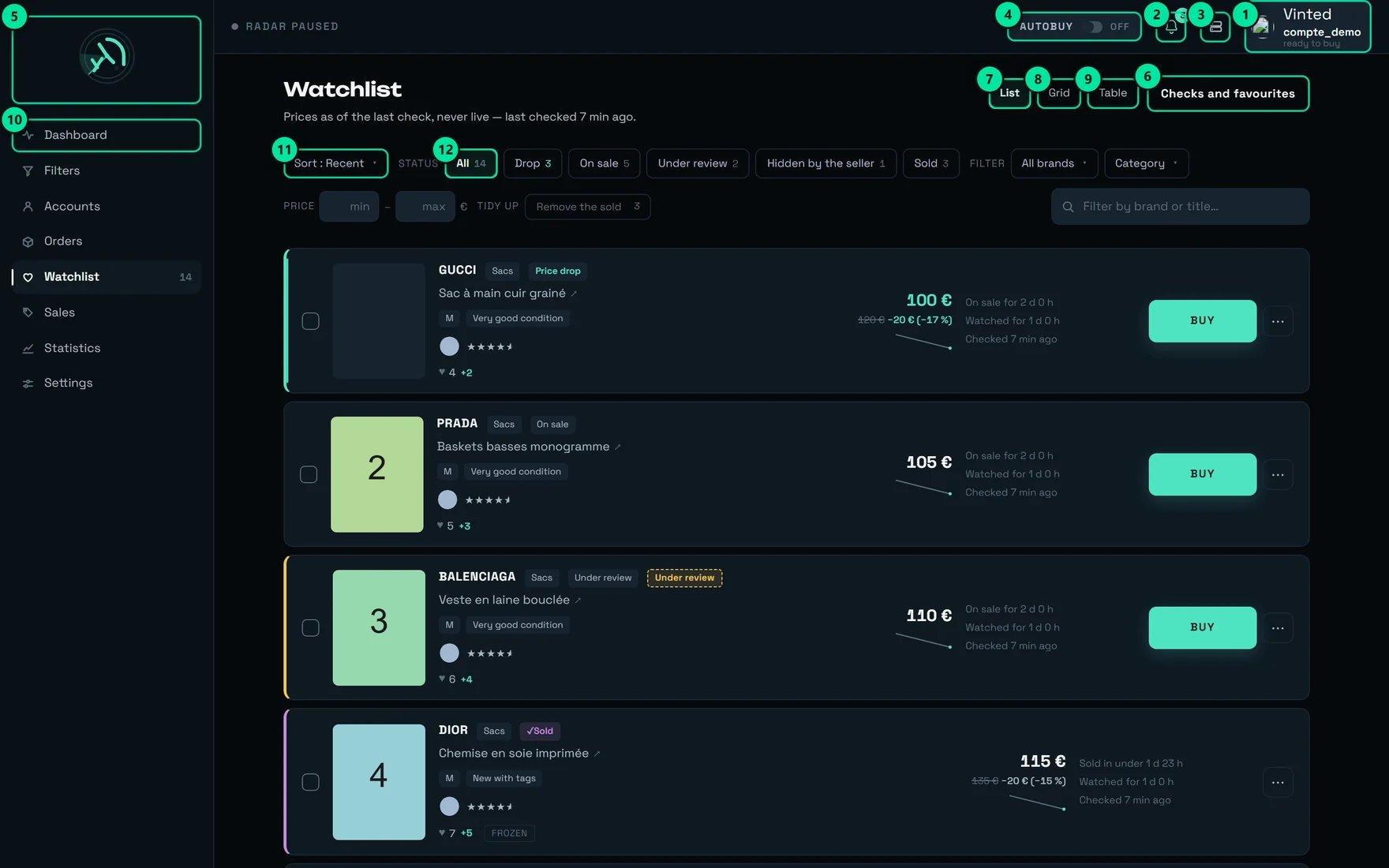 | № | Control | What it does |
| -- | --------------------------------- | ---------------------------------------------------------------------------------------------------------------------- |
| 1 | Account indicator — `compte_demo` | The account that will pay for the next purchase. Tooltip: `compte_demo will pay for the next purchase — ready to buy.` |
| 2 | Bell — `3` | Unread notifications. Tooltip: `3 unread notifications` |
| 3 | `Administration` | REGA staff only — this button does not appear on your account. |
| 4 | `AUTOBUY` pill · `OFF` | Arms or disarms automatic buying. Tooltip: `Automatic buying disarmed` |
| 5 | `rega` logo | Tooltip: `rega — home` |
| 6 | `Checks and favourites` | Opens the settings drawer: the `CHECK` banner and `VINTED FAVOURITES`. Folded by default. |
| 7 | `List` | `One card per row, full width — the most readable view, available everywhere` |
| 8 | `Grid` | `Several cards per row — to scan a large collection at a glance` |
| 9 | `Table` | `Dense rows — to compare many items at once` |
| 10 | `Dashboard` | The live feed: it is the heart on a card there that fills this screen. |
| 11 | `Sort : Recent` | The sort menu, ten entries. Default: `The most recently watched items first` |
| 12 | `All` · `14` | The status filter, each chip carrying its count. |
The `Watchlist 14` counter in the left bar and the `All 14` chip count **every** item, finished ones included — sold, withdrawn, gone. It is not the number of items still active: it is the number of rows you have not removed yet.
***
## The life of a watched item
This is the heart of the screen: what REGA allows itself to say about an item, and on what proof.
```mermaid theme={null}
stateDiagram-v2
direction LR
state "Unknown status" as inconnu
state "On sale" as vente
state "Price drop" as baisse
state "Under review" as verif
state "Hidden by the seller" as masque
state "Sold" as vendu
state "Withdrawn by the seller" as retire
state "Withdrawn" as parti
[*] --> inconnu : heart on a feed card, or favourites import
inconnu --> vente : first price read
vente --> baisse : price below the one on the day it was watched
baisse --> vente : the price climbs back above
vente --> verif : Vinted reviews the listing
verif --> vente : review passed
vente --> masque : the seller hides the listing
masque --> vente : listing back in the catalogue
vente --> vendu : sale marker read
vente --> retire : listing closed, without a sale
vente --> parti : 2 checks with no answer
vendu --> [*] : frozen, we stop checking
```
| Status | What it means, word for word |
| ------------------------- | ---------------------------------------------------------------------------------------------------------------------------------------------------------------------------------------------------------------------------------------------------------- |
| `On sale` | `The listing answered at the last check, at an unchanged or higher price.` |
| `Price drop` | `The price has fallen below the one on the day the item was put under watch.` |
| `Sold` | `Sale CONFIRMED: an authenticated check read the listing's sale marker (“sold”). That is the only proof that allows the word “sold” — without it, we write “withdrawn”.` |
| `Withdrawn by the seller` | `Withdrawal OBSERVED: the listing was closed for a reason that is not a sale. The item therefore found no buyer.` |
| `Under review` | `The listing is hidden while Vinted reviews it, and Vinted does not allow the transaction yet. This is NOT a withdrawal: it comes back on sale once the review is done, we keep checking it, and a purchase started now joins the queue.` |
| `Hidden by the seller` | `The SELLER has hidden the listing: it no longer shows in the catalogue, but Vinted still allows the transaction — so it can be bought right away through its link.` |
| `Withdrawn` | `The listing left the market without leaving a sale marker: an item that vanishes this way was withdrawn, not sold. There remains a rare case, never observed, where the reason for closure is unreadable — it is filed here for want of anything better.` |
| `Reserved` | `Item flagged as reserved.` |
| `Unknown status` | `No successful check yet — we would rather claim nothing.` |
Every status chip carries that sentence as its tooltip: hover it rather than guess.
**`Under review` and `Hidden by the seller` look alike and are opposites.** Two witness items, compared field by field on 27/07, carried exactly the same hiding markers and differed on one point only: Vinted allowed the transaction for one, not for the other. A `Hidden by the seller` can be bought **right away** through its link; an `Under review` gets queued.
***
## Reading a row in three seconds
| What you see | What it says |
| ------------------------------------------------ | --------------------------------------------------------------------------------------------------------------------- |
| The coloured edge, on the left | Drop, review, sale: all three are recognisable without reading the chip. |
| `No brand` | The brand was not read — the row is still valid. |
| Amber `Under review` chip | `Item being reviewed by Vinted — it exists but cannot be bought yet. A purchase started will wait for its approval.` |
| `♥ 4` then `+2` | Favourites at the last check, and the change since it was put under watch. |
| `Frozen` | `Frozen item: we have stopped checking it, its data is locked.` |
| `Price only` | `Checked on price alone: this item's page could not be opened, so neither its category nor its favourites were read.` |
| `100 €`, `120 €` struck through, `−20 € (−17 %)` | The current price, the one on the day it was watched, and the gap. |
| `watched at {montant}` | The price has **risen**: we recall the starting price, in grey, without emphasis. |
| The mini curve | The **last 20 checks**. Nothing is drawn below 2 points. |
| `On sale for ≈ {duree}` | A **minimum**, counted since REGA started watching the item. |
| `Watched for {duree}` · `Checked {quand}` | How long you have watched it, and how fresh the price is. |
| `BUY` then `⋯` | The purchase, and the row menu. |
The listing title is a direct link to Vinted (`↗`). Clicking **the title** opens Vinted; clicking **the card** opens the details inside REGA.
**Tooltips carry facts the row has no room to write.** Hover `Checked {quand}`: you get `Last checked {quand} ({date}).`, then `This item is checked about every {cadence} — the same rhythm as every watched item, whatever its age.` and `Next check in {duree}.` Hover the `♥`: `Peak observed: {n} favourites.` Hover `Watched for`: `First seen by rega on {date}. This is not the listing's publication date…`
`Open the details` · `Open the listing` · `Search the image (Google Lens)` · `Make an offer` · `Check now` · `Stop watching`
* `Search the image (Google Lens)` only appears if there is a photo. Help: `Opens Google Lens on the listing's photo — to identify the model, or to compare.`
* `Make an offer` only appears if the seller is known. Help: `Opens the offer window, pre-filled at the allowed floor (−40%).`
* `Check now` on a single row answers `Checked — {nom}`, or `Check skipped — {nom} has just been checked`.
***
## The `Checks and favourites` drawer
The button (marker 6) opens two panels, folded by default.
### The `CHECK` banner
It carries, in order: the state (`Running…`, `No check yet`, or `Last checked {quand}`), the load (`every item is up to date` or `{n} items waiting`), the rhythm (`one check every {duree}`), and the `Check now` button — help: `Check the price and availability of the watched items`.
The button is **never** greyed out, even when it can do nothing: a dead button explains nothing. If it does not check, it tells you why.
* A check is already running: `Check skipped — a check is already running`
* Everything was checked less than a minute ago: `Check skipped — everything was checked less than a minute ago`
The **60-second** floor between two checks of the same item applies to the manual button too. Clicking twice in a row manufactures nothing.
`Checked — {n} items{suffixe}`, where the suffix adds up what changed: `{n} price drops`, `{n} listings vanished`, `{n} with no answer`.
The banner shows `checks slowed ×{facteur}` and `{n} behind`, with this explanation: `The watch can serve {capacite} checks per hour; these items ask for {demande}. None is lost, they are served more slowly: the real interval is about {reel}.`
In plain terms: your prices are N × 15 min behind, **nothing is lost**, and the slowdown is uniform. Simulated over 24 h at 2.8× saturation: **0 item left unchecked, 2 checks of spread** between the best and least served.
### The `VINTED FAVOURITES` panel
The `Checks and favourites` button, to the right of the title.
The selector only lists **connected** accounts, and shows their username — never the email address. With no connected account: `Connect an account to import its Vinted favourites into the watchlist.`
The button switches to `Syncing…`. Note shown: `Items already watched are not duplicated.`
`{n} favourites imported`, or `No new favourite — they were already being watched`, or `No favourite to import`. On failure: `Import failed — {raison}` (fallback: `the server did not answer`).
The import goes up to **10,000 favourites** and **reproduces Vinted's order**: the most recently liked comes first under the `Recent` sort.
***
## The toolbar
It stays stuck to the top while you scroll.
A single menu, titled `Sort by`, ten entries. The trigger shows `Sort : {label}`.
| Entry | What it does |
| -------------------- | ------------------------------------------------------------ |
| `Recent` *(default)* | `The most recently watched items first` |
| `Oldest` | `The items watched the longest first` |
| `Drop` | `The biggest price drop first` |
| `Recently sold` | `The most recently gone items first (observed closing date)` |
| `Most liked` | `The most favourited items first` |
| `Price ↑` | `Cheapest to dearest` |
| `Price ↓` | `Dearest to cheapest` |
| `Status` | `Grouped by status` |
| `Check` | `The most recently checked items first` |
| `Title` | `Alphabetical order` |
Under the `STATUS` label: `All` with its count, then one chip per status present — `Drop`, `On sale`, `Under review`, `Hidden by the seller`, `Sold`, `Withdrawn by the seller`, `Withdrawn`.
* Every chip carries its count, and **only the drops one is coloured**.
* A chip at zero that is not the current filter **is not shown**: six chips at zero make the screen look broken.
* `Reserved` and `Unknown status` have no chip, but their items are there, under `All`.
* A chip's tooltip is the full explanation of the status.
Under `FILTER`: `All brands` and `Category`.
* Every brand carries its count. **Re-picking the current value deselects it.**
* The category is a tree: ticking a parent ticks its whole subtree, and a partly ticked parent shows an intermediate state. Two entries worth knowing: `Untick everything` and `Category not resolved`.
* Under `PRICE`, two fields `min` and `max` in €. They apply to the **current price** — the one from the last check, not the one on the day it was watched.
* The value is only sent **when you leave the field or press Enter**: every commit triggers a full re-read of the list.
Under `TIDY UP`, one button per final status — shown **only if there is something to remove**:
| Button | Help |
| ---------------------- | ------------------------------------------------------------------------------------------------ |
| `Remove the sold` | `Stop watching the items whose sale is confirmed` |
| `Remove the withdrawn` | `Stop watching the items their seller has withdrawn` |
| `Remove the gone` | `Stop watching the items that have gone without our knowing whether they were sold or withdrawn` |
On the right, the `Filter by brand or title…` field. It is **purely local**: it sifts what is already shown, on the brand, the title **or the item's identifier**.
`TIDY UP` is **irreversible** and takes the price history with it. The confirmation window says so: `{n} items marked “{statut}” will leave the watch. Their price history is lost, and this cannot be undone.` The server only accepts it on final statuses — otherwise: `bulk removal is limited to final statuses (sold / withdrawn / gone).`
***
## Buying from the watchlist
```mermaid theme={null}
flowchart TD
A["Click BUY"] --> B{"Is the item still on the market?"}
B -->|"sold, withdrawn, reserved"| Z["No BUY button is shown"]
B -->|"yes"| C{"Can an account pay?"}
C -->|"no"| D["Button off: No account can pay"]
C -->|"yes"| E["Confirmation: amount, announced account, no safety cap"]
E --> F{"Item under review?"}
F -->|"no"| G["Immediate purchase, real money"]
F -->|"yes"| H["Queued: fires automatically on approval, 96 h horizon"]
G --> I["Followed in the Orders screen"]
H --> I
```
The confirmation button becomes `Queue it` instead of `Buy` if the item is being reviewed by Vinted — and the window title changes from `Confirm the purchase` to `Schedule the purchase`.
Direct purchase: `The purchase goes out immediately. It is real money, with no safety cap.`
Queued: `This item is being reviewed by Vinted. The purchase will be queued and will start automatically as soon as it is reviewed.`
Direct purchase: `Next payer announced: {pseudo} — the account actually used is the one the server assigns at the moment of firing.` Queued: `With the account {pseudo}` — that one really is the account that will pay, hours later if need be.
The outcome is read in the **Orders** screen, and for a queued purchase in **Orders → Under review**.
**Two refusals switch the confirmation button off:**
* `No account can pay — set the buying scope in the Accounts screen.`
* `{nom} is not connected — the purchase would fail.`
As long as a refusal holds, the button stays off: nothing goes out by accident.
**Where automatic buying runs**: on our servers — closing the tab does not stop it. The `AUTOBUY` pill (marker 4) arms the server; it survives closing the tab, closing the browser, shutting the machine down. **The only gesture that stops it is disarming it.**
* **`Purchase ceiling`** — Settings → BUYING. Applies to **every** purchase, manual and automatic, on every machine. **Empty by default.** Once set, it also refuses an item whose price is unreadable.
* **`Cap per item`** — the AUTOBUY panel on the dashboard. Worth **120 €** out of the box, and remembered **in this browser only**.
* **A filter's cap** — bounds only the automatic buying of that one filter.
A purchase launched by hand from the watchlist only knows the first of the three.
`Automatic pick-up point`, in **Settings**, is **on out of the box**. Switched off, the purchase **fails**: `No pick-up point could be selected for this order.` Nothing asks you anything at the moment of paying.
Not to be confused with `PREPARE THIS CARRIER`, in the **Accounts** screen: that is a **real** purchase of a few euros, once per account and per carrier, and it is **optional** — without it the purchase still goes through, about 1.3 s slower. The gain does not add up: it is the **seller** who picks the carrier, so preparing several widens the **share** of your purchases that gain that time, never the time gained.
The payment is **never** replayed: its outcome is unknown, and replaying it would risk a double charge. You find the real state in **Orders**.
***
## Making an offer
The window opens **at the floor, at −40%** of the current price, slider included.
* Permanent summary: `{montant} will be offered for {article} with the account {pseudo}. The seller receives the offer immediately, and accepting it closes the sale at that price.`
* The floor line: `Minimum offer {montant} — Vinted refuses below −40%.`
* The account is announced as `account set by the buying scope — changeable for this offer`, with a `Change` button: `Change the account that will send this offer`.
* The `Send {montant}` button **sends on the first click**: there is no second confirmation.
- `This item's price has not been checked yet — the offer floor cannot be worked out.`
- `Seller unknown for now: it arrives at the next enriched check, and the offer needs it.`
- `No account can make an offer — set this in Accounts.`
* `Offer too low — minimum {plancher} €.` — the window then **raises your entry** to the floor it returned.
* `Listed price missing — reopen the item then try again.`
* `Too many offers in a row — wait a moment before trying again.`
* `Item not open to offers yet — try again in a few seconds.`
### A batch of offers
Tick several items: the selection bar appears inside the toolbar, with `Select all`, `Deselect all`, `Offer on {n}` and `Delete the selection`.
The confirmation is explicit: `Each offer goes out at the floor Vinted accepts (−40%) of the item's current price, one every 5 seconds — that is about {durée}.` Beyond twenty items: `Your selection contains {n}: only the first 20 will receive an offer.`
While sending, the button counts (`Offers… {fait}/{total}`) and `Stop` interrupts the batch.
**A batch often stops before the end, and that is not a fault of the batch.** Offers go through the only rate-limited point of Vinted, **per account**, and it is **the same quota as purchases**. At the first refusal, the batch stops dead:
`{n} not sent — Vinted rate-limited this account (offers share the same quota as purchases). Try again in about twenty minutes, or spread them over another account.`
***
## Three shop routines
It is the only coloured chip in the bar: it carries the number of active drops.
`The biggest price drop first` — the top of the list is your margin.
The field applies to the **current price**. Commit with Enter: the list is re-read.
`BUY` if the price suits you as it is, `Make an offer` otherwise. A drop shown here is at most 15 minutes old: that is what makes it usable.
`The most recently gone items first (observed closing date)`.
It is the only one backed by proof. `Withdrawn` mixes genuine withdrawals with unproven sales.
`Sold in under {duree}`: the closure is observed at a check, so the sale happened between the previous check and that one.
The `♥ n` and its change since being watched show visible demand; the tooltip adds `Peak observed: {n} favourites.`
Beyond that, the window warns you that `only the first 20` will receive an offer.
The quota is **per account**. Send part of the batch, then change account for the rest — in the offer window, the `Change` button picks the account **for this offer only**.
Offers and purchases share the same quota: an account drained by a batch is an account that cannot buy right away.
You would be trading your offers for the next purchase.
Below 900 px, it is folded behind `Refine`.
`Remove the sold`, then `Remove the withdrawn`, then `Remove the gone`.
`Their price history is lost, and this cannot be undone.`
Tidying serves the readability of your list, not the speed of the watch.
***
## Buy, offer, or wait?
```mermaid theme={null}
flowchart TD
A["A watched item interests you"] --> B{"What is its status?"}
B -->|"Sold · Withdrawn"| C["Nothing left to do — stop watching it"]
B -->|"Reserved"| D["The BUY button is not shown"]
B -->|"Under review"| E["BUY, then Queue it: the purchase fires on approval"]
B -->|"Hidden by the seller"| F["Buyable right away through its link — do not wait"]
B -->|"On sale · Price drop"| G{"Does the price suit you as it is?"}
G -->|"yes"| H["BUY — real money, immediate"]
G -->|"no"| I["Make an offer — floor −40%, same quota as purchases"]
```
***
## The screen's states
| State | What you read |
| ------------------------------- | ---------------------------------------------------------------------------------------------------------------------------------------------------------------------- |
| Loading | `Loading watched items…` |
| No watched item | `No watched item — the heart on a feed card adds the item here.` |
| Emptied by a filter | `None of the {suivis} watched items matches these filters: {filtres}.` + `Clear the filters` |
| Emptied with no nameable filter | `No watched item matches this filter.` |
| Service unreachable | `The service is temporarily unreachable. Check your connection, then retry.` + `Try again` |
| Checked on price alone | A note under the title: `Favourites, category, seller and departure status will appear as soon as an account can open the items' pages.` + a `Price only` chip per row |
| Watch saturated | `checks slowed ×{facteur}` and `{n} behind` in the `CHECK` banner |
The six restrictions the empty state can name: `status “X”`, `brand “X”`, `category “X”`, `price between {min} and {max} €`, `price above {min} €`, `price below {max} €`, `search “X”`.
***
## Our advice
On our production data, **31 items carried the sold status, only 11 carried the sale marker**. REGA steps down a notch on the other twenty. To know whether a model sells fast: sort by `Recently sold` and **count only the `Sold` chips**.
Measured on 26/07 on **42 `Under review` items** re-probed: **0 withdrawn, 31 still buyable, 9 fully back on sale**. Click `BUY` anyway: the window becomes `Schedule the purchase`, and the purchase fires on its own at approval, with a **96 h** horizon.
It has left the Vinted catalogue, but the transaction is still allowed: it is buyable through its link. On a check of **233 items, 8 were hidden and 7 perfectly buyable**. Do not wait for it to "come back".
The rhythm is **flat: 15 minutes for every item**, whatever its age. That is what makes a drop usable for arbitrage. No point re-clicking `Check now`: a **60 s** floor per item applies to the manual button too.
20 offers at most, one every **5 seconds**, quota **per account** — and it is the purchases' quota. In the offer window, `Change` picks the account **for this offer only**: split your waves, and keep one account at rest to buy with.
`Sync` goes up to **10,000 favourites** and respects Vinted's order. Then set the periodic sync in **Accounts → Favourites**: `15 min`, `30 min`, `1 h`, `3 h`, `6 h`, `24 h`. It is **off out of the box**.
The sidebar counter and the `All` chip include finished items. The three `TIDY UP` buttons are the only way out. Remember that removal **takes the price history with it** and cannot be undone.
`Select all` only takes what the current filter lets you see. The screen warns you: `{n} watched items outside this view — not affected`. To treat everything at once, **clear the filters first**.
At **253 items**, the watch serves **1,012 checks per hour out of 14,400 possible**. Saturation only arrives around **3,600 items**, and when it does, it is uniform: nothing is abandoned. Look at the `×N` factor instead, it will be more useful.
`Checked {quand}` gives the full date, the rhythm and `Next check in {duree}.` The `♥` gives `Peak observed: {n} favourites.` The price of a gone item warns: `Last price seen before the listing left the market — this is not a confirmed sale amount.`
With no seller read, the `Make an offer` entry does not even exist. Open that row's `⋯` menu and click `Check now`: the next check brings back category, favourites and seller.
On an immediate purchase, the account shown is only an announcement — the server assigns at the moment of firing. If a specific item must go out from a specific account, set the **buying scope in Accounts** first, then check the account actually used in **Orders**.
The `Filter by brand or title…` field also accepts **the item's identifier**: that is the fastest route when you have the Vinted link in front of you. And before committing money, `Search the image (Google Lens)` opens the listing's photo on Google Lens — `to identify the model, or to compare`.
***
## What surprises people
Removing an item from the watchlist does not switch off the heart on its feed card. Symmetrically, an **imported** favourite lights no heart in the feed. The watchlist is the one that counts.
The queuing is properly recorded on the server — it is only this page's button that does not remember it after a reload. The durable truth is in **Orders → Under review**.
A check that does not succeed leaves the status as it is — it does not even count as an absence. It takes **two checks with no answer** to conclude a departure. One is enough on an item already `Under review` or `Hidden by the seller`, where the absence is a second independent signal.
It was not buyable: a sale is excluded by the measurement. It therefore leaves the watch without that word, and the **Orders** screen files it under `Check failed`.
Measured: four items sold **39 to 51 minutes** earlier, and five others **11.9 hours** earlier, still answered with their sale marker. A withdrawn listing, on the other hand, stops answering. That is why a sudden disappearance reads `Withdrawn` and not `Sold`.
Emptying the list with the search field depends on no toolbar setting. It is the most confusing of the six cases: if the list looks empty for no reason, **clear the search field first**.
The list reloads on its own **every 20 seconds**, but only when the tab is in the foreground. A machine left open overnight asks for nothing — it is the watch on our servers that keeps checking, not your browser.
That is deliberate: reserved means the seller has promised it to someone, whereas under review only means "not yet".
The `Refine` badge only counts brand, category and price bounds. It can therefore show no number at all while three tidy-up buttons are folded underneath.
The choice is remembered **in this browser only**, and it is cleared when you sign out. On another machine you start again in `List`.
Vinted's image addresses expire. Rather than a broken icon, REGA shows a grey frame. A photo arrives **about 1 second after the card** anyway, and measured coverage tops out around **83 to 88%**: a card with no photo is a normal case, not a failure.
Neither the reference price, nor the date it was put under watch. The drop keeps being counted from day one — which is what you want.
The date Vinted publishes is reset every time an item is relisted — up to **40 days of difference** on a single page. REGA dates from the first day it saw the item, and announces it with a `≈`. In the same way, `Sold in under {duree}` is a maximum, and `Stayed on sale at least {duree}` a minimum.
***
## On a phone
| № | Control | What it does |
| -- | --------------------------------- | ---------------------------------------------------------------------------------------------------------------------- |
| 1 | Account indicator — `compte_demo` | The account that will pay for the next purchase. Tooltip: `compte_demo will pay for the next purchase — ready to buy.` |
| 2 | Bell — `3` | Unread notifications. Tooltip: `3 unread notifications` |
| 3 | `Administration` | REGA staff only — this button does not appear on your account. |
| 4 | `AUTOBUY` pill · `OFF` | Arms or disarms automatic buying. Tooltip: `Automatic buying disarmed` |
| 5 | `rega` logo | Tooltip: `rega — home` |
| 6 | `Checks and favourites` | Opens the settings drawer: the `CHECK` banner and `VINTED FAVOURITES`. Folded by default. |
| 7 | `List` | `One card per row, full width — the most readable view, available everywhere` |
| 8 | `Grid` | `Several cards per row — to scan a large collection at a glance` |
| 9 | `Table` | `Dense rows — to compare many items at once` |
| 10 | `Dashboard` | The live feed: it is the heart on a card there that fills this screen. |
| 11 | `Sort : Recent` | The sort menu, ten entries. Default: `The most recently watched items first` |
| 12 | `All` · `14` | The status filter, each chip carrying its count. |
The `Watchlist 14` counter in the left bar and the `All 14` chip count **every** item, finished ones included — sold, withdrawn, gone. It is not the number of items still active: it is the number of rows you have not removed yet.
***
## The life of a watched item
This is the heart of the screen: what REGA allows itself to say about an item, and on what proof.
```mermaid theme={null}
stateDiagram-v2
direction LR
state "Unknown status" as inconnu
state "On sale" as vente
state "Price drop" as baisse
state "Under review" as verif
state "Hidden by the seller" as masque
state "Sold" as vendu
state "Withdrawn by the seller" as retire
state "Withdrawn" as parti
[*] --> inconnu : heart on a feed card, or favourites import
inconnu --> vente : first price read
vente --> baisse : price below the one on the day it was watched
baisse --> vente : the price climbs back above
vente --> verif : Vinted reviews the listing
verif --> vente : review passed
vente --> masque : the seller hides the listing
masque --> vente : listing back in the catalogue
vente --> vendu : sale marker read
vente --> retire : listing closed, without a sale
vente --> parti : 2 checks with no answer
vendu --> [*] : frozen, we stop checking
```
| Status | What it means, word for word |
| ------------------------- | ---------------------------------------------------------------------------------------------------------------------------------------------------------------------------------------------------------------------------------------------------------- |
| `On sale` | `The listing answered at the last check, at an unchanged or higher price.` |
| `Price drop` | `The price has fallen below the one on the day the item was put under watch.` |
| `Sold` | `Sale CONFIRMED: an authenticated check read the listing's sale marker (“sold”). That is the only proof that allows the word “sold” — without it, we write “withdrawn”.` |
| `Withdrawn by the seller` | `Withdrawal OBSERVED: the listing was closed for a reason that is not a sale. The item therefore found no buyer.` |
| `Under review` | `The listing is hidden while Vinted reviews it, and Vinted does not allow the transaction yet. This is NOT a withdrawal: it comes back on sale once the review is done, we keep checking it, and a purchase started now joins the queue.` |
| `Hidden by the seller` | `The SELLER has hidden the listing: it no longer shows in the catalogue, but Vinted still allows the transaction — so it can be bought right away through its link.` |
| `Withdrawn` | `The listing left the market without leaving a sale marker: an item that vanishes this way was withdrawn, not sold. There remains a rare case, never observed, where the reason for closure is unreadable — it is filed here for want of anything better.` |
| `Reserved` | `Item flagged as reserved.` |
| `Unknown status` | `No successful check yet — we would rather claim nothing.` |
Every status chip carries that sentence as its tooltip: hover it rather than guess.
**`Under review` and `Hidden by the seller` look alike and are opposites.** Two witness items, compared field by field on 27/07, carried exactly the same hiding markers and differed on one point only: Vinted allowed the transaction for one, not for the other. A `Hidden by the seller` can be bought **right away** through its link; an `Under review` gets queued.
***
## Reading a row in three seconds
| What you see | What it says |
| ------------------------------------------------ | --------------------------------------------------------------------------------------------------------------------- |
| The coloured edge, on the left | Drop, review, sale: all three are recognisable without reading the chip. |
| `No brand` | The brand was not read — the row is still valid. |
| Amber `Under review` chip | `Item being reviewed by Vinted — it exists but cannot be bought yet. A purchase started will wait for its approval.` |
| `♥ 4` then `+2` | Favourites at the last check, and the change since it was put under watch. |
| `Frozen` | `Frozen item: we have stopped checking it, its data is locked.` |
| `Price only` | `Checked on price alone: this item's page could not be opened, so neither its category nor its favourites were read.` |
| `100 €`, `120 €` struck through, `−20 € (−17 %)` | The current price, the one on the day it was watched, and the gap. |
| `watched at {montant}` | The price has **risen**: we recall the starting price, in grey, without emphasis. |
| The mini curve | The **last 20 checks**. Nothing is drawn below 2 points. |
| `On sale for ≈ {duree}` | A **minimum**, counted since REGA started watching the item. |
| `Watched for {duree}` · `Checked {quand}` | How long you have watched it, and how fresh the price is. |
| `BUY` then `⋯` | The purchase, and the row menu. |
The listing title is a direct link to Vinted (`↗`). Clicking **the title** opens Vinted; clicking **the card** opens the details inside REGA.
**Tooltips carry facts the row has no room to write.** Hover `Checked {quand}`: you get `Last checked {quand} ({date}).`, then `This item is checked about every {cadence} — the same rhythm as every watched item, whatever its age.` and `Next check in {duree}.` Hover the `♥`: `Peak observed: {n} favourites.` Hover `Watched for`: `First seen by rega on {date}. This is not the listing's publication date…`
`Open the details` · `Open the listing` · `Search the image (Google Lens)` · `Make an offer` · `Check now` · `Stop watching`
* `Search the image (Google Lens)` only appears if there is a photo. Help: `Opens Google Lens on the listing's photo — to identify the model, or to compare.`
* `Make an offer` only appears if the seller is known. Help: `Opens the offer window, pre-filled at the allowed floor (−40%).`
* `Check now` on a single row answers `Checked — {nom}`, or `Check skipped — {nom} has just been checked`.
***
## The `Checks and favourites` drawer
The button (marker 6) opens two panels, folded by default.
### The `CHECK` banner
It carries, in order: the state (`Running…`, `No check yet`, or `Last checked {quand}`), the load (`every item is up to date` or `{n} items waiting`), the rhythm (`one check every {duree}`), and the `Check now` button — help: `Check the price and availability of the watched items`.
The button is **never** greyed out, even when it can do nothing: a dead button explains nothing. If it does not check, it tells you why.
* A check is already running: `Check skipped — a check is already running`
* Everything was checked less than a minute ago: `Check skipped — everything was checked less than a minute ago`
The **60-second** floor between two checks of the same item applies to the manual button too. Clicking twice in a row manufactures nothing.
`Checked — {n} items{suffixe}`, where the suffix adds up what changed: `{n} price drops`, `{n} listings vanished`, `{n} with no answer`.
The banner shows `checks slowed ×{facteur}` and `{n} behind`, with this explanation: `The watch can serve {capacite} checks per hour; these items ask for {demande}. None is lost, they are served more slowly: the real interval is about {reel}.`
In plain terms: your prices are N × 15 min behind, **nothing is lost**, and the slowdown is uniform. Simulated over 24 h at 2.8× saturation: **0 item left unchecked, 2 checks of spread** between the best and least served.
### The `VINTED FAVOURITES` panel
The `Checks and favourites` button, to the right of the title.
The selector only lists **connected** accounts, and shows their username — never the email address. With no connected account: `Connect an account to import its Vinted favourites into the watchlist.`
The button switches to `Syncing…`. Note shown: `Items already watched are not duplicated.`
`{n} favourites imported`, or `No new favourite — they were already being watched`, or `No favourite to import`. On failure: `Import failed — {raison}` (fallback: `the server did not answer`).
The import goes up to **10,000 favourites** and **reproduces Vinted's order**: the most recently liked comes first under the `Recent` sort.
***
## The toolbar
It stays stuck to the top while you scroll.
A single menu, titled `Sort by`, ten entries. The trigger shows `Sort : {label}`.
| Entry | What it does |
| -------------------- | ------------------------------------------------------------ |
| `Recent` *(default)* | `The most recently watched items first` |
| `Oldest` | `The items watched the longest first` |
| `Drop` | `The biggest price drop first` |
| `Recently sold` | `The most recently gone items first (observed closing date)` |
| `Most liked` | `The most favourited items first` |
| `Price ↑` | `Cheapest to dearest` |
| `Price ↓` | `Dearest to cheapest` |
| `Status` | `Grouped by status` |
| `Check` | `The most recently checked items first` |
| `Title` | `Alphabetical order` |
Under the `STATUS` label: `All` with its count, then one chip per status present — `Drop`, `On sale`, `Under review`, `Hidden by the seller`, `Sold`, `Withdrawn by the seller`, `Withdrawn`.
* Every chip carries its count, and **only the drops one is coloured**.
* A chip at zero that is not the current filter **is not shown**: six chips at zero make the screen look broken.
* `Reserved` and `Unknown status` have no chip, but their items are there, under `All`.
* A chip's tooltip is the full explanation of the status.
Under `FILTER`: `All brands` and `Category`.
* Every brand carries its count. **Re-picking the current value deselects it.**
* The category is a tree: ticking a parent ticks its whole subtree, and a partly ticked parent shows an intermediate state. Two entries worth knowing: `Untick everything` and `Category not resolved`.
* Under `PRICE`, two fields `min` and `max` in €. They apply to the **current price** — the one from the last check, not the one on the day it was watched.
* The value is only sent **when you leave the field or press Enter**: every commit triggers a full re-read of the list.
Under `TIDY UP`, one button per final status — shown **only if there is something to remove**:
| Button | Help |
| ---------------------- | ------------------------------------------------------------------------------------------------ |
| `Remove the sold` | `Stop watching the items whose sale is confirmed` |
| `Remove the withdrawn` | `Stop watching the items their seller has withdrawn` |
| `Remove the gone` | `Stop watching the items that have gone without our knowing whether they were sold or withdrawn` |
On the right, the `Filter by brand or title…` field. It is **purely local**: it sifts what is already shown, on the brand, the title **or the item's identifier**.
`TIDY UP` is **irreversible** and takes the price history with it. The confirmation window says so: `{n} items marked “{statut}” will leave the watch. Their price history is lost, and this cannot be undone.` The server only accepts it on final statuses — otherwise: `bulk removal is limited to final statuses (sold / withdrawn / gone).`
***
## Buying from the watchlist
```mermaid theme={null}
flowchart TD
A["Click BUY"] --> B{"Is the item still on the market?"}
B -->|"sold, withdrawn, reserved"| Z["No BUY button is shown"]
B -->|"yes"| C{"Can an account pay?"}
C -->|"no"| D["Button off: No account can pay"]
C -->|"yes"| E["Confirmation: amount, announced account, no safety cap"]
E --> F{"Item under review?"}
F -->|"no"| G["Immediate purchase, real money"]
F -->|"yes"| H["Queued: fires automatically on approval, 96 h horizon"]
G --> I["Followed in the Orders screen"]
H --> I
```
The confirmation button becomes `Queue it` instead of `Buy` if the item is being reviewed by Vinted — and the window title changes from `Confirm the purchase` to `Schedule the purchase`.
Direct purchase: `The purchase goes out immediately. It is real money, with no safety cap.`
Queued: `This item is being reviewed by Vinted. The purchase will be queued and will start automatically as soon as it is reviewed.`
Direct purchase: `Next payer announced: {pseudo} — the account actually used is the one the server assigns at the moment of firing.` Queued: `With the account {pseudo}` — that one really is the account that will pay, hours later if need be.
The outcome is read in the **Orders** screen, and for a queued purchase in **Orders → Under review**.
**Two refusals switch the confirmation button off:**
* `No account can pay — set the buying scope in the Accounts screen.`
* `{nom} is not connected — the purchase would fail.`
As long as a refusal holds, the button stays off: nothing goes out by accident.
**Where automatic buying runs**: on our servers — closing the tab does not stop it. The `AUTOBUY` pill (marker 4) arms the server; it survives closing the tab, closing the browser, shutting the machine down. **The only gesture that stops it is disarming it.**
* **`Purchase ceiling`** — Settings → BUYING. Applies to **every** purchase, manual and automatic, on every machine. **Empty by default.** Once set, it also refuses an item whose price is unreadable.
* **`Cap per item`** — the AUTOBUY panel on the dashboard. Worth **120 €** out of the box, and remembered **in this browser only**.
* **A filter's cap** — bounds only the automatic buying of that one filter.
A purchase launched by hand from the watchlist only knows the first of the three.
`Automatic pick-up point`, in **Settings**, is **on out of the box**. Switched off, the purchase **fails**: `No pick-up point could be selected for this order.` Nothing asks you anything at the moment of paying.
Not to be confused with `PREPARE THIS CARRIER`, in the **Accounts** screen: that is a **real** purchase of a few euros, once per account and per carrier, and it is **optional** — without it the purchase still goes through, about 1.3 s slower. The gain does not add up: it is the **seller** who picks the carrier, so preparing several widens the **share** of your purchases that gain that time, never the time gained.
The payment is **never** replayed: its outcome is unknown, and replaying it would risk a double charge. You find the real state in **Orders**.
***
## Making an offer
The window opens **at the floor, at −40%** of the current price, slider included.
* Permanent summary: `{montant} will be offered for {article} with the account {pseudo}. The seller receives the offer immediately, and accepting it closes the sale at that price.`
* The floor line: `Minimum offer {montant} — Vinted refuses below −40%.`
* The account is announced as `account set by the buying scope — changeable for this offer`, with a `Change` button: `Change the account that will send this offer`.
* The `Send {montant}` button **sends on the first click**: there is no second confirmation.
- `This item's price has not been checked yet — the offer floor cannot be worked out.`
- `Seller unknown for now: it arrives at the next enriched check, and the offer needs it.`
- `No account can make an offer — set this in Accounts.`
* `Offer too low — minimum {plancher} €.` — the window then **raises your entry** to the floor it returned.
* `Listed price missing — reopen the item then try again.`
* `Too many offers in a row — wait a moment before trying again.`
* `Item not open to offers yet — try again in a few seconds.`
### A batch of offers
Tick several items: the selection bar appears inside the toolbar, with `Select all`, `Deselect all`, `Offer on {n}` and `Delete the selection`.
The confirmation is explicit: `Each offer goes out at the floor Vinted accepts (−40%) of the item's current price, one every 5 seconds — that is about {durée}.` Beyond twenty items: `Your selection contains {n}: only the first 20 will receive an offer.`
While sending, the button counts (`Offers… {fait}/{total}`) and `Stop` interrupts the batch.
**A batch often stops before the end, and that is not a fault of the batch.** Offers go through the only rate-limited point of Vinted, **per account**, and it is **the same quota as purchases**. At the first refusal, the batch stops dead:
`{n} not sent — Vinted rate-limited this account (offers share the same quota as purchases). Try again in about twenty minutes, or spread them over another account.`
***
## Three shop routines
It is the only coloured chip in the bar: it carries the number of active drops.
`The biggest price drop first` — the top of the list is your margin.
The field applies to the **current price**. Commit with Enter: the list is re-read.
`BUY` if the price suits you as it is, `Make an offer` otherwise. A drop shown here is at most 15 minutes old: that is what makes it usable.
`The most recently gone items first (observed closing date)`.
It is the only one backed by proof. `Withdrawn` mixes genuine withdrawals with unproven sales.
`Sold in under {duree}`: the closure is observed at a check, so the sale happened between the previous check and that one.
The `♥ n` and its change since being watched show visible demand; the tooltip adds `Peak observed: {n} favourites.`
Beyond that, the window warns you that `only the first 20` will receive an offer.
The quota is **per account**. Send part of the batch, then change account for the rest — in the offer window, the `Change` button picks the account **for this offer only**.
Offers and purchases share the same quota: an account drained by a batch is an account that cannot buy right away.
You would be trading your offers for the next purchase.
Below 900 px, it is folded behind `Refine`.
`Remove the sold`, then `Remove the withdrawn`, then `Remove the gone`.
`Their price history is lost, and this cannot be undone.`
Tidying serves the readability of your list, not the speed of the watch.
***
## Buy, offer, or wait?
```mermaid theme={null}
flowchart TD
A["A watched item interests you"] --> B{"What is its status?"}
B -->|"Sold · Withdrawn"| C["Nothing left to do — stop watching it"]
B -->|"Reserved"| D["The BUY button is not shown"]
B -->|"Under review"| E["BUY, then Queue it: the purchase fires on approval"]
B -->|"Hidden by the seller"| F["Buyable right away through its link — do not wait"]
B -->|"On sale · Price drop"| G{"Does the price suit you as it is?"}
G -->|"yes"| H["BUY — real money, immediate"]
G -->|"no"| I["Make an offer — floor −40%, same quota as purchases"]
```
***
## The screen's states
| State | What you read |
| ------------------------------- | ---------------------------------------------------------------------------------------------------------------------------------------------------------------------- |
| Loading | `Loading watched items…` |
| No watched item | `No watched item — the heart on a feed card adds the item here.` |
| Emptied by a filter | `None of the {suivis} watched items matches these filters: {filtres}.` + `Clear the filters` |
| Emptied with no nameable filter | `No watched item matches this filter.` |
| Service unreachable | `The service is temporarily unreachable. Check your connection, then retry.` + `Try again` |
| Checked on price alone | A note under the title: `Favourites, category, seller and departure status will appear as soon as an account can open the items' pages.` + a `Price only` chip per row |
| Watch saturated | `checks slowed ×{facteur}` and `{n} behind` in the `CHECK` banner |
The six restrictions the empty state can name: `status “X”`, `brand “X”`, `category “X”`, `price between {min} and {max} €`, `price above {min} €`, `price below {max} €`, `search “X”`.
***
## Our advice
On our production data, **31 items carried the sold status, only 11 carried the sale marker**. REGA steps down a notch on the other twenty. To know whether a model sells fast: sort by `Recently sold` and **count only the `Sold` chips**.
Measured on 26/07 on **42 `Under review` items** re-probed: **0 withdrawn, 31 still buyable, 9 fully back on sale**. Click `BUY` anyway: the window becomes `Schedule the purchase`, and the purchase fires on its own at approval, with a **96 h** horizon.
It has left the Vinted catalogue, but the transaction is still allowed: it is buyable through its link. On a check of **233 items, 8 were hidden and 7 perfectly buyable**. Do not wait for it to "come back".
The rhythm is **flat: 15 minutes for every item**, whatever its age. That is what makes a drop usable for arbitrage. No point re-clicking `Check now`: a **60 s** floor per item applies to the manual button too.
20 offers at most, one every **5 seconds**, quota **per account** — and it is the purchases' quota. In the offer window, `Change` picks the account **for this offer only**: split your waves, and keep one account at rest to buy with.
`Sync` goes up to **10,000 favourites** and respects Vinted's order. Then set the periodic sync in **Accounts → Favourites**: `15 min`, `30 min`, `1 h`, `3 h`, `6 h`, `24 h`. It is **off out of the box**.
The sidebar counter and the `All` chip include finished items. The three `TIDY UP` buttons are the only way out. Remember that removal **takes the price history with it** and cannot be undone.
`Select all` only takes what the current filter lets you see. The screen warns you: `{n} watched items outside this view — not affected`. To treat everything at once, **clear the filters first**.
At **253 items**, the watch serves **1,012 checks per hour out of 14,400 possible**. Saturation only arrives around **3,600 items**, and when it does, it is uniform: nothing is abandoned. Look at the `×N` factor instead, it will be more useful.
`Checked {quand}` gives the full date, the rhythm and `Next check in {duree}.` The `♥` gives `Peak observed: {n} favourites.` The price of a gone item warns: `Last price seen before the listing left the market — this is not a confirmed sale amount.`
With no seller read, the `Make an offer` entry does not even exist. Open that row's `⋯` menu and click `Check now`: the next check brings back category, favourites and seller.
On an immediate purchase, the account shown is only an announcement — the server assigns at the moment of firing. If a specific item must go out from a specific account, set the **buying scope in Accounts** first, then check the account actually used in **Orders**.
The `Filter by brand or title…` field also accepts **the item's identifier**: that is the fastest route when you have the Vinted link in front of you. And before committing money, `Search the image (Google Lens)` opens the listing's photo on Google Lens — `to identify the model, or to compare`.
***
## What surprises people
Removing an item from the watchlist does not switch off the heart on its feed card. Symmetrically, an **imported** favourite lights no heart in the feed. The watchlist is the one that counts.
The queuing is properly recorded on the server — it is only this page's button that does not remember it after a reload. The durable truth is in **Orders → Under review**.
A check that does not succeed leaves the status as it is — it does not even count as an absence. It takes **two checks with no answer** to conclude a departure. One is enough on an item already `Under review` or `Hidden by the seller`, where the absence is a second independent signal.
It was not buyable: a sale is excluded by the measurement. It therefore leaves the watch without that word, and the **Orders** screen files it under `Check failed`.
Measured: four items sold **39 to 51 minutes** earlier, and five others **11.9 hours** earlier, still answered with their sale marker. A withdrawn listing, on the other hand, stops answering. That is why a sudden disappearance reads `Withdrawn` and not `Sold`.
Emptying the list with the search field depends on no toolbar setting. It is the most confusing of the six cases: if the list looks empty for no reason, **clear the search field first**.
The list reloads on its own **every 20 seconds**, but only when the tab is in the foreground. A machine left open overnight asks for nothing — it is the watch on our servers that keeps checking, not your browser.
That is deliberate: reserved means the seller has promised it to someone, whereas under review only means "not yet".
The `Refine` badge only counts brand, category and price bounds. It can therefore show no number at all while three tidy-up buttons are folded underneath.
The choice is remembered **in this browser only**, and it is cleared when you sign out. On another machine you start again in `List`.
Vinted's image addresses expire. Rather than a broken icon, REGA shows a grey frame. A photo arrives **about 1 second after the card** anyway, and measured coverage tops out around **83 to 88%**: a card with no photo is a normal case, not a failure.
Neither the reference price, nor the date it was put under watch. The drop keeps being counted from day one — which is what you want.
The date Vinted publishes is reset every time an item is relisted — up to **40 days of difference** on a single page. REGA dates from the first day it saw the item, and announces it with a `≈`. In the same way, `Sold in under {duree}` is a maximum, and `Stayed on sale at least {duree}` a minimum.
***
## On a phone
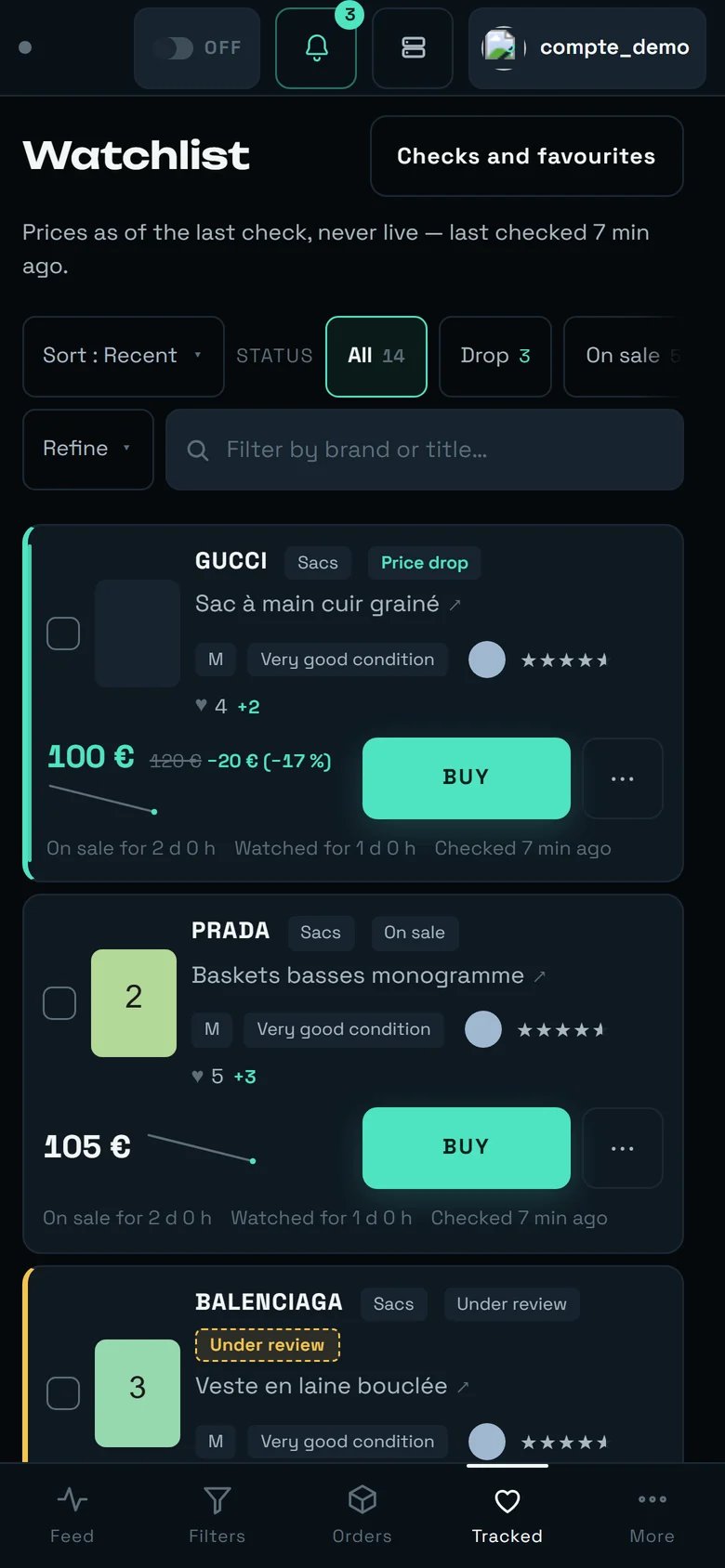 * The `List` / `Grid` / `Table` selector **is not shown**: the grid needs 760 px, the table 1100 px. We do not offer a dead button.
* Brand, category, price bounds and the `TIDY UP` buttons move behind `Refine`.
* The status chips scroll horizontally.
* The card reorganises into three rows: identity, then price and purchase, then the times.
* Navigation moves to the bottom: `Feed`, `Filters`, `Orders`, `Tracked`, `More`.
* Sorting, the `All` chip and the search stay directly accessible.
* `BUY`, the `⋯` menu and the details view work identically.
* The subtitle keeps announcing the date of the last check.
* Touch targets are at least 44 px: the sort menu is usable without zooming.
***
## The limits, said plainly
* **The watchlist does not separate by account.** Items from all your accounts are mixed together, whatever account imported them.
* **Beyond about 3,600 watched items**, the real interval stretches: the banner shows it (`checks slowed ×{facteur}`) instead of hiding it. Nothing is abandoned, everything is served more slowly.
* **The "item available again" notification is never sent** today. The three that really go out: `Price drop on a tracked item`, `A tracked item has been sold`, `A tracked item has left the market`.
* **The statistics strip and the "favourites ≥" filter were removed** at the owner's request. The `♥` counter and the `Most liked` sort remain.
* **On a very small screen (320 px wide)**, only one whole card fits. Measured on 31/07, not re-checked since.
***
## Going further
The live feed: it is the heart on a card that fills the watchlist.
Where a purchase launched from here lands, queued ones included.
The buying scope, and the periodic favourites sync.
The `Purchase ceiling`, the automatic pick-up point and the notifications.
* The `List` / `Grid` / `Table` selector **is not shown**: the grid needs 760 px, the table 1100 px. We do not offer a dead button.
* Brand, category, price bounds and the `TIDY UP` buttons move behind `Refine`.
* The status chips scroll horizontally.
* The card reorganises into three rows: identity, then price and purchase, then the times.
* Navigation moves to the bottom: `Feed`, `Filters`, `Orders`, `Tracked`, `More`.
* Sorting, the `All` chip and the search stay directly accessible.
* `BUY`, the `⋯` menu and the details view work identically.
* The subtitle keeps announcing the date of the last check.
* Touch targets are at least 44 px: the sort menu is usable without zooming.
***
## The limits, said plainly
* **The watchlist does not separate by account.** Items from all your accounts are mixed together, whatever account imported them.
* **Beyond about 3,600 watched items**, the real interval stretches: the banner shows it (`checks slowed ×{facteur}`) instead of hiding it. Nothing is abandoned, everything is served more slowly.
* **The "item available again" notification is never sent** today. The three that really go out: `Price drop on a tracked item`, `A tracked item has been sold`, `A tracked item has left the market`.
* **The statistics strip and the "favourites ≥" filter were removed** at the owner's request. The `♥` counter and the `Most liked` sort remain.
* **On a very small screen (320 px wide)**, only one whole card fits. Measured on 31/07, not re-checked since.
***
## Going further
The live feed: it is the heart on a card that fills the watchlist.
Where a purchase launched from here lands, queued ones included.
The buying scope, and the periodic favourites sync.
The `Purchase ceiling`, the automatic pick-up point and the notifications.