> ## Documentation Index
> Fetch the complete documentation index at: https://docs.regasolutions.io/llms.txt
> Use this file to discover all available pages before exploring further.
# Your first ten minutes
> From the invitation link to your first purchase: create your workspace, connect a Vinted account, start the radar, buy by hand — and know how to come back tomorrow.
 You have received a link. By the end of this page your workspace exists, a Vinted account is
connected, **the radar is running**, and you have bought a first item **by hand**.
This is the page you **act** on. It is also the one where a mistake costs the most: here you open an
account that will spend real money, on your Vinted accounts, with your card. Read the red boxes —
they are not decorative either.
**What to have to hand before you start.**
1. **The invitation link exactly as it arrived.** It works **once only**, and its code is
**43 characters** long: you click it, you never retype it.
2. **The phone of the Vinted account** you are about to connect — the connection asks for a code
sent by SMS.
3. **That Vinted account with a card saved and set as default**, a phone number and a delivery
address. With no card the purchase is refused cleanly — no charge, but the item is lost.
4. **Something to write down ten recovery codes on**, at the very last step. They are shown once.
## The path, at a glance
The order is not a suggestion: each move unlocks the next, and every empty screen in rega points you
to the **furthest upstream** step that is missing — never to its own.
```mermaid theme={null}
flowchart TD
A["The link you received
You have received a link. By the end of this page your workspace exists, a Vinted account is
connected, **the radar is running**, and you have bought a first item **by hand**.
This is the page you **act** on. It is also the one where a mistake costs the most: here you open an
account that will spend real money, on your Vinted accounts, with your card. Read the red boxes —
they are not decorative either.
**What to have to hand before you start.**
1. **The invitation link exactly as it arrived.** It works **once only**, and its code is
**43 characters** long: you click it, you never retype it.
2. **The phone of the Vinted account** you are about to connect — the connection asks for a code
sent by SMS.
3. **That Vinted account with a card saved and set as default**, a phone number and a delivery
address. With no card the purchase is refused cleanly — no charge, but the item is lost.
4. **Something to write down ten recovery codes on**, at the very last step. They are shown once.
## The path, at a glance
The order is not a suggestion: each move unlocks the next, and every empty screen in rega points you
to the **furthest upstream** step that is missing — never to its own.
```mermaid theme={null}
flowchart TD
A["The link you received
it works once only"] --> B["1 · Your workspace
name, e-mail, 10-character password"]
B --> C["2 · A Vinted account connected
code received by SMS"]
C --> D["3 · A filter
what the radar must look for"]
D --> E["4 · The stream fills up"]
E --> F["5 · First purchase by hand
the BUY button"]
F --> G["6 · Two-step verification
and the 10 codes written down"]
G --> H["Tomorrow: address + password
a session lasts 30 days"]
C -. "with no account connected" .-> X["The radar searches,
but nothing can be bought"]
D -. "with no filter" .-> Y["The radar has nothing to look for
the stream stays empty"]
```
***
## Step by step
The language switch sits **at the top of the invitation page**, above the title.
**The invitation page opens in ENGLISH, the application opens in FRENCH.** These are two separate
settings, deliberately: the first screen a British shop ever saw used to open in French. Choosing the
language on the invitation page is therefore **not enough** — you will have to set it a second time
inside the application, in your first minute there.
Worse: **e-mails follow the language recorded on your person**, and at sign-up that information does
not exist yet. Your confirmation message will therefore go out in French whatever you ticked on the
form. If your shop is English-speaking, switch the language inside the application before you ask
for anything by e-mail.
The page title tells you what the link opens: `Your REGA trial`, `Your REGA plan` or
`Your REGA access`. Just underneath, the duration: `{n} days of full access, no card needed.`
— a trial is **7 days** by default, and an unopened link expires after **30 days**.
Three fields, two boxes:
| The field | What is asked | The constraint |
| ------------------- | ------------------------------------------------------ | ------------------------- |
| `Your display name` | The name that will identify you inside the product | none |
| `Your e-mail` | The address that receives receipts, resets and notices | 320 characters at most |
| `Password` | Your rega password — **not** your Vinted one | `At least 10 characters.` |
* **Required box:** `I have read and accept the terms of use, the terms of sale and the privacy
policy.` The three links open in a new tab.
* **Optional box:** `I ask for the service to start immediately and I acknowledge that I lose my
14-day right of withdrawal once it has been fully performed.` — with, underneath it,
`Optional — without this box, access opens after 14 days.`
Then `Create my workspace`, which becomes `Creating…`.
**Never retype the link.** The code is 43 characters long, and a half-copied link gives you
**exactly the same screen** as a link that never existed:
`This invitation link does not exist. Check that it was copied in full.`
If you lost the link **before** creating your workspace, do not try to reconstruct it: ask us to
reissue it. A fresh code is attached to the workspace **already prepared for you**, with its plan and
its configuration — you lose nothing. If you lost it **after**, it is of no further use: your way in
is now the sign-in screen and your password.
**The button stays off until the terms box is ticked.** That is not a fault: it is the only required
box on the form. Tick it first and the button lights up.
**A double click does not create two workspaces.** The seat is reserved in one indivisible move:
measured, **12 simultaneous attempts, exactly one succeeds**. The others get
`This link has just been used. Invitations are single-use.`
**And a failed sign-up does not burn your link.** If you read
`An account already exists with this address.`, start again with another address — **the same
link**. There is no need to ask for a new one.
If your link carries a price, the screen shows the `What this link offers` panel — the name of the
plan, then the amount with `on subscribing, then` and `per month`.
The payment link is **named but not clickable** there, and the screen tells you why:
`Create your workspace first: the payment link is waiting in the message you received.`
**Create the workspace first, pay afterwards.** The payment attaches itself to the workspace; the
other way round leaves a payment with no account to attach it to.
A lifetime link never shows a price, and that is not an oversight: `0 €` is never written in this
product — zero means "standard rate", never "free".
A confirmation message goes out at sign-up. Its link is valid for **7 days**.
**This is not a gate: nothing is blocked if you do not click.** The screen says so itself:
`Your account works normally: this confirmation is not a prerequisite. You can ask for another one
from your settings.`
But it is the **only channel** for your receipts, for password resets, and for the **notice before
your data is deleted**, sent at D-3 and then D-1. Confirm it now, it takes five seconds.
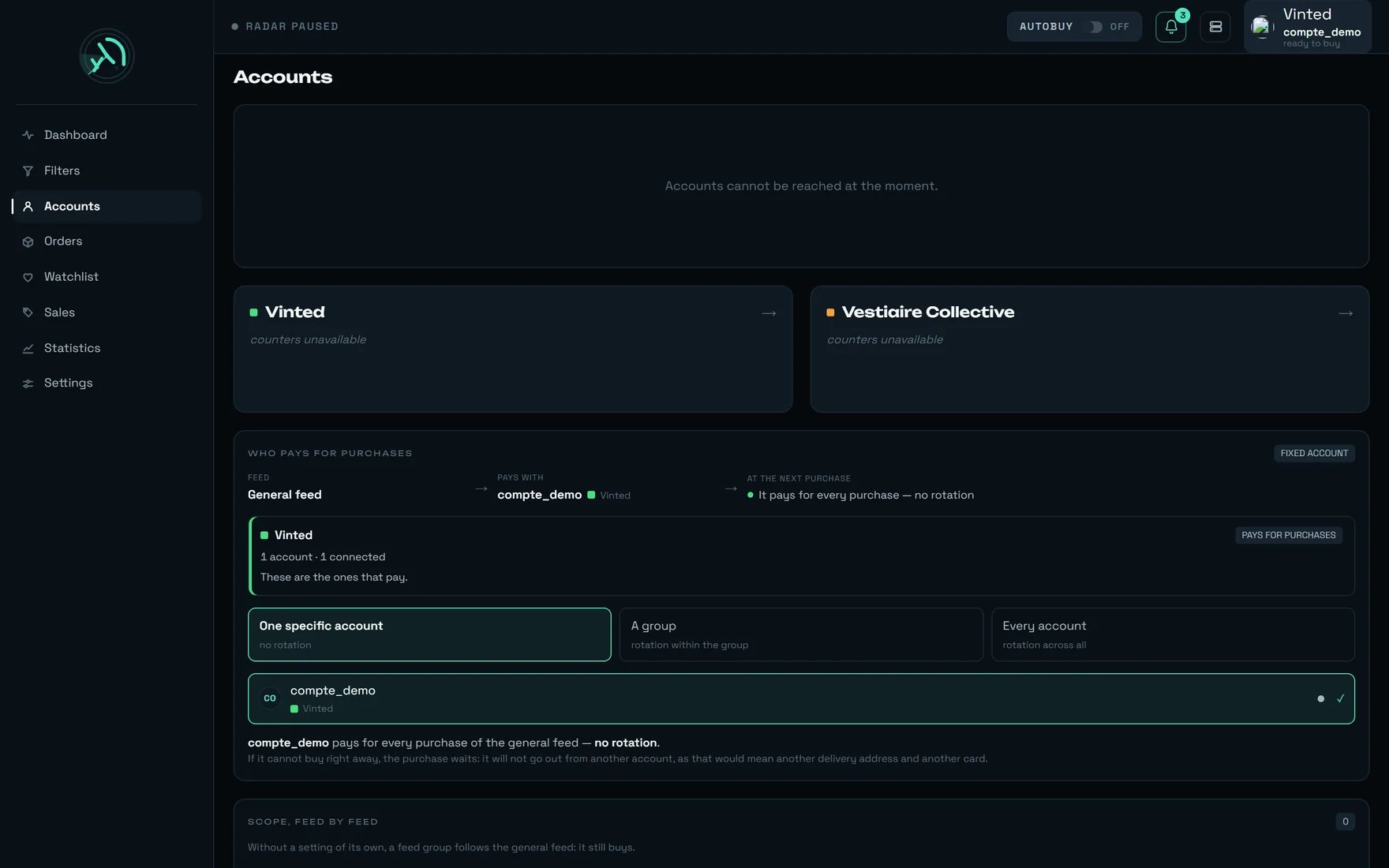 Until an account is connected, the screen shows `Start by connecting a Vinted account` and explains
why: `This is the account that will buy, with its card and its delivery address. Connecting asks for
a code sent by SMS.`
The `Add an account` button opens the connection window: Vinted username and Vinted password.
The screen tells you: `Your Vinted password is not kept: it is used to open the connection, then
forgotten. Vinted will then send a code by SMS.`
The step is called `SMS code`, the field `CODE RECEIVED BY SMS`, and the status
`Vinted has sent a code by SMS.` Keep the phone **of the Vinted account** in your hand: this code
is not rega's.
**Three checks to run on the Vinted side before you carry on.** They cost nothing now and cost an
item later.
1. **A card saved, and set as default.** Since 12/08/2026 Vinted no longer pre-selects the card at
payment time; rega puts it in place itself, but it has to exist. Without it:
`The bank card could not be selected for this purchase. Check the card saved on this Vinted
account.`
2. **A phone number.** Some carriers require it, and without it the payment is refused cleanly — no
charge, but the item is lost: `A phone number is required for delivery.` **In the UK it is
mandatory**, and the format is strict: `+44777777777` is refused, `+447342748772` is accepted.
3. **A delivery address.** It is what decides the country of the pick-up points — not the site you
are using. A French session delivering to Florence asks for **Italian** pick-up points.
**Do not delete a connected Vinted account "just to test", and do not connect it elsewhere in
parallel.** The same Vinted username seen from two different places is the exact signal of a
permanent block — it has already cost two accounts. An account connected to rega stays connected to
rega.
Until an account is connected, the screen shows `Start by connecting a Vinted account` and explains
why: `This is the account that will buy, with its card and its delivery address. Connecting asks for
a code sent by SMS.`
The `Add an account` button opens the connection window: Vinted username and Vinted password.
The screen tells you: `Your Vinted password is not kept: it is used to open the connection, then
forgotten. Vinted will then send a code by SMS.`
The step is called `SMS code`, the field `CODE RECEIVED BY SMS`, and the status
`Vinted has sent a code by SMS.` Keep the phone **of the Vinted account** in your hand: this code
is not rega's.
**Three checks to run on the Vinted side before you carry on.** They cost nothing now and cost an
item later.
1. **A card saved, and set as default.** Since 12/08/2026 Vinted no longer pre-selects the card at
payment time; rega puts it in place itself, but it has to exist. Without it:
`The bank card could not be selected for this purchase. Check the card saved on this Vinted
account.`
2. **A phone number.** Some carriers require it, and without it the payment is refused cleanly — no
charge, but the item is lost: `A phone number is required for delivery.` **In the UK it is
mandatory**, and the format is strict: `+44777777777` is refused, `+447342748772` is accepted.
3. **A delivery address.** It is what decides the country of the pick-up points — not the site you
are using. A French session delivering to Florence asks for **Italian** pick-up points.
**Do not delete a connected Vinted account "just to test", and do not connect it elsewhere in
parallel.** The same Vinted username seen from two different places is the exact signal of a
permanent block — it has already cost two accounts. An account connected to rega stays connected to
rega.
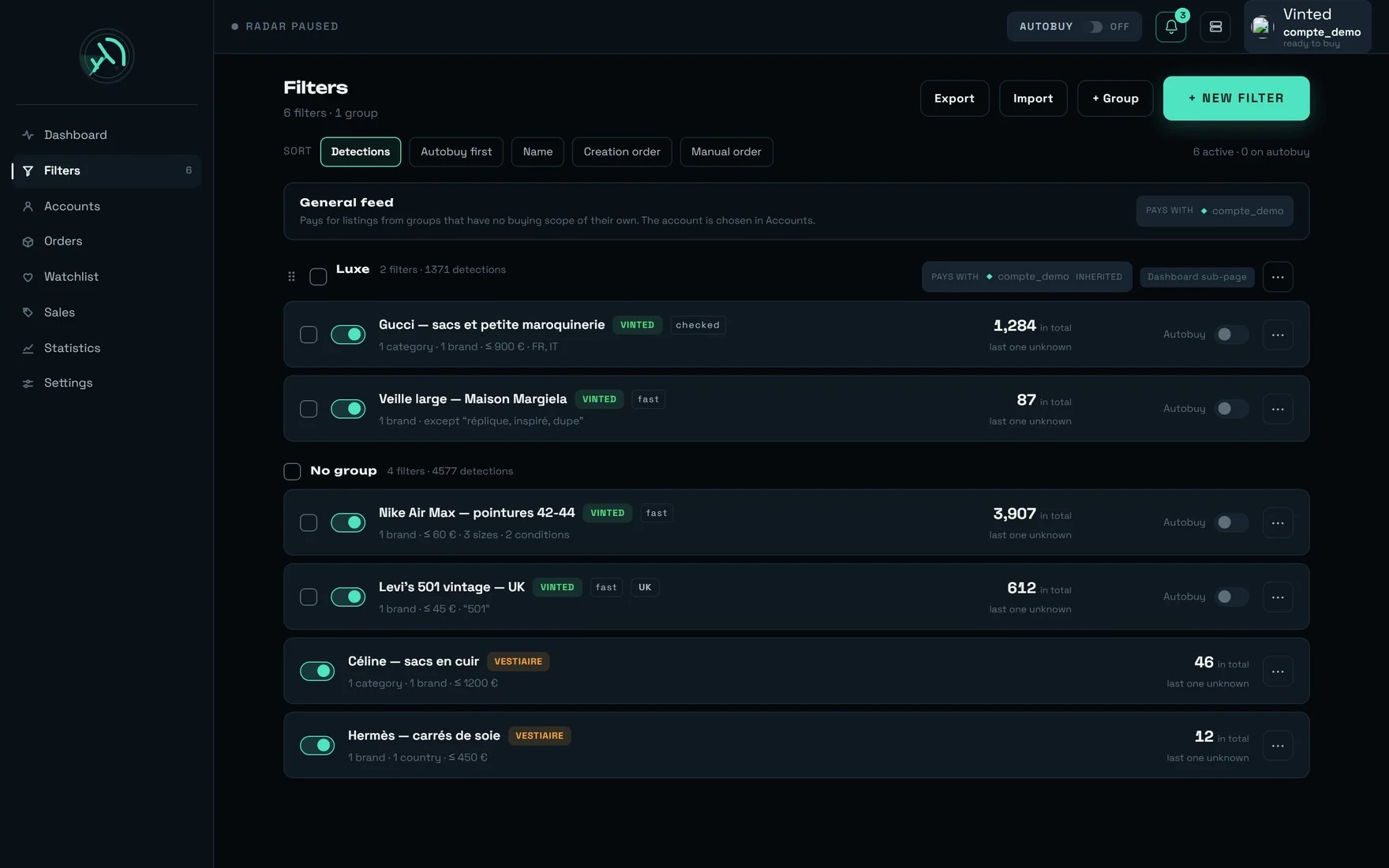 Until a filter exists, the dashboard shows `Create a filter to start the radar` and the reason, in
plain words: `A filter describes what you are looking for — brands, price, size, category. The radar
only sweeps what a filter asks for: with no filter it cannot detect anything, so nothing will reach
this screen.`
The `+ New filter` button, the `FILTER NAME` field — the example offered is `e.g. Prada bags` — then
`CREATE THE FILTER`.
**On the first day, leave `Autobuy on this filter` switched off.** You will see what your filter
actually catches without a single euro moving. The filter panel describes what the switch does:
`Automatic purchase as soon as it is detected.` — arm it the next day, once you know what the filter
brings in.
**The day you arm that filter: fill in `€ max`.** The field carries its help underneath —
`Cap per item — leave empty to impose no cap` — and if you arm it without filling it in, a red note
appears: `No cap: this filter will buy whatever the price.`
**This is the only cap that automatic buying actually consults.** The other two — the one in the
dashboard panel and the one in Settings — do not cap the automatic buying that runs on our servers.
The detail is on the **[Money](/how-to/money)** page.
**A filter left as a draft never buys**, whatever you tick. It is the one condition nothing can
switch off: confirm the filter before you rely on it.
Until a filter exists, the dashboard shows `Create a filter to start the radar` and the reason, in
plain words: `A filter describes what you are looking for — brands, price, size, category. The radar
only sweeps what a filter asks for: with no filter it cannot detect anything, so nothing will reach
this screen.`
The `+ New filter` button, the `FILTER NAME` field — the example offered is `e.g. Prada bags` — then
`CREATE THE FILTER`.
**On the first day, leave `Autobuy on this filter` switched off.** You will see what your filter
actually catches without a single euro moving. The filter panel describes what the switch does:
`Automatic purchase as soon as it is detected.` — arm it the next day, once you know what the filter
brings in.
**The day you arm that filter: fill in `€ max`.** The field carries its help underneath —
`Cap per item — leave empty to impose no cap` — and if you arm it without filling it in, a red note
appears: `No cap: this filter will buy whatever the price.`
**This is the only cap that automatic buying actually consults.** The other two — the one in the
dashboard panel and the one in Settings — do not cap the automatic buying that runs on our servers.
The detail is on the **[Money](/how-to/money)** page.
**A filter left as a draft never buys**, whatever you tick. It is the one condition nothing can
switch off: confirm the filter before you rely on it.
 **A blank screen for a few hundred milliseconds on the first load is normal**, and deliberate. As
long as rega does not yet know what you are missing, it writes nothing: showing "no sales" and then
correcting itself 200 ms later with "connect an account" would give two answers to the same question.
On a card in the stream, the button reads `BUY`. Click it on a **cheap** item: this first purchase
teaches you the product, and it saves you time on every purchase after it (see the tips, below).
The same spot then changes state, without ever moving:
| What the button says | What it means |
| ------------------------------- | --------------------------------------------------------------------------------------------------------- |
| `BUY` | Nothing has left. |
| `PURCHASE UNDER WAY…` | The chain is running on our servers. |
| `✓ BOUGHT` | Charged. A `Purchase confirmed` notification arrives, with `Charged: {total} {devise}`. |
| `GONE — BOUGHT BY SOMEONE ELSE` | Someone paid before you. This is not a fault. |
| `UNDER VERIFICATION` | Vinted is still checking the listing: `Queued — the purchase starts as soon as Vinted verifies the item.` |
| `🔐 VALIDATE THE PAYMENT` | **Your bank is asking you to confirm. Without your click, nothing is paid.** |
| `TO CHECK — OUTCOME UNKNOWN` | Tracking has stopped, the payment may still go through. **Do not click again.** |
**Stay reachable for a quarter of an hour after clicking.** If your bank asks for a confirmation,
rega exposes the `🔐 VALIDATE THE PAYMENT` button immediately and sends a
`Bank confirmation required` notification — `Your bank is asking for a confirmation — without it,
the purchase will not complete.` You have **15 minutes**. After that the purchase is simply not
valid: **not a single euro has left**.
**A blank screen for a few hundred milliseconds on the first load is normal**, and deliberate. As
long as rega does not yet know what you are missing, it writes nothing: showing "no sales" and then
correcting itself 200 ms later with "connect an account" would give two answers to the same question.
On a card in the stream, the button reads `BUY`. Click it on a **cheap** item: this first purchase
teaches you the product, and it saves you time on every purchase after it (see the tips, below).
The same spot then changes state, without ever moving:
| What the button says | What it means |
| ------------------------------- | --------------------------------------------------------------------------------------------------------- |
| `BUY` | Nothing has left. |
| `PURCHASE UNDER WAY…` | The chain is running on our servers. |
| `✓ BOUGHT` | Charged. A `Purchase confirmed` notification arrives, with `Charged: {total} {devise}`. |
| `GONE — BOUGHT BY SOMEONE ELSE` | Someone paid before you. This is not a fault. |
| `UNDER VERIFICATION` | Vinted is still checking the listing: `Queued — the purchase starts as soon as Vinted verifies the item.` |
| `🔐 VALIDATE THE PAYMENT` | **Your bank is asking you to confirm. Without your click, nothing is paid.** |
| `TO CHECK — OUTCOME UNKNOWN` | Tracking has stopped, the payment may still go through. **Do not click again.** |
**Stay reachable for a quarter of an hour after clicking.** If your bank asks for a confirmation,
rega exposes the `🔐 VALIDATE THE PAYMENT` button immediately and sends a
`Bank confirmation required` notification — `Your bank is asking for a confirmation — without it,
the purchase will not complete.` You have **15 minutes**. After that the purchase is simply not
valid: **not a single euro has left**.
 Until it is switched on, the screen shows `Two-step verification` →
`not switched on — your password alone protects your workspace`. The button is called `Switch on`,
and switching on happens in **three moves**:
`Scan this code` with your authenticator app. The code is drawn inside your browser, never
anywhere else. If your app cannot read it: `Your app does not scan? Enter this key by hand:` —
the key is shown in plain text under the code.
`Enter the code showing now.` This step exists for a reason: a badly read code, an app that
recorded something else, a phone with the wrong time — without this confirmation you would be
locked out **at your next sign-in**.
The screen is headed `Keep these codes` and adds: `They will never be shown again. Each works
once, in place of the six-digit code.` A `Download` button, an `I have kept them` button.
**Do not click the second before you have used the first.**
**Switching on two-step verification SIGNS OUT all your other devices.** The server says it word for
word: `Two-step verification switched on. Your other devices have been signed out.`
That is why this step comes **last**. If you switch it on in the middle of the setup, from the phone
you were about to read the Vinted SMS on, you eject yourself from the session open on your computer.
The code comes from an authenticator app — the screen says so:
`The code comes from an authenticator app: no SMS, no charge.` It is **not** Vinted's SMS code. Two
different codes, possibly two different phones.
***
## The dashboard, control by control
This is the screen you will live on. Here is what each marker carries.
Until it is switched on, the screen shows `Two-step verification` →
`not switched on — your password alone protects your workspace`. The button is called `Switch on`,
and switching on happens in **three moves**:
`Scan this code` with your authenticator app. The code is drawn inside your browser, never
anywhere else. If your app cannot read it: `Your app does not scan? Enter this key by hand:` —
the key is shown in plain text under the code.
`Enter the code showing now.` This step exists for a reason: a badly read code, an app that
recorded something else, a phone with the wrong time — without this confirmation you would be
locked out **at your next sign-in**.
The screen is headed `Keep these codes` and adds: `They will never be shown again. Each works
once, in place of the six-digit code.` A `Download` button, an `I have kept them` button.
**Do not click the second before you have used the first.**
**Switching on two-step verification SIGNS OUT all your other devices.** The server says it word for
word: `Two-step verification switched on. Your other devices have been signed out.`
That is why this step comes **last**. If you switch it on in the middle of the setup, from the phone
you were about to read the Vinted SMS on, you eject yourself from the session open on your computer.
The code comes from an authenticator app — the screen says so:
`The code comes from an authenticator app: no SMS, no charge.` It is **not** Vinted's SMS code. Two
different codes, possibly two different phones.
***
## The dashboard, control by control
This is the screen you will live on. Here is what each marker carries.
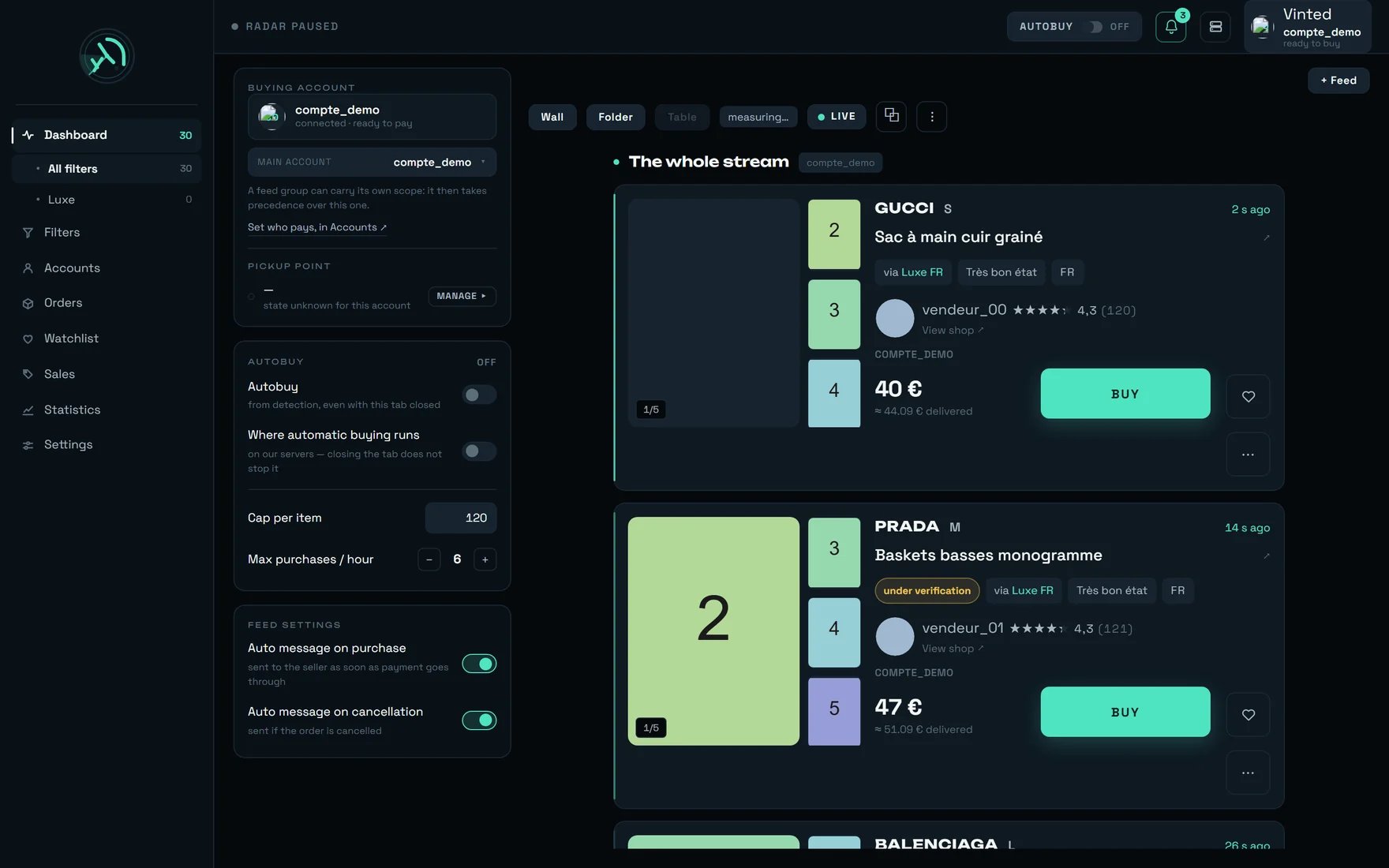
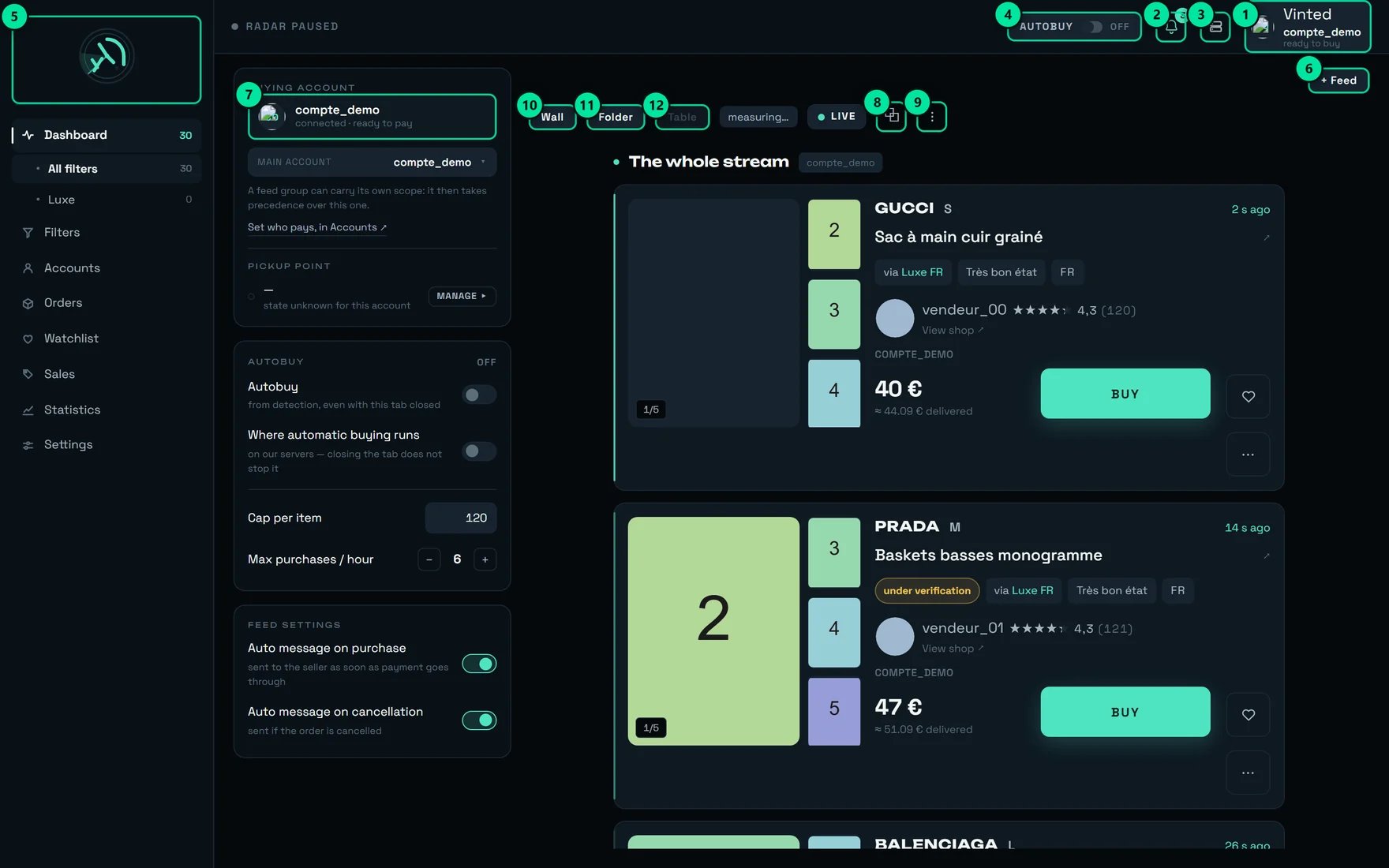 | № | The control | What it does |
| -- | ---------------------- | ------------------------------------------------------------------------------------------------------------------------------ |
| 1 | The account, top right | Says **who will pay for the next purchase**. On our demo account: `compte_demo will pay for the next purchase — ready to buy.` |
| 2 | The bell | Unread notifications — here `3 unread notifications`. |
| 3 | `Administration` | REGA staff only — this button does not appear on your account. |
| 4 | `AUTOBUY` / `OFF` | Automatic buying. Here: `Automatic buying disarmed`. Once armed, the badge reads `ARMED`. |
| 5 | The logo | `rega — home`. |
| 6 | `+ Feed` | `Open a feed, or go back to the whole stream`. |
| 7 | The account badge | `compte_demo` · `connected · ready to pay`. It opens `See this account's delivery address and payment method`. |
| 8 | `⧉` | `Open the general stream in a detached window`. |
| 9 | `⋮` | `Recent purchases and conversations` — this is where you will follow your first purchase. |
| 10 | `Wall` | `Many listings at a glance, photo first`. |
| 11 | `Folder` | `One listing at a time, all its details`. |
| 12 | `Table` | The dense view. It needs a very wide window and does not appear below that. |
**The `AUTOBUY` badge arms our servers, not your browser.** Once armed, it survives closing the tab,
closing the browser and switching off your machine. **The only move that stops it is disarming it.**
The left-hand panel merely states this, under `Where automatic buying runs`:
`on our servers — closing the tab does not stop it`. It is not a switch you set, it is a fact you are
reminded of.
***
## What happens during your first purchase
You click once. The rest runs on our servers, without you. A real purchase measured end to end takes
**7.88 s** cold, **5.93 s** when the order had already been prepared.
```mermaid theme={null}
flowchart TD
A["You click BUY"] --> B["rega names the account that pays
| № | The control | What it does |
| -- | ---------------------- | ------------------------------------------------------------------------------------------------------------------------------ |
| 1 | The account, top right | Says **who will pay for the next purchase**. On our demo account: `compte_demo will pay for the next purchase — ready to buy.` |
| 2 | The bell | Unread notifications — here `3 unread notifications`. |
| 3 | `Administration` | REGA staff only — this button does not appear on your account. |
| 4 | `AUTOBUY` / `OFF` | Automatic buying. Here: `Automatic buying disarmed`. Once armed, the badge reads `ARMED`. |
| 5 | The logo | `rega — home`. |
| 6 | `+ Feed` | `Open a feed, or go back to the whole stream`. |
| 7 | The account badge | `compte_demo` · `connected · ready to pay`. It opens `See this account's delivery address and payment method`. |
| 8 | `⧉` | `Open the general stream in a detached window`. |
| 9 | `⋮` | `Recent purchases and conversations` — this is where you will follow your first purchase. |
| 10 | `Wall` | `Many listings at a glance, photo first`. |
| 11 | `Folder` | `One listing at a time, all its details`. |
| 12 | `Table` | The dense view. It needs a very wide window and does not appear below that. |
**The `AUTOBUY` badge arms our servers, not your browser.** Once armed, it survives closing the tab,
closing the browser and switching off your machine. **The only move that stops it is disarming it.**
The left-hand panel merely states this, under `Where automatic buying runs`:
`on our servers — closing the tab does not stop it`. It is not a switch you set, it is a fact you are
reminded of.
***
## What happens during your first purchase
You click once. The rest runs on our servers, without you. A real purchase measured end to end takes
**7.88 s** cold, **5.93 s** when the order had already been prepared.
```mermaid theme={null}
flowchart TD
A["You click BUY"] --> B["rega names the account that pays
and reserves it"]
B --> C["It opens the order at Vinted"]
C --> D["It chooses the pick-up point
and puts the card in place"]
D --> E{"Does your bank ask
for a confirmation?"}
E -- no --> F["REAL CHARGE
item + delivery + buyer protection"]
E -- yes --> G["🔐 VALIDATE THE PAYMENT button
you have 15 minutes"]
G -- "you confirm" --> F
G -- "nobody confirms" --> H["Purchase not valid
not a single euro has left"]
C -. "the item has just gone" .-> I["GONE — BOUGHT BY SOMEONE ELSE"]
C -. "Vinted is still checking the listing" .-> J["Queued — up to 96 h"]
F --> K["✓ BOUGHT · 'Purchase confirmed' notification"]
```
### The price on show is not the amount charged
Three numbers are in circulation, and they do not say the same thing.
| What you see | What it contains |
| ----------------------------------------------------------- | ----------------------------------------------------------------------------------------------------------------------------------------------------------------------------------------------- |
| The price on the card | The item **alone**, in the currency of the listing. |
| The "delivered" price on the card — `≈ {montant} delivered` | An **estimate**: item + buyer protection + delivery. The tooltip admits it: `Estimated total price: item + delivery (about €3-4). The exact postage depends on the carrier chosen at purchase.` |
| `total debited` on the purchase row | **The real one.** Until it is known, the row says `item price — total not confirmed yet`. |
**Count on roughly €4 above the price on show, every time.** The delivery estimate the screen uses is
**€3.50** — deliberately modest. Measured: real postage at **€2.89**, and buyer protection taking an
item from **€10.00 to €11.20**.
And **all three caps compare the ITEM price, never the total.** A cap set at €100 therefore lets
through a purchase charged at around €108. Set your caps to the **item price** you accept, not to
your total budget.
**`Automatic pick-up point`, in Settings → the `Buying` tab, must stay on.** It is on out of the box. Turned
off, the purchase **fails** — and it fails after the item has been reserved, with
`No pick-up point could be selected for this order.` Nothing asks anyone anything. The screen says it
itself: `rega chooses the collection point during the purchase. Turned off, the purchase fails for
want of a pick-up point — leave it on.`
**A payment is never replayed after an interruption at the moment of paying.** The outcome is unknown
there, and replaying would risk a double charge. That is why the `TO CHECK — OUTCOME UNKNOWN` row
**never** offers a retry button, and why it tells you: `Outcome unknown: tracking stops here. Check in
Orders BEFORE retrying — a payment may still go through.`
***
## Coming back tomorrow
The invitation link works once only. From now on your way in is **your address and your password** —
and most of the time, nothing at all.
```mermaid theme={null}
flowchart TD
A["You come back to rega"] --> B{"Less than 30 days
since your last visit?"}
B -- yes --> C["You are already signed in
nothing to do"]
B -- no --> D["Address + password"]
D --> E{"Two-step verification
switched on?"}
E -- no --> C
E -- yes --> F["6-digit code
valid for 90 seconds at most"]
F --> C
F -- "phone lost" --> G["One of your 10
recovery codes"]
G --> C
D -. "password forgotten" .-> H["Link by e-mail
30 minutes, once only"]
H --> E
```
### How long a session lasts
| Fact | Value |
| ------------------------------------ | ------------------------------------------------------------ |
| Length of a session | **30 days** |
| Renewal | **rolling** — the deadline is pushed back at most once a day |
| Does it survive closing the browser? | **Yes.** It is not a browsing session. |
| Consequence | **Someone who uses it every day never signs in again.** |
### The special cases
From the sign-in screen: `Forgotten your password?` → the `Forgotten password` screen, then
`Send the link`.
The screen then moves to `Check your inbox`, with the sentence that matters:
**`The link is valid for 30 minutes and works only once.`**
* The answer is **the same whether the account exists or not** — including in timing:
`If an account exists with this address, a link has just been sent to it.` The server adds
`Check your junk folder too.`
* The new password is **validated before** the link is used up: a typo does not burn the link.
* Once set: `Password changed` — `Your password is up to date, and every device that was signed in
has been signed out.`
* Dead link: `This link is no longer valid. Ask for a new one.` — **one message for three causes**
(unknown, already used, expired).
* Truncated link: `Part of this link is missing. Open it from the message you received, without
retyping it.`
**Resetting your password does NOT bypass two-step verification.** This is deliberate: otherwise
your inbox would become the second factor. It is also why the `Forgotten your password?` link
**disappears** from the screen while the code is being asked for.
This is rega's two-step verification. The screen says:
`Enter the code shown by your authenticator app.` and, just below,
`You can also enter one of your recovery codes.`
| Fact | Value |
| --------------------------------------------------- | ------------------------------------------------------- |
| Length of the code | **6 digits** |
| It changes every | **30 seconds** |
| Real window of validity | **90 seconds at most** (one step of drift is tolerated) |
| Length of the sign-in challenge | **5 minutes** |
| Tries before you must start again from the password | **5** |
The refusals, word for word:
* `Incorrect code. Check the time on your phone, or use a recovery code.`
* `Too many tries. Start again from your password.`
* `This sign-in request has expired. Start again.`
* `Two-step verification is temporarily unavailable. It is not your code: get in touch.` — that one
is a fault **on our side**, never yours.
You have **ten** of them, **ten characters** each. Each works **once only**, in place of the
six-digit code.
* They are shown **only when you switch verification on**. No page replays them.
* Asking for new ones **destroys the previous ones**: `New recovery codes. The old ones no longer
work.` — including any you had printed.
* Their alphabet **deliberately excludes ambiguous characters** (no I, no O, no zero, no 1), because
they are copied out by hand, often from a piece of paper, by someone who has just lost their phone.
A separating dash is tolerated when you type them.
* The screen reminds you how many are left, and what happens when there are none:
`none left — losing your phone locks you out of your workspace`.
With no phone **and** no recovery code, your workspace can no longer be reached without our
intervention. This is the one place in this guide where forgetting something for ten seconds costs
you a day.
rega **keeps no register of connected devices** — so there is nothing to revoke remotely, and showing
a list of "devices" would be inventing data.
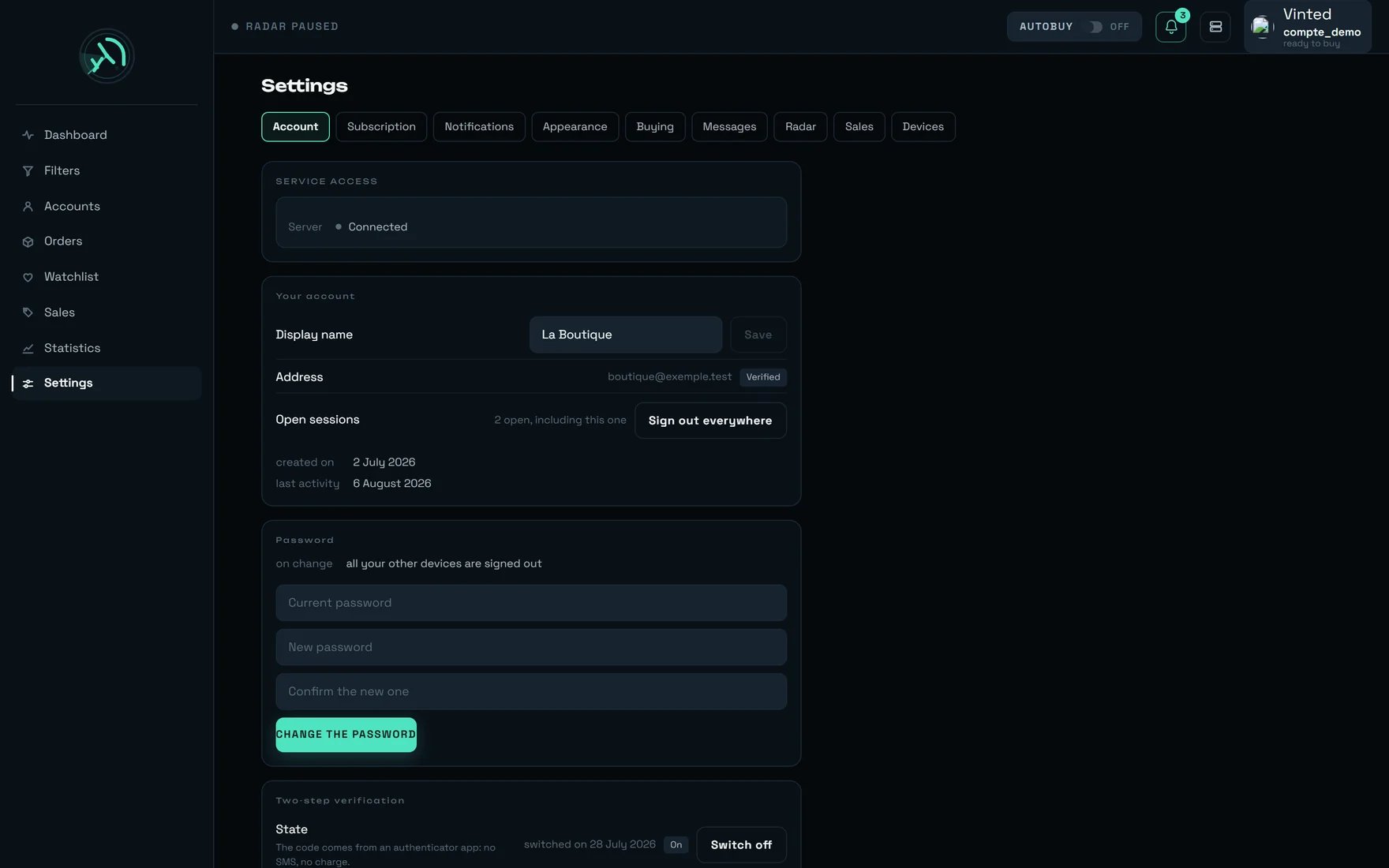
The only global move is in Settings → Account: `Close every session?` — and the confirmation window
is blunt: `Every signed-in device will be signed out, including this one. Nothing rega has collected
is touched, and your sign-in methods stay in place.`
The server then confirms: `All your connections have been closed. Sign in again to carry on.`
Changing your password from Settings has the same effect: `on change` →
`all your other devices are signed out`.
After **4 failures with no delay**, a delay appears and **doubles** with each further failure: 2 s,
4 s, 8 s, 16 s, 32 s… capped at **5 minutes**. A single success cancels the running penalty, and an
hour of quiet clears everything.
The message is `Too many attempts. Try again in {n} minutes.`
**The refusal never says whether the account exists.** That is a security constraint, not a tone:
this form must not become a directory of our clients.
When access is cut, **every** page is replaced by the same screen — never a half-working page. Its
title follows your case: `Activate your workspace`, `Your trial`, `Your bespoke plan` or
`Resume your subscription`.
**You remain able to sign in**, to change your password and to reset it: the end of a subscription
must not become the loss of an account.
The `Your data` block tells you exactly what is kept and until when:
`Filters, tracked sales, watchlist and history.` Retention is **7 days** after the cut, and two
notices arrive before it: **D-3** then **D-1**, headed `Your data is about to be deleted`.
**When you resume, you redo nothing.** Your filters were never unsubscribed, only set aside: they
start again on their own.
***
## Our advice
**1 — Copy the link, never retype it — and if it is lost before you sign up, ask for a reissue rather
than a new link.**
A reissue attaches a fresh code to the workspace **already prepared for you**: it is the only move
that preserves the work. The old link is revoked in the same breath, because two live links to one
workspace would mean two ways in for one seat. Once somebody has actually entered, however, a reissue
is refused: from then on it is your password that opens the door.
**2 — Set the language TWICE: on the invitation page, then inside the application.**
These are two separate worlds, with two deliberate defaults. And your e-mails follow the language
recorded inside the application, not the one on the sign-up form. An English-speaking shop that
forgets this second setting will get its password-reset letters in French.
**3 — Tick the withdrawal box if you want to start today.**
It is optional, and the screen writes its consequence underneath it:
`Optional — without this box, access opens after 14 days.` It is not a marketing box, it is a legal
obligation — but the consequence is very real.
**4 — Open Vinted BEFORE connecting the account, and check three things.**
Card saved and set as default, phone number, delivery address. All three take two minutes on Vinted
and head off three separate refusals, each of which would otherwise be discovered at the worst
moment: the one where an item slips away.
**5 — On the first day, buy by hand. Arm automatic buying the next day.**
A new filter almost always catches wider than expected. Watch what it brings in for a day, tighten
it, **then** arm it — with its `€ max` filled in.
**6 — Make your very first purchase on a cheap item: it saves you \~1.3 s on every purchase after it.**
Only a **purchase that was actually paid** creates the pick-up point Vinted remembers; after that,
rega skips two steps of the chain. Measured: three dry runs change **nothing**, and four matched
observations out of four show that the remembered point ignores anything that was not paid for. There
is no shortcut — but there is one small purchase.
**7 — Rank your pick-up points BEFORE that first purchase, not after.**
Your ranking comes ahead of any automatic strategy, but it is **at the moment of the paid purchase**
that it fixes the point every later purchase will reuse without a round trip. Setting it afterwards
costs you those \~1.3 s every time, until the next purchase through that carrier.
**8 — Stay reachable for a quarter of an hour after a purchase.**
The `🔐 VALIDATE THE PAYMENT` button is exposed **immediately**, as soon as rega knows your bank's
link, and a notification goes out at the same instant. Leave the purchase notifications on and accept
the one on your phone: without the click, the purchase dies as an unfinished payment — no charge, but
lost.
**9 — Faced with `TO CHECK — OUTCOME UNKNOWN`, go and look in Orders. Do not click again.**
The row is never red, and it never offers a retry: that would be a second purchase on a transaction
that may already have been paid. Tracking stops; the payment may still go through.
**10 — Only switch on two-step verification at the end, and write down the ten codes before closing
the window.**
It signs out all your other devices, and the codes come out once only. Asking for new ones destroys
the previous ones. Download them, and only then click `I have kept them`.
**11 — Do not delete a connected Vinted account "just to test".**
Deleting and re-creating is not a neutral move: it has already happened to a real shop, on 04/08, and
it cost them their place in that day's rotation.
**12 — Confirm your e-mail address even though nothing forces you to.**
It blocks neither sign-in nor payment. But it is the channel for your receipts, your password reset
and the **two notices before your data is deleted**. The confirmation link is valid for 7 days; you
can ask for another one from Settings.
***
## What surprises people
It stays off until the terms-of-use box is ticked. That is not a fault: it is the only required box
on the form.
Reading the link commits nothing — that is deliberate, otherwise merely opening the page would use up
a seat. The accepted consequence: between the reading and your submission someone else can take the
link, and the sign-up will answer `This link has just been used. Invitations are single-use.` That is
the right behaviour.
If you signed up **without** an invitation, your workspace exists but is not active:
`Your workspace is not active yet: choose a plan to begin. Everything is ready, there is nothing to
set up again.` This is neither a fault nor an expired trial — telling you "your trial has ended"
would be false.
And that is not an oversight. `0 €` is never written in this product: zero means "standard rate",
never "free".
Deliberate. As long as rega does not know what you are missing, it writes nothing rather than writing
a sentence it would have to correct 200 ms later.
This is not "close the others". The confirmation window puts it in bold: `including this one`. A
blunt move that is announced beats a partial one.
It only applies to automatic buying **when it runs in the tab**. But it runs on our servers — the
screen writes it itself under `Where automatic buying runs`:
`on our servers — closing the tab does not stop it`. The only cap that counts is each filter's
`€ max`. The whole detail is on the **[Money](/how-to/money)** page.
It is capped at **96 %** before confirmation, on purpose: it is not proof of payment, and it must
never look like it.
The account is committed at click time — it is reserved **before** the purchase completes. A useful
corollary: "Retry" starts again on the **next** account, which is the right behaviour, an account
that has just failed being the worst placed.
This is not a cap, it is freshness: an item detected several minutes ago has almost always gone. The
default threshold is **120 seconds**.
***
## On a phone
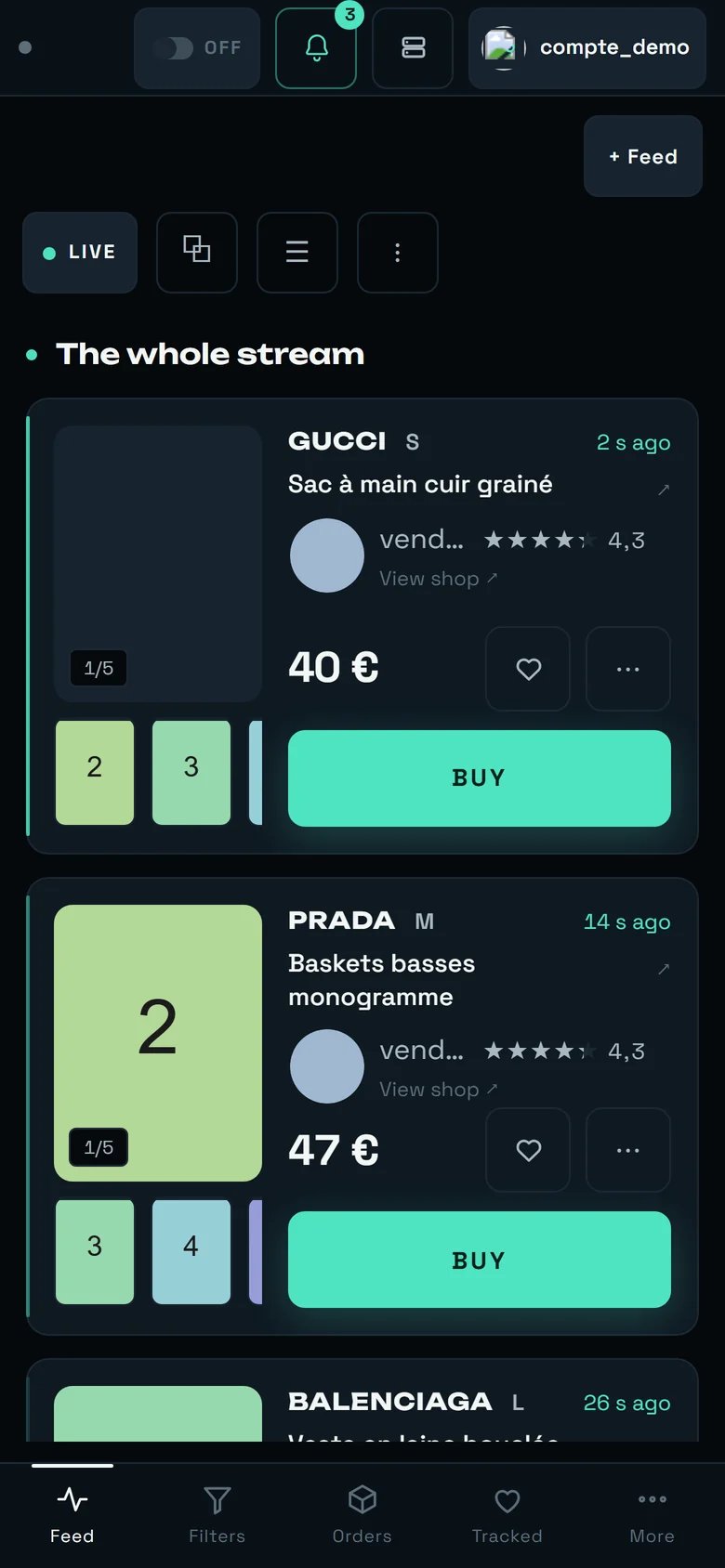 The setup itself works perfectly well with a thumb: the invitation page, connecting a Vinted account
and creating a filter all fit on a small screen. Two remarks:
* **What informs gives way, what acts stays.** The `AUTOBUY` badge and the account that pays never
drop: they are the only two things that touch money.
* **The `Table` view is not offered** below a certain width — it needs a very wide window. On a
phone there is a single layout, and it is the right one.
The full detail is on the **[REGA on your phone](/how-to/on-your-phone)** page.
***
## What rega does not do — said plainly
* **No register of connected devices**, so nothing to revoke remotely. The only global move is
"close every session", which signs you out as well.
* **Two-step verification is compulsory for nobody.** It is offered, never imposed.
* **No bank card is ever entered in rega.** The product offers no card form at all: your payment
method lives at Vinted, and nowhere else.
* **No monthly budget, no cumulative spending alert.** Nothing adds up your charges to compare them
against a threshold. The `Spend` tile in the statistics is descriptive and incomplete: it adds
up **item prices**, without postage or buyer protection, and it counts cancelled orders too.
* **Two rare messages stay in French even on an English screen**: they announce a temporary
unavailability at the moment of creating a workspace. In both cases your link stays valid.
***
## What next
The three caps, where automatic buying really runs, and the amount actually charged.
What filters for free, what costs, and how not to miss what you are after.
Connect, check, and name the one that pays.
The screen where the stream lands and where races are won.
Where an item gets lost, and everything you can change to lose fewer.
What rega does without you — and the security of your own access.
The setup itself works perfectly well with a thumb: the invitation page, connecting a Vinted account
and creating a filter all fit on a small screen. Two remarks:
* **What informs gives way, what acts stays.** The `AUTOBUY` badge and the account that pays never
drop: they are the only two things that touch money.
* **The `Table` view is not offered** below a certain width — it needs a very wide window. On a
phone there is a single layout, and it is the right one.
The full detail is on the **[REGA on your phone](/how-to/on-your-phone)** page.
***
## What rega does not do — said plainly
* **No register of connected devices**, so nothing to revoke remotely. The only global move is
"close every session", which signs you out as well.
* **Two-step verification is compulsory for nobody.** It is offered, never imposed.
* **No bank card is ever entered in rega.** The product offers no card form at all: your payment
method lives at Vinted, and nowhere else.
* **No monthly budget, no cumulative spending alert.** Nothing adds up your charges to compare them
against a threshold. The `Spend` tile in the statistics is descriptive and incomplete: it adds
up **item prices**, without postage or buyer protection, and it counts cancelled orders too.
* **Two rare messages stay in French even on an English screen**: they announce a temporary
unavailability at the moment of creating a workspace. In both cases your link stays valid.
***
## What next
The three caps, where automatic buying really runs, and the amount actually charged.
What filters for free, what costs, and how not to miss what you are after.
Connect, check, and name the one that pays.
The screen where the stream lands and where races are won.
Where an item gets lost, and everything you can change to lose fewer.
What rega does without you — and the security of your own access.