> ## Documentation Index
> Fetch the complete documentation index at: https://docs.regasolutions.io/llms.txt
> Use this file to discover all available pages before exploring further.
# Buying on Vestiaire
> Where a Vestiaire purchase starts in the feed, what preparing really does, where delivery is chosen, why the pick-up map needs a full basket, what a listing costs once the marketplace has added its lines, and the bank confirmation that is always asked for.
Buying on Vestiaire starts in the same feed as Vinted: a card, a written marketplace label, and its **“BUY”** button. From there it is two gestures and one answer to your bank — and **the charge comes from that answer**, never from rega. It is also the marketplace where the price on the card tells you the least: we measured an item displayed at **€34** billed **€102.12** in the basket. This page follows the whole tunnel, from the card to the sentence that closes it.
 **The four sentences to remember.**
1. **Preparing costs nothing and undoes itself.** The basket, the delivery and the payment intent are all free and reversible.
2. **The charge happens at the very last step** — the confirmation that leaves on its own once your bank has answered. We led two complete chains up to the bank challenge and stopped: **zero euros spent, twice**.
3. **A payment cannot be replayed.** If it fails, you start the purchase again from the beginning.
4. **The basket is shared by the whole account.** One purchase at a time, and anything left lying in it is added to the amount you pay.
***
## Where a Vestiaire purchase starts
There is no Vestiaire screen to go to. Detections from both marketplaces land in the **same feed**, on the same cards, and a written label says which marketplace each one comes from. That label is on **both** sides, “Vinted” as well as “Vestiaire”: if only one carried it, its absence would become the information.
**The four sentences to remember.**
1. **Preparing costs nothing and undoes itself.** The basket, the delivery and the payment intent are all free and reversible.
2. **The charge happens at the very last step** — the confirmation that leaves on its own once your bank has answered. We led two complete chains up to the bank challenge and stopped: **zero euros spent, twice**.
3. **A payment cannot be replayed.** If it fails, you start the purchase again from the beginning.
4. **The basket is shared by the whole account.** One purchase at a time, and anything left lying in it is added to the amount you pay.
***
## Where a Vestiaire purchase starts
There is no Vestiaire screen to go to. Detections from both marketplaces land in the **same feed**, on the same cards, and a written label says which marketplace each one comes from. That label is on **both** sides, “Vinted” as well as “Vestiaire”: if only one carried it, its absence would become the information.
 One click on **“BUY”** opens the purchase window, titled “BUY ON VESTIAIRE”. **Nothing stands between the card and that window**: no confirmation is asked before it opens, because opening it engages nothing at all. The button says as much when you hover it — “Opens the purchase on Vestiaire: cart preparation, then payment. Nothing is charged automatically — your bank will ask for a validation, and it is your answer that triggers the payment.” The same button sits inside the item's detail window, the one that opens when you click the card itself.
Above the feed sit three buttons — **“Both”**, **“Vinted”**, **“Vestiaire”** — and they change **only what is painted**. The product writes it out in full: “The feed has received `{total}` listings; `{n}` are not from `{place}` and are therefore not shown. The radar keeps detecting them and autobuy keeps handling them — this setting only changes what is painted.” The choice is remembered by the browser you made it in, and “Both” is the default.
***
## Two gestures, and only one of them costs money
The window that opens from the card says it before anything else: “Two steps, and neither is automatic: preparing arms this account's cart on Vestiaire (and empties whatever was in it), paying opens your bank's validation. The charge comes from your answer, not from rega.”
| Step | Your gesture | What rega does | What it commits |
| ----------------------- | ----------------------------------------- | ------------------------------------------------------------------------------------------------------------------------------------ | ----------------------------------------------------- |
| **1. Prepare** | “Prepare the purchase (no payment)” | Empties the account's Vestiaire basket, adds the item, sets delivery, picks the payment method, checks the basket, opens the payment | **Nothing.** Free, and reversible |
| **2. Pay** | “PAY”, then “OPEN THE PAYMENT” | Sends your card's security code, encrypted, and brings up your bank's challenge | A payment reference is used up and **never replayed** |
| **3. Answer your bank** | “ANSWER MY BANK” | Opens a page that carries your bank's challenge and waits for its answer | Nothing, until your bank has answered |
| **4. The confirmation** | (automatic, the moment your bank answers) | Sends the confirmation | **The charge** |
The sentence above the “PAY” button is worth reading in full, once: “This sends your card's security code and opens your bank's confirmation. Nothing is charged until you answer — but this payment cannot be replayed: if it fails, you will have to start the purchase again.”
```mermaid theme={null}
flowchart TD
A["“Prepare the purchase (no payment)”
One click on **“BUY”** opens the purchase window, titled “BUY ON VESTIAIRE”. **Nothing stands between the card and that window**: no confirmation is asked before it opens, because opening it engages nothing at all. The button says as much when you hover it — “Opens the purchase on Vestiaire: cart preparation, then payment. Nothing is charged automatically — your bank will ask for a validation, and it is your answer that triggers the payment.” The same button sits inside the item's detail window, the one that opens when you click the card itself.
Above the feed sit three buttons — **“Both”**, **“Vinted”**, **“Vestiaire”** — and they change **only what is painted**. The product writes it out in full: “The feed has received `{total}` listings; `{n}` are not from `{place}` and are therefore not shown. The radar keeps detecting them and autobuy keeps handling them — this setting only changes what is painted.” The choice is remembered by the browser you made it in, and “Both” is the default.
***
## Two gestures, and only one of them costs money
The window that opens from the card says it before anything else: “Two steps, and neither is automatic: preparing arms this account's cart on Vestiaire (and empties whatever was in it), paying opens your bank's validation. The charge comes from your answer, not from rega.”
| Step | Your gesture | What rega does | What it commits |
| ----------------------- | ----------------------------------------- | ------------------------------------------------------------------------------------------------------------------------------------ | ----------------------------------------------------- |
| **1. Prepare** | “Prepare the purchase (no payment)” | Empties the account's Vestiaire basket, adds the item, sets delivery, picks the payment method, checks the basket, opens the payment | **Nothing.** Free, and reversible |
| **2. Pay** | “PAY”, then “OPEN THE PAYMENT” | Sends your card's security code, encrypted, and brings up your bank's challenge | A payment reference is used up and **never replayed** |
| **3. Answer your bank** | “ANSWER MY BANK” | Opens a page that carries your bank's challenge and waits for its answer | Nothing, until your bank has answered |
| **4. The confirmation** | (automatic, the moment your bank answers) | Sends the confirmation | **The charge** |
The sentence above the “PAY” button is worth reading in full, once: “This sends your card's security code and opens your bank's confirmation. Nothing is charged until you answer — but this payment cannot be replayed: if it fails, you will have to start the purchase again.”
```mermaid theme={null}
flowchart TD
A["“Prepare the purchase (no payment)”
basket emptied, item added,
delivery set, payment opened"] --> B{"Which payment method
does the account use?"}
B -->|PayPal| P["A link to follow
— rega never learns the outcome"]
B -->|card| C["“PAY”
the security code goes out encrypted"]
C --> D{"Does your bank ask
for a confirmation?"}
D -->|"yes — 4 times out of 4 measured"| E["“ANSWER MY BANK”
a page opens in a tab, and waits"]
E --> F["The confirmation leaves on its own
— and the money leaves with it"]
D -->|"no — an exempt card"| F
F --> G["“The payment has been requested.”
Vestiaire says nothing after this"]
style G fill:#1f6f43,color:#fff
style P fill:#7a4b00,color:#fff
```
The reconnaissance rega led on this marketplace cost **zero euros** — two complete chains taken up to the bank challenge and stopped there — precisely because the charge sits at the last step and nowhere before it. One figure quoted here does not come from it: the **18 seconds** of the bank challenge were read from a capture of a purchase that really was charged.
***
## What “Prepare the purchase” actually does
Seven things, in this order, from a single click.
| Order | Step | What is worth knowing |
| ----- | ------------------------------ | ----------------------------------------------------------------------------------------------------------------------------------------------------------------------------------------------------------------------------------------------------------------------------------------------------------------- |
| 1 | Read the account's basket | An empty basket is a normal answer, not a fault — we saw it 14 times out of 47 |
| 2 | **Empty the basket** | The basket is **global to the account**: anything sitting in it would join the amount of your next payment |
| 3 | Add the item | — |
| 4 | **Set delivery** | This is the **only** moment it can be set: opening the payment carries no delivery information at all |
| 5 | Pick the payment method | In order: the one named, then the family set in rega, then the one the account selected at Vestiaire, then the first available — and, only if that list came back empty, a card method observed on this marketplace. Never that last one first: the identifiers vary from one account and one country to the next |
| 6 | Check the basket can be bought | The same check the site itself runs before each of its own payments |
| 7 | Open the payment | An answer that looks like a success but carries no reference is treated as a failure, not as a success |
A confirmation stands between you and step 2: “Preparing this purchase from `{compte}` first removes everything sitting in its Vestiaire basket. No payment is triggered.” The button that goes through is named after what it does — “Empty the basket and prepare” — and on success the screen writes “Purchase prepared from `{compte}`”.
**One purchase at a time per account.** Unlike Vinted, the lock is on the **account**, not on the item, because the basket is shared. Start a second one and you get: “A purchase is already under way on this account. Wait for it to finish: on Vestiaire, two purchases started at the same time from one account cancel each other out.” The gesture expected of you is to wait — not to try again.
**A payment family that is asked for and not offered is a refusal, not a fallback.** An account set to PayPal is never paid by card behind your back, and the reverse is just as true. And the methods on offer depend on **the order** — the seller, their country, the item — not only on the account: a method that worked yesterday can be absent today.
**rega never sends the amount.** It is fixed by the marketplace when the payment opens, and the marketplace reads it from the basket. That is why every figure you see quoted on a Vestiaire purchase is a **basket total**, never a listing price.
***
## Where delivery is chosen, and why the map needs a full basket
**The list of pick-up points requires a basket that is not empty.** Measured on a real account on 17 August, by filling then emptying it, everything else identical: **0 points on an empty basket, 12 points on a full one**. The marketplace does not return an error for the empty case — it returns an empty list, which reads exactly like “there is nothing near you”.
So rega **borrows** the basket to draw the map, and gives it straight back:
If the account is already preparing something: “This account is already preparing a purchase. Finish it before opening the pickup-point map — both share the same basket.”
We do not throw away a choice you made: “Your Vestiaire basket already holds an item. Empty it to display pickup points: the map needs the basket, and we will not discard your choice.”
An item from your own feed when there is one, otherwise one of your recent detections. **Never an invented reference**: a dead item would draw an empty map you would believe.
Both are only readable while the basket is full. Once the basket is given back, the order no longer exists.
Including on failure. And the whole borrowing runs **by itself**, the moment the map has nothing to draw: once each time the panel is opened, never in a loop, and never while the account is preparing a purchase. What makes that safe is the two refusals above, not caution at the last step.
With nothing to borrow, the refusal names the gesture rather than showing an empty map: “The pickup-point map needs an item in the basket — Vestiaire shows none without an order. Start the Vestiaire radar, or open the map from an item in the feed: REGA borrows it just long enough to read, then empties the basket.”
There is no radar to start by hand on this marketplace: **an active Vestiaire filter is itself the request to watch**. So of the two routes that sentence names, the one you can act on straight away is the second — open the map from an item already in your feed.
**“No point near here” and “this order does not accept pick-up points” are two different things**, and they do not call for the same move. Measured on five items in a row: **6 points, 0, 5 points, 0, 0** — **three items out of five did not ship to a pick-up point at all**, and the marketplace said so by returning an empty list, not an error. On one of them, a foreign seller, home delivery was the only option and both postage figures were the same: **€45.00**.
| Fact | What it means for you |
| ------------------------------------------------------------------------------------------------------------------------------------------------------------------------------------------------- | ---------------------------------------------------------------------------------------------------------------- |
| The carrier follows the country **and the order**: measured across 347 pick-up points, one and the same shop came back under Mondial Relay, Chronopost, DPD, BRT or InPost depending on the order | You never choose the carrier — and two orders sent to the same address can come back with two different ones |
| The **full postal address and the country code are required** | Without them the marketplace answers that no pick-up point is available — which is not the same as an empty list |
| The marketplace remembers **one** pick-up point, on the order in progress, and nothing else | The ranking of your favourite points is kept by rega, not by Vestiaire |
| A saved point only makes sense **for the address that produced it** | A favourite kept without its address is treated as stale |
| Addresses are located **in France only** | Elsewhere, the map says it does not know where the address is, rather than dropping a pin in the wrong place |
**If no delivery is set, the marketplace decides alone, and silently.** It attaches the nearest pick-up point — so the parcel does not go home, it goes to a shop nobody chose. Nothing in the marketplace's answers shows it: the delivery block came back empty on **34 answers out of 34**. rega says it out loud instead, even when everything went well: “No delivery method is saved for this account: Vestiaire will pick a nearby pick-up point on its own.”
**A delivery refusal stops the purchase before the payment is opened.** Nothing is engaged at that point, so there is nothing to undo. If your saved pick-up point is not offered for that order, the purchase stops and the screen explains why: “The pick-up point saved for this account (`{nom}`) is not offered by Vestiaire for this order. The purchase was stopped before any payment: without that choice, the parcel would have gone to a shop nobody picked. Choose a pick-up point from those Vestiaire offers, or switch to home delivery.”
**When one mode is refused, rega tries the other and tells you the new price.** “The saved pick-up point was not possible for this order: delivery switches to the account's HOME address, for `{port}`. REGA preferred that to losing the item — nothing has been paid yet.” The same sentence exists the other way round, towards a pick-up point. It is only tried on a **refusal** — never when nobody has chosen anything.
***
## What the item really costs
**The displayed price is not the price paid, and the gap is neither constant nor proportional.** That is why every Vestiaire purchase in rega reads the **basket total**, and never the listing price.
Here is the whole of a real order, measured on 17 August on an item displayed at €34:
| Line | Amount |
| ---------------- | ----------- |
| The items | €34.00 |
| Delivery | €45.00 |
| Duties and taxes | €23.12 |
| **Total billed** | **€102.12** |
**Buyer service fees are not a line on top — they are a slice of the price already shown.** On that same order they came to **€8.16**. The item displayed at €34 is paid €34 for the item: **€8.16** of it goes to the marketplace and **€25.84** to the seller. What is added **above** the displayed price is postage and duties — here €45.00 and €23.12.
Five real orders, side by side. The gap is never the same twice:
| Displayed | Basket total | Gap | What explains it |
| ----------------------------- | ------------- | ------------ | ------------------------ |
| Heels, **€20.00** | **€86.52** | **+€66.52** | Shipped outside the EU |
| Jumper, **€21.00** | **€25.90** | **+€4.90** | Pick-up point postage |
| Moschino dress, **€97.00** | **€116.52** | **+€19.52** | Not broken down |
| Item, **€34.00** | **€102.12** | **+€68.12** | Postage and duties |
| Accepted offer, **€3,400.00** | **€3,890.00** | **+€490.00** | Postage added afterwards |
### Postage can more than double
Measured on the same order: **€4.90 to a pick-up point against €10.90 to a home address**. On another listing, a price of **€263.00** breaks down into **€250.00** for the seller and **€13.00** of buyer fees, with postage on top — **€14.90** home, **€9.90** to a pick-up point. And on the out-of-EU order above, both modes cost the same **€45.00**: choosing a pick-up point does not always save anything.
**A price constraint in a filter compares the listing price, never what you will pay.** A Vestiaire filter capped at €50 will happily hand you the €34 item that costs €102.12 at the basket. The constraint is not broken — it simply does not measure the same thing. See [Writing a Vestiaire filter](/vestiaire/filters).
Every amount you read is **written by rega**, from the figure the marketplace sends, in the conventions of the language you are reading it in. What rega never does is **convert a currency**: it does not hold the rate, so a price in pounds stays in pounds. An amount the marketplace does not send is shown as unknown, **never as “0”**: a credible false figure is worse than an admitted gap. And there is **no price cap** anywhere on this path, by an explicit and repeated decision: what replaces the constraint is visibility.
***
## Paying: the bank confirmation, which is always asked for
 **Measured 4 times out of 4** — twice through a browser, twice through rega — the device fingerprint sent before the payment did not exempt anything: the bank asked for its challenge every time. That is a **policy of the card issuer**, not a limit of the marketplace, and **another card may well be exempt**. On the one capture we followed all the way, the challenge itself took **18 seconds and three form submissions**, and the bank's push notification did arrive on the phone.
### What you have to do, in order
Without it the payment does not even open: “No usable card is saved in rega for this account: the payment was not opened.” The panel explains where cards come from: “A card is saved with Vestiaire at the first purchase: rega presents it at payment, then Vestiaire keeps it and shows it here.”
**The security code alone is enough.** “rega keeps this card's security code, and nothing else: the number stays with Vestiaire. That is all it takes to pay.” The longer explanation is worth reading: “Vestiaire already keeps the card; it only asks for its security code at every purchase. Entrust it to rega and this account prepares the purchase on its own — basket, delivery, card — and all that is left for you is to confirm it with your bank. rega never needs the number.”
The screen then shows “Your bank is asking you to confirm this payment. Nothing is charged until you answer.”
The page says what it is doing: “Answer your bank in the frame below. This page is waiting: do not close it.” It also shows the “Purchase amount”, so you check the total before answering.
“Answer received — finishing the purchase…”, then “Your bank answered and the payment has been requested. You can close this tab.”
**Step four does not work today.** Measured on 21 August: the page opens, but the frame that should carry your bank stays blank, so the purchase cannot be taken to its end from rega. What to do in the meantime is written in full in the last section of this page, “What buying on Vestiaire does not do yet”.
### Why there is a page of ours in the middle
On Vinted, your bank serves a page and the browser opens it. On Vestiaire there is no page to open: the bank expects data to be sent to it, not a visit. So rega serves its own page, under its own address, which posts to your bank inside a frame and listens for the answer.
**Your gesture does not change: it is still a link that opens in a tab.** Everything that differs sits behind it.
That page is deliberately powerless, and it is worth knowing why:
It holds neither the payment provider's data nor the authorisation token, and neither of them can be obtained from it. At worst, a page that was tampered with could **cancel** a purchase in progress. It cannot pay for one.
It hands back only the sealed answer your bank produced. The verdict is read by our servers, never announced by the page.
There is no “try again” button, and a lock prevents a second send in the same breath. That case is exactly how double charges happen.
Deliberate: a challenge measured at 18 seconds and three submissions would be turned into a fake abandonment by any deadline. There is no “this is taking a while” message either, for the same reason.
***
## PayPal takes another road, and we lose sight of it
If the account is set to PayPal, the tunnel branches **before** the bank challenge: what comes back is **an address to open**, not a challenge. The amount sent to PayPal is read from the basket, never from the listing.
**rega will never know whether a PayPal payment went through.** No route gives the outcome back, so the product says so instead of guessing. The notification says it too, title and body: “PayPal payment to complete” — “The payment link is ready. Nothing has been charged until you follow it, and REGA will not know the outcome: check on Vestiaire before starting over.”
***
## After the last word, the silence
**The marketplace's last word is “requested”, not “paid”** — and there is no word after it. No route rereads the state of a payment, and the site's own confirmation page rereads nothing either. The only indirect signal is the basket going empty, and it proves nothing: a basket emptied by hand looks exactly the same.
A payment can end in five ways, and the product names them all:
| Outcome | What it means |
| ------------- | ---------------------------------------------------------- |
| **Open** | The line is still live and can be resumed |
| **Cancelled** | You closed it yourself; the basket was emptied with it |
| **Refused** | The marketplace or your bank said no |
| **Requested** | The confirmation went out. Your bank has the last word |
| **Unknown** | The confirmation went out and **no answer ever came back** |
The last one is the only place in the whole product where we refuse to state that nothing was charged: “The confirmation was sent but Vestiaire did not answer. Check your order on Vestiaire before starting another purchase: we cannot tell whether the payment went through.”
**Nothing is ever replayed on a timeout.** When an answer does not come back, the outcome is unknown, and replaying risks charging you twice. On this marketplace there is no signal that would prove non-execution, so there is no exception to that rule.
On a clean ending, the sentence you get is deliberately modest: “The payment has been requested. Your bank has the last word; you will find the order in your Vestiaire account.”
***
## If you stop halfway
A challenge that is opened and never answered used to lock the account for good — one waiting line, a basket still holding a **€97** dress for **€116.52**, and no way out of it. Since 17 August there is a way out, and it is one button: **“Cancel payment”**.
| State of the payment | Can it be cancelled? | Why |
| ----------------------------- | -------------------- | ------------------------------------------------------------------------------ |
| **Basket** — an item is held | Yes | Nothing has gone out |
| **Payment opened** | Yes | Nothing is charged at that stage |
| **Card sent** | Yes | Your bank has not decided |
| **Bank confirmation pending** | Yes | It is a normal state of the tunnel |
| **Confirmation sent** | **No** | The money may have moved; offering “cancel” would suggest we can undo a charge |
Cancelling does two things: it closes the line **and it empties the basket** — the second being the useful half. And the product tells you whether the emptying worked, because a basket you believe to be empty is the worst of the three possible states:
| What you read | What it means |
| ---------------------------------------------------------------------------------------------------------------------------------------------------------- | ---------------------------------------------------------------------- |
| “Payment cancelled and basket emptied — the account can buy again. rega never requested the money for this one. The item is no longer reserved for you.” | Clean exit |
| “Payment cancelled, but the Vestiaire basket could not be emptied. The next purchase will clear it; until then, the pickup-point map will refuse to open.” | The account can buy, but the map stays shut until the next preparation |
| “This payment was already closed — the account is free.” | You clicked twice; the state is the same |
| “This payment has already been requested from the bank: rega can no longer cancel it. Check your Vestiaire orders before buying this item again.” | Too late — the confirmation is gone |
| “This payment could not be cancelled.” | Nothing changed; try again |
**Cancelling releases the item.** The hold falls, and somebody else can buy it. That is not recoverable, and the button's tooltip says so before you press it: “Closes this payment and empties the Vestiaire basket, so the account can buy again. The item will no longer be reserved for you.”
### Closing the challenge tab is not cancelling
The relay page's “Close without answering” button **does not tell our servers anything**: the line stays **open**, and therefore resumable. That is deliberate — your bank may be authenticating the very same payment in its app, on another device, and closing it from here would kill a payment that was about to succeed. What you read on leaving is “You left without answering your bank. Nothing was charged.”
**A payment left open finds its way back to you.** A banner sits at the very top of the dashboard — above everything else on the screen — titled “Your bank is waiting for your confirmation” or “A Vestiaire payment is under way”, with the amount and two buttons — “Resume” and “Cancel payment”. It explains why it matters: “While this payment waits, no other Vestiaire purchase can go out: the basket is shared across the account.” It refreshes every **20 seconds**, and that refresh only reaches Vestiaire for an account that has a payment under way: when nothing is waiting, it costs the marketplace nothing.
Before that banner existed, the link lived in the browser's memory: one reload, one tab change, one switch to a phone, and you had to know a 32-character identifier to get back to your own money.
**Nothing is ever cancelled automatically**, and that is a decision. A challenge may be sitting open in your banking app on another device; cancelling it on a timer would kill a payment that was going to complete. Only the states where a human gesture unblocks something are surfaced in the banner.
***
## Buying that starts without you, and stops before the money
There is automatic buying on this marketplace, and it is **semi-automatic** on purpose: rega drives, you confirm. Nothing on that path can reach the confirmation — not directly, not through anything it calls.
| Step | What happens | Who does it |
| ---- | ----------------------------------------------------------------------- | ---------------- |
| ① | The radar keeps a listing on a filter whose **Autobuy** is armed | The radar |
| ② | A paying account is chosen and reserved | rega |
| ③ | Basket filled, delivery set, payment opened | rega |
| ④ | The account is **held**, and what is waiting is noted down | rega |
| ⑤ | You are told: bell, live update, push notification | rega |
| — | **The loop stops here** | — |
| ⑥ | You open the link, the payment opens and your bank's challenge comes up | **You** |
| ⑦ | Your bank authenticates you, the confirmation goes out | ← **the charge** |
**Where that tick box is.** On the Filters screen, both marketplaces share one list, and a Vestiaire line carries the same **“Autobuy”** column as a Vinted one, under the same word. Its tooltip says who decides: “Arm autobuy — rega prepares everything, you confirm with your bank”. The toast that follows repeats it — “Autobuy armed — `{nom}` · you will confirm each purchase with your bank”.
**Measured 4 times out of 4** — twice through a browser, twice through rega — the device fingerprint sent before the payment did not exempt anything: the bank asked for its challenge every time. That is a **policy of the card issuer**, not a limit of the marketplace, and **another card may well be exempt**. On the one capture we followed all the way, the challenge itself took **18 seconds and three form submissions**, and the bank's push notification did arrive on the phone.
### What you have to do, in order
Without it the payment does not even open: “No usable card is saved in rega for this account: the payment was not opened.” The panel explains where cards come from: “A card is saved with Vestiaire at the first purchase: rega presents it at payment, then Vestiaire keeps it and shows it here.”
**The security code alone is enough.** “rega keeps this card's security code, and nothing else: the number stays with Vestiaire. That is all it takes to pay.” The longer explanation is worth reading: “Vestiaire already keeps the card; it only asks for its security code at every purchase. Entrust it to rega and this account prepares the purchase on its own — basket, delivery, card — and all that is left for you is to confirm it with your bank. rega never needs the number.”
The screen then shows “Your bank is asking you to confirm this payment. Nothing is charged until you answer.”
The page says what it is doing: “Answer your bank in the frame below. This page is waiting: do not close it.” It also shows the “Purchase amount”, so you check the total before answering.
“Answer received — finishing the purchase…”, then “Your bank answered and the payment has been requested. You can close this tab.”
**Step four does not work today.** Measured on 21 August: the page opens, but the frame that should carry your bank stays blank, so the purchase cannot be taken to its end from rega. What to do in the meantime is written in full in the last section of this page, “What buying on Vestiaire does not do yet”.
### Why there is a page of ours in the middle
On Vinted, your bank serves a page and the browser opens it. On Vestiaire there is no page to open: the bank expects data to be sent to it, not a visit. So rega serves its own page, under its own address, which posts to your bank inside a frame and listens for the answer.
**Your gesture does not change: it is still a link that opens in a tab.** Everything that differs sits behind it.
That page is deliberately powerless, and it is worth knowing why:
It holds neither the payment provider's data nor the authorisation token, and neither of them can be obtained from it. At worst, a page that was tampered with could **cancel** a purchase in progress. It cannot pay for one.
It hands back only the sealed answer your bank produced. The verdict is read by our servers, never announced by the page.
There is no “try again” button, and a lock prevents a second send in the same breath. That case is exactly how double charges happen.
Deliberate: a challenge measured at 18 seconds and three submissions would be turned into a fake abandonment by any deadline. There is no “this is taking a while” message either, for the same reason.
***
## PayPal takes another road, and we lose sight of it
If the account is set to PayPal, the tunnel branches **before** the bank challenge: what comes back is **an address to open**, not a challenge. The amount sent to PayPal is read from the basket, never from the listing.
**rega will never know whether a PayPal payment went through.** No route gives the outcome back, so the product says so instead of guessing. The notification says it too, title and body: “PayPal payment to complete” — “The payment link is ready. Nothing has been charged until you follow it, and REGA will not know the outcome: check on Vestiaire before starting over.”
***
## After the last word, the silence
**The marketplace's last word is “requested”, not “paid”** — and there is no word after it. No route rereads the state of a payment, and the site's own confirmation page rereads nothing either. The only indirect signal is the basket going empty, and it proves nothing: a basket emptied by hand looks exactly the same.
A payment can end in five ways, and the product names them all:
| Outcome | What it means |
| ------------- | ---------------------------------------------------------- |
| **Open** | The line is still live and can be resumed |
| **Cancelled** | You closed it yourself; the basket was emptied with it |
| **Refused** | The marketplace or your bank said no |
| **Requested** | The confirmation went out. Your bank has the last word |
| **Unknown** | The confirmation went out and **no answer ever came back** |
The last one is the only place in the whole product where we refuse to state that nothing was charged: “The confirmation was sent but Vestiaire did not answer. Check your order on Vestiaire before starting another purchase: we cannot tell whether the payment went through.”
**Nothing is ever replayed on a timeout.** When an answer does not come back, the outcome is unknown, and replaying risks charging you twice. On this marketplace there is no signal that would prove non-execution, so there is no exception to that rule.
On a clean ending, the sentence you get is deliberately modest: “The payment has been requested. Your bank has the last word; you will find the order in your Vestiaire account.”
***
## If you stop halfway
A challenge that is opened and never answered used to lock the account for good — one waiting line, a basket still holding a **€97** dress for **€116.52**, and no way out of it. Since 17 August there is a way out, and it is one button: **“Cancel payment”**.
| State of the payment | Can it be cancelled? | Why |
| ----------------------------- | -------------------- | ------------------------------------------------------------------------------ |
| **Basket** — an item is held | Yes | Nothing has gone out |
| **Payment opened** | Yes | Nothing is charged at that stage |
| **Card sent** | Yes | Your bank has not decided |
| **Bank confirmation pending** | Yes | It is a normal state of the tunnel |
| **Confirmation sent** | **No** | The money may have moved; offering “cancel” would suggest we can undo a charge |
Cancelling does two things: it closes the line **and it empties the basket** — the second being the useful half. And the product tells you whether the emptying worked, because a basket you believe to be empty is the worst of the three possible states:
| What you read | What it means |
| ---------------------------------------------------------------------------------------------------------------------------------------------------------- | ---------------------------------------------------------------------- |
| “Payment cancelled and basket emptied — the account can buy again. rega never requested the money for this one. The item is no longer reserved for you.” | Clean exit |
| “Payment cancelled, but the Vestiaire basket could not be emptied. The next purchase will clear it; until then, the pickup-point map will refuse to open.” | The account can buy, but the map stays shut until the next preparation |
| “This payment was already closed — the account is free.” | You clicked twice; the state is the same |
| “This payment has already been requested from the bank: rega can no longer cancel it. Check your Vestiaire orders before buying this item again.” | Too late — the confirmation is gone |
| “This payment could not be cancelled.” | Nothing changed; try again |
**Cancelling releases the item.** The hold falls, and somebody else can buy it. That is not recoverable, and the button's tooltip says so before you press it: “Closes this payment and empties the Vestiaire basket, so the account can buy again. The item will no longer be reserved for you.”
### Closing the challenge tab is not cancelling
The relay page's “Close without answering” button **does not tell our servers anything**: the line stays **open**, and therefore resumable. That is deliberate — your bank may be authenticating the very same payment in its app, on another device, and closing it from here would kill a payment that was about to succeed. What you read on leaving is “You left without answering your bank. Nothing was charged.”
**A payment left open finds its way back to you.** A banner sits at the very top of the dashboard — above everything else on the screen — titled “Your bank is waiting for your confirmation” or “A Vestiaire payment is under way”, with the amount and two buttons — “Resume” and “Cancel payment”. It explains why it matters: “While this payment waits, no other Vestiaire purchase can go out: the basket is shared across the account.” It refreshes every **20 seconds**, and that refresh only reaches Vestiaire for an account that has a payment under way: when nothing is waiting, it costs the marketplace nothing.
Before that banner existed, the link lived in the browser's memory: one reload, one tab change, one switch to a phone, and you had to know a 32-character identifier to get back to your own money.
**Nothing is ever cancelled automatically**, and that is a decision. A challenge may be sitting open in your banking app on another device; cancelling it on a timer would kill a payment that was going to complete. Only the states where a human gesture unblocks something are surfaced in the banner.
***
## Buying that starts without you, and stops before the money
There is automatic buying on this marketplace, and it is **semi-automatic** on purpose: rega drives, you confirm. Nothing on that path can reach the confirmation — not directly, not through anything it calls.
| Step | What happens | Who does it |
| ---- | ----------------------------------------------------------------------- | ---------------- |
| ① | The radar keeps a listing on a filter whose **Autobuy** is armed | The radar |
| ② | A paying account is chosen and reserved | rega |
| ③ | Basket filled, delivery set, payment opened | rega |
| ④ | The account is **held**, and what is waiting is noted down | rega |
| ⑤ | You are told: bell, live update, push notification | rega |
| — | **The loop stops here** | — |
| ⑥ | You open the link, the payment opens and your bank's challenge comes up | **You** |
| ⑦ | Your bank authenticates you, the confirmation goes out | ← **the charge** |
**Where that tick box is.** On the Filters screen, both marketplaces share one list, and a Vestiaire line carries the same **“Autobuy”** column as a Vinted one, under the same word. Its tooltip says who decides: “Arm autobuy — rega prepares everything, you confirm with your bank”. The toast that follows repeats it — “Autobuy armed — `{nom}` · you will confirm each purchase with your bank”.
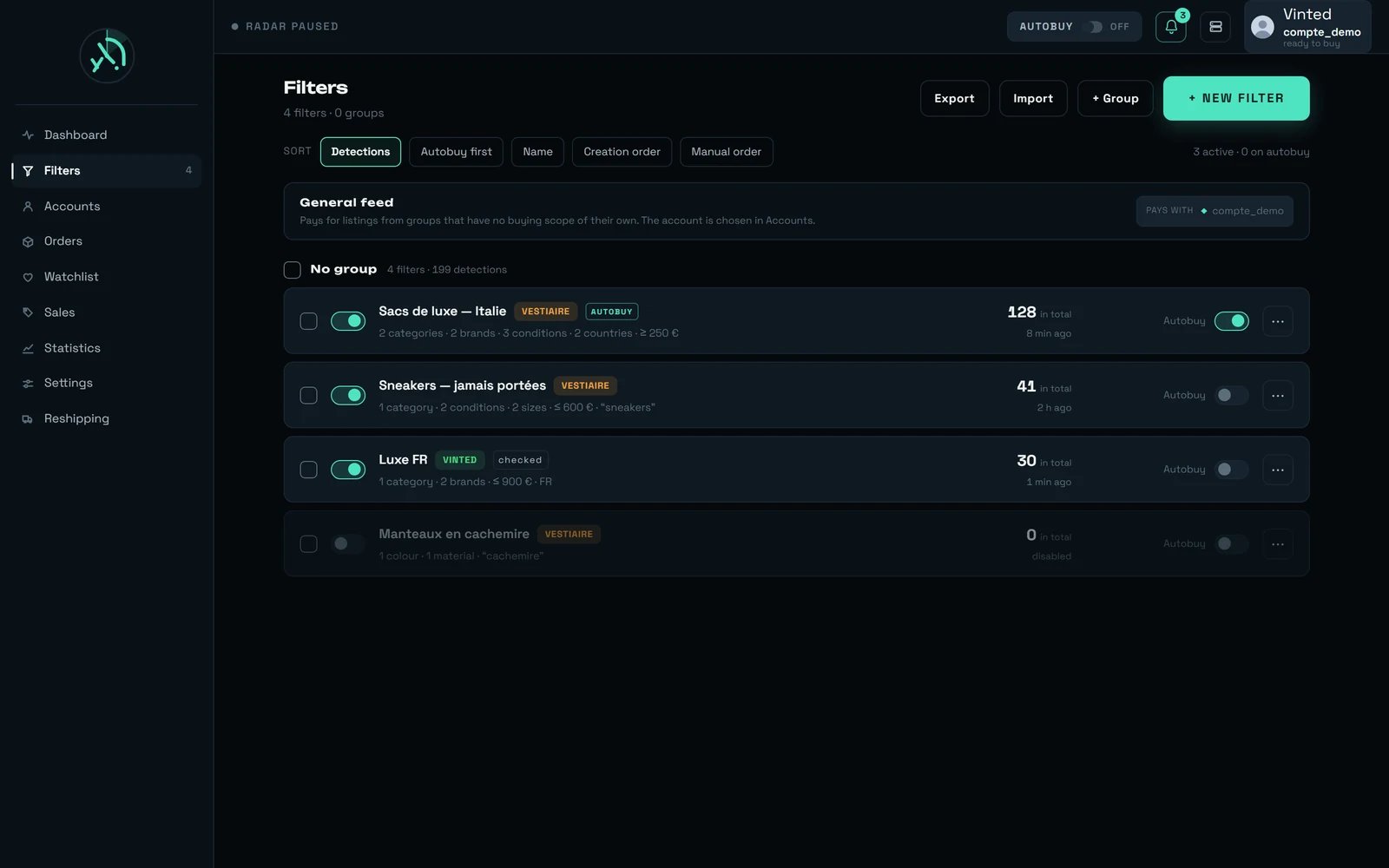 **Arming is per filter, one tick box at a time.** A new filter never starts filling baskets on its own — it is disarmed by default, and it can be armed straight from the creation window. Arming filters in bulk is **refused**: it would fill as many baskets as there are filters, in one gesture, without ever announcing the number.
**Arming Autobuy and starting the watch are two different things.** The watch needs nothing but an **active** Vestiaire filter: there is no radar button anywhere in the product. Autobuy is the extra tick that lets rega go as far as a prepared basket while you are away. One filter can be active without it.
Why not open the payment at detection time, rather than at your click? Because opening it early would **burn the payment reference**, and the bank challenge would already be dead for someone who looks at their phone twenty minutes later. It is opened fresh, at the moment you click.
### The fifteen minutes, and what they are not
You get **15 minutes** to confirm. The panel counts them down — “You have `{minutes}` min left to confirm.”, then “You have less than a minute left to confirm.” — and says what happens if you do nothing: “After that, nothing is charged: the purchase is simply dropped and the account becomes available again.”
**That number is a judgement call, not a measurement**, and we would rather write it than let you assume otherwise. What has been measured is that an accepted offer is valid for 24 hours and reserves nothing. What has **not** been measured is how long a Vestiaire basket keeps its contents. The 15 minutes sit between two real costs: too short and you miss the notification, too long and the account is blocked for every other detection. It is neither a spending guardrail nor a cap.
The notification carries the **basket total**, delivery included — never the listing price: “A purchase is waiting for you — `{montant}` `{devise}`” / “The basket is ready and nothing has been charged. Your bank will ask you to confirm: you have `{minutes}` min. Without your confirmation, the purchase simply will not happen.” It never claims the item is reserved for you: how long a Vestiaire basket keeps what it holds has never been measured, so nothing here promises the item will still be there.
Following that notification opens a page of its own — the same one your bank's confirmation is answered on, outside the product's navigation on purpose. It shows the amount under “Basket total, delivery included”, names the filter that found it with `Found by “{filtre}”`, and carries two buttons: **“Confirm with my bank”** and **“Do not buy”**. When there is nothing left to confirm it says so in full: “No purchase is waiting for your confirmation. Any that were waiting have been confirmed, cancelled, or ran out of time — in every case, nothing was charged.”
### Why a detection may not arm a purchase
None of these is a spending guardrail: nothing here judges a price, an opportunity or a pace. They all say the same thing — *we do not ask you to confirm a payment we could not describe correctly.*
| Reason | What it means |
| ---------------------------------------------------------------------- | ----------------------------------------------------------------------------- |
| The filter is not armed | Semi-automatic buying is not ticked on that filter |
| One of the filter's criteria could not be read | We do not buy what we could not read |
| The listing was **already sold** when we found it | It is shown to you, it is not bought |
| No eligible paying account | A Vestiaire listing is only paid with a Vestiaire account, never a Vinted one |
| The account is busy | A preparation or a validation already holds it |
| The account has no dedicated network address | There is **no fallback** on this point |
| The marketplace refused the basket, the delivery or the payment method | The preparation stopped before anything was engaged |
| The basket total could not be read | We give up rather than announce a figure we are not sure of |
**Pending validations do not survive a restart of the service.** Nothing is charged — none of them had reached the confirmation — and the next preparation empties the basket. If the purchase can no longer be opened when you click, you are told why: “This purchase could not be opened. The item may have been sold in the meantime — nothing was charged.”
***
## What can refuse a purchase, and what it means
### The card and the bank
| What you read | What to do |
| ---------------------------------------------------------------------------------------------------- | ----------------------------------------------------------- |
| “No usable card is saved in rega for this account: the payment was not opened.” | Save the card, or its security code alone, on that account |
| “No card is set for this account: the payment could not be opened.” | Pick which card the account pays with |
| “The card saved in rega does not match any usable card on this Vestiaire account. Nothing was paid.” | The card was changed or removed at Vestiaire; save it again |
| “Vestiaire did not accept the saved card for this order. Nothing was paid.” | Try another card on that account |
| “Your bank declined the payment. Nothing was charged. Try another card.” | The refusal comes from your bank, not from the marketplace |
| “Your bank did not approve this confirmation. Nothing was charged.” | Start the purchase again |
| “Your bank's security check did not go through. Nothing was paid.” | Start the purchase again |
| “Your bank's security check could not be opened. Nothing was paid.” | Start the purchase again |
| “This bank confirmation can no longer be opened. Nothing was charged: start the purchase again.” | The challenge expired on your bank's side |
| “Your bank's answer could not be read. Nothing was charged: you can start the purchase again.” | — |
| “Vestiaire replied in a way we cannot read. Nothing was paid.” | Try again in a moment |
### The account, the basket and delivery
| What you read | What to do |
| ---------------------------------------------------------------------------------------------------------------------------- | ----------------------------------------------------------------- |
| “Connect a Vestiaire account to buy, make an offer or add to favourites.” | See [Your Vestiaire accounts](/vestiaire/accounts) |
| “A purchase is already under way on this account. Wait for it to finish…” | Wait. Do not start again |
| “A payment is already waiting on this account, and both share the same basket. Resume it, or cancel it to free the account.” | Use the banner: “Resume”, or “Cancel payment” |
| “No delivery address could be set for this account. The purchase was stopped before any payment.” | Add a delivery address to the account |
| “The pick-up point saved for this account (`{nom}`) is not offered by Vestiaire for this order…” | Choose another point, or switch to home delivery |
| “Your Vestiaire basket already holds an item. Empty it to display pickup points…” | Empty the basket at Vestiaire, or finish the purchase in progress |
| “Your Vestiaire basket could not be read. Nothing was changed.” | Try again in a moment |
| “Pickup points could not be displayed. Your basket was not changed.” | Try again; nothing was engaged |
| “Add a delivery address to see the pick-up points.” | The map has no meaning without an address |
| “Choose the delivery address first: a pick-up point only makes sense for the address that produced it.” | Set the address, then open the map |
A refusal from Vestiaire never signs you out of rega. It is the marketplace refusing something, not us: the message is red, the screen stays where it was, nothing else moves.
***
## What surprises people
On Vinted you can run two purchases side by side on one account. Here you cannot: one basket, one account, one purchase at a time. Everything else on this page follows from that single fact — the emptying, the lock, the banner, and the pick-up map needing a borrowed item.
And it is written in the confirmation before it happens. If you keep a shortlist in your Vestiaire basket, move it to your favourites first: the preparation does not sort, it clears.
Three items out of five, measured in a row, simply do not ship to a pick-up point. The marketplace expresses that with an empty list and a perfectly ordinary answer — which is why we distinguish “no point near here” from “this order does not accept them”.
The marketplace sends the home price and the pick-up price together, every time. So the amount you see for the mode you did not choose is real — it is not an error.
The negotiated price goes down to the basket on its own, with no extra step. Then postage is added on top: an accepted offer of €3,400 was billed **€3,890**. See [Making an offer](/vestiaire/offers).
We never write “paid” on a Vestiaire purchase, because the marketplace never says it. Anything more definite would be us inventing an outcome we cannot read.
The second one lands on the same state and says so: “This payment was already closed — the account is free.”
Yours may have one; ours does not. Adding a timer would have turned a challenge measured at 18 seconds and three submissions into a fake abandonment.
***
## What buying on Vestiaire does not do yet
We would rather write it here than let you find out halfway through.
**The bank confirmation does not display, so a Vestiaire purchase cannot be completed from rega today.** Measured on 21 August: the payment opens, the page opens, and the frame that should carry your bank stays blank. The cause is known and the fix is being worked on; we put no date on it.
What to do while it lasts:
1. **Cancel the payment** from the banner at the top of the dashboard — **“Cancel payment”**. Until you do, no other Vestiaire purchase can go out from that account: the basket is shared.
2. **Nothing is charged** in this case, and the banner says so itself: “Payment cancelled and basket emptied — the account can buy again. rega never requested the money for this one. The item is no longer reserved for you.”
Everything before that step is unaffected: preparing, delivery, the pick-up map, offers and the basket total all work.
The Orders screen knows nothing about Vestiaire. Once a payment has been requested, the order lives in your Vestiaire account and nowhere else in rega — including when a purchase notification takes you to that screen.
A Vestiaire card looks the same in a feed tab of your own, but its buy button does nothing there, without a message. Start the purchase from the dashboard feed.
Nothing rereads the state of a payment, because nothing can. The last thing rega knows is that the confirmation went out.
The link is served, the amount is right, and there our knowledge stops. Check the order at Vestiaire before starting over.
There is no way to draw that map on an empty basket. Borrowing an item is the only route, and it needs one of your own.
Elsewhere the map admits it does not know where the address is, rather than placing a pin that would be wrong.
Deliberate: an obligation kept on disk would be a lock under another name. Nothing is charged, and the next preparation clears the basket.
The marketplace announces them — €23.12 on the order measured above — but rega shows you the total that contains them, not the breakdown.
Offers stay a manual gesture, by decision. Nothing in semi-automatic buying negotiates a price.
**We do not publish a duration for a Vestiaire purchase.** Vinted has one, measured end to end; this marketplace does not, and a plausible figure would be a promise the product never made. What is measured here is the bank challenge — **18 seconds, three form submissions** — and that part is neither ours nor shortenable.
***
## Where to go next
Connecting an account, the card panel, and the five health points a purchase needs.
The floor, the irreversible rise, and why an accepted offer reserves nothing.
Manual validation, the pace of the radar, and what a shared watch means.
Every criterion, what it costs — and why a price cap does not measure the total.
The feed both marketplaces arrive in, the cards, and the banner that brings a payment back to you.
The same question on Vinted: caps, the total debited, and what spends without you.
**Arming is per filter, one tick box at a time.** A new filter never starts filling baskets on its own — it is disarmed by default, and it can be armed straight from the creation window. Arming filters in bulk is **refused**: it would fill as many baskets as there are filters, in one gesture, without ever announcing the number.
**Arming Autobuy and starting the watch are two different things.** The watch needs nothing but an **active** Vestiaire filter: there is no radar button anywhere in the product. Autobuy is the extra tick that lets rega go as far as a prepared basket while you are away. One filter can be active without it.
Why not open the payment at detection time, rather than at your click? Because opening it early would **burn the payment reference**, and the bank challenge would already be dead for someone who looks at their phone twenty minutes later. It is opened fresh, at the moment you click.
### The fifteen minutes, and what they are not
You get **15 minutes** to confirm. The panel counts them down — “You have `{minutes}` min left to confirm.”, then “You have less than a minute left to confirm.” — and says what happens if you do nothing: “After that, nothing is charged: the purchase is simply dropped and the account becomes available again.”
**That number is a judgement call, not a measurement**, and we would rather write it than let you assume otherwise. What has been measured is that an accepted offer is valid for 24 hours and reserves nothing. What has **not** been measured is how long a Vestiaire basket keeps its contents. The 15 minutes sit between two real costs: too short and you miss the notification, too long and the account is blocked for every other detection. It is neither a spending guardrail nor a cap.
The notification carries the **basket total**, delivery included — never the listing price: “A purchase is waiting for you — `{montant}` `{devise}`” / “The basket is ready and nothing has been charged. Your bank will ask you to confirm: you have `{minutes}` min. Without your confirmation, the purchase simply will not happen.” It never claims the item is reserved for you: how long a Vestiaire basket keeps what it holds has never been measured, so nothing here promises the item will still be there.
Following that notification opens a page of its own — the same one your bank's confirmation is answered on, outside the product's navigation on purpose. It shows the amount under “Basket total, delivery included”, names the filter that found it with `Found by “{filtre}”`, and carries two buttons: **“Confirm with my bank”** and **“Do not buy”**. When there is nothing left to confirm it says so in full: “No purchase is waiting for your confirmation. Any that were waiting have been confirmed, cancelled, or ran out of time — in every case, nothing was charged.”
### Why a detection may not arm a purchase
None of these is a spending guardrail: nothing here judges a price, an opportunity or a pace. They all say the same thing — *we do not ask you to confirm a payment we could not describe correctly.*
| Reason | What it means |
| ---------------------------------------------------------------------- | ----------------------------------------------------------------------------- |
| The filter is not armed | Semi-automatic buying is not ticked on that filter |
| One of the filter's criteria could not be read | We do not buy what we could not read |
| The listing was **already sold** when we found it | It is shown to you, it is not bought |
| No eligible paying account | A Vestiaire listing is only paid with a Vestiaire account, never a Vinted one |
| The account is busy | A preparation or a validation already holds it |
| The account has no dedicated network address | There is **no fallback** on this point |
| The marketplace refused the basket, the delivery or the payment method | The preparation stopped before anything was engaged |
| The basket total could not be read | We give up rather than announce a figure we are not sure of |
**Pending validations do not survive a restart of the service.** Nothing is charged — none of them had reached the confirmation — and the next preparation empties the basket. If the purchase can no longer be opened when you click, you are told why: “This purchase could not be opened. The item may have been sold in the meantime — nothing was charged.”
***
## What can refuse a purchase, and what it means
### The card and the bank
| What you read | What to do |
| ---------------------------------------------------------------------------------------------------- | ----------------------------------------------------------- |
| “No usable card is saved in rega for this account: the payment was not opened.” | Save the card, or its security code alone, on that account |
| “No card is set for this account: the payment could not be opened.” | Pick which card the account pays with |
| “The card saved in rega does not match any usable card on this Vestiaire account. Nothing was paid.” | The card was changed or removed at Vestiaire; save it again |
| “Vestiaire did not accept the saved card for this order. Nothing was paid.” | Try another card on that account |
| “Your bank declined the payment. Nothing was charged. Try another card.” | The refusal comes from your bank, not from the marketplace |
| “Your bank did not approve this confirmation. Nothing was charged.” | Start the purchase again |
| “Your bank's security check did not go through. Nothing was paid.” | Start the purchase again |
| “Your bank's security check could not be opened. Nothing was paid.” | Start the purchase again |
| “This bank confirmation can no longer be opened. Nothing was charged: start the purchase again.” | The challenge expired on your bank's side |
| “Your bank's answer could not be read. Nothing was charged: you can start the purchase again.” | — |
| “Vestiaire replied in a way we cannot read. Nothing was paid.” | Try again in a moment |
### The account, the basket and delivery
| What you read | What to do |
| ---------------------------------------------------------------------------------------------------------------------------- | ----------------------------------------------------------------- |
| “Connect a Vestiaire account to buy, make an offer or add to favourites.” | See [Your Vestiaire accounts](/vestiaire/accounts) |
| “A purchase is already under way on this account. Wait for it to finish…” | Wait. Do not start again |
| “A payment is already waiting on this account, and both share the same basket. Resume it, or cancel it to free the account.” | Use the banner: “Resume”, or “Cancel payment” |
| “No delivery address could be set for this account. The purchase was stopped before any payment.” | Add a delivery address to the account |
| “The pick-up point saved for this account (`{nom}`) is not offered by Vestiaire for this order…” | Choose another point, or switch to home delivery |
| “Your Vestiaire basket already holds an item. Empty it to display pickup points…” | Empty the basket at Vestiaire, or finish the purchase in progress |
| “Your Vestiaire basket could not be read. Nothing was changed.” | Try again in a moment |
| “Pickup points could not be displayed. Your basket was not changed.” | Try again; nothing was engaged |
| “Add a delivery address to see the pick-up points.” | The map has no meaning without an address |
| “Choose the delivery address first: a pick-up point only makes sense for the address that produced it.” | Set the address, then open the map |
A refusal from Vestiaire never signs you out of rega. It is the marketplace refusing something, not us: the message is red, the screen stays where it was, nothing else moves.
***
## What surprises people
On Vinted you can run two purchases side by side on one account. Here you cannot: one basket, one account, one purchase at a time. Everything else on this page follows from that single fact — the emptying, the lock, the banner, and the pick-up map needing a borrowed item.
And it is written in the confirmation before it happens. If you keep a shortlist in your Vestiaire basket, move it to your favourites first: the preparation does not sort, it clears.
Three items out of five, measured in a row, simply do not ship to a pick-up point. The marketplace expresses that with an empty list and a perfectly ordinary answer — which is why we distinguish “no point near here” from “this order does not accept them”.
The marketplace sends the home price and the pick-up price together, every time. So the amount you see for the mode you did not choose is real — it is not an error.
The negotiated price goes down to the basket on its own, with no extra step. Then postage is added on top: an accepted offer of €3,400 was billed **€3,890**. See [Making an offer](/vestiaire/offers).
We never write “paid” on a Vestiaire purchase, because the marketplace never says it. Anything more definite would be us inventing an outcome we cannot read.
The second one lands on the same state and says so: “This payment was already closed — the account is free.”
Yours may have one; ours does not. Adding a timer would have turned a challenge measured at 18 seconds and three submissions into a fake abandonment.
***
## What buying on Vestiaire does not do yet
We would rather write it here than let you find out halfway through.
**The bank confirmation does not display, so a Vestiaire purchase cannot be completed from rega today.** Measured on 21 August: the payment opens, the page opens, and the frame that should carry your bank stays blank. The cause is known and the fix is being worked on; we put no date on it.
What to do while it lasts:
1. **Cancel the payment** from the banner at the top of the dashboard — **“Cancel payment”**. Until you do, no other Vestiaire purchase can go out from that account: the basket is shared.
2. **Nothing is charged** in this case, and the banner says so itself: “Payment cancelled and basket emptied — the account can buy again. rega never requested the money for this one. The item is no longer reserved for you.”
Everything before that step is unaffected: preparing, delivery, the pick-up map, offers and the basket total all work.
The Orders screen knows nothing about Vestiaire. Once a payment has been requested, the order lives in your Vestiaire account and nowhere else in rega — including when a purchase notification takes you to that screen.
A Vestiaire card looks the same in a feed tab of your own, but its buy button does nothing there, without a message. Start the purchase from the dashboard feed.
Nothing rereads the state of a payment, because nothing can. The last thing rega knows is that the confirmation went out.
The link is served, the amount is right, and there our knowledge stops. Check the order at Vestiaire before starting over.
There is no way to draw that map on an empty basket. Borrowing an item is the only route, and it needs one of your own.
Elsewhere the map admits it does not know where the address is, rather than placing a pin that would be wrong.
Deliberate: an obligation kept on disk would be a lock under another name. Nothing is charged, and the next preparation clears the basket.
The marketplace announces them — €23.12 on the order measured above — but rega shows you the total that contains them, not the breakdown.
Offers stay a manual gesture, by decision. Nothing in semi-automatic buying negotiates a price.
**We do not publish a duration for a Vestiaire purchase.** Vinted has one, measured end to end; this marketplace does not, and a plausible figure would be a promise the product never made. What is measured here is the bank challenge — **18 seconds, three form submissions** — and that part is neither ours nor shortenable.
***
## Where to go next
Connecting an account, the card panel, and the five health points a purchase needs.
The floor, the irreversible rise, and why an accepted offer reserves nothing.
Manual validation, the pace of the radar, and what a shared watch means.
Every criterion, what it costs — and why a price cap does not measure the total.
The feed both marketplaces arrive in, the cards, and the banner that brings a payment back to you.
The same question on Vinted: caps, the total debited, and what spends without you.