> ## Documentation Index
> Fetch the complete documentation index at: https://docs.regasolutions.io/llms.txt
> Use this file to discover all available pages before exploring further.
# Writing a Vestiaire filter
> Every criterion a Vestiaire filter can carry, what it keeps, what it costs you in coverage, how keywords and prices really behave, and what happens when two criteria contradict each other.
A Vestiaire filter is decided **entirely at our end**. Nothing you tick is ever sent to the marketplace **to decide a detection**: the radar asks Vestiaire for listings, and your criteria are applied here, on every one of them. Your criteria do leave for the marketplace in exactly one place — the preview counter at the top of the form, which counts and never detects. That single fact explains almost everything on this page — including the one thing that surprises people most, which is that a criterion is free in time and can still be expensive in coverage.
 **Where the form is.** **Filters**, in the left-hand menu → **“+ New filter”** → the **“Which marketplace?”** window → the **Vestiaire Collective** card. There is no separate Vestiaire screen to open: the filters of both marketplaces live in that one list, and the listings they keep arrive in the dashboard feed. The guided tour of that screen is [here](/screens/filters); this page is the trade manual behind it.
***
## Getting to the form
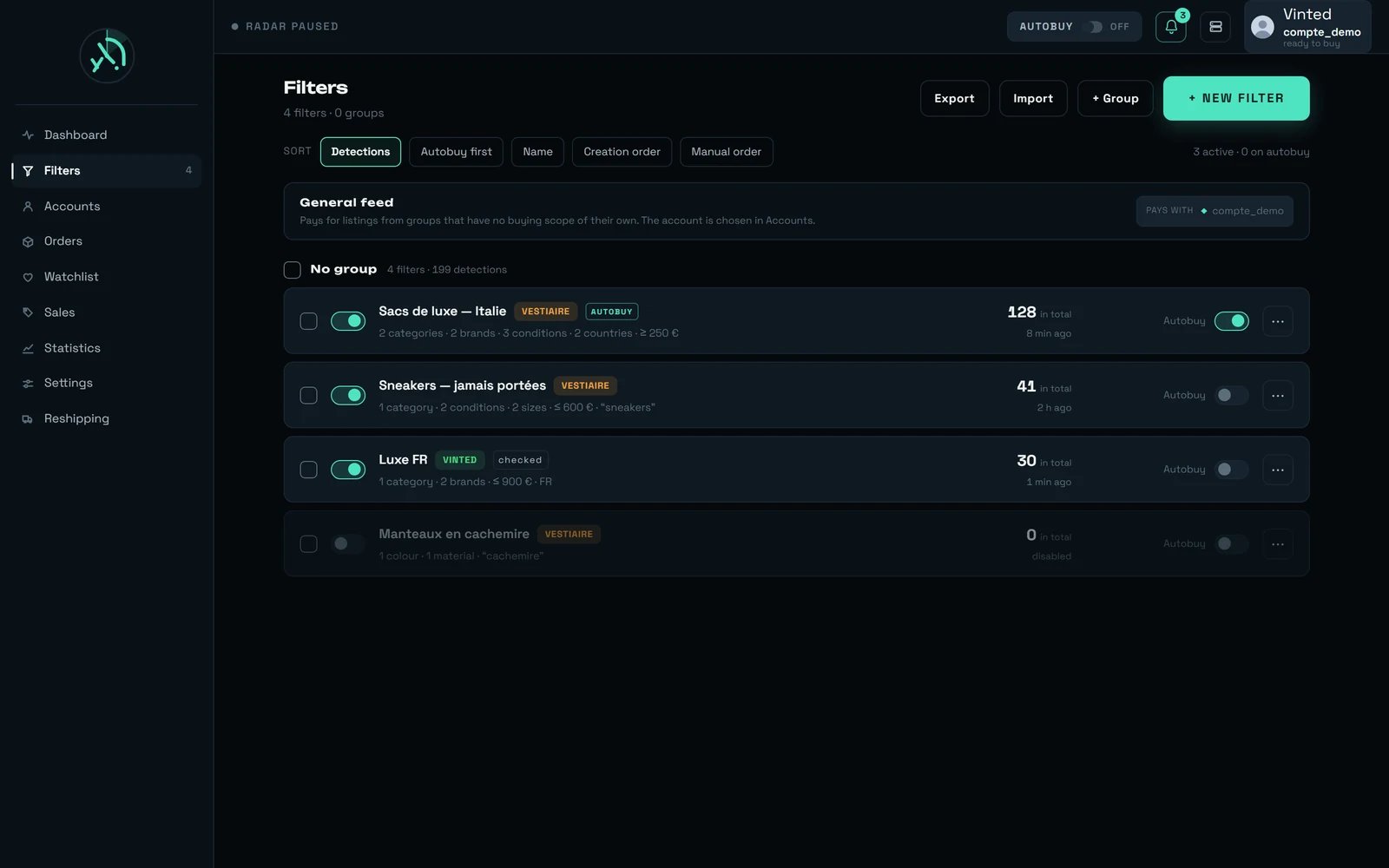
Vinted filters and Vestiaire filters sit in **one single list**, sorted together. Each row states its marketplace **in writing** — a **VINTED** or **VESTIAIRE** pill — never by colour alone.
Top right of the screen. It is the same button for both marketplaces: nothing has to be switched to Vestiaire beforehand.
Two cards, Vinted and Vestiaire Collective. The line under the title is worth reading twice: “The two share neither their criteria nor their settings. This choice cannot be changed later.”
The window closes and the criteria form opens on an empty draft, with “Vestiaire Collective” written in its header. Everything described below is that form.
A confirmation names the marketplace the filter was created on, and the new row joins the list with its **VESTIAIRE** pill.
**Where the form is.** **Filters**, in the left-hand menu → **“+ New filter”** → the **“Which marketplace?”** window → the **Vestiaire Collective** card. There is no separate Vestiaire screen to open: the filters of both marketplaces live in that one list, and the listings they keep arrive in the dashboard feed. The guided tour of that screen is [here](/screens/filters); this page is the trade manual behind it.
***
## Getting to the form
Vinted filters and Vestiaire filters sit in **one single list**, sorted together. Each row states its marketplace **in writing** — a **VINTED** or **VESTIAIRE** pill — never by colour alone.
Top right of the screen. It is the same button for both marketplaces: nothing has to be switched to Vestiaire beforehand.
Two cards, Vinted and Vestiaire Collective. The line under the title is worth reading twice: “The two share neither their criteria nor their settings. This choice cannot be changed later.”
The window closes and the criteria form opens on an empty draft, with “Vestiaire Collective” written in its header. Everything described below is that form.
A confirmation names the marketplace the filter was created on, and the new row joins the list with its **VESTIAIRE** pill.
 **The marketplace is decided once, at creation.** An existing filter never goes back through that window — editing it reopens the form of its own marketplace, and nothing turns a Vinted filter into a Vestiaire one. To carry a set of criteria across, write the filter again on the other side.
**The Vestiaire card is offered to everyone**, with or without a Vestiaire account. A filter detects on its own; an account is what an offer or a purchase needs, never a detection. What one costs you and what it buys you is in [Your Vestiaire accounts](/vestiaire/accounts).
***
## The one rule that governs the whole form
Three sentences, and the rest follows from them.
1. **An empty field is not a constraint.** It is freedom you are giving the radar, never an oversight.
2. **A field the listing does not carry never satisfies a constraint you set.** It refuses the listing — it never lets it through by default. We would rather lose a detection than manufacture a false one.
3. **Between two different criteria it is an AND; inside a single criterion it is an OR.** Three brands widen; a brand plus a colour narrows.
That third rule is the one people misread. Ticking Gucci, Prada and Chloé asks for *any of the three*. Ticking Gucci **and** the colour black **and** Italy asks for *all three at once*, and each one you add can only shrink what comes back.
With nothing ticked at all, the form warns you before you save: “With no constraint, this filter will keep every listing.” It is a legitimate choice — see [what a filter that is too wide gives you](#what-a-filter-that-is-too-wide-gives-you) — but it should be a decision.
***
## The seventeen things a filter can carry
The form edits **seventeen** fields, and this is the complete list. Nothing else exists — anything not in this table is either a behaviour switch (further down) or something the product does not offer yet.
| № | As the form names it | What it keeps | What you can choose | Left empty |
| ------ | -------------------------------- | ---------------------------------------- | ----------------------------------------------------------------------------------------------------------------------------------------------------------------------------------------- | ----------------------------------------------------- |
| **1** | “Brands” | Listings of those brands | **17,530** brands in the catalogue, **13,679** of them active — only the active ones are offered | Any brand |
| **2** | “Category” — the universe | Women, Men or Children | **3** values | Any universe |
| **3** | “Category” — first level | The aisle (“Clothing”) | **14** values measured | Any aisle |
| **4** | “Category” — second level | The family (“Dresses”) | **99 to 112** values, depending on what you have already ticked | Any family |
| **5** | “Category” — third level | The finest cut the tree offers | Up to **229** values with nothing else ticked | Any of them |
| **6** | The models carried by the filter | A precise model | **Not choosable.** The marketplace publishes no list of models, and the field is missing from **79 %** of listings. The form shows what the filter already carries and lets you remove it | No model demanded |
| **7** | “Condition” | The state of the item | **5** values | Any condition |
| **8** | “Colour” | The colour as the marketplace indexes it | **24** values, **22** of which have a swatch in the product | Any colour |
| **9** | “Material” | The material | **56** top-level values and **19** finer ones | Any material |
| **10** | “Sizes” | A size, scale by scale | **24** scales exist. **None is offered until you tick a category** — under “Women › Clothing › Dresses”, exactly **one** comes back | Any size |
| **11** | “Seller's country” | The origin | The marketplace offers **71** countries; “From Europe” is **29** of them | Any origin |
| **12** | “Minimum price (€)” | A floor | Whole euros | No floor |
| **13** | “Maximum price (€)” | A ceiling | Whole euros | **No ceiling at all** — an empty field bounds nothing |
| **14** | “Keywords” | Words that must appear | Free text; “Every word must be present.” | No word demanded |
| **15** | “Words to rule out” | Words that disqualify | Free text; “A single one is enough to rule the listing out.” | No word ruled out |
| **16** | “Whole word” | How words are compared | A switch, **off** by default | “bag” also finds “bagged” |
| **17** | “Ignore accents” | How words are compared | A switch, **on** by default | Turned off, “chine” no longer finds “chiné” |
Fields **16** and **17** are not criteria of their own: they govern **both** word lists at once. The form states it rather than hiding it — “Both settings apply to both lists, and words are searched in the title as well as in the description.”
***
## Every criterion is free in time — some are paid for in coverage
On Vinted, a criterion can cost you milliseconds, and the form prices each one. **Here, nothing costs time**: your criteria never travel to the marketplace on the detection path, so no criterion can slow a detection down. What some of them cost instead is **coverage** — and that price is not written on any screen, so this is where we write it.
The radar reads Vestiaire two ways at once, and the two do not carry the same information about a listing.
One listing at a time. It is the only read that gives freshness: on a measured sample it saw **77 out of 77** listings, and it serves the listing **at the very moment it is validated** — the shortest delay measured was around **0 seconds**.
Four hundred listings in one go. It saw **54 out of 77**, and the **23** it missed were precisely the freshest — created **149 to 229 seconds** earlier. It lags **3 to 5 minutes** behind, and exists for completeness, never for speed.
Here is what each read can decide about a listing. This table is the most useful thing on this page.
| The criterion | Decidable on the item read | Decidable on the batch read |
| -------------------------- | -------------------------- | --------------------------- |
| Brand | yes | yes |
| Model | yes | yes |
| Price | yes | yes |
| Keywords | yes | yes |
| Universe | yes | yes |
| Colour | yes | yes |
| **Seller's country** | **no** | yes |
| **Size** | **no** | yes |
| **Condition** | yes | **no** |
| **Material** | yes | **no** |
| Category, first two levels | yes | learned, at no extra cost |
| **Category, third level** | yes | **no, and definitively** |
**What that means for you, in three lines.**
* Constraining the **seller's country** rules out the item read — so nothing will be kept during a listing's first few minutes.
* Constraining a **size** rules out the item read as well, **and** rules out bags, jewellery and watches, whose listings carry no size at all.
* Constraining the **condition**, the **material** or the **third category level** rules out the batch read — you keep all the freshness, you lose the catch-up.
The “learned” line deserves a word, because it costs nothing and it works. Every listing read one at a time teaches us how its address maps onto the first two category levels, and the batch read then reuses that lesson for free — verified **6 times out of 6**. When two addresses would teach contradictory lessons, we **arbitrate nothing**: that address stays ambiguous for good. It is the same principle as everywhere else here — losing a detection is cheaper than inventing one.
```mermaid theme={null}
flowchart TD
A["A listing is validated by hand
**The marketplace is decided once, at creation.** An existing filter never goes back through that window — editing it reopens the form of its own marketplace, and nothing turns a Vinted filter into a Vestiaire one. To carry a set of criteria across, write the filter again on the other side.
**The Vestiaire card is offered to everyone**, with or without a Vestiaire account. A filter detects on its own; an account is what an offer or a purchase needs, never a detection. What one costs you and what it buys you is in [Your Vestiaire accounts](/vestiaire/accounts).
***
## The one rule that governs the whole form
Three sentences, and the rest follows from them.
1. **An empty field is not a constraint.** It is freedom you are giving the radar, never an oversight.
2. **A field the listing does not carry never satisfies a constraint you set.** It refuses the listing — it never lets it through by default. We would rather lose a detection than manufacture a false one.
3. **Between two different criteria it is an AND; inside a single criterion it is an OR.** Three brands widen; a brand plus a colour narrows.
That third rule is the one people misread. Ticking Gucci, Prada and Chloé asks for *any of the three*. Ticking Gucci **and** the colour black **and** Italy asks for *all three at once*, and each one you add can only shrink what comes back.
With nothing ticked at all, the form warns you before you save: “With no constraint, this filter will keep every listing.” It is a legitimate choice — see [what a filter that is too wide gives you](#what-a-filter-that-is-too-wide-gives-you) — but it should be a decision.
***
## The seventeen things a filter can carry
The form edits **seventeen** fields, and this is the complete list. Nothing else exists — anything not in this table is either a behaviour switch (further down) or something the product does not offer yet.
| № | As the form names it | What it keeps | What you can choose | Left empty |
| ------ | -------------------------------- | ---------------------------------------- | ----------------------------------------------------------------------------------------------------------------------------------------------------------------------------------------- | ----------------------------------------------------- |
| **1** | “Brands” | Listings of those brands | **17,530** brands in the catalogue, **13,679** of them active — only the active ones are offered | Any brand |
| **2** | “Category” — the universe | Women, Men or Children | **3** values | Any universe |
| **3** | “Category” — first level | The aisle (“Clothing”) | **14** values measured | Any aisle |
| **4** | “Category” — second level | The family (“Dresses”) | **99 to 112** values, depending on what you have already ticked | Any family |
| **5** | “Category” — third level | The finest cut the tree offers | Up to **229** values with nothing else ticked | Any of them |
| **6** | The models carried by the filter | A precise model | **Not choosable.** The marketplace publishes no list of models, and the field is missing from **79 %** of listings. The form shows what the filter already carries and lets you remove it | No model demanded |
| **7** | “Condition” | The state of the item | **5** values | Any condition |
| **8** | “Colour” | The colour as the marketplace indexes it | **24** values, **22** of which have a swatch in the product | Any colour |
| **9** | “Material” | The material | **56** top-level values and **19** finer ones | Any material |
| **10** | “Sizes” | A size, scale by scale | **24** scales exist. **None is offered until you tick a category** — under “Women › Clothing › Dresses”, exactly **one** comes back | Any size |
| **11** | “Seller's country” | The origin | The marketplace offers **71** countries; “From Europe” is **29** of them | Any origin |
| **12** | “Minimum price (€)” | A floor | Whole euros | No floor |
| **13** | “Maximum price (€)” | A ceiling | Whole euros | **No ceiling at all** — an empty field bounds nothing |
| **14** | “Keywords” | Words that must appear | Free text; “Every word must be present.” | No word demanded |
| **15** | “Words to rule out” | Words that disqualify | Free text; “A single one is enough to rule the listing out.” | No word ruled out |
| **16** | “Whole word” | How words are compared | A switch, **off** by default | “bag” also finds “bagged” |
| **17** | “Ignore accents” | How words are compared | A switch, **on** by default | Turned off, “chine” no longer finds “chiné” |
Fields **16** and **17** are not criteria of their own: they govern **both** word lists at once. The form states it rather than hiding it — “Both settings apply to both lists, and words are searched in the title as well as in the description.”
***
## Every criterion is free in time — some are paid for in coverage
On Vinted, a criterion can cost you milliseconds, and the form prices each one. **Here, nothing costs time**: your criteria never travel to the marketplace on the detection path, so no criterion can slow a detection down. What some of them cost instead is **coverage** — and that price is not written on any screen, so this is where we write it.
The radar reads Vestiaire two ways at once, and the two do not carry the same information about a listing.
One listing at a time. It is the only read that gives freshness: on a measured sample it saw **77 out of 77** listings, and it serves the listing **at the very moment it is validated** — the shortest delay measured was around **0 seconds**.
Four hundred listings in one go. It saw **54 out of 77**, and the **23** it missed were precisely the freshest — created **149 to 229 seconds** earlier. It lags **3 to 5 minutes** behind, and exists for completeness, never for speed.
Here is what each read can decide about a listing. This table is the most useful thing on this page.
| The criterion | Decidable on the item read | Decidable on the batch read |
| -------------------------- | -------------------------- | --------------------------- |
| Brand | yes | yes |
| Model | yes | yes |
| Price | yes | yes |
| Keywords | yes | yes |
| Universe | yes | yes |
| Colour | yes | yes |
| **Seller's country** | **no** | yes |
| **Size** | **no** | yes |
| **Condition** | yes | **no** |
| **Material** | yes | **no** |
| Category, first two levels | yes | learned, at no extra cost |
| **Category, third level** | yes | **no, and definitively** |
**What that means for you, in three lines.**
* Constraining the **seller's country** rules out the item read — so nothing will be kept during a listing's first few minutes.
* Constraining a **size** rules out the item read as well, **and** rules out bags, jewellery and watches, whose listings carry no size at all.
* Constraining the **condition**, the **material** or the **third category level** rules out the batch read — you keep all the freshness, you lose the catch-up.
The “learned” line deserves a word, because it costs nothing and it works. Every listing read one at a time teaches us how its address maps onto the first two category levels, and the batch read then reuses that lesson for free — verified **6 times out of 6**. When two addresses would teach contradictory lessons, we **arbitrate nothing**: that address stays ambiguous for good. It is the same principle as everywhere else here — losing a detection is cheaper than inventing one.
```mermaid theme={null}
flowchart TD
A["A listing is validated by hand
by the Vestiaire staff"] --> B["The radar meets it
during a sweep"]
B --> C{"Which read met it?"}
C -->|"the item read — the fresh one"| D{"Does your filter constrain
a size, or the country?"}
C -->|"the batch read — 3 to 5 min later"| E{"Does your filter constrain
the condition, the material,
or the third category level?"}
D -->|yes| X["Refused: that read does not
carry the dimension"]
E -->|yes| X
D -->|no| F{"Is every constrained
criterion satisfied?"}
E -->|no| F
F -->|no| Y["Not kept"]
F -->|yes| G["Kept — a detection line,
“seen in {n} s”"]
style G fill:#1f6f43,color:#fff
style X fill:#7a4b00,color:#fff
```
The radar counts, sweep after sweep, how many listings it had to refuse for a dimension the read did not carry. That count is kept and written down — it is simply not shown on your screen yet. It is listed among the limits at the bottom of this page.
***
## Criterion by criterion
**Field left empty**: nothing at all is offered. The list says “Start typing a brand name.”, and the line under the field says “Type two letters to search the whole brand catalogue.”
That silence is deliberate. The marketplace only ever hands back **one hundred** brands for your current scope, out of **17,530** — a list that would look complete while showing 0.6 % of the catalogue, and would make a brand that is merely absent from those hundred look like a brand that does not exist.
**Field filled in**, from two characters: the search covers the whole directory. Brands the marketplace already counts for your scope come first, **each with its count**; the rest of the catalogue follows, without one. **A missing count is not a count of zero** — the directory does not count, and we do not invent the number. When the search finds more than it can show, it says so: `{n} shown out of {total} found — narrow the search.`
A brand is the cheapest criterion in the form: decidable by both reads, and it narrows hard.
The universe (Women, Men, Children), then three levels of tree. The screen shows the full path, “Women › Clothing › Dresses”.
**They combine with AND, not with OR.** Ticking “Women” and then “Shoes (Men)” does not give you both: it gives the intersection, which is **nothing at all**. We do not forbid it — the preview counter says so immediately, in figures, and that is a more honest answer than a rule we would have guessed on your behalf.
The third level is one of **three** criteria the batch read cannot decide — the condition and the material are the other two. On **1,882 out of 1,882** listings read that way, the address stops one level above it, and nothing in the line lets us derive it. Constraining any of the three means asking to be told by the item read alone.
The number of values offered moves with what you have already ticked: **14** at the first level, **99 to 112** at the second, up to **229** at the third with nothing else set.
**Pick a category first.** With no category ticked, this field offers nothing at all and says only that: “Pick a category first: the sizes offered depend on it.” The marketplace does hand back eighteen scales when nothing is ticked — eighteen intervals of bare numbers, several of them starting on the same value, which is precisely why we no longer put them in front of you.
Once a category is set, sizes are offered **scale by scale**, and which scales appear depends on that category: under “Women › Clothing › Dresses”, exactly **one** comes back. The consequence is then written **above** the control, before you pick any size: “Constraining size rules out bags, jewellery and watches: the field is missing from 43 % of listings.”
A saved filter that already carries sizes always shows them, whatever its category — a constraint you cannot see is a constraint you cannot remove.
**Scales have no name.** They are shown by their two extremes, `Scale {de} – {a}`. The marketplace gives them no name, and inventing one (“Shoes EU”) would be writing down a piece of data we do not have.
And a size is kept as **the marketplace's own value**, never as its label — because one and the same size stands for “12 UK / 40 FR / 44 IT / 8 US / L International” all at once. A filter written on the label lost **40 %** of the matching items in the most favourable case measured: **49 out of 81**.
**24** values, **22** of them with a swatch in the product.
A “Blue” filter catches an item described as “Navy”, and a “Beige” filter catches a “Camel”. That is not a tolerance we added: **the marketplace indexes it that way**, and we read what it indexes.
One value behaves differently, and it is worth knowing: **“Other”** weighs **17,362** listings, and it comes with no parent colour at all — on **60 listings out of 60** probed. Judging colour on the parents alone would have thrown away at least ten thousand listings, so we do not.
**56** top-level values and **19** finer ones, and the two sets are independent of each other.
The direction matters, and it was measured across **8 crossings** with a control: ticking **“Exotic leather”** keeps an item described as **“Python”**; ticking **“Python”** does **not** keep an item described as “Exotic leather”. Tick the wider of the two when you hesitate.
Material is decidable on the item read only: constraining it rules out the batch read.
**5** values. Like the material, the condition is carried by the item read and not by the batch read, so constraining it costs you the catch-up and nothing else.
The condition label stored on a detection is the one from the sweep, which runs in French for everybody. What travels beside it is the **identifier**, and that is what your screen translates — so an English interface shows you an English condition even though the sweep read it in French.
Three modes: **“Any origin”** (“The seller's country is not constrained.”), **“From Europe”**, and **“Chosen countries”** (“Only listings sold from these countries will be kept.”). The marketplace offers **71** countries.
**“From Europe” is exactly 29 countries**, and it is the marketplace's own definition, not ours: Austria, Belgium, Bulgaria, Croatia, Cyprus, Czechia, Estonia, Finland, France, Germany, Greece, Hungary, Iceland, Ireland, Italy, Latvia, Liechtenstein, Lithuania, Luxembourg, Malta, Monaco, Poland, Portugal, Romania, Slovakia, Slovenia, Spain, Sweden and the Isle of Man.
**Denmark and the Netherlands are not in it** — and the Netherlands alone weighs **8,154** listings. Iceland, Liechtenstein, Monaco and the Isle of Man are. Three independent readings of the marketplace gave the same list, so we serve it as it stands rather than quietly correcting it into something you could not check.
One honesty point: the form calls this criterion **“Seller's country”**, and what is actually compared is the country **the listing** is in. On six items read through both doors, the two disagreed **twice**. Where you need the seller specifically, read the seller's country on the detection line.
The marketplace publishes **no list of models**, and the field is missing from **79 %** of listings. So there is nothing to pick from, and the form says exactly that: “The marketplace publishes no list of models: these are kept as they are, and can be removed.”
A filter that already carries models keeps them, shows how many — `{n} models carried by this filter` — and lets you take them off. That is the whole of it.
***
## Price: which number is being compared
Two fields, **“Minimum price (€)”** and **“Maximum price (€)”**, both in euros, both empty to begin with. Empty means no bound at all: with the ceiling left empty, no price is ever too high for the filter.
What matters is **which** price is compared, and it is not the one you will pay.
| The number | What it is | Measured on one real item |
| ---------------------------------- | -------------------------------------------------- | ------------------------- |
| The seller's price | What the seller asks | **€250.00** |
| The buyer's fee | What the marketplace adds on top | **€13.00** |
| **The price your filter compares** | Seller's price + buyer's fee, **postage excluded** | **€263.00** |
| Postage to a home address | Not compared | €14.90 |
| Postage to a pick-up point | Not compared | €9.90 |
**A price bound therefore does not compare what you will actually pay.** On the item above, a filter set to “under €270” keeps it, and postage is still to come on top — €14.90 to a home address, €9.90 to a pick-up point. That is a deliberate choice: the compared price is the one that exists at the moment of detection, while postage only exists once a delivery has been chosen. What an item really costs, every fee added, is set out in [Buying on Vestiaire](/vestiaire/buying).
There is **one** Vestiaire to read, and the country is a criterion applied to the listing — not a shop to choose. Nothing here resembles the Vinted rule where the origin you pick decides which shop is watched and a mismatched filter goes structurally blind. The interface language is a setting, and it changes nothing about what the radar sees: the sweep is shared by every client and runs once, in French, and your screen translates what it shows you.
***
## Keywords: the criterion nobody else applies for us
 Keywords are the one criterion that is **never** sent to the marketplace, not even for the preview counter. We check them ourselves, on every listing, in **the title and the description**.
| The rule | What it means in practice |
| --------------------------------------------------------------- | ---------------------------------------------------------------------------------------------------------------- |
| **Every word in “Keywords” must be present** | Three words is an AND, and it is the fastest way to write a silent filter |
| **A single word in “Words to rule out” is enough** | One match, and the listing is gone. Exclusions are cheap; use them |
| **The two lists are searched in the title AND the description** | A word buried in a long description brings in a listing you were not expecting |
| **“Whole word” is off by default** | So “bag” also finds “bagged”. The widest mode is the one that cannot make you miss a listing |
| **“Ignore accents” is on by default** | So “chine” finds “chiné” |
| **Both switches govern both lists** | Unlike the Vinted form, where each list carries its own mode. We write it on screen rather than let you find out |
**Keywords are not counted in the preview**, and the preview says so itself: “Keywords are not counted here: they are checked at detection time, against the title and the description.”
The reason is worth a sentence. The marketplace's own search is a **relevance** search, not a text match; mixing its answer with our rule would give you a believable number that belongs to neither. So the counter tells you what the rest of your criteria are worth, and your words are checked later, on each listing.
**One inclusion word, several exclusions.** That is the shape that works, here as on Vinted. Since we read the description too, an inclusion word is far wider than it looks — and an exclusion word far more useful.
***
## The preview counter, and what it is really telling you
At the top of the form sits **“On Vestiaire right now”**, followed by the number of listings that would match **at this instant**. It re-reads on its own while you tick.
| What it shows | What it means |
| ------------------------------------------------------------------------------------------- | ------------------------------------------------------------------------------------------------ |
| `{n}` | That many listings match your criteria right now — keywords excluded |
| “No criteria: every listing would be kept.” | Nothing is ticked |
| “No listing matches these criteria. Most often, two category levels contradict each other.” | Your criteria cancel each other out. This is the sentence to act on |
| `{n}+` | The marketplace stops counting at **10,000**. The `+` says it is a truncation, not a measurement |
| `Prices seen: from {de} to {a}` | The range covered by what matches |
| “The count could not be refreshed. The lists shown are still those of the last reading.” | The reading failed; nothing shown is invented, it is simply older |
**The marketplace applies your criteria in exactly one place: this counter.** Detections are decided entirely at our end, on a different path.
The consequence is worth knowing, because it makes the two easy to believe in agreement when they are not: **a fault in the counter shows on the counter and not on your detections — and the other way round**. The counter is an excellent way to catch a contradiction before saving. It is not proof that the filter will detect.
**The number next to a value says what you would GAIN, not what you have.** Each count is computed by relaxing that one value's own constraint and applying all the others. With Gucci ticked, type “max” in the brand field: Max Mara comes back with a count, and that count is what you would get **if** you ticked Max Mara as well.
***
## When two criteria contradict each other
| The case | What happens |
| -------------------------------------------------------------------- | ------------------------------------------------------------------------------------------------------------------------------------------------------------------------------------------------------- |
| Two different criteria | They combine with **AND**. Every constrained dimension has to be satisfied, and one clear refusal is enough |
| Several values inside one criterion | They combine with **OR**. Three brands, three colours, three countries all widen |
| Two category levels that do not belong together | The intersection, so **zero**. Nothing forbids it, and the counter says so at once |
| A criterion on a dimension the read does not carry | The listing is **refused**, never kept by default — and the refusal is counted rather than swallowed |
| No criterion at all | Everything is kept, and the form says so before you save |
| A material from the top level and one from the finer level, together | **We do not know how the marketplace combines them.** Our own rule keeps either of the two; the marketplace may require both. So a counter at zero in that one case does not prove your filter is empty |
That last row is not a gap we are hiding — it is the one contradiction case nobody has measured, and we would rather write it here than let you conclude something false from a zero.
***
## The four switches that are not criteria
Beyond the seventeen fields, a filter carries four decisions. They change what the filter *does*, not what it *keeps*.
| Switch | Default | What it does |
| ------------------- | -------------------------------------------------- | ----------------------------------------------------------------------------------------------------------------------------------------------------------------------------------------------------------------- |
| **The name** | “Unnamed filter” if you leave it blank at creation | An existing filter cannot be saved without one: “Give this filter a name so you can find it again.” A nameless filter used to fall back on a twelve-character identifier, which reads like nothing at all |
| **“Active filter”** | **on** | Unticked, the filter is kept but never confronted with a listing |
| **“Alert me”** | **off** | Ticked, every kept listing raises an alert. “An alert on every kept listing. A broad filter can produce a lot.” A new filter does not start ringing on its own |
| **“Autobuy”** | **off** | “As soon as a listing matches, rega reserves an account, fills the basket and prepares the payment — then warns you. You are the one who confirms with your bank: without your confirmation, nothing is charged.” |
**An active filter is what starts the watch.** There is no arming button anywhere in your menu, and there is nothing for you to click: creating an active Vestiaire filter is the request itself. **To stop detection, untick “Active filter”** — an inactive filter is kept, and never confronted with a listing.
One exception, which we would rather write than let you meet: if **every** one of your Vestiaire filters is inactive, re-ticking one does not put the watch back on its feet there and then. Creating a filter does. The watch also picks its state back up on its own after one of our updates.
**Autobuy never spends.** It reserves an account, empties and fills that account's basket, sets the delivery and takes the purchase up to the payment — and hands back. Nothing that runs without you can reach the step that actually charges a card: it is not a setting we could get wrong, it is a road that does not exist. What autobuy costs you is **your basket**, not your money: see [Buying on Vestiaire](/vestiaire/buying).
Once saved, the filter becomes a row in the Filters list, and that row is where the rest of its life is read.
| On the row | What it tells you |
| ----------------------------- | ---------------------------------------------------------------------------------------------------------------------------------------------------------------------------------------------------------------------------------- |
| The **VESTIAIRE** pill | The marketplace, written out. It is on every row of **both** marketplaces — an unlabelled row would be an answer in itself |
| The big number and “in total” | Listings kept **since the filter was created**, never a count for today. Under it, the freshness line: “8 min ago”, or “disabled”, or “no detection” |
| The **Autobuy** column | The same column and the same word as on a Vinted row — with **no cap beside it**, because no cap exists on this marketplace |
| The `⋯` menu | “Edit” · “Duplicate” · “Move to a group” · “Delete”. Two entries a Vinted row carries are missing here: “Duplicate by region”, which copies a filter across Vinted shops, and “See last listings”, whose history is Vinted's alone |
**The counter on the row is the only thing that tells you whether a filter works.** No description of criteria will ever say that they are too strict *together*. One hour after creating a filter, a row reading “0 in total · no detection” means widen it — drop the size first, then the colour, then one category level.
***
## What a filter that is too wide gives you
Listings are born on Vestiaire at about **24 per minute during the day** — measured over 7.8 continuous hours, between 13.5 and 46 per minute — and **7.2 per minute at night**, between 22:30 and 00:30 UTC. That is a ratio of **3.3**, and, in cadence, about **two hundred times slower than Vinted**.
So a filter that keeps most of that flow does not break anything. It simply gives you more than you can read.
At \~24 births a minute, a filter keeping most of them produces on the order of **35,000 detection lines a day**. That figure is a **calculation from the measured birth rate**, not a measurement of a real filter — we have never measured what a typical filter produces per day in production, and we will not publish a number we do not have.
Three things happen to a wide filter, and none of them is an error message:
* **The dashboard feed fills up with one marketplace.** Three buttons at the top of it — “Both”, “Vinted”, “Vestiaire” — decide what is painted, and a counter tells you how many cards are being hidden. Nothing else moves: “The radar keeps detecting them and autobuy keeps handling them — this setting only changes what is painted.”
* **“Alert me” becomes unbearable** long before the feed does. Leave it off until the counter on the row tells you the filter is calibrated.
* **Detections are wiped after 48 hours**, on their own, with no warning beforehand. Whatever you want to keep, favourite it or open it the same day.
**The first sweep after the watch starts notifies nothing.** It is an inventory: without that rule, your first filter would pour the couple of thousand listings already online onto you as if they had just been born. And a listing already filed is **never** filed again — the radar re-sees it on every sweep for as long as it stays in the window, and says nothing.
***
## A Vinted filter, a Vestiaire filter
What transposes, and what simply does not exist here. Read it as pairs.
| On a Vinted filter | On a Vestiaire filter |
| ------------------------------------------------------------------------------------------------------------------------------------------------------------------ | ------------------------------------------------------------------------------------------------------------------------------------------------------------------------------------------- |
| A filter must carry an **anchor** — a brand, a keyword of three characters, a category, a material — or it stays silent for ever, with nothing on screen to say so | **There is no anchor rule.** A filter with no criterion at all keeps everything, and the form warns you before you save |
| Criteria have a **price in milliseconds**: a category was measured at 15.8 s on 14/08, a precise origin at 362 ms, and the form prices each one | **No criterion costs time.** Nothing is pushed to the marketplace to detect. What some criteria cost is coverage — one of the two reads |
| Keywords are matched against the **title** | Keywords are matched against the **title and the description** |
| Each keyword list carries **its own mode** | **Two switches govern both lists**, and the form says so out loud |
| **MIN PRICE gives capacity back** to every other filter — the one free lever in the product | A price bound changes **nothing** about speed. It only decides what is kept |
| The price compared is the item alone, and about €4 of postage and protection is added afterwards | The price compared already includes the **buyer's fee** — and still excludes postage |
| The **origin decides which shop is watched**; a filter aimed at British sellers while watching the French shop is structurally blind | There is **one marketplace**. The country is a criterion applied to the listing, and it never changes what is read |
| **Colour is no longer a criterion** — it was removed on 31/07 | Colour **is** a criterion, 24 values, and it already carries its parents: “Blue” catches “Navy” |
| Material and pattern have **no picker**: they only arrive from a pasted Vinted link | Material has a real picker — 56 top-level values, 19 finer ones — and it rolls up to the parent |
| Sizes come with **“Extend to equivalent sizes”**, on by default, because 67 labels stand for several sizes at once | Sizes are picked **scale by scale**, the scales have no name, and constraining size rules out bags, jewellery and watches |
| You can **paste a Vinted link** and have the form fill itself | **No link import.** Everything is ticked by hand |
| **Export and import** save and restore all your filters | The export format is Vinted's, and it **does not take Vestiaire filters** |
| A **group** is a dashboard sub-page and the unit that decides who pays | The Vestiaire form has **no group picker**: you file a filter from the list, and drag-and-drop stays Vinted |
| **Estimate** watches the live flow for about fifteen seconds, and ignores your keywords and your origin | The **preview counter** asks the marketplace and answers to the second — it counts everything except your keywords, and stops at 10,000 |
| **Autobuy debits.** Three caps exist, and all three start **empty**: nothing bounds the spending until you fill one in | **Autobuy never debits.** It prepares, then hands back to you and your bank |
| **Bulk edit** carries the brands, the prices, the origin | Bulk edit exists, but carries neither the **name** nor **autobuy** — renaming twenty filters at once would make them indistinguishable, and arming twenty at once would fill twenty baskets |
***
## Our advice
Both are decidable by both reads, both narrow hard, and neither costs you any coverage. Everything else is refinement.
“On Vestiaire right now” is the only thing that catches a contradiction **before** it costs you a day of silence. At zero, loosen — most often it is two category levels.
The field is missing from 43 % of listings, and an absent field never satisfies a constraint. A “Gucci bags” filter with a size ticked finds next to nothing, and says nothing.
It rules out the fresh read: your listings can then only arrive through the batch read, which lags 3 to 5 minutes. On this marketplace, that is most of your advantage.
“Exotic leather” keeps “Python”; “Python” does not keep “Exotic leather”. When you hesitate between a family and its member, take the family.
Every inclusion word must be present, and we read the description too. Three words is how a silent filter is written.
“0 in total · no detection” after an hour means the criteria are too strict together. No amount of re-reading the form will tell you that.
An alert per kept listing, on a flow of \~24 births a minute. Turn it on once the counter on the row tells you what the filter keeps, never before.
It is the gesture that holds — the one that survives a restart. Deleting keeps the detections but their line will read “deleted filter”.
Detections are wiped after 48 hours, silently. Favourite the find, or open it in a tab.
***
## What surprises people
Not a contradiction: a refusal for **want of information**. If the read that met the listing does not carry the dimension you constrained, the listing is refused rather than let through. The alternative — letting it through — would fabricate detections that do not match.
This is the difference that surprises people most in practice. A word buried in a long description brings in a listing you were not expecting — and, symmetrically, an exclusion word buried in a description throws out a listing you did want.
Both defaults lean the same way: **towards the widest reading**, because the widest one cannot make you miss anything. And both apply to the list that includes as well as to the list that rules out.
Ticking “Women” and “Shoes (Men)” is an intersection, not a union. The preview counter answers immediately, in figures — which is why the sentence it shows at zero names this case first.
And it includes Iceland, Liechtenstein, Monaco and the Isle of Man. It is the marketplace's own grouping, verified three independent ways. We serve it as it stands rather than correct it into something you could not check against the site.
Past that, the marketplace stops counting. We show the `+` rather than a bare figure, because writing “10,000” would pass a limit off as a measurement.
It is computed by relaxing that value's own constraint while applying all the others. So the list keeps showing you brands you have not ticked, with the number of listings ticking them would add.
Because the marketplace files navy under blue itself. We did not add a tolerance — we read its index. The same goes for camel, which it files under both beige and brown.
The fallback name is saved as though you had typed it: created in English, it stays “Unnamed filter” even after you switch the interface to French — and one created in French stays “Filtre sans nom” in an English interface. Renaming it is the only way out.
There is no arming button for you to find: an active Vestiaire filter **is** the request. The surprising half is the reverse — if all your Vestiaire filters are inactive, re-ticking one does not put the watch back on its feet on the spot.
***
## What filters do not do yet
We would rather write it here than let you find out halfway through.
The marketplace publishes no list of models, and the field is missing from **79 %** of listings. A filter that already carries models shows them and lets you remove them — that is all.
They are old items put back on sale, far below the window we sweep. No filter can reach them, whatever it is written with. The rest — **99.3 %** — is covered.
Direct shipping and the countries it covers, the seller's badge, discounts, the marketplace's own editorial picks, stock, region, the movement of a watch, whether the shop is official, whether an item is already sold, and local delivery countries. **That is not a closed list** — the marketplace publishes more dimensions than the form carries, and we would rather name the ones we have seen than a count we cannot keep true. None of them can be filtered on here yet.
The radar counts its rounds, its delays, and how many listings each dimension made undecidable. **None of it is on any screen of your menu** — the RADAR badge and the per-minute counter in the header speak for Vinted only. So “this criterion is costing me a read” is something this page tells you, and the product does not.
A filter is filed from the list, not from the form, and drag-and-drop remains a Vinted feature.
The file format saves and restores Vinted filters only. Vestiaire filters are not carried by it.
Deliberately: renaming twenty filters at once would make them indistinguishable, and arming twenty at once would fill twenty baskets. On a selection that mixes both marketplaces, the price, the origin and the alert reach everything — the brands and the conditions reach the Vinted filters only, and the window says so before you save.
The purge runs on its own and warns you of nothing. It is the deadline that governs how you work on this marketplace.
Two things we have **not** measured, and will not guess at: how many listings a typical filter really detects per day in production, and how the marketplace combines a top-level material with a finer one. Where a figure does not exist, this guide leaves the space empty rather than fill it.
***
## Where to go next
Why there is no birth to watch for here, and what one shared sweep means.
Both marketplaces in one list — sorting, groups, bulk edits, and the guided tour of the row.
What a filter needs before it can offer or prepare anything.
The floor, where it comes from, and why it never goes back down.
What an item really costs once every fee is added.
The same trade, on Vinted — where criteria are paid for in milliseconds.
Keywords are the one criterion that is **never** sent to the marketplace, not even for the preview counter. We check them ourselves, on every listing, in **the title and the description**.
| The rule | What it means in practice |
| --------------------------------------------------------------- | ---------------------------------------------------------------------------------------------------------------- |
| **Every word in “Keywords” must be present** | Three words is an AND, and it is the fastest way to write a silent filter |
| **A single word in “Words to rule out” is enough** | One match, and the listing is gone. Exclusions are cheap; use them |
| **The two lists are searched in the title AND the description** | A word buried in a long description brings in a listing you were not expecting |
| **“Whole word” is off by default** | So “bag” also finds “bagged”. The widest mode is the one that cannot make you miss a listing |
| **“Ignore accents” is on by default** | So “chine” finds “chiné” |
| **Both switches govern both lists** | Unlike the Vinted form, where each list carries its own mode. We write it on screen rather than let you find out |
**Keywords are not counted in the preview**, and the preview says so itself: “Keywords are not counted here: they are checked at detection time, against the title and the description.”
The reason is worth a sentence. The marketplace's own search is a **relevance** search, not a text match; mixing its answer with our rule would give you a believable number that belongs to neither. So the counter tells you what the rest of your criteria are worth, and your words are checked later, on each listing.
**One inclusion word, several exclusions.** That is the shape that works, here as on Vinted. Since we read the description too, an inclusion word is far wider than it looks — and an exclusion word far more useful.
***
## The preview counter, and what it is really telling you
At the top of the form sits **“On Vestiaire right now”**, followed by the number of listings that would match **at this instant**. It re-reads on its own while you tick.
| What it shows | What it means |
| ------------------------------------------------------------------------------------------- | ------------------------------------------------------------------------------------------------ |
| `{n}` | That many listings match your criteria right now — keywords excluded |
| “No criteria: every listing would be kept.” | Nothing is ticked |
| “No listing matches these criteria. Most often, two category levels contradict each other.” | Your criteria cancel each other out. This is the sentence to act on |
| `{n}+` | The marketplace stops counting at **10,000**. The `+` says it is a truncation, not a measurement |
| `Prices seen: from {de} to {a}` | The range covered by what matches |
| “The count could not be refreshed. The lists shown are still those of the last reading.” | The reading failed; nothing shown is invented, it is simply older |
**The marketplace applies your criteria in exactly one place: this counter.** Detections are decided entirely at our end, on a different path.
The consequence is worth knowing, because it makes the two easy to believe in agreement when they are not: **a fault in the counter shows on the counter and not on your detections — and the other way round**. The counter is an excellent way to catch a contradiction before saving. It is not proof that the filter will detect.
**The number next to a value says what you would GAIN, not what you have.** Each count is computed by relaxing that one value's own constraint and applying all the others. With Gucci ticked, type “max” in the brand field: Max Mara comes back with a count, and that count is what you would get **if** you ticked Max Mara as well.
***
## When two criteria contradict each other
| The case | What happens |
| -------------------------------------------------------------------- | ------------------------------------------------------------------------------------------------------------------------------------------------------------------------------------------------------- |
| Two different criteria | They combine with **AND**. Every constrained dimension has to be satisfied, and one clear refusal is enough |
| Several values inside one criterion | They combine with **OR**. Three brands, three colours, three countries all widen |
| Two category levels that do not belong together | The intersection, so **zero**. Nothing forbids it, and the counter says so at once |
| A criterion on a dimension the read does not carry | The listing is **refused**, never kept by default — and the refusal is counted rather than swallowed |
| No criterion at all | Everything is kept, and the form says so before you save |
| A material from the top level and one from the finer level, together | **We do not know how the marketplace combines them.** Our own rule keeps either of the two; the marketplace may require both. So a counter at zero in that one case does not prove your filter is empty |
That last row is not a gap we are hiding — it is the one contradiction case nobody has measured, and we would rather write it here than let you conclude something false from a zero.
***
## The four switches that are not criteria
Beyond the seventeen fields, a filter carries four decisions. They change what the filter *does*, not what it *keeps*.
| Switch | Default | What it does |
| ------------------- | -------------------------------------------------- | ----------------------------------------------------------------------------------------------------------------------------------------------------------------------------------------------------------------- |
| **The name** | “Unnamed filter” if you leave it blank at creation | An existing filter cannot be saved without one: “Give this filter a name so you can find it again.” A nameless filter used to fall back on a twelve-character identifier, which reads like nothing at all |
| **“Active filter”** | **on** | Unticked, the filter is kept but never confronted with a listing |
| **“Alert me”** | **off** | Ticked, every kept listing raises an alert. “An alert on every kept listing. A broad filter can produce a lot.” A new filter does not start ringing on its own |
| **“Autobuy”** | **off** | “As soon as a listing matches, rega reserves an account, fills the basket and prepares the payment — then warns you. You are the one who confirms with your bank: without your confirmation, nothing is charged.” |
**An active filter is what starts the watch.** There is no arming button anywhere in your menu, and there is nothing for you to click: creating an active Vestiaire filter is the request itself. **To stop detection, untick “Active filter”** — an inactive filter is kept, and never confronted with a listing.
One exception, which we would rather write than let you meet: if **every** one of your Vestiaire filters is inactive, re-ticking one does not put the watch back on its feet there and then. Creating a filter does. The watch also picks its state back up on its own after one of our updates.
**Autobuy never spends.** It reserves an account, empties and fills that account's basket, sets the delivery and takes the purchase up to the payment — and hands back. Nothing that runs without you can reach the step that actually charges a card: it is not a setting we could get wrong, it is a road that does not exist. What autobuy costs you is **your basket**, not your money: see [Buying on Vestiaire](/vestiaire/buying).
Once saved, the filter becomes a row in the Filters list, and that row is where the rest of its life is read.
| On the row | What it tells you |
| ----------------------------- | ---------------------------------------------------------------------------------------------------------------------------------------------------------------------------------------------------------------------------------- |
| The **VESTIAIRE** pill | The marketplace, written out. It is on every row of **both** marketplaces — an unlabelled row would be an answer in itself |
| The big number and “in total” | Listings kept **since the filter was created**, never a count for today. Under it, the freshness line: “8 min ago”, or “disabled”, or “no detection” |
| The **Autobuy** column | The same column and the same word as on a Vinted row — with **no cap beside it**, because no cap exists on this marketplace |
| The `⋯` menu | “Edit” · “Duplicate” · “Move to a group” · “Delete”. Two entries a Vinted row carries are missing here: “Duplicate by region”, which copies a filter across Vinted shops, and “See last listings”, whose history is Vinted's alone |
**The counter on the row is the only thing that tells you whether a filter works.** No description of criteria will ever say that they are too strict *together*. One hour after creating a filter, a row reading “0 in total · no detection” means widen it — drop the size first, then the colour, then one category level.
***
## What a filter that is too wide gives you
Listings are born on Vestiaire at about **24 per minute during the day** — measured over 7.8 continuous hours, between 13.5 and 46 per minute — and **7.2 per minute at night**, between 22:30 and 00:30 UTC. That is a ratio of **3.3**, and, in cadence, about **two hundred times slower than Vinted**.
So a filter that keeps most of that flow does not break anything. It simply gives you more than you can read.
At \~24 births a minute, a filter keeping most of them produces on the order of **35,000 detection lines a day**. That figure is a **calculation from the measured birth rate**, not a measurement of a real filter — we have never measured what a typical filter produces per day in production, and we will not publish a number we do not have.
Three things happen to a wide filter, and none of them is an error message:
* **The dashboard feed fills up with one marketplace.** Three buttons at the top of it — “Both”, “Vinted”, “Vestiaire” — decide what is painted, and a counter tells you how many cards are being hidden. Nothing else moves: “The radar keeps detecting them and autobuy keeps handling them — this setting only changes what is painted.”
* **“Alert me” becomes unbearable** long before the feed does. Leave it off until the counter on the row tells you the filter is calibrated.
* **Detections are wiped after 48 hours**, on their own, with no warning beforehand. Whatever you want to keep, favourite it or open it the same day.
**The first sweep after the watch starts notifies nothing.** It is an inventory: without that rule, your first filter would pour the couple of thousand listings already online onto you as if they had just been born. And a listing already filed is **never** filed again — the radar re-sees it on every sweep for as long as it stays in the window, and says nothing.
***
## A Vinted filter, a Vestiaire filter
What transposes, and what simply does not exist here. Read it as pairs.
| On a Vinted filter | On a Vestiaire filter |
| ------------------------------------------------------------------------------------------------------------------------------------------------------------------ | ------------------------------------------------------------------------------------------------------------------------------------------------------------------------------------------- |
| A filter must carry an **anchor** — a brand, a keyword of three characters, a category, a material — or it stays silent for ever, with nothing on screen to say so | **There is no anchor rule.** A filter with no criterion at all keeps everything, and the form warns you before you save |
| Criteria have a **price in milliseconds**: a category was measured at 15.8 s on 14/08, a precise origin at 362 ms, and the form prices each one | **No criterion costs time.** Nothing is pushed to the marketplace to detect. What some criteria cost is coverage — one of the two reads |
| Keywords are matched against the **title** | Keywords are matched against the **title and the description** |
| Each keyword list carries **its own mode** | **Two switches govern both lists**, and the form says so out loud |
| **MIN PRICE gives capacity back** to every other filter — the one free lever in the product | A price bound changes **nothing** about speed. It only decides what is kept |
| The price compared is the item alone, and about €4 of postage and protection is added afterwards | The price compared already includes the **buyer's fee** — and still excludes postage |
| The **origin decides which shop is watched**; a filter aimed at British sellers while watching the French shop is structurally blind | There is **one marketplace**. The country is a criterion applied to the listing, and it never changes what is read |
| **Colour is no longer a criterion** — it was removed on 31/07 | Colour **is** a criterion, 24 values, and it already carries its parents: “Blue” catches “Navy” |
| Material and pattern have **no picker**: they only arrive from a pasted Vinted link | Material has a real picker — 56 top-level values, 19 finer ones — and it rolls up to the parent |
| Sizes come with **“Extend to equivalent sizes”**, on by default, because 67 labels stand for several sizes at once | Sizes are picked **scale by scale**, the scales have no name, and constraining size rules out bags, jewellery and watches |
| You can **paste a Vinted link** and have the form fill itself | **No link import.** Everything is ticked by hand |
| **Export and import** save and restore all your filters | The export format is Vinted's, and it **does not take Vestiaire filters** |
| A **group** is a dashboard sub-page and the unit that decides who pays | The Vestiaire form has **no group picker**: you file a filter from the list, and drag-and-drop stays Vinted |
| **Estimate** watches the live flow for about fifteen seconds, and ignores your keywords and your origin | The **preview counter** asks the marketplace and answers to the second — it counts everything except your keywords, and stops at 10,000 |
| **Autobuy debits.** Three caps exist, and all three start **empty**: nothing bounds the spending until you fill one in | **Autobuy never debits.** It prepares, then hands back to you and your bank |
| **Bulk edit** carries the brands, the prices, the origin | Bulk edit exists, but carries neither the **name** nor **autobuy** — renaming twenty filters at once would make them indistinguishable, and arming twenty at once would fill twenty baskets |
***
## Our advice
Both are decidable by both reads, both narrow hard, and neither costs you any coverage. Everything else is refinement.
“On Vestiaire right now” is the only thing that catches a contradiction **before** it costs you a day of silence. At zero, loosen — most often it is two category levels.
The field is missing from 43 % of listings, and an absent field never satisfies a constraint. A “Gucci bags” filter with a size ticked finds next to nothing, and says nothing.
It rules out the fresh read: your listings can then only arrive through the batch read, which lags 3 to 5 minutes. On this marketplace, that is most of your advantage.
“Exotic leather” keeps “Python”; “Python” does not keep “Exotic leather”. When you hesitate between a family and its member, take the family.
Every inclusion word must be present, and we read the description too. Three words is how a silent filter is written.
“0 in total · no detection” after an hour means the criteria are too strict together. No amount of re-reading the form will tell you that.
An alert per kept listing, on a flow of \~24 births a minute. Turn it on once the counter on the row tells you what the filter keeps, never before.
It is the gesture that holds — the one that survives a restart. Deleting keeps the detections but their line will read “deleted filter”.
Detections are wiped after 48 hours, silently. Favourite the find, or open it in a tab.
***
## What surprises people
Not a contradiction: a refusal for **want of information**. If the read that met the listing does not carry the dimension you constrained, the listing is refused rather than let through. The alternative — letting it through — would fabricate detections that do not match.
This is the difference that surprises people most in practice. A word buried in a long description brings in a listing you were not expecting — and, symmetrically, an exclusion word buried in a description throws out a listing you did want.
Both defaults lean the same way: **towards the widest reading**, because the widest one cannot make you miss anything. And both apply to the list that includes as well as to the list that rules out.
Ticking “Women” and “Shoes (Men)” is an intersection, not a union. The preview counter answers immediately, in figures — which is why the sentence it shows at zero names this case first.
And it includes Iceland, Liechtenstein, Monaco and the Isle of Man. It is the marketplace's own grouping, verified three independent ways. We serve it as it stands rather than correct it into something you could not check against the site.
Past that, the marketplace stops counting. We show the `+` rather than a bare figure, because writing “10,000” would pass a limit off as a measurement.
It is computed by relaxing that value's own constraint while applying all the others. So the list keeps showing you brands you have not ticked, with the number of listings ticking them would add.
Because the marketplace files navy under blue itself. We did not add a tolerance — we read its index. The same goes for camel, which it files under both beige and brown.
The fallback name is saved as though you had typed it: created in English, it stays “Unnamed filter” even after you switch the interface to French — and one created in French stays “Filtre sans nom” in an English interface. Renaming it is the only way out.
There is no arming button for you to find: an active Vestiaire filter **is** the request. The surprising half is the reverse — if all your Vestiaire filters are inactive, re-ticking one does not put the watch back on its feet on the spot.
***
## What filters do not do yet
We would rather write it here than let you find out halfway through.
The marketplace publishes no list of models, and the field is missing from **79 %** of listings. A filter that already carries models shows them and lets you remove them — that is all.
They are old items put back on sale, far below the window we sweep. No filter can reach them, whatever it is written with. The rest — **99.3 %** — is covered.
Direct shipping and the countries it covers, the seller's badge, discounts, the marketplace's own editorial picks, stock, region, the movement of a watch, whether the shop is official, whether an item is already sold, and local delivery countries. **That is not a closed list** — the marketplace publishes more dimensions than the form carries, and we would rather name the ones we have seen than a count we cannot keep true. None of them can be filtered on here yet.
The radar counts its rounds, its delays, and how many listings each dimension made undecidable. **None of it is on any screen of your menu** — the RADAR badge and the per-minute counter in the header speak for Vinted only. So “this criterion is costing me a read” is something this page tells you, and the product does not.
A filter is filed from the list, not from the form, and drag-and-drop remains a Vinted feature.
The file format saves and restores Vinted filters only. Vestiaire filters are not carried by it.
Deliberately: renaming twenty filters at once would make them indistinguishable, and arming twenty at once would fill twenty baskets. On a selection that mixes both marketplaces, the price, the origin and the alert reach everything — the brands and the conditions reach the Vinted filters only, and the window says so before you save.
The purge runs on its own and warns you of nothing. It is the deadline that governs how you work on this marketplace.
Two things we have **not** measured, and will not guess at: how many listings a typical filter really detects per day in production, and how the marketplace combines a top-level material with a finer one. Where a figure does not exist, this guide leaves the space empty rather than fill it.
***
## Where to go next
Why there is no birth to watch for here, and what one shared sweep means.
Both marketplaces in one list — sorting, groups, bulk edits, and the guided tour of the row.
What a filter needs before it can offer or prepare anything.
The floor, where it comes from, and why it never goes back down.
What an item really costs once every fee is added.
The same trade, on Vinted — where criteria are paid for in milliseconds.