What REGA does for your shop, what happens between a listing being born and a paid purchase, and where to start — on Vinted, on Vestiaire Collective, and in our warehouse.
A single sweep, spreading from one point of light.
REGA watches Vinted for you. It sees every listing the second it is born, matches it against the
filters you wrote, and puts it on your screen with a BUY button on it. And if you ask it to, it
buys on its own — on our servers, with no need for your computer to be switched on.REGA now watches two marketplaces, and it runs a warehouse of its own. Everything below
describes Vinted, because that is where the race is. On Vestiaire Collective a listing only goes
online once a member of the marketplace’s staff has validated it by hand — there is no birth to
catch, and the whole method changes with it. And reshipping gives your accounts a delivery
address at our warehouse: we receive what you buy, open it, photograph it, then group several
purchases into a single parcel and send it to your door. Both have their own set of pages, and both
start under “Where to start”.
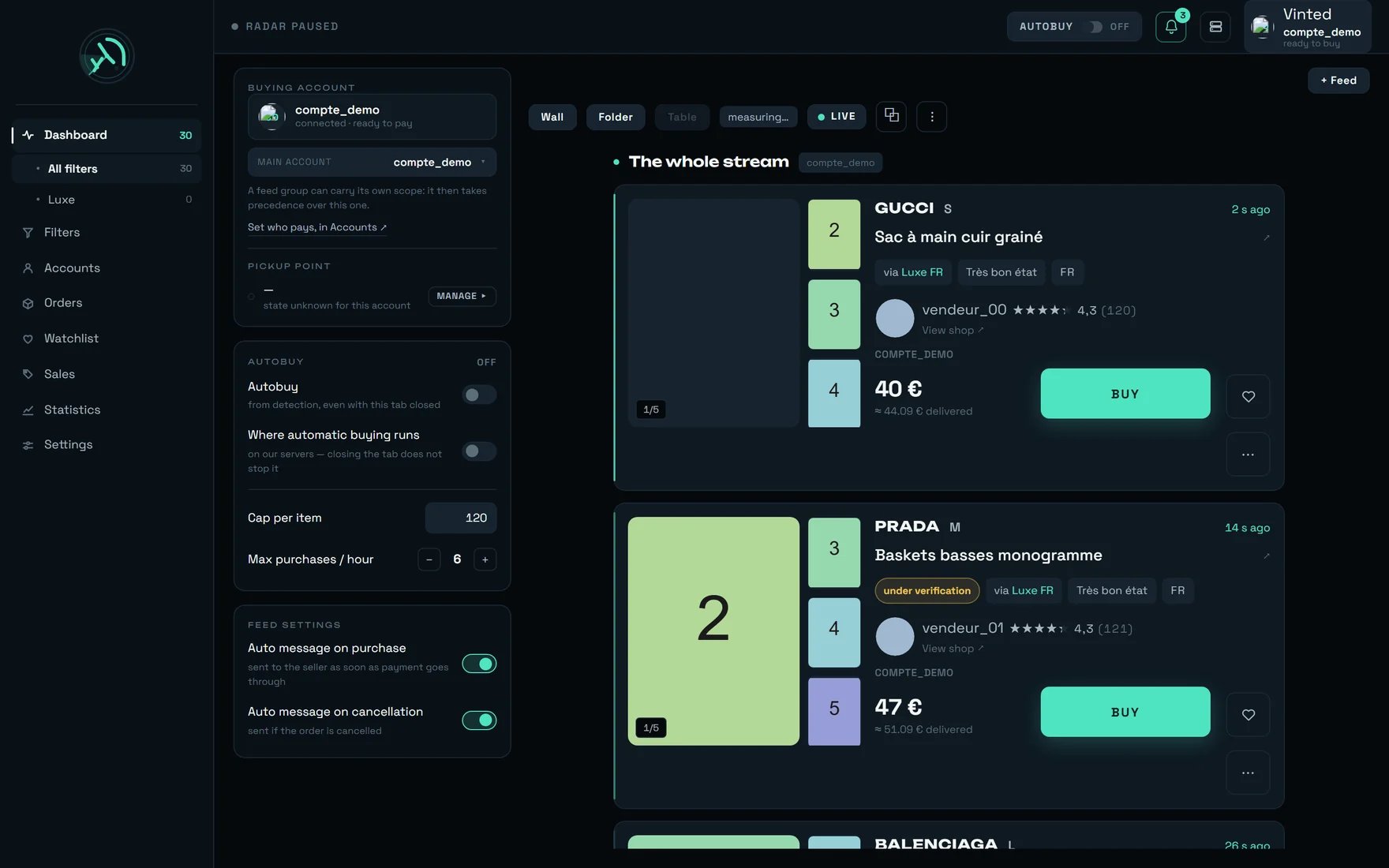
The dashboard: settings on the left, the stream of listings in the middle, recent purchases on the right.
Two things worth knowing before you start. A complete card reaches your screen about a second
after the listing is born. And a purchase takes six to nine seconds from end to end — most of
that time is Vinted’s own processing, and nobody can shorten it.
On the screenshot above, the Administration button in the left-hand column: REGA staff only —
this button does not appear on your account.
Here is everything that happens between a listing appearing on Vinted and a parcel heading your way.
Two facts explain the whole race. First, on Vinted the item goes to whoever is debited
first, not to whoever opens the order first: opening an order reserves nothing. Second, an item is
not buyable the second it appears — the marketplace makes it buyable a short moment later, and
REGA waits for that moment for you.
A wide dark plane, and a single lit horizon. Everything on this chain happens in the seconds between a listing being born and a payment going through.
Connect a Vinted account, write a first filter, watch the stream fill up — in that order,
because the other way round surfaces nothing.
Writing a good filter
The skill everything else rests on: what the radar can look for, what costs time, and what a
filter that is really working looks like.
Money
The three caps and exactly what each one covers, the price on screen versus the total actually
debited, and everything that can spend when you did not expect it.
When something refuses
The refusal messages you will read most often, what each one means, and the move that unblocks
it.
Vestiaire Collective
The second marketplace, where every listing is put online by hand: nothing to catch at birth, a
window swept without pause instead, and a purchase you finish yourself.
Reshipping
A delivery address at our warehouse: your purchases are received, opened and photographed, then
several of them leave as one parcel for your door.
It is not decorative: every step needs the one before it.
Create your workspace
From the invitation link you were sent. A password of at least 10 characters, and the terms
of use box to tick — the button stays off until it is ticked, which is not a fault. The link
is single-use: never retype it by hand.
Connect a Vinted account
The Accounts screen. That account is the one that will buy, with its card and its
delivery address. Vinted sends a code by SMS during sign-in: keep the account’s phone within
reach.
Create a filter
The Filters screen. “The radar only sweeps what a filter asks for: with no filter it cannot
detect anything, so nothing will reach this screen.” A filter can perfectly well be created with
no account — it is buying that needs one.
Watch the stream, and buy by hand first
Listings drop in as they come. Make two or three purchases by clicking before you arm anything:
you will see the real refusals go past, and you will know how to read a purchase row.
Arm automatic buying, filter by filter
The AUTOBUY pill opens the tap, but each filter is armed separately on the Filters
screen. That is deliberate: without it, automatic buying would buy absolutely everything the
radar displays.
Only turn on two-step verification at the very end. It signs out every other device of yours
the moment you arm it — including the computer you were working on. And the 10 recovery codes
are shown only once: write them down before you close the window. Asking for new ones invalidates
the previous set.
The AUTOBUY pill arms the server, not your tab. It survives closing the tab, closing the
browser, and switching your machine off. The only thing that stops it is disarming it.
In the left-hand panel, the line “Where automatic buying runs” — “on our servers — closing the tab
does not stop it” — states that fact. It is not a switch you set.
Every purchase — by hand and automatic, from any machine
empty: no cap
“Cap per item”
the AUTOBUY panel on the dashboard
the automation in this browser only, and it is remembered only there
€120
A filter’s cap
the Filters screen, filter by filter
that filter’s automatic buying only
none
REGA sets no price cap out of the box, and we would rather say so plainly than hide it: it is
yours to decide whether you want one. Mind what the “Purchase ceiling” means once it is set — it
also refuses an item whose price cannot be read, not just an item that is too expensive.
In Settings, and on by default. Switched off, the purchase fails: “No pick-up point
could be selected for this order.” Nothing asks anyone a question, nothing waits for your answer
— the purchase simply stops.
“PREPARE THIS CARRIER” — a real purchase, and optional
In Accounts. It is a real purchase of a few euros, to be made once per account and per
carrier. It saves ~1.3 s on every later purchase that goes through that carrier — out of
the six to nine seconds a purchase takes.Without it the purchase still completes — simply those ~1.3 s later. And the gain is not
additive: it is the seller who picks the carrier, so preparing several carriers widens the
share of your purchases that save that time, never the time saved.
If the connection drops exactly at the moment of paying, nobody knows whether Vinted debited or
not. Replaying would risk a double charge — REGA never does it. The row then reads
“TO CHECK — OUTCOME UNKNOWN”, no “RETRY” button is offered, and the message tells you what to do:
“Outcome unknown: tracking stops here. Check in Orders BEFORE retrying — a payment may still go
through.”
Both take exactly the same chain: same choice of paying account, same pick-up point, same card,
same bank confirmation. Here is what really separates them.
You click BUY
rega buys on its own
Trigger: your click on the card.
No cap applies to your click — neither the browser one nor a filter’s. Only the Settings
“Purchase ceiling”, if you have set one, applies here too.
No freshness rule: you can click on a listing you saw ten minutes ago (it will almost
certainly be gone, but nothing stops you).
Two simultaneous purchases per account, not three. On the third: “A purchase is already
under way on this account.”
If no account is free, the refusal shows immediately.
Trigger: the first armed filter that accepts the item.
The filter must be confirmed: a draft never buys. That condition cannot be switched
off.
Freshness: 120 seconds by default. An item detected longer ago is refused — “an item
detected several minutes ago is almost always gone”.
Per-filter cap and hourly cap available, both empty out of the box.
If no account is free, the item stays in the queue and goes as soon as one frees up.
If Vinted blocks one account from buying, all your automatic buying disarms at once. That
is deliberate: when one account is blocked, the move that protects you is to wait, not to
carry on with another one. The block lifts on its own, on the scale of a day: let the day
pass and arm again tomorrow.
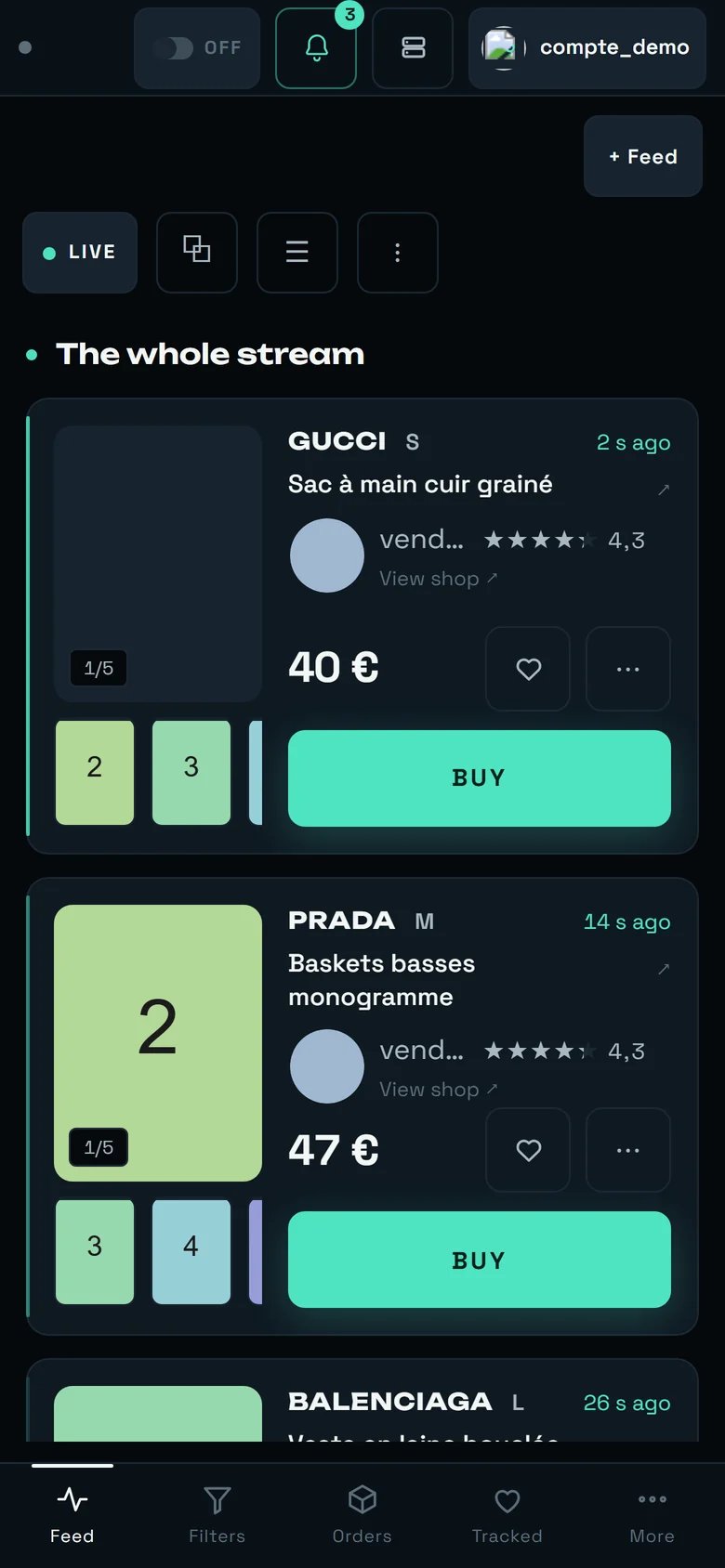
REGA on a phone: a single band, the “Folder” layout imposed, BUY across the full width.
At the bottom of the screen: Feed · Filters · Orders · Tracked · More.
A single band, and the layout selector disappears entirely — there would be only one option,
and a selector with one option is not a selector. The choice you made on a big screen is remembered
and comes back untouched.
BUY takes the full width, under the photos: it is the one geometry where your thumb cannot miss
its target.
An iPad in portrait gets the phone layout. That is decided on width alone, and it is
deliberate.
The split that works: the computer for writing filters and connecting accounts, the phone for
watching and buying. And remember that automatic buying needs neither — it runs on our servers. The
detail is in REGA on your phone.
These behaviours are correct. They surprise everyone the first time.
Your very first screen is empty — that is not a fault
A step is missing, and the screen tells you which one: “First, connect a Vinted account” —
“rega watches Vinted with your own accounts: one of them will buy whatever the radar finds.” —
then “Create a filter to start the radar”.Every screen always points you to the earliest missing step, never to its own. A blank
screen for half a second on the very first load is normal too: REGA would rather write nothing
than write a sentence it has to correct a moment later.
Scrolling pauses the stream, silently
As soon as you scroll more than 40 pixels, the display freezes. That is intended: a card
slipping in under your cursor as you click is a real, unwanted purchase.So the “12 NEW” counter climbing while you read is not a fault, and nothing is lost:
listings keep arriving, keep filling in, and stay buyable. One click on the counter brings them
in. The plain gesture is the LIVE / PAUSED button — and it is the only one.
The AUTOBUY pill is still armed when you reopen the app
That is the point. The state lives on the server, not in your browser: finding it armed after
you closed everything is not a bug, it is proof that automatic buying kept running while you were
away.
On a “GONE” item there is no RETRY button
“GONE — BOUGHT BY SOMEONE ELSE” offers no retry, and that is a protection: an item bought by
somebody else does not come back. Insisting on it wins nothing, and it tires the very account
you wanted to buy the next one with.
“Under verification” is not a failure — and above all, do not buy over it
Vinted takes the listing out of the catalogue while it checks it, for 30 minutes to 2 hours,
and does not allow the transaction in the meantime. The item is not lost, and it is not
buyable either. REGA knows this and starts the purchase on its own as soon as it reopens:
“Vinted is still checking this listing. The purchase will start as soon as it is available.” So
let it run rather than clicking again, and do not buy over it in the meantime.
A dry run is not inert
A test purchase still creates a real order with the seller — it simply does not pay it. So it
uses up one turn of the account, exactly like a real purchase. Believing it has no effect would
be wrong.
Most “failures” are not failures
Most of the failures you will read are races lost or items already gone — not errors. That
is why every failure is filed under a verdict in plain words, one of which is “Race lost, or
the item had already gone”. Read the verdict before concluding something is broken.