
Sixteen occasions to write, spread over the life of one parcel — and a single rule deciding which of them is worth an email.
Sixteen occasions, and not one more
The list is a closed one. A new event in the service writes to nobody until it has been added to it — that is the safe default for outgoing mail, and it is why this page can claim to be exhaustive.One parcel’s life, and every letter it sets off
Every letter we send, in one table
What each letter says, family by family
Getting in — the two letters about our address
Getting in — the two letters about our address
Your reshipping service is open opens on “Your reshipping space is open. You can now have your purchases delivered to us: we receive them, we inspect them, and we reship them to you, grouped, wherever you want.” Then the two gestures, spelled out: “Two things to do once: tick the accounts whose purchases should come to us, and set our address — phone number included — as the delivery address on those accounts.” Its button reads “Open my space”.It goes out only when the service was closed before. Switching it on again on a workspace that is already open writes to nobody: a switch that wrote on every click becomes harassment.Important: our delivery address has changed is one of the two subject lines of the sixteen that carry a warning word — the other is the last reminder before abandonment — and it earns it: “The address to have your purchases delivered to has changed. Update it on your accounts now: a parcel sent to the old address will not reach us.” Then: “Copy it in full, phone number included — carriers use it for delivery notices.” Its button, “See the new address”, opens How it works, because that is the page carrying the address.Only six postal fields set it off: recipient, address lines, city, postal code, country, phone. Renaming a warehouse or changing its internal instructions changes nothing you can see, so it writes to nobody. And it reaches every workspace whose service is open — a closed one is not told.Arrival, inspection, and approval by silence
Arrival, inspection, and approval by silence
“{titre}” has arrived at our warehouse is the calm one: “We received “{titre}”. It is registered, weighed and stored.” Then, so that you are not surprised by the next letter: “Our inspection follows: you will get the photos and our report, and you will then have a window to tell us whether everything is fine.” Button: “See the item”, on that exact item.Your item has arrived — tell us if everything is fine is the letter that commits you, and the only one in the whole service written in two versions. Both open the same way: “We received “{titre}” and inspected it. The photos and our report are waiting for you.”Then it splits. While a claim with the seller is still possible: “You have until {echeance} to reply. With no reply from you, the item will be approved automatically and enter the warehouse.” When the claim window has already closed: “The claim window with the seller has already closed for this item: you can still report an issue, but it cannot lead to a claim.” Button: “See the inspection”.It is the only letter of the sixteen written in two versions, and the reason is the clock: it is the one message where the cost of not reading it in time is a claim you can no longer file.“{titre}” has entered the warehouse is what comes next when you say nothing: “The reply window closed without hearing from you: “{titre}” was approved automatically and is waiting for you in the warehouse.” Then: “Your first {jours} days of storage are free. You can group it with other items whenever you like.” Button: “See my warehouse”, on that item.It is set off by the clock alone, and it answers the only gesture of this service you do not make yourself.Requests and disputes
Requests and disputes
We have answered your request says: “Your request about “{titre}” has been handled. Our answer is waiting in your space.” The answer itself is not in the letter — you open the item to read it. Its second line, “If anything is still unclear, just reply: it is faster than a second request.”, sits above a footer that asks you not to reply; see the last section of this page.We have opened a dispute for “{titre}” reports a gesture we made on your behalf: “We have opened a dispute with the platform for “{titre}”, based on what you reported to us.” Then, unusually for a letter: “We are following the case and will write as soon as it is settled. Nothing is asked of you until then.” Its button opens the list of disputes — there is no page for a single dispute.Dispute closed — “{titre}” opens on “The claim we filed for “{titre}” has just been closed.” Its second line is the outcome itself, and it is composed in the language of each reader, not in the language of whoever settled it:- “You are refunded
{montant}, and the item stays in your warehouse.” - “You are refunded
{montant}, and the item goes back to the seller.” - “The platform rejected the claim. The item stays in your warehouse.”
- and, if the outcome cannot be named, simply “The claim is closed.”
Quotes and payment
Quotes and payment
Your shipping quotes are ready reads: “Parcel {reference} is ready to go. We are offering you {n} carrier(s), from cheapest to fastest.” Then what the price covers: “The price covers shipping, packing and your storage fees. A quote stays valid for {jours} days.” Button: “See the quotes”.The count of carriers is recounted at the moment of sending, which is why a second quote on the same parcel produces a second letter saying two. And the number of days is filled in from a setting — by default seven — so read the figure in your own letter rather than the one on this page.Your quote has expired takes care to reassure before it asks: “The quote for parcel {reference} has passed its validity date and can no longer be paid. Your items have not moved: they are still in the warehouse.” Then the reason for the limit: “Ask for a new one whenever you like — carrier rates change, which is the reason for this limit.” Button: “Request a new quote”, on that parcel.Payment received — your parcel is on its way is the receipt: “We have received your payment for parcel {reference}. It is moving to packing.” and “You will get the tracking number as soon as it is handed to the carrier.” It carries neither the amount nor the breakdown — those live on the quote.The parcel itself
The parcel itself
Your parcel {reference} has left is the only letter carrying a tracking number, and it says nothing else: “Parcel {reference} was handed to {transporteur}.” then “Tracking number: {numero}”. Button: “Track my parcel”, on that parcel’s tracking.Your parcel {reference} has been cancelled leads with what you would worry about: “Parcel {reference} has been cancelled. Nothing is lost: the items it contained are back in your warehouse.” Then: “You can group them differently and request a new quote whenever you like.”It does not say who cancelled — you or us. The same letter serves both cases, on purpose.Storage, and the end of the line
Storage, and the end of the line
Your free storage ends in {jours} day(s) is the only letter that repeats without your doing anything: it goes out at each reminder tier, by default fifteen days, seven days and one day before the free period ends. Its body: “{n} item(s) in your warehouse leave free storage in {jours} day(s).” then “After that, fees accrue per day and per item, and are settled when you ship. Grouping your items now avoids them.” Button: “See my warehouse”.Action needed: “{titre}” is about to leave the warehouse is the last call: ““{titre}” has been with us for a long time and is nearing the storage limit. Past that limit, it leaves the stock for good.” Then the way out, in one line: “To keep it, simply ship it: put it in a parcel and request a quote.” Button: “Ship this item”.It carries no date — neither how long the item has been with us nor the day the limit falls.“{titre}” has left your warehouse states the end: ““{titre}” passed the storage limit and has been removed from stock. This is final.” and “Storage fees accrued up to that date remain payable. Your other items are not affected.” It does not repeat the reason we recorded internally.The bell and the letter are not the same channel
They come from the same gesture, and they do not cover the same ground.Who gets a copy, and in which language
Every letter goes to every person in your workspace. Three colleagues means three copies of the same message — we never let the person who made the gesture choose who hears about it, because the point of these letters is to reach whoever is awake. The language is decided person by person, never by the workspace and never by the browser that happens to be open.
The two language buttons in the top bar of the service — the switch your letters follow.
Where each button takes you
Every letter carries exactly one button, and the same address repeated in plain text underneath it, under the line “If the button does not work, copy this address into your browser:” — for mail readers that strip links.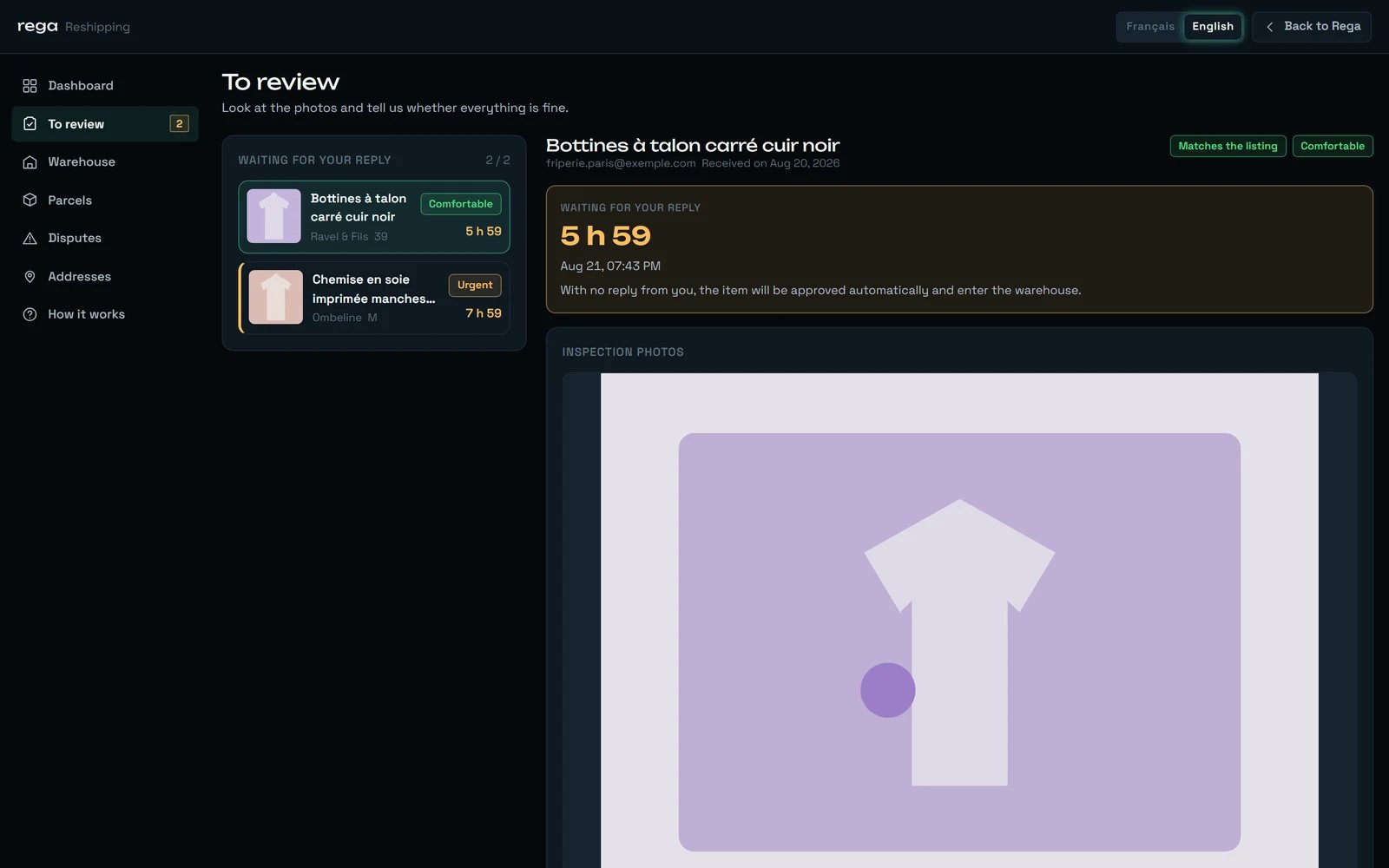
Where “See the inspection” lands: the checks still waiting, the countdown, and the sentence the letter carries word for word.
The letters that arrive more than once
The letters that never arrive twice
This is the other half of the same design, and it is worth as much.A storage reminder is sent once per tier, per item
A storage reminder is sent once per tier, per item
Once the free period is over, that reminder does not come back
Once the free period is over, that reminder does not come back
A payment counted twice still produces one receipt
A payment counted twice still produces one receipt
A dispute already opened, a request already handled
A dispute already opened, a request already handled
Turning the service on when it is already on
Turning the service on when it is already on
An abandonment candidate is recorded once
An abandonment candidate is recorded once
What we never write, and why
Sixteen occasions is a short list on purpose. Here is what happens at the moments we deliberately stay quiet.“{titre}” has entered the warehouse.The countdown on the sheet is still what binds you — but you do not learn about the approval after the fact.What you will not find inside a letter
- No amount, anywhere — with one exception. The refund obtained on a settled dispute is the only sum of money in the whole set. The receipt does not carry what you paid, nor the breakdown; the storage reminder never puts a figure on the fees; the abandonment letter does not either.
- The answer to a service request is not in the letter. It tells you an answer exists and takes you to it.
- No date on the last reminder before abandonment. It says the limit is near, not which day it falls.
- No reason on the abandonment letter. A reason is recorded internally; the letter does not repeat it.
- No name on a cancelled parcel. The letter does not say whether you or we cancelled it.
- One button, never two. With the same address repeated in plain text underneath.
- The same footer on all sixteen: “rega — automated message, please do not reply.”
There is nothing to unsubscribe from
How a letter travels
- A letter that fails to go out never fails the gesture. Your item is still received, your quote still issued, your parcel still gone.
- Nothing here follows a delivery or an opening. We do not know whether a letter reached you, and we would rather write that here than let you assume otherwise.
- A message can be lost on the way out. It is rare, and it is real.
What this does not do yet
We would rather write it here than let you find out halfway through.No preferences, no unsubscribe
One letter invites a reply its footer refuses
The inspection deadline reads in French
A refund keeps a French comma
Two buttons land on a list
A delivered parcel is never written about
A sentence can go out unfinished
“{titre}” has arrived at our warehouse. It is rare, and it is better recognised than puzzled over.