The account that will pay for the next purchase. Tooltip: “compte_demo will pay for the next purchase — ready to buy.” It does not decide what the list shows.
2
The bell and its number
”3 unread notifications”.
3
”Administration”
REGA staff only — this button does not appear on your account.
4
The “AUTOBUY” pill, here on “OFF”
Tooltip: “Automatic buying disarmed”.
5
The “rega — home” logo
Back to the home screen.
6
The ”↻” button
”Read again now” — starts a reading without waiting for the next minute.
7
”Dashboard” and the left column
Navigation between screens.
8
The “Orders” view
Your purchases, as a list or as a board.
9
The “Messages” view
”All conversations”. A badge there counts unread messages.
10
The “Pick-up points” view
”Parcels waiting at a pick-up point, grouped by point”.
—
The “Offers” view — not numbered on the capture above, it arrived after it; it sits between “Pick-up points” and “Being checked"
"The offers you have sent, and what they proposed”. No count badge.
11
The “Being checked” view
”Items being checked by Vinted — the purchase starts as soon as they are cleared”.
12
”List” (and its neighbour “Kanban”)
Two layouts of the same list.
Automatic buying runs on our servers. The “AUTOBUY” pill arms the server: it survives closing the tab, closing the browser, shutting your machine down. The only thing that stops it is disarming it. Purchase ceilings are set elsewhere — see Settings.
The whole page scrolls, header included. Only the toolbar — ACCOUNTS, the views, then STATUS — stays pinned at the top: that is what you are looking for once you are far down the list.
This is where the screen earns its keep. The rest of the page details the controls; these three sequences are what our most effective users actually do.
The three-minute morning
A parcel is not arriving
You want to cancel
1
Pin the scope to “All accounts”
In ACCOUNTS, choose “All accounts”. Without that, you are looking at whichever account the rotation landed on overnight — not at your activity.
2
Switch to “Kanban”
Eight columns, one per stage. At a glance: what has not moved, what is waiting for you, what is dragging on.
3
Wait for the counter at the top to go quiet
The small “0/10” next to “read just now” counts the order pages being read. While it is turning, the columns are not final. It disappears once everything is resolved.
4
Open “Pick-up points”
You are looking for one thing only: a line whose wait has passed “for 7 days”. That is the parcel you go and collect today.
5
Finish with “Messages”
The unread badge tells you whether there is anything. Opening a thread marks it read — only open it if you intend to reply.
1
Open the order, not the list
The list shows a likely status. The order page shows the exact one, and that reading costs you nothing.
2
Read the PICK-UP POINT section
If it says “Pick-up point not recorded for this order — the platform does not give it back after the purchase.”, the address is lost for that order: carrier tracking becomes your only lead.
3
Expand PARCEL TRACKING
The “Show the tracking” button reads nothing until you click it. The steps come from the carrier, exactly as received.
4
Go back to “Pick-up points” and read the two truncation sentences
”… were not examined (the reading stopped before the end)” and “The point of 2 parcels was not read …”. A missing parcel is almost always in there, never in a wrong choice of account.
5
If the point has no name yet, use the “Tracking ↗” link
Its tooltip states the real shortcut: “Carrier tracking — it often names the point before the platform”.
1
Look at the state on the line first
“Label created”: still doable. “Dispatched”: the platform will almost certainly refuse.
2
Open the conversation, ACTIONS section
There is no cancel button on the list or on the Kanban. That is deliberate.
3
If the button is not there, read the reason
There are only three: “This order is already cancelled.” · “The cancellation of this order has already been sent.” · “No parcel is attached to this order yet: there is nothing to cancel for now.”
4
Click “Cancel the order”, then “Confirm”
You have no reason to type in: it is chosen automatically.
5
Read the answer, and do not cancel twice
Either “Cancellation sent.” or the “Answer from the platform” block carrying Vinted’s own sentence. The “Cancellation sent” chip stays on the line to stop you.
Your purchases, as a “List” (one row per order, with the STATUS bar) or as a “Kanban” (“One column per stage”). The Kanban shows the eight stages side by side, plus a ninth “Unknown status” column that only appears when it holds something. An empty column shows a dash: it stays in place to give the shape of the cycle.
One card per conversation: avatar, username, last message (fallback “Preview unavailable”), item thumbnail, date, and a coloured dot “Unread message”. The status chip only appears when REGA managed to match the thread to its order. While reading: “Reading conversations…”, then “No conversation.” if there is nothing. When Vinted holds a further page, a “Show more” button sits under the list — before, the screen stopped at the first page without saying so.
Parcels that have physically arrived, grouped by point, all accounts together. A read-only badge shows “all accounts” — tooltip: “A pick-up point is a physical place: every account is read there together.” It is not a selector. The ACCOUNTS selector disappears on this view.
The offers you have sent from REGA, on every account at once: the amount proposed, the listed price struck out, the discount, the sending account, and “Open the conversation”. It does not know the seller’s answer — that is read in the conversation. While reading: “Reading offers…”, then “No offers in progress. The ones you send will appear here.” if nothing was noted.
Items Vinted has not cleared yet, so not buyable yet. REGA watches them and starts the purchase the moment they clear, without you.
The “Pick-up points” tab deliberately carries no count badge. Carrying one would force REGA to go back to Vinted for the shipment of every live order, on every account you are looking at, before you have even asked for the view — and to make that demand on your accounts for a number you did not request. The “Offers” tab carries none either: its count — “3 offers sent” — is shown inside the view, once you open it.
To the right of the title, REGA writes how old the list is: “read just now”, “read 3 min ago”, and “never read” if no reading has completed yet. The tooltip gives the exact date followed by “refreshed every minute”; if nothing has ever completed, it says “No reading completed — refreshed every minute”.Next to it, a counter such as 0/10 with a spinner. It counts the still-live orders whose detailed page REGA is reading in the background. Its tooltip:
Faded cards are sorted from the list reading, without confirmation: their exact status is being read in the background.
The counter is your green light. While it turns, a faded card is a likely placement. When it disappears, every live order has been confirmed one by one. It never counts closed orders: those stay faded, on purpose.
The selector on the left is labelled ACCOUNTS, and its tooltip states exactly what it does — and above all what it does not:
Choose which accounts you are LOOKING at — no effect on the account that pays
Menu section
What you pick there
SCOPE
”Active account” (shown as “compte_demo (active)”) or “All accounts”.
GROUPS
Your account groups, under their name.
ONE ACCOUNT
One specific account, by its username.
(menu footer)
“This choice only concerns reading: it changes neither the account that pays nor the rotation.”
A disconnected account stays clickable, but it is greyed out and announced: “compte_demo — not connected: nothing can be read”. Until the account states have arrived, the menu shows “The list of accounts arrives with their state.”
“Active account” is not an account: it is a moving target. It is the account the server will make pay, and the rotation switches account after every purchase. If your list jumps to another account’s orders on its own, that is not a fault — it is the default scope following the rotation. Choose “All accounts” or a named account explicitly: your choice is remembered for this screen, and nothing will overwrite it again.
Two uses, two scopes. “All accounts” to steer in the morning: you see everything, and every row carries the name of the account that paid. A named account to work one through: the list stops moving under you, and “Load more” only ever goes back through that one account.
Below the first row, the STATUS bar offers “All” then eight buttons in life-cycle order, each with its total. On narrow screens the labels shorten.
The status, in full
On the narrow bar
What it means
Purchase pending
Pending
Payment went through, the seller has done nothing.
Label created
Label
The seller has their label. Still cancellable.
Dispatched
Dispatched
The parcel is moving. The platform no longer cancels.
Delivered (to the pick-up point)
At the point
The parcel is waiting at the point. You do not have it.
To confirm (48 h)
To confirm
You collected it: 48 h to confirm.
Completed (confirmed)
Completed
You confirmed, the payment went to the seller.
Cancelled
Cancelled
A cancellation or a refund.
On hold
On hold
Dispute, incident.
Hover a button: its tooltip separates two populations — “12 orders read on opening”, or “12 read on opening, 5 matches unconfirmed”. On the selected button one more sentence appears, and it is the most important information on the screen:
Sorted here, over the 18 loaded orders. Faded rows match this status without being confirmed: open them to be sure.
On “Cancelled” only, one extra line: “‘Cancelled’ covers both a cancellation and a refund — the list does not tell them apart.”
The bar sorts what is already on screen, and nothing more. It does not go and look for the rest at Vinted: it works over the orders already loaded. Before concluding “I have nothing to confirm”, scroll down to the sweep note and click “Load more”.
Photo, item title (fallback “Order 12345”), then — in the French interface only — the status label written by Vinted, shown exactly as received, a row of chips, the price, the relative date (the tooltip gives the exact one), and “Open the conversation” — or “No conversation”. In the English interface that Vinted sentence is not shown at all: the translated state chip stands alone.
The chip
When it appears
What it says
Coloured marker + dot
The order is waiting for something from you
”This order is waiting for something from you”
The account name
Only when you are looking at several accounts
”Bought by compte_demo — this is the account that will answer if you open the conversation.”
The state
Always — read (exact) or inferred (likely)
“Status read when this order was opened — more precise than the list one. An open dispute or a recent closure may not show there yet."
"Cancellation sent”
A cancellation left from REGA
It is durable, even if the status has not moved yet.
”Unrecognised status”
Vinted returned an unseen value
”The platform returned a status we do not know yet. The order is shown all the same."
"to be confirmed”
A live order whose page has not been read
The counter at the top is dealing with it.
In the list, Vinted’s four coarse states are shown as they are: “In progress”, “Action required”, “Completed”, “Cancelled or refunded” — and “In progress” alone covers six different situations.A click — or Enter / Space — opens the conversation. If there is none: “No conversation — this order does not have one yet”.
An order only reaches its exact box once its page has been read. Otherwise it sits in the likely box inferred from the list, its card stays faded and carries the “to be confirmed” chip. That is also why the Kanban settles a few seconds after opening.
Almost everything on this screen is free. Only two readings ask Vinted for something again on your accounts — and on “All accounts”, they leave on every account being looked at, at once. That volume is what tires an account: click those two deliberately, not out of habit. One write costs differently: sending a message slows down the account it goes out from, buying included.
The gesture
What it costs
Opening the screen
Nothing to do: the list arrives, then REGA goes back through your older orders on its own
”↻ Read again now”
Asks Vinted for your orders again straight away, on every account being looked at, instead of waiting for the next minute — and, on the Messages view, your conversations too
Opening an order (its page)
Nothing at all: that reading is not limited — open it as often as you like
Opening the Offers view
Nothing at all: it reads what REGA noted when each offer left, and asks Vinted for nothing — which is also why it does not know the seller’s answer
”Load more” — free version
Nothing at all: it shows 50 rows already received
”Load more” — paid version
Goes back to Vinted for older orders, on every account being looked at — click it when the sweep note tells you to
”Show the tracking”
Read only if you click, never before
”SEND” in a conversation
Not free for the account it goes out from: messages sent one after another slow that same account down, buying included — about twenty minutes
Leaving the tab in the background
Nothing: everything is suspended
Passing through the screen
Nothing, if the reading is recent
REGA reuses a recent reading instead of asking again. Reopening a screen twice in a row therefore does not cost twice.
One line, cut into segments — and not one of them the same length.
Below the list, one sentence tells you how far back REGA went. It is the sentence to read before you conclude anything at all.
What you read
What you do about it
”Looking for orders in progress…”
The sweep is still running: wait for it before concluding.
”every order has been swept”
Complete. It is the only sentence that says so — this one you can trust.
”stopped after 10 pages”
The sweep stopped on its own limit — “Load more” goes further back: an older order may be sleeping there.
”the last 2 with no order in progress”
It stopped for want of finding anything live. Same gesture.
”the next reading failed”
An incident interrupted it. Start it again, then read this line again.
Load more, free
“Already loaded” — rows already received but not shown yet: showing them asks Vinted for nothing. Click it as much as you like.
Load more, paid
“Fetches older orders.” — this one goes back to Vinted. It is the gesture to make when the note says the sweep stopped before the end, not one to repeat out of habit.
Above 1,280 px it opens as a column on the right (titled CONVERSATION); below that, it is a 420 px sheet sliding in from the edge. Its header carries “Close the conversation”, the avatar and username (fallback “Other party”), “Reload the thread”, and an “Actions on this conversation” menu offering exactly one thing: “Delete the conversation”.The item’s title in the panel is a button: it opens the REGA item card — seller, photos, purchase, watchlist — without leaving the screen and without going to Vinted. With no item identifier it stays a plain text (fallback “Item”). And a thread left open re-reads itself every 15 seconds, as long as the panel is open and the tab visible: a seller’s reply appears without closing and reopening.
PICK-UP POINT
Name, code, carrier, address, then: “Chosen 2 d ago. A point can close: check it before you travel.” While searching: “Looking for the pick-up point…”.Two refusals, not to be confused:
“Pick-up point not recorded — no order has a recorded pick-up point here yet.” — your register is empty, which is a normal start.
“Pick-up point not recorded for this order — the platform does not give it back after the purchase.” — that specific order has no point.
The section disappears as soon as the order is completed or cancelled.
ACTIONS
They exist only if Vinted offers them on that order:
“I have received the parcel” — “Reports receipt. The payment is not released yet.”
“Confirm the order” — “Releases the payment to the seller. This is final: it cannot be undone from rega.”
“Cancel the order”, in red — the only red we allow ourselves on this screen.
After a click, REGA is blunt: “Request sent — it is not confirmed. The real status will appear at the next reading.”
PARCEL TRACKING
It is read on demand only: the “Show the tracking” button, then “Reading the tracking…”, then the carrier’s steps exactly as received, with a “Carrier tracking ↗” link and the note “Tracking passed on as received, with no confirmation on our side.” If there is nothing: “No tracking is available for this parcel.”
The thread and the composer
Bubbles, offers, events. An item of an unseen kind is never hidden: it shows as “A message of a kind this screen cannot display yet.” A message’s relative date is written in the language of the interface. An offer you sent shows as a line of its own — the item’s title, the amount and, when Vinted gives it, its status, all in Vinted’s own words (fallback “Offer”).Vinted sometimes offers up to three ready-made replies: one click drops them into the field, as they are. The composer shows “Write to the seller…” and the “SEND” button. On an empty field the button is not dead: it answers “Empty message — write something before sending”. If Vinted closed the conversation: “Replying is not possible on this thread — the platform closed the conversation.”Three outcomes for a send: “Message sent”, “Sending not confirmed — reopen the thread to check”, or “Message not sent — …”.Writing is the only gesture in this panel that is not free for the account it goes out from. Messages sent one after another slow that same account down, buying included: wait about twenty minutes, or write from another account. The account that has just written is not the account to buy with straight after.
That is the exact meaning of the sentence in the dialog: “Only confirm once you have checked the item.” Confirming releases the money, and it is final.
2
Open the conversation, ACTIONS section
There is no “confirm” button on the list or on the Kanban.
3
“Confirm the order”, then “Confirm” in the CONFIRM THE ORDER dialog
The “Go back” button takes you out without doing anything.
4
Wait for the next reading
REGA shows “Request sent — it is not confirmed. The real status will appear at the next reading.” The list re-reads itself every minute.
The text of the CANCEL THE ORDER dialog says it all:
Cancels the purchase with the seller. This is final: it cannot be undone from rega. The reason is chosen automatically — you have nothing to enter. If the parcel has already left, the platform may refuse: its answer will appear here.
Beyond two cancellations in 24 h on the same account, REGA warns you: “This account has cancelled 3 orders in the last 24 h. Too many cancellations close together can restrict the account on Vinted.” Nothing is blocked — we inform, we do not forbid. Past that, space them out, or let another account pay.
After sending: “Cancellation sent. The state above stays the one from the last reading until the platform changes it.” The “Cancellation sent” chip stays on the row — it is there to stop you cancelling a second time.
At the top, the summary: “3 parcels to collect” · “at 2 pick-up points”, the read-only “all accounts” badge, and a “Rebuild the view” button.Then one row per point, collapsed: the carrier logo, the shop name, the carrier in full, the address (or “Unknown address”), the longest wait at that point — “for 9 days”, “arrived today”, “unknown wait” —, the number of parcels, and a “Directions ↗” link.Expanded (“See the items waiting here”), one row per item: photo, title, seller, and the paying account, always shown. The wait tooltip says where it is counted from: “Counted from the drop-off at the pick-up point.” or “Counted from the Vinted notification (the real arrival is slightly earlier).”There is a special row: “Pick-up point not given yet”, subtitled “Address published within a few hours”, with a “Tracking ↗” link. Vinted often names the point a good day after the parcel has actually arrived; in between, only the carrier knows where it is — which is exactly what the link’s tooltip says. Never read that row as a lost parcel: use “Tracking ↗”, it usually names the shop before the platform does.
The view is blunt about what it did not see, in two sentences to read before concluding that a parcel is missing:
“4 orders in progress were not examined (the reading stopped before the end): their parcels do not appear here.”
“The point of 2 parcels was not read (the reading stopped before the end): it is known, and will appear at the next pass.”
The offers you have sent to Vinted sellers from REGA — from the feed, from the REGA item card, or from the watchlist — on every one of your accounts at once. It answers one question only: what did I propose, to whom, and from which account?
The Offers view on our demo account: three offers sent, the listed price struck out, the discount worked out.
At the top, the counter: “3 offers sent”. Then one card per offer, most recent first:
On the card
What it is
The photo and the title
The item as REGA knew it when the offer left. The title is a button: it opens the REGA item card — photos, seller, buy, watchlist. Without a known item, it stays plain text. Fallback: “Untitled item”.
The amount in bold
What you proposed — always in euros, whatever the market of the account.
The struck-out price
The price the item was listed at when the offer left.
”−30 %“
The discount, worked out from the two figures above. It is absent when the listed price was not known.
The account name
The account the offer went out from. Every account is listed here, whatever ACCOUNTS says above.
”Open the conversation”
Switches to the Messages view and opens the thread the offer created. It is only there when a conversation was noted — otherwise nothing is shown, rather than a button that would open nothing.
The view does not know whether the seller said yes. What it shows is what REGA noted at the moment each offer left — a reading of REGA’s own notes, with no request to Vinted. That is what makes it free, and that is its limit: the seller’s answer lives in the conversation, and only there. Open it.
No accepted / refused / counter-offer state
Pretending to know it would show “pending” on an offer already refused — exactly the sentence that makes you wait for nothing. The state is read in the thread, as a system line: item title · price · status · date, where the title and the status are Vinted’s own words, shown as received (fallback: “Offer”). Reply from there.
No date
The moment the offer left is kept, but it is not shown. The order of the cards is the only clue: most recent first.
The list never empties by itself
An offer stays listed once it has been accepted, refused, or forgotten. The only thing that changes a card is a new offer on the same item from the same account: it replaces the previous one — Vinted holds one negotiation per item, so REGA keeps one line. “No offers in progress.” therefore means nothing noted, not nothing pending.
Nothing before 3 September 2026
REGA started keeping offers on that day. An offer sent from REGA before that date left no trace, and it is not there.
“↻ Read again now” does not re-read this view
The header button re-reads your orders — and the conversations when you are on Messages. To re-read the offers, switch to another view and come back: the list is read again on every opening.
Vinted only
An offer made on Vestiaire Collective does not appear here.
There is no “make an offer” button on this screen: the view only lists. An offer leaves from four places, through two windows that share one rule — Vinted refuses anything below −40 % of the listed price, so the window never lets you go under it.
From
The window you get
A feed card: ⋯ menu → “Make an offer”, or “Make an offer” in the detail window — see The dashboard
Opens at −10 %; slider and field are bounded between the floor and the listed price. The offer goes out from the paying account of that feed, and that account cannot be changed there.
The REGA item card: “Send an offer” — only while the listing is alive and its seller and price are known
The same window. The verdict is written on the card, not in a toast.
A watchlist row: ⋯ menu → “Make an offer” — see The watchlist
Opens at the floor, and the account is changeable for that one offer (“Change”). The button carries the amount itself — “Send 24 €” — and sends on the first click.
A watchlist selection: “Offer on 12”
Every offer at the floor, one every 5 seconds, twenty at most. The batch stops at the first quota refusal and says how many were left.
Two things hold everywhere: an offer always goes out in euros, and from the feed window and the item card the same amount cannot be sent twice on the same item — change it first.
An offer is not free for the account it goes out from. It opens a conversation at Vinted, and Vinted limits how many conversations an account can open in a row — the same limit as buying, and a refusal counts too. After a burst, that account is slowed down for about twenty minutes, buying included. The order of magnitude reported to us is about three offers in a row per account: treat it as a rough figure, not a rule. That is why the batch spaces its offers out and stops at the first refusal, and why the watchlist window lets you change the account: spread offers over accounts that are not about to buy.
Once sent, the offer shows here; the seller’s answer shows in the conversation — “Open the conversation” takes you straight to it.
An item Vinted has not cleared yet cannot be bought. REGA puts it in a queue, watches it closely, and starts the purchase the moment it clears — you have nothing to do.At the top, “Give up after” and its delay — tooltip: “Delay after which an item that was never checked is given up, with a notification.” The delay actually applied today is 96 h.Four groups, decided by the server, and an empty group is not shown: “In the purchase queue: being checked”, “Check failed”, “Successful purchases”, “Failed purchases”.A card carries the photo, the brand and title — a plain click opens the REGA item card; ctrl, cmd, shift or a middle click opens the listing at Vinted in a new tab —, the status among nine labels, then ”· followed 3 h ago”, ”· given up in ~72 h”, ”· 42.00 € charged” where they apply, the selector for the account that will start the purchase (“The purchase will come from compte_demo.”) and the price.
The nine statuses, word for word
“Waiting to be checked” · “Purchase under way” · “Purchased” · “Purchase failed” · “Bought by another member” · “Removed or rejected at the check” · “Given up (not checked in time)” · “Could not start the purchase” · “Removed from the queue”.
What “Remove” means — and when it disappears
The “Remove” button exists only while the item is waiting: “Removes this item from the queue: no purchase will be started for it any more.” Once the purchase has left, it is replaced by “followed in the Orders tab”, whose tooltip explains why: “The purchase has left: it cannot be taken back from this queue. Its outcome — paid, refused, or a confirmation to make with your bank — appears in the list of orders.” Finished entries stay visible for 7 days, even after signing out.
The “Confirm with your bank ↗” link has a short window. Its tooltip: “Your bank is asking for a confirmation. Without it, the payment does not go through.” It appears during the purchase, not after: a bank confirmation happens straight away or not at all. The same link is duplicated in the dashboard’s recent purchases, on purpose.
Past two hours, stop hoping. A check that is genuinely under way clears quickly — most of them within the first half-hour, and practically none once two hours have passed. An item still “Waiting to be checked” the next day will not go: do not hold your budget for it.
Nothing has been read yet. Never confused with “no order”.
”No order on this scope.”
The reading completed, and there really is nothing for the accounts being looked at.
”No order loaded with this status.”
There are orders, but none with this status among those already loaded. Click “Load more”.
An error sentence + “Retry”
The very first reading failed, and there is nothing in memory.
The list stays, but “read” gets older
A reading failed afterwards: nothing is wiped, you keep your rows.
A banner “compte_demo could not be read — …”
One account is down, the others are up to date. With several: “3 accounts could not be read. The others are up to date.”
Faded cards + “to be confirmed” + the counter at the top
REGA is reading the order pages. A few seconds.
”Reading parcels…” then “No parcel at a pick-up point. Parcels appear here as soon as they arrive — not while they are in transit.”
Pick-up points view, nothing waiting.
”Reading failed.” on pick-up points
The reading failed — the last known view is not wiped.
”Reading…” then “No item being checked.”
Being checked view, empty queue.
”Reading offers…”
Offers view, the reading is under way.
”No offers in progress. The ones you send will appear here.”
Offers view: nothing noted since 3 September 2026 — not “no offer pending”: the view does not know the seller’s answer.
”Your offers could not be read. Try again in a moment.” + “Retry”
Offers view, the reading failed. “Retry” reads again.
Failure sentences are always translated from a cause, never copied: “This account is not connected. Reconnect it from the Accounts tab.”, “Too many requests in a row. Let a minute pass.”, “Reading is momentarily unavailable on this account. Try again shortly.”, “This information is unavailable for now.”
There is no alert red and no alert orange on that banner. In REGA a failure is stated in words, not in colour — the only red on this screen is the “Cancel the order” button.
1. Pin your scope once — otherwise the list will move under you
By default the scope follows the active account, therefore the rotation, therefore every purchase. Open ACCOUNTS and pick “All accounts” or a named account. The choice is kept for this screen and will never be overwritten automatically again. It is the first setting to make, and you make it once.
2. Open the order whose status matters — it is the only exact status, and it is free
Vinted’s list carries only 4 coarse states; the 8 fine states live on the order page. “In progress” alone covers six situations. That reading is not limited: open it without hesitating, as often as you like.
3. Never conclude anything without reading the sweep note
Only one sentence allows the word “complete”: “every order has been swept”. On “stopped after 10 pages” or “the last 2 with no order in progress”, an old on-hold order may be sleeping further back — and that is exactly the kind of order you are looking for.
4. Hover “Load more” before clicking repeatedly
“Already loaded…” = free, click as much as you want. “Fetches older orders.” = the one that goes back to Vinted. It is the only gesture on this screen that asks the platform for something you have not already got: click it when the sweep note tells you to, not ten times in a row out of distraction.
5. At the pick-up counter, give the recipient of the paying account
Every row shows the account that paid — that account carries the delivery address, and it is the recipient name on that address the shop is expecting. Not the Vinted username on screen. Every write (replying, confirming, cancelling, deleting) also leaves from that account, never from the one shown top right.
6. On Pick-up points, look at the wait, not at the parcel count
The longest wait is carried by the collapsed row, on purpose: without it, a parcel forgotten for eleven days would stay invisible until someone expanded the row. Treat “for 7 days” as an alarm. Points keep a parcel for about ten days then return it to the sender, but the exact delay depends on the carrier and Vinted publishes it nowhere: that 7-day threshold is our convention, not a measurement.
7. A missing parcel in Pick-up points is never an account question
This view reads all accounts, always, and shows only parcels that have physically arrived — never those in transit. If a parcel is missing, the answer is in the two truncation sentences at the bottom of the view.
8. Cancel early, and read the “Answer from the platform”
The boundary is this: while the parcel has not left, cancellation often goes through; once dispatched, the platform refuses. REGA can only say no with proof — everywhere else it offers the button and lets Vinted decide. On a refusal, the “Answer from the platform” block carries Vinted’s sentence word for word: it is the only one that says why.
9. “Confirm with your bank ↗”: click it the second it appears
It shows during the purchase. Do not wait for the card to turn to “Purchased” — without that confirmation the payment does not go through, and the window closes. It is the only gesture on this screen that decides between bought and lost.
10. Being checked: past 2 h, move on
A check that is really under way clears within minutes, or within the first couple of hours — never a day later. An item still waiting the next day will not go. Let the queue give up on it by itself (96 h, with a notification) rather than counting on it.
11. Give the Kanban some width, or stay on the List
The board is the only element in REGA allowed to exceed the reading width. At the normal width (1,120 px) you only see 3 columns out of 8; at 2,160 px the eight fit together — a column hardly goes below 244 px without becoming unreadable. On a laptop the Kanban watches poorly: prefer the List and its STATUS bar.
12. Leave the tab open — but know that it sleeps
In the background, nothing is read: not the list, not the conversations, not the pick-up points, not the checking queue. On your return, everything out of date is re-read immediately. A list that “has not moved” while you were elsewhere is therefore normal: when you come back, look at “read … ago”, not at the list.
13. Never confirm early to please a seller
“Confirm the order” releases the money and it is final: it cannot be undone from rega. The 48 h of “To confirm (48 h)” are your only window to open, check and photograph. A seller in a hurry is not a reason to give it up.
14. Moving through the app costs nothing — use that
REGA prepares your orders while you are on another screen, and does nothing at all when the reading it already has is recent. Passing through Orders between two screens is therefore free; it is the paid “Load more” that costs, not the navigation.
The number on a status button adds two things together
It adds read orders and matching, unconfirmed orders. A button showing 12 may contain no confirmed order at all. The tooltip separates them; the faded shade tells them apart at a glance.
“Delivered (to the pick-up point)” does not mean you have the parcel
The three labels are deliberately explicit: “Delivered (to the pick-up point)” = the parcel is waiting at the point; “To confirm (48 h)” = you collected it, 48 h to confirm; “Completed (confirmed)” = you confirmed. The word “Delivered” on its own has already misled everyone — hence the bracket.
A “confirmed” status can still be incomplete
The tooltip of the read state admits it: “An open dispute or a recent closure may not show there yet.” Neither is readable from the conversation — an on-hold order has already displayed “Dispatched”, in full confidence.
A completed order stays faded, and that is deliberate
REGA no longer reads the pages of closed orders: they add nothing and they cost. Before that choice, almost every card carried “to be confirmed” — a signal carried by nearly all the cards signals nothing at all.
“Cancellation sent” is not “order cancelled”
The row keeps showing the status from the last reading until Vinted changes it. The “Cancellation sent” chip, however, is durable. Do not cancel a second time because the status has not moved: the next reading arrives within the minute.
Opening an unread thread marks it read straight away
The unread counter drops on opening, without you having replied. And a deleted thread disappears instantly from the list, before the next reading: deletion is irreversible at Vinted, and reopening it would lead nowhere.
The Messages badge can be a lower bound
An account whose unread messages could not be counted is never counted as zero: it stays unknown, and the total becomes partial. The tooltip then changes sentence: “At least this many unread messages — one account could not be counted”. Beyond 99, the badge shows “99+”.
Your draft does not follow you from one conversation to another
Switching thread empties the field. That is a safety measure: it prevents accidentally sending a message into someone else’s conversation.
Some sentences stay in French inside the English interface
A conversation’s subtitle, a cancellation refusal, a pick-up point address, the carrier’s steps: all of that comes from Vinted and is shown as received. Translating it would create a second truth, which would become false the day Vinted changes its own. One sentence has left that list: the status label Vinted writes under each order is now shown in the French interface only — in English, the translated state chip stands alone.
The Offers view never says whether the seller accepted
It lists what REGA noted when the offer went out — amount, listed price, account — and reads nothing back from Vinted. Accepted, refused or countered is read in the conversation, and nowhere else. The list does not empty itself either: “No offers in progress.” means nothing was noted, not that everything is settled.
The Kanban hides one column — exactly one
“Unknown status” only appears when it holds something. The other eight stay in place, empty, with a dash: it is the structure of the cycle that justifies them, not their contents.
The ACCOUNTS selector disappears on one view
On “Pick-up points” there is none. A pick-up point is a physical place: the view reads every account together, and an account filter there would produce exactly the mistake it exists to prevent.
The ACCOUNTS selector stays on the Offers view — and does nothing there
It is still painted at the left of the bar, but the Offers view ignores it: an offer belongs to the account that sent it, and reading the header’s scope there would hide the others’. Every account’s offers are listed, and each card names its account. Only “Pick-up points” removes the selector; on “Offers” it is merely inert.
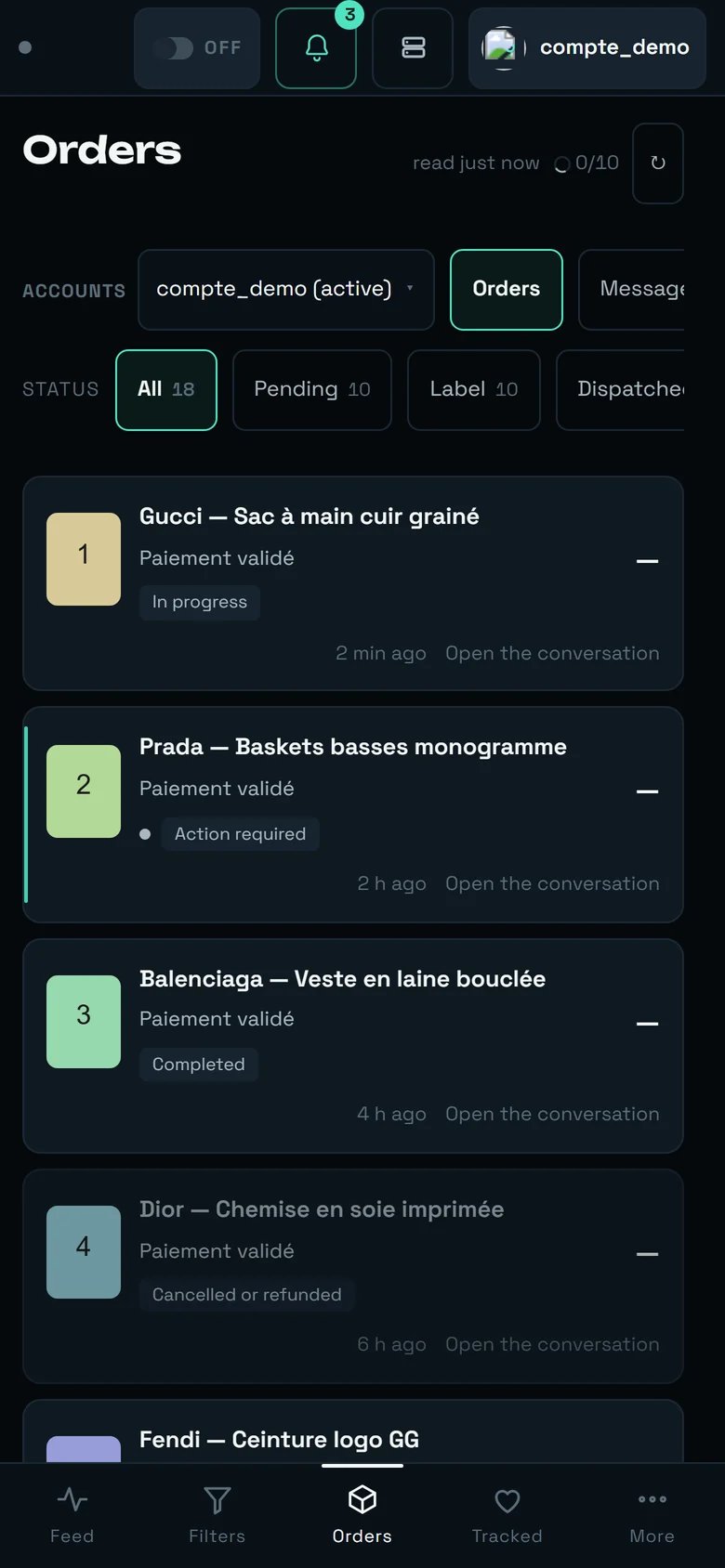
The Orders screen on a phone. This capture predates the handle: today, on arrival, the toolbar is folded behind it.
Nothing disappears, only the way to reach it changes:
Under the title, a handle — a short bar, announced “Show the controls” — hides the toolbar on arrival: ACCOUNTS, the views, STATUS and the actions (”↻”). One tap shows them (the handle then reads “Hide the controls”), a second tap folds them again, and the choice is remembered for this screen, on this device. The title itself never folds.
Once shown, the status buttons shorten: “Pending”, “Label”, “At the point”, “To confirm”.
The “Offers” chip sits with the other views, on the same bar: nothing about offers is hidden in a menu.
Each row folds onto two lines.
The conversation panel becomes a 380 px side sheet sliding in from the edge.
The Kanban stacks and scrolls with the page instead of scrolling sideways.
At the bottom, the short navigation: Feed · Filters · Orders · Tracked · More. Orders are under Orders.
Folded, the toolbar gives its height to the orders themselves: that is the whole point of the handle.
In the French interface the handle reads « Afficher les commandes » — commandes meaning controls there, not orders. Same screen, same handle.
“I have received the parcel” and “Confirm the order” return no usable acknowledgement
Vinted does not give one. That is the exact reason for the sentence “Request sent — it is not confirmed. The real status will appear at the next reading.” Parcel tracking is in the same situation: we pass it on to you as received, without confirming it.
There is no “yes” for a cancellation
By construction: REGA can only prove the no. Everywhere else it offers and Vinted decides. The cancellation reason cannot be typed in, and a cancellation that has already left is not re-sent from a button — that is a recovery gesture, and it has no place behind a distracted click.
The pick-up point of older orders is lost for good
Vinted never gives the pick-up point back after the purchase. REGA records it at the moment of the purchase: an order placed before 1 August 2026 will therefore stay at the point with no known address, for good. Carrier tracking remains your best lead.
The point's name is read from the carrier's own message
Carriers do not all announce an arrival with the same wording, and nothing guarantees they will keep the one they use today. Our reading is therefore cautious by construction — it never makes a parcel disappear, it files it under “Pick-up point not given yet”, with its “Tracking ↗” link.
A message that fails to send is not retried on its own
If Vinted refuses a send on an older conversation, REGA shows “Message not sent — …” and stops there. We do not retry on your behalf: retrying without telling you risks sending the same message twice.
Two known defects
If your scope designates no account (an emptied group, for instance), the screen shows an off-topic sentence — “This action is not offered on this order.” — instead of saying the group is empty. And the “Being checked” toolbar may briefly show “24 h” / “48 h” on the very first reading: the only delay actually applied is 96 h.
Accounts
Reconnect a fallen account, prepare a carrier.
Settings
The purchase ceiling and the automatic pick-up point.
Dashboard
Recent purchases, live — and the offer window of the feed.
Watchlist
Make an offer from a tracked item — one at a time, or a batch of twenty.