The index
These are the words of the Vinted screens, the core of the product. Vestiaire Collective and reshipping keep their own lists further down.What REGA looks for
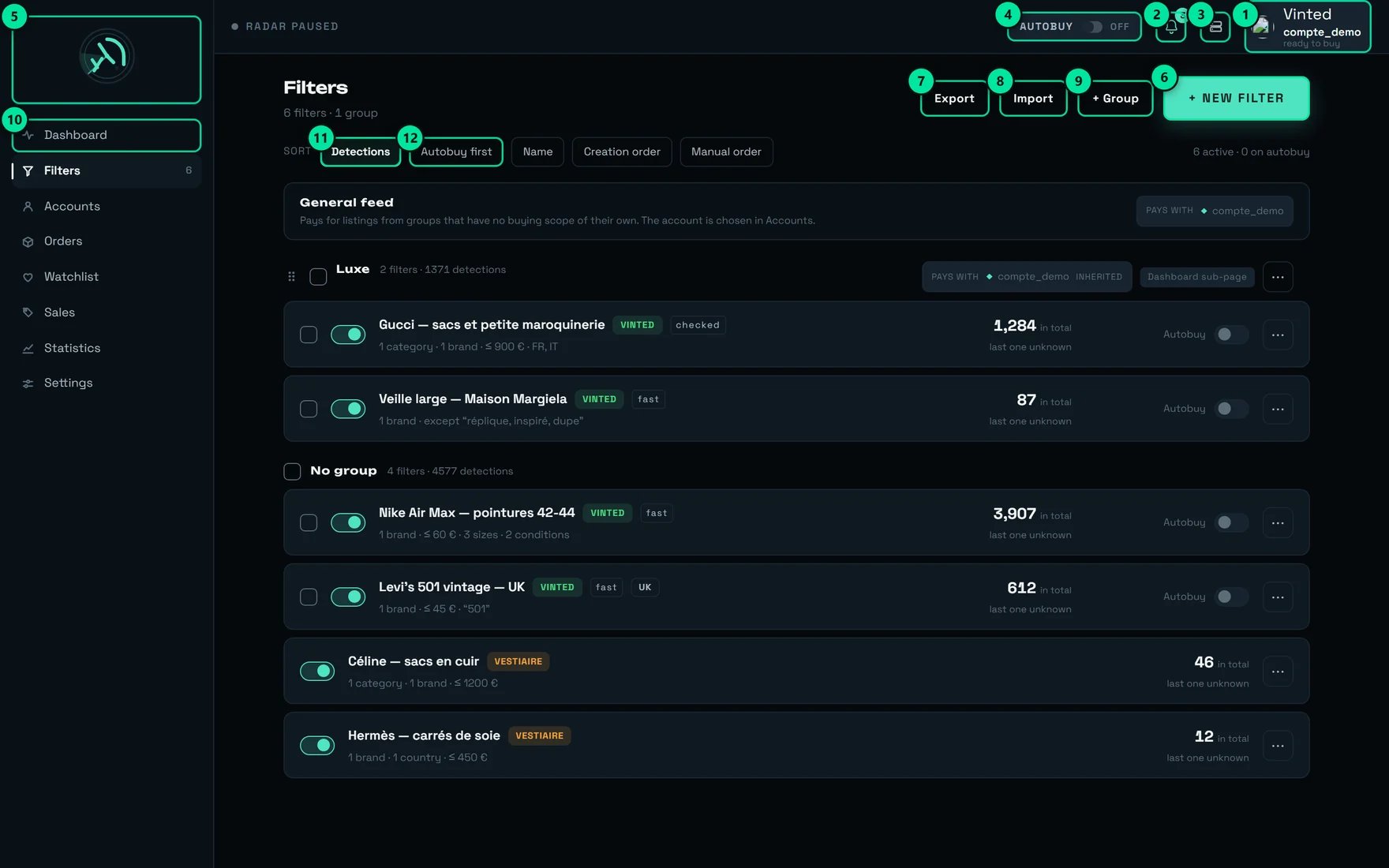
The Filters screen. Every word in this section is here: “+ New filter”, “+ Group”, and the “Detections” and “Autobuy first” sorts.
Radar — “Radar”
Radar — “Radar”
Filter — “Filter”
Filter — “Filter”
Group (of filters) — “Group”
Group (of filters) — “Group”
Detection — “Detection”
Detection — “Detection”
Regime: “fast” · “checked” · “widened”
Regime: “fast” · “checked” · “widened”
Market — “Market”
Market — “Market”
Watching Vinted {pays}., and on its row, a marker Site: {pays}.→ Watching several countries.Marketplace — “Marketplace”
Marketplace — “Marketplace”
{n} seats available. counts team seats (in French, “places” — the product changes word, we do not).What REGA shows you
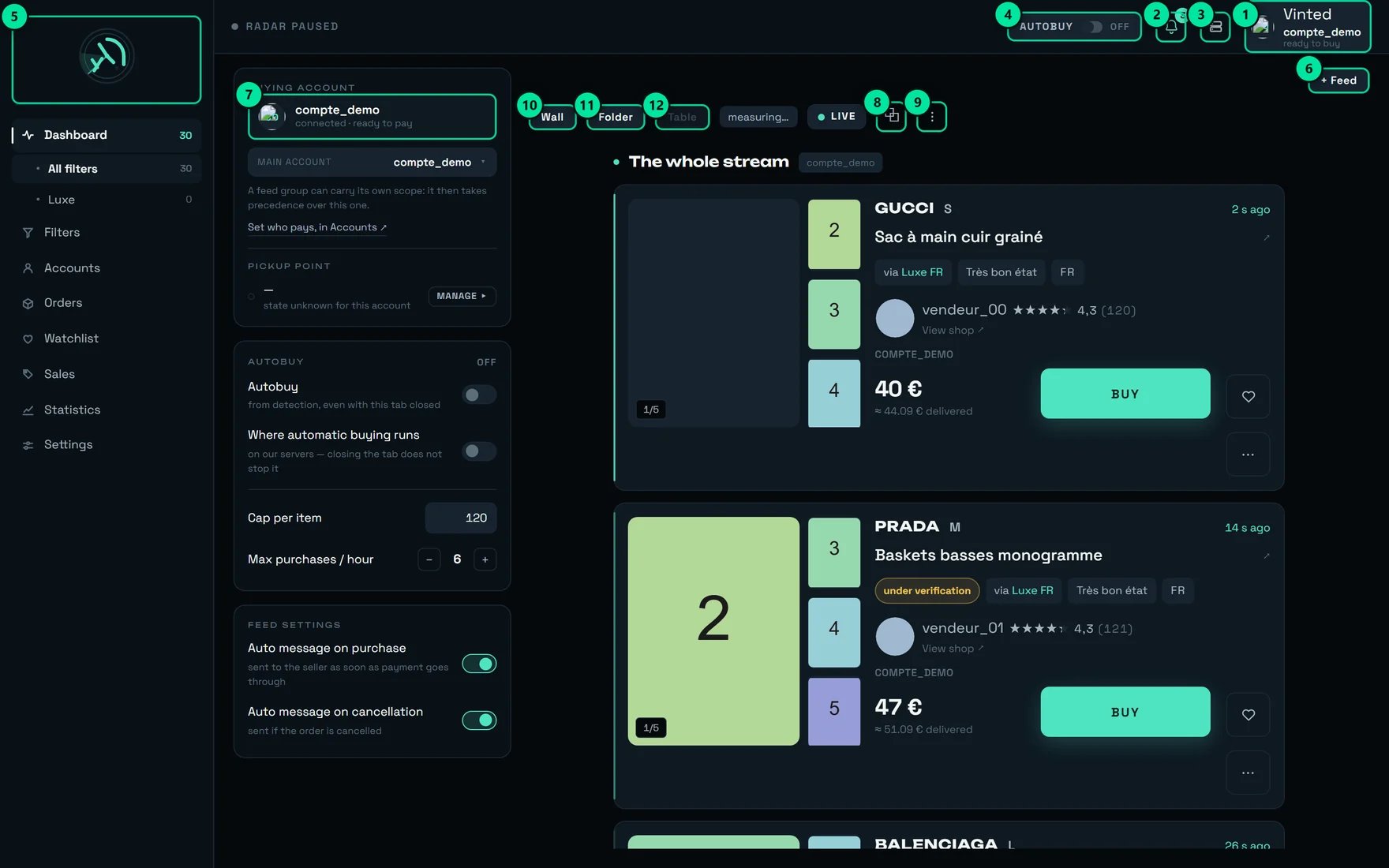
The dashboard. “+ Feed” opens a band; “Wall”, “Folder” and “Table” change its layout; the AUTOBUY panel and the paying account hold the words of buying.
the whole stream / Feed / General feed
the whole stream / Feed / General feed
- “the whole stream” — all your detections, with no filter restriction. The picker even offers “Open a feed on the whole stream — no filter restriction”.
- A feed — a band on screen, opened on a filter, a group, or the whole stream. You open several side by side, you rename them, you pin them (“Pin (keep on screen)”).
- The “General feed” — the one the others inherit their buying settings from, as long as they have none of their own.
Feed group — “Feed group”
Feed group — “Feed group”
Wall · Folder · Table
Wall · Folder · Table
Listing / item
Listing / item
- A listing is the page published by a seller on the marketplace. It is born, it can be hidden, it can disappear. That is what the radar sees: “Many listings at a glance”.
- An item is the object itself, the one you watch and the one you buy: “The list of tracked items — sold, withdrawn or still on sale”, “No watched item”, “Cap per item”.
Watchlist and “Check”
Watchlist and “Check”
one check every {duree} — in practice 15 minutes, and an item’s card confirms it — This item is checked about every {cadence} — the same rhythm as every watched item, whatever its age.checks slowed ×{facteur}, nothing is lost, but the fifteen minutes stretch: “None is lost, they are served more slowly: the real interval is about {reel}.” The banner spells that real interval out, so you never have to guess how old a price is.What buys
AUTOBUY — “AUTOBUY”
AUTOBUY — “AUTOBUY”
- “Autobuy” — “from detection, even with this tab closed”
- “Where automatic buying runs” — “on our servers — closing the tab does not stop it”
The three caps — “Purchase ceiling” / “Cap per item” / “€ max”
The three caps — “Purchase ceiling” / “Cap per item” / “€ max”
Buying scope — “Buying scope”
Buying scope — “Buying scope”
Rotation and account group
Rotation and account group
Buying account and “Ready to buy”
Buying account and “Ready to buy”
{n} things to sort out before buying (“A purchase would stop before payment.”).Being checked / Under review
Being checked / Under review
- On the feed: “Under verification — the purchase starts as soon as it is verified”
- In Orders, the “Being checked” tab — “Items being checked by Vinted — the purchase starts as soon as they are cleared”
- In Sales: “The listing is temporarily hidden by Vinted. This is NOT a withdrawal: we keep checking it.”
- In the watchlist: “a purchase started now joins the queue”
What delivers
Pick-up point — “Pick-up point”
Pick-up point — “Pick-up point”
Carrier, and “PREPARE THIS CARRIER”
Carrier, and “PREPARE THIS CARRIER”
It works, but it costs {cout} on every purchase.Order, and its states
Order, and its states
Sales, and the vocabulary of tracking
Sales, and the vocabulary of tracking
Where each word comes in
The same item, from the moment a seller publishes it to your pick-up point — with, at each step, the word the product uses.The words of Vestiaire Collective
Vestiaire Collective is not a second Vinted, and its words say so. A listing there only goes online once a member of the marketplace’s staff has validated it by hand, at an hour nobody can predict: there is no birth to catch, and so no moment to be sitting in front of your screen for — you arm the radar and you leave it armed. What the screen counts is “watch rounds”, a word that exists nowhere else in the product, and the sign that this screen keeps a vocabulary of its own. Several words do come back — Radar, Filter, Autobuy, Check, Pick-up point — and not one of them means quite the same thing. Everything below is written on the Vestiaire Collective screen, or on the cards it feeds into your main feed.Radar — “Arm the radar”
Radar — “Arm the radar”
Usual delay and longest delay
Usual delay and longest delay
- “usual delay” — “Time between the listing going live on Vestiaire and the moment we saw it. Fixed at discovery.”
- “longest delay” — “Nine times out of ten, we see the listing in less than this.”
Refusals from Vestiaire
Refusals from Vestiaire
Active filter · Alert me · Autobuy
Active filter · Alert me · Autobuy
On Vestiaire right now, and “hits”
On Vestiaire right now, and “hits”
- “On Vestiaire right now” is the form’s preview: how many listings answer your criteria at this instant, at the marketplace. It is there to help you write the filter, not to judge it.
- The “hits” on a filter’s row are what that filter has actually kept since, with the mention
last {quand}.
The minimum of an offer — the number that costs the most
The minimum of an offer — the number that costs the most
Price {price} · minimum offer {min}.The window always names where that floor came from, and the two sentences are not worth the same thing:Prepare, PAY, ANSWER MY BANK
Prepare, PAY, ANSWER MY BANK
The basket — one word that governs the whole account
The basket — one word that governs the whole account
The states of a Vestiaire account, and “Check”
The states of a Vestiaire account, and “Check”
{detail}”.Ready · To watch · Missing
Ready · To watch · Missing
Buyer fees — “buyer fees”
Buyer fees — “buyer fees”
buyer fees {m}, and in the watchlist, next to the price excluding fees.The tooltip says exactly what it is, and above all what it is not: “The marketplace charged this amount to the buyer ON TOP of the seller’s price ({hors}). This is not a discount.”Two marketplaces, one numbering space
Two marketplaces, one numbering space
Listing seen on {place} on sales, on the watchlist and in the feed. It is also why a Vestiaire sale alert has no link to the item: the number it would use opens a real, unrelated listing on the other marketplace. → Following what sells.The words of reshipping
Reshipping is a service of its own, on its own site, with its own navigation and its own language switch. Seven destinations — “Dashboard”, “To review”, “Warehouse”, “Parcels”, “Disputes”, “Addresses”, “How it works” — four of which fit in a phone’s bottom bar, the other three under “More”. Almost nothing in its vocabulary comes from the rest of the product — and the two words that do, carrier and check, do not mean here what they mean anywhere else. One reading rule governs all of it: an item carries three independent facts, and they never merge. Where the goods are, what you answered, what we obtained.An item carries three labels at once, and they are not three stages
An item carries three labels at once, and they are not three stages
The nine states of an item — from “Expected” to “Abandoned”
The nine states of an item — from “Expected” to “Abandoned”
Approved by you · Approved without a reply · Issue reported
Approved by you · Approved without a reply · Issue reported
The seven states of a dispute — from “No dispute” to “Dispute rejected”
The seven states of a dispute — from “No dispute” to “Dispute rejected”
Matches the listing · Slight discrepancy · Major defect
Matches the listing · Slight discrepancy · Major defect
“Review pending” is the only word that asks something of you
“Review pending” is the only word that asks something of you
The eight states of a parcel — from “Being prepared” to “Delivered”
The eight states of a parcel — from “Being prepared” to “Delivered”
Quote, and its seven lines
Quote, and its seven lines
Valid until {date}. Several quotes for one parcel are the rule, not the exception: you compare two or three side by side.The lines a quote can carry, in the order they appear:Storage fees — “Storage fees”
Storage fees — “Storage fees”
{n} days are free. After that, fees accrue per day and per item, and are settled when you ship.”The two fees, and the two words that name them
The two fees, and the two words that name them
Declared value and Insurance
Declared value and Insurance
“Free” and “—” are not the same answer
“Free” and “—” are not the same answer

Rows of identical tiles, and only one of them lit. Two words can be spelled the same way and name two different things.
The words that look alike and do not mean the same thing
This is the most useful section on the page. Every line is a confusion with a real cost.“Group” means three different things
“Group” means three different things
“Cap per item” (dashboard) ≠ “€ max” (filter)
“Cap per item” (dashboard) ≠ “€ max” (filter)
- The one in the AUTOBUY panel starts at €120 and is only kept in this browser. Another machine, another browser, a private window: it goes back to 120.
- The one on a filter’s card — the “€ max” field — follows your REGA account everywhere, and that is the one that bounds that filter’s automatic buying.
“Automatic pick-up point” ≠ “PREPARE THIS CARRIER”
“Automatic pick-up point” ≠ “PREPARE THIS CARRIER”
- “Automatic pick-up point” (Settings → BUYING) is on from the start and required in practice: turned off, the purchase fails — “No pick-up point could be selected for this order.”
- “PREPARE THIS CARRIER” (Accounts screen) is optional: it is a real purchase of a few euros that saves ~1.3 s on later purchases with that carrier.
“Detection” ≠ “Check”
“Detection” ≠ “Check”
- A detection is a discovery: a listing that is born and passes a filter. It arrives once, and it is timestamped.
- A check is a re-reading: REGA reopens an item you already watch to see its price and availability, every 15 minutes.
“Table”, “Dashboard” — and “Dashboard” again
“Table”, “Dashboard” — and “Dashboard” again
- “Table” is a feed layout, next to “Wall” and “Folder”.
- “Dashboard” is also the name of a tab on the Sales screen — “The tracking aggregates”.
- “Dashboard” is the name of the home screen in the sidebar, in English as in French. On a phone, that same screen is called “Feed”.
“Marketplace” or a subscription seat
“Marketplace” or a subscription seat
- In filters and accounts, “marketplace” means Vinted or Vestiaire Collective. In French, the product says “place”.
- In Settings → Subscription,
{n} seats available.counts team seats. In French, the product says “places” — the same word as marketplace.
“Being checked” ≠ “Check” (login) ≠ “To confirm (48 h)”
“Being checked” ≠ “Check” (login) ≠ “To confirm (48 h)”
- “Being checked” — Vinted is reviewing a listing. The purchase queues up and goes out on its own.
- “Check” — a login step for an account, on the Accounts screen.
- “To confirm (48 h)” — the state of a delivered order that you have to confirm on Vinted.
“Radar” on Vinted, “Radar” on Vestiaire
“Radar” on Vinted, “Radar” on Vestiaire
- The Vinted radar is read in Settings — “Active — the radar is sweeping” — and what it looks for is “Your filters.”
- The Vestiaire radar has a button of its own on its own screen, “Arm the radar”, and among its tiles it counts one thing the Vinted radar has no equivalent for: “watch rounds”.
“AUTOBUY” debits; Vestiaire's “Autobuy” never does
“AUTOBUY” debits; Vestiaire's “Autobuy” never does
The three caps are Vinted's. Vestiaire has none
The three caps are Vinted's. Vestiaire has none
“Sold”: a deduction on Vinted, a statement on Vestiaire
“Sold”: a deduction on Vinted, a statement on Vestiaire
- On Vinted, a sale is reconstructed: the listing disappears, and “a sale and a withdrawal produce the same signal”. Hence the “Removed” status, and a “Sold” tab that only shows what carries Vinted’s sale marker.
- On Vestiaire Collective, the marketplace says it: a sold listing keeps its page and carries a sale date, while a withdrawn listing answers that it is no longer available. Sold and withdrawn are two different answers, never the same one.
sold in {d} is a measured duration — both dates come from the marketplace, not from our checking rhythm.“Pick-up point” on Vinted, on Vestiaire, and in reshipping
“Pick-up point” on Vinted, on Vestiaire, and in reshipping
- On Vinted, “Automatic pick-up point” is a setting, on from the start, and it must stay that way: turned off, the purchase fails.
- On Vestiaire, there is no equivalent setting but a map, and it has a counter-intuitive condition: it can only be drawn once the purchase has been prepared. Before that, the marketplace returns no point at all, without an error — which reads, wrongly, as “there is nothing near you”.
- In reshipping, the word does not exist: your parcel goes to an address you saved in “Your addresses”.
“Carrier”: the seller chooses on Vinted, you choose in reshipping
“Carrier”: the seller chooses on Vinted, you choose in reshipping
- On Vinted, “It is the seller who chooses the carrier, not you” — which is the entire reason “PREPARE THIS CARRIER” exists.
- In reshipping, the carrier is one of the offers on your quote, and choosing one commits you to nothing until you pay.
“Check” on a Vestiaire account, and “checks” in reshipping
“Check” on a Vestiaire account, and “checks” in reshipping
- “Check”, on a Vestiaire account, is a button. It probes a buying page and answers “Connected — this account can buy.” — because a connection can be whole for browsing and refused for paying.
- “checks”, in reshipping, are inspections: the queue counts them,
{n} checks shown out of {total}. The most urgent are first.
“Parcel” does not name the same object in each world
“Parcel” does not name the same object in each world
- On Vinted and on Vestiaire Collective, a parcel is the one a seller sends you. You choose neither its packing nor, on Vinted, its carrier.
- In reshipping, a parcel is a box we make up for you: you decide its contents, its packing options and its carrier, it carries a reference, a quote, a packing slip, and it goes through eight states.
“Report an issue” ≠ opening a dispute
“Report an issue” ≠ opening a dispute
- Reporting is always possible, always free, and always recorded. The item does not even change state: it stays at “Review pending”.
- Opening a dispute is the claim we then file with the marketplace. It costs €5.00, and it is only due while the recourse window is still open.
An “Order” is only ever a Vinted one
An “Order” is only ever a Vinted one
Which “group” do you need?
Our advice
Make the “Autobuy first” sort your weekly inspection
Read the regime pill before concluding that a filter is slow
What slows it down: {liste}., then add a brand or a keyword — the product announces the way out itself: “with a brand or a keyword, this criterion becomes immediate again”.Name your groups like aisles, not like folders
Clear the “things to sort out before buying” counter before arming anything
Tell “Already used” from “Ready” on your carriers
a point will be chosen on the spot, {gain} more. Only “Ready” saves those ~1.3 s.Prepare the carrier your sellers use most, first
Learn the four short words of the phone
Use the language switch as a dictionary
What surprises people
“widened” does not mean more results
“widened” does not mean more results
A feed pushed off screen keeps working
A feed pushed off screen keeps working
A feed group with no setting still buys
A feed group with no setting still buys
Deleting a group deletes nothing else
Deleting a group deletes nothing else
Group deleted — {nom} · the accounts are kept. A group is storage, not a container.A cap that is set refuses a price it cannot read as a number
A cap that is set refuses a price it cannot read as a number
“Being checked” is good news, not a blockage
“Being checked” is good news, not a blockage
“Sold” and “Removed” sometimes come from the same signal
“Sold” and “Removed” sometimes come from the same signal
The French version keeps the word “Feed”
The French version keeps the word “Feed”
On a phone, the words get shorter
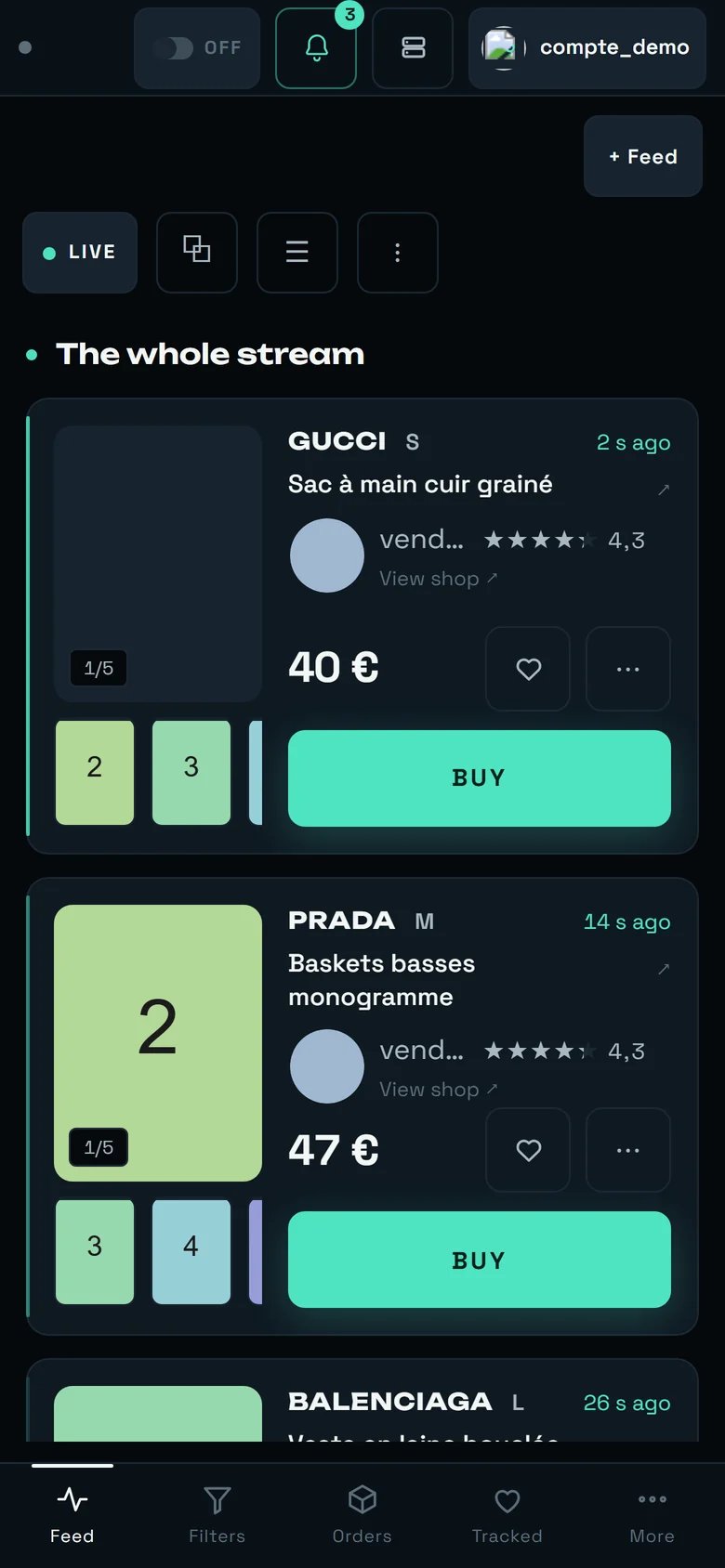
The dashboard on a phone. The bottom bar keeps only four tabs — and two of them change name.
The limit of this glossary
This dictionary covers what a client sees: REGA’s eight main screens, the Vestiaire Collective screen, and the seven destinations of reshipping. It also covers only what is written on a screen — the words of the product, in both of its languages. Here is where it stops.- The administration console. It has a vocabulary of its own — composing a verdict, issuing a quote, setting a rate card — and its button does not appear on your account.
- The words Vinted and Vestiaire use themselves. We quote the ones that reach your screens. The rest belongs to their sites, and they change it without telling us.
- What does not exist yet, and therefore has no word. Every page of this guide ends on its own gaps.