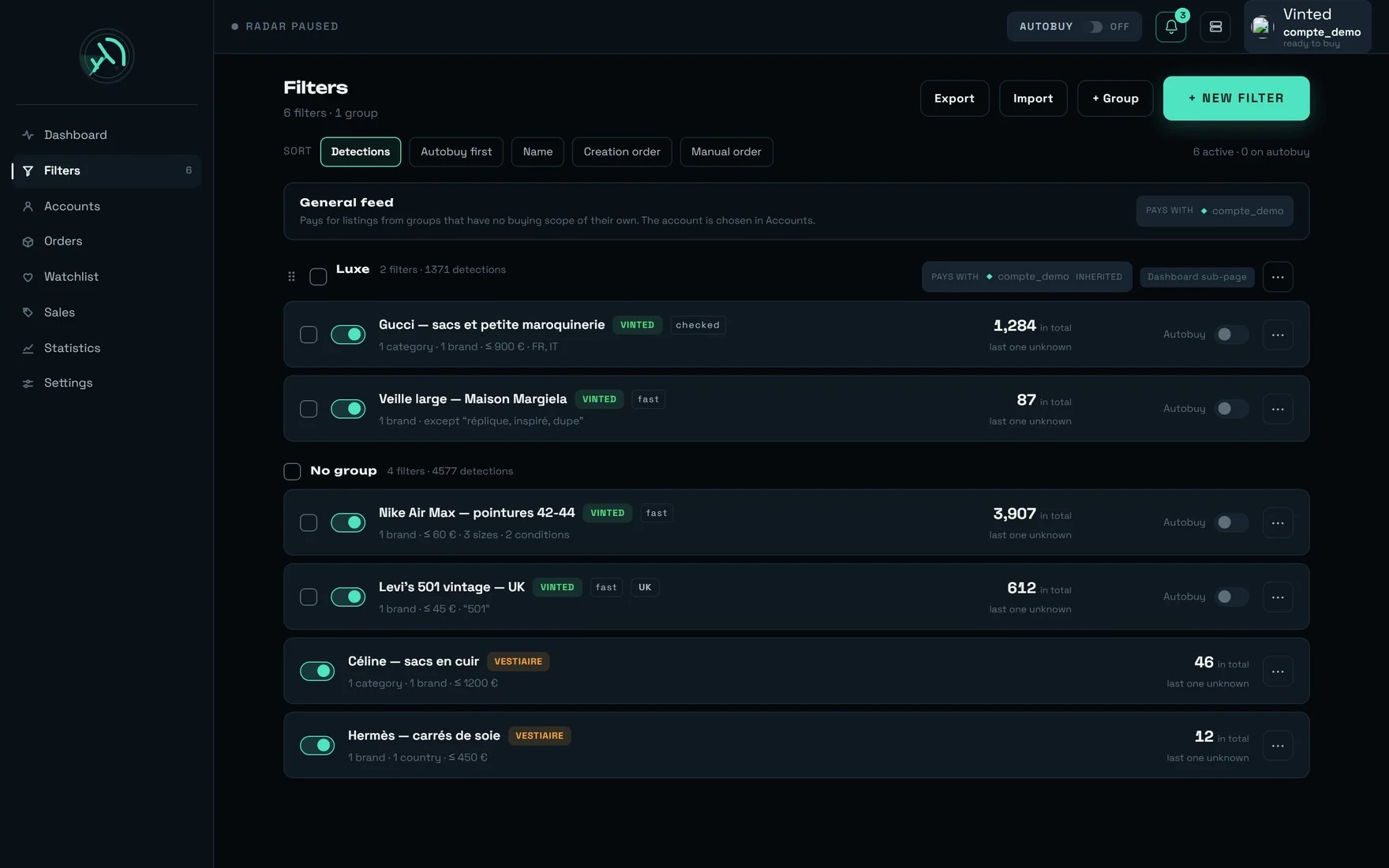
The Filters screen on a populated account: the General feed banner, a “Luxe” group, a “No group” section, and both marketplaces side by side.
What you are looking at
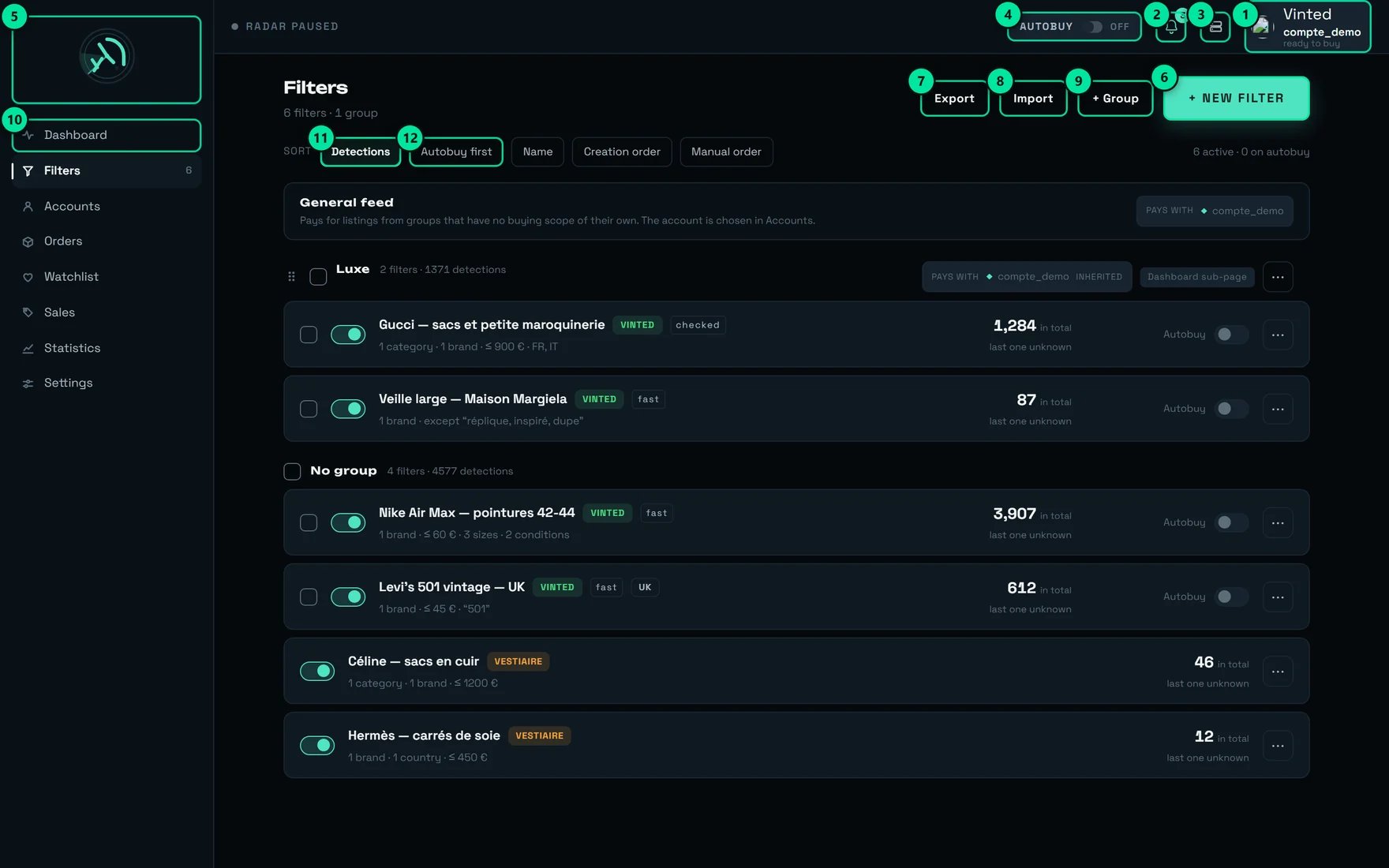
The same controls, numbered.
The two header counters do not count the same thing
“6 filters · 1 group”
“6 active · 0 on autobuy · 2 notify”
A filter row, badge by badge
The rule that governs everything: your criteria do not cost the same
Some criteria are settled with the listing itself: they are free and instant. Others need information that does not arrive with the listing: those are paid in milliseconds, sometimes in seconds. The pill on each row tells you which case you are in, and the form recalculates it on every keystroke.The table to keep in front of you
Writing a filter, step by step
Pick the marketplace — this choice is final
- Vinted — “Automatic buying, groups, rate measurement. Kept listings arrive in the feed.”
- Vestiaire — “Categories, sizes, origin. Kept listings appear on the Vestiaire Collective screen, not in the feed yet.”
Paste the Vinted link — first, never last
vinted.co.uk
address does create a British filter: the site’s address is what decides. The search’s sort,
page and session parameters, on the other hand, are deliberately ignored — copying them across
has no effect.Categories — aim at the parent
First {plafond} results out of {total} — narrow the search. The catalogue holds
2,920 entries across 5 levels, with plenty of homonyms — “Other” exists 14 times, which is
why every result carries its breadcrumb.Ticking a category takes all of its sub-categories:
{n} categories — sub-categories are included. The screen warns you when an addition is
pointless (Already covered — {chemin}) and when it absorbs others
({n} sub-categories absorbed — {chemin}).Brands, price, sizes, conditions
- Brands — live search. A filter with a brand only accepts the exact brand carried by the listing: the title never decides. With no brand, your keywords are what decide.
- MIN PRICE (€) / MAX PRICE (€) — see advice n°1: the minimum price is the single most profitable lever on this screen.
- Sizes — leave “Extend to equivalent sizes” on (it is on by default). A size group can carry
Only {noms}and the note “Does not narrow the filter’s other categories.” - Conditions — drop-down. Nothing ticked = “All conditions”.
Keywords — and the try-out that saves you a week of silence
All {nb} words must appear, in any order — this is not a phrase.
A word that is too short is flagged:
“{mot}” is very short: in “contains” mode it appears in a great many titles.This title would be rejected: {raisons}. with the exact reason:
it does not contain “…”, it contains “…”, it contains other words (“…”).Seller's origin — and the site it decides
Watching Vinted {pays}.Group, then estimate
≈ {centre} listings/min with its precision. When
nothing showed up, it does not lie:
Fewer than ~{haut} listings/min — none appeared in {duree}, too rare to be estimated that quickly.
and it then offers Refine the estimate (takes longer).Autobuy, notifications, saving
- Autobuy on this filter — “Automatic purchase as soon as it is detected.” The € max field carries the help “Cap per item — leave empty to impose no cap”. Left empty: “No cap: this filter will buy whatever the price.”
- Notify me — “One notification on every detection by this filter — photo, brand, title and price. No cap is applied: a wide filter will produce a lot of them.”
Both marketplaces live in this one list
Vestiaire Collective has no screen of its own. Its filters are read every time this page opens and merged into the same list as your Vinted ones — same sorts, same groups, same selection bar. The listings they keep arrive in the dashboard feed, next to the Vinted ones. What differs between the two is written on each row, never left for you to guess.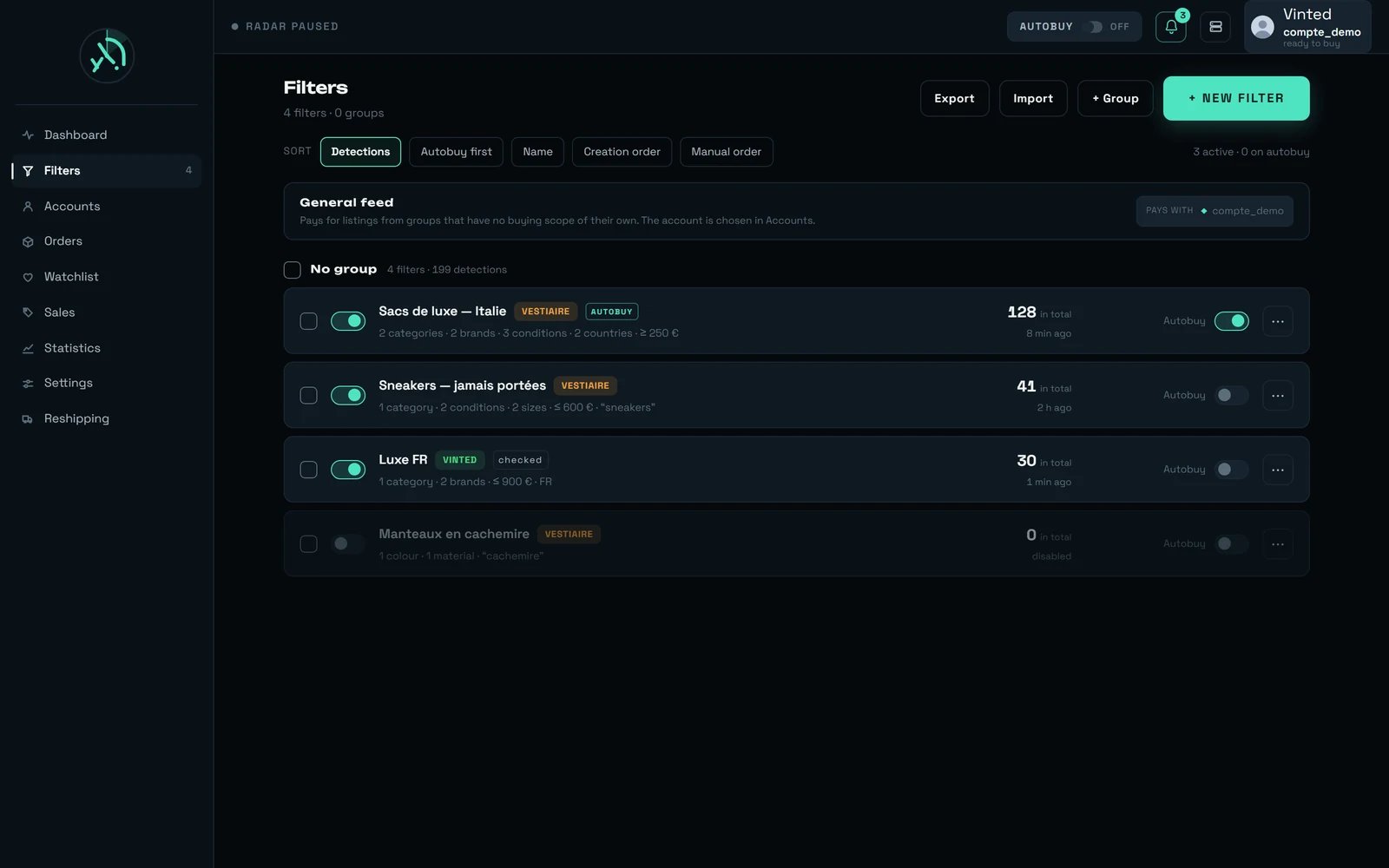
Both marketplaces in one list: every row states which one it belongs to, and the header counters add them together.
“Which marketplace?” — the question that comes before the form
+ New filter does not open the form straight away. A window titled “Which marketplace?” opens first, two cards stacked full width, with this line under the title: “The two share neither their criteria nor their settings. This choice cannot be changed later.” The Vestiaire Collective card is offered to everyone, whether or not you have a Vestiaire account connected: a filter detects on its own, and an account is what an offer or a purchase needs, never a detection. Every criterion the Vestiaire form then offers — three levels of categories, 24 sizing scales, colour, material, the seller’s country — is written out in Writing a Vestiaire filter.A Vestiaire row, badge by badge
Autobuy armed — {nom} · you will confirm each purchase with your bank.
The ⋯ menu, and what a bulk action carries across
Three filters that work, written out in full
- The luxury drop
- The keyword watch
- The watched category
Trap n°1: the filter that surfaces nothing

A grid of identical tiles, and only a handful of them lit. A filter is worth as much for what it leaves in the dark as for what it lights up.
Automatic buying on a filter
Ticking a filter’s Autobuy is not enough to send a purchase out: there are four gates, and they all have to open.The three caps, from widest to narrowest
Working on several filters at once
Multiple selection and bulk editing
Multiple selection and bulk editing
{n} filters selected — only the fields you turn on will change. Five blocks, each with its own
“Change …” switch:Groups, and the Dashboard sub-page
Groups, and the Dashboard sub-page
⋯ menu offers “Rename the group”, “Export the group” and “Delete the group”, the last one
with its promise: “The group’s filters are kept, they go back to having no group”.An empty group shows “No filter in this group — move one here from its ⋯ menu.” The “No group”
section appears as soon as a filter is filed nowhere. A Vestiaire filter is filed like any other
— from its ⋯ menu or in bulk; it simply has no group selector inside its own form, so it lands
in “No group” and moves afterwards.The “pays with” badge names the account that will pay for that group; “inherited” means it
follows the General feed banner: “Pays for listings from groups that have no buying scope of
their own. The account is chosen in Accounts.” That setting is not written here — the banner and
the badges are read-only, and they take you to Accounts.Duplicate by region
Duplicate by region
⋯ menu offers Duplicate by region:
{nom} — one copy per ticked country, same criteria, only the seller's country changes.
26 countries are offered, with the “Euro area”, “All” and “Clear” shortcuts, and the button
counts the copies before firing: Duplicate — {n} copies.Export, import
Export, import
{resume} — from {fichier}, with an “Arm the imported autobuy” switch that is
off by default: “Imported filters buy nothing until you arm it.” Vestiaire filters are not
carried by an export, and an import never creates one.Groups are merged by name: re-importing “Luxe” does not create a duplicate. An export, on the
other hand, does not carry the paying account — after an import, go and set it in
Accounts, otherwise the group follows the General feed.Three refusals, deliberately distinct: “File unreadable — reading failed.” · “File damaged — use
the original rega filter export.” · “File not recognised — this is not a rega filter export.”Ordering by hand: “Manual order”
Ordering by hand: “Manual order”
⠿ handles and the ↑ ↓ arrows on filters only appear under the Manual order sort.
Groups, on the other hand, can be dragged into order under every sort.Dropping a filter onto “No group” simply takes it out of its group: the order of ungrouped
filters is not remembered, there is no container to store it in. And handles never appear on a
Vestiaire row.What can refuse, and how it is said
Every refusal follows the same shape —{quoi} — {raison} — and the reason comes from the server,
never from a guess made by the screen.
The screen’s states
Our advice
1. Put a MIN PRICE on every filter, even a low one
It is the only free lever in the product: it costs nothing, it changes no regime, and the higher the floor, the more capacity all your filters get back. Set it just under the price of the items you actually buy: a 10 € floor already leaves out more than half of the flow, and at 30 € only a small fraction of it is left. It is the first few dozen euros of floor that do nearly all the work — aim as high as your hunt allows, and a low floor is always worth more than no floor. ⚠️ The floor that applies is the lowest one across your active filters. A single filter with no floor — or with a very low one — is enough to cancel the benefit for all the others; it is the most common oversight on this screen, and the most expensive. If you do only one thing after this page, do that one — and do it in bulk.2. Stay on “Euro area” until you actually need to tell countries apart
It is the only origin preset that costs nothing, and it is the default on a new filter. Ticking “France” alone does not make the filter more accurate: it makes it “checked”. You lose the distinction between countries, you gain speed. Conversely, if you sell internationally, know that the euro area is far from covering the whole flow: “Any origin” is free too.3. Never write a category on its own
Add a brand or a keyword to it and it goes back to immediate detection — the cost banner offers it to you itself. A category on its own shows nothing on its first pass, then delivers your listings in batches, at a regular interval.4. A filter with no brand deserves one keyword
The rarest, the most discriminating. Several keywords on a brand-less filter behave like one run-on string — “sac cabas” does not catch “cabas en cuir, sac porté épaule”. Put the rest into EXCLUDED WORDS or into a category, and check with TRY IT ON A TITLE.5. Aim at the parent category, never at the leaf
Sub-categories are included anyway, and a very deep category makes the check markedly slower. The breadcrumb under each result exists for that: “Other” appears 14 times in the catalogue.6. Re-read “Watching Vinted …” before every save
It is the only line on the screen that says which shop is really being read. A filter that aims at British sellers while the French shop is the one being read can structurally find nothing, and no counter says so.7. Estimate once, and use “Refine” before declaring a filter dead
A rare filter and a dead filter look exactly alike on a short estimate: neither of them shows anything. That is what Refine the estimate (takes longer) is for — use it before concluding that a filter finds nothing. And do not fire estimates back to back: while they run, it is your own radar that slows down and lets listings through. Estimate once, then refine.8. Read the estimate as a ceiling, not as a rate
It ignores your keywords and your origin: estimating “Gucci, bags, keyword cabas, France only” actually measures “Gucci, bags” — potentially ten times more. And it does not follow the shop your filter watches: on a British filter, the figure is worthless.9. Keep an eye on your wide filters — they slow down all the others
Once your filters keep more listings than the feed can absorb, cards stop arriving in a moment and start arriving markedly late. Nothing is lost, nothing fails, and no counter says so: it all simply comes too late to race for. A single very wide filter is enough to tip the whole screen over — which is also why advice n°1 exists.10. Export before any clean-up pass
Deleting from the⋯ menu is immediate, with no confirmation and no undo. Export writes out
everything, into a dated file you can re-import. Thirty seconds of insurance — and importing never
re-arms autobuy on its own.
11. Name your filters for the sort, not for yourself
The Name sort is alphabetical, and there is neither search nor pagination in the list. At 40 filters, a consistent prefix (LUXE — …, UK — …, WATCH — …) beats any folder. Groups, on
top of that, give you a Dashboard sub-page.
12. To watch another shop, paste its link — it is free
On the capture, the row “Levi’s 501 vintage — UK” carries the UK marker and stays “fast”: its summary mentions no seller country at all. Watching the British shop costs nothing; it is restricting the seller’s country that is paid for. Keep that in mind before ticking a country “just to be sure”.What surprises people
The header announces filters, and the body says “No filter”
The header announces filters, and the body says “No filter”
The AUTOBUY badge disappears when you disable the filter — but the arming stays
The AUTOBUY badge disappears when you disable the filter — but the arming stays
“1,284 in total” and “last one unknown” on the same row
“1,284 in total” and “last one unknown” on the same row
A French filter never shows a country marker
A French filter never shows a country marker
Deleting a group does not delete its filters
Deleting a group does not delete its filters
A listing can appear with one filter, then gain a second
A listing can appear with one filter, then gain a second
Ticking a parent category absorbs the ones you had already ticked
Ticking a parent category absorbs the ones you had already ticked
Already covered — {chemin} when the addition is pointless,
{n} sub-categories absorbed — {chemin} when it replaces others. Your selection is simplified,
not reduced.Reopening a filter to change its price no longer loses its materials and patterns
Reopening a filter to change its price no longer loses its materials and patterns
A size can narrow only part of your filter
A size can narrow only part of your filter
Only {noms} and the note
“Does not narrow the filter’s other categories.” And the screen counts the ones left out:
{n} categories offer none: they will not be narrowed.An import never arms automatic buying on its own
An import never arms automatic buying on its own
On a phone
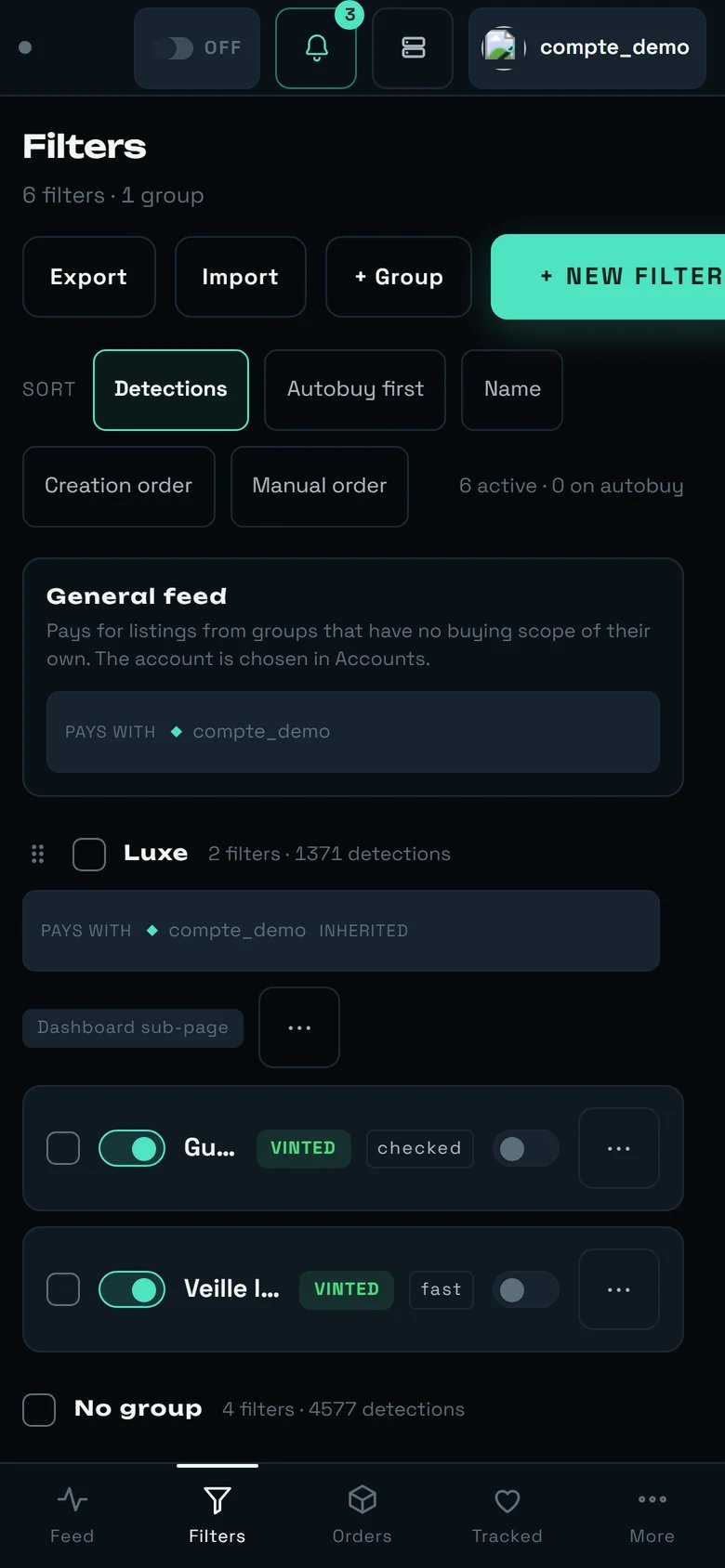
The same screen on mobile. This capture predates the handle: today Export, Import, + Group, the sorts and the General feed banner are folded behind it on arrival.
- + New filter stays in the header, always visible. Export, Import, + Group, the sort bar and the General feed banner are folded behind a handle — a short bar announced “Show the controls” — and come back with one tap (the handle then reads “Hide the controls”). The choice is remembered for this screen, on this device.
- A filter row keeps the checkbox, the switch, the name (truncated — “Gu…”), the marketplace pill, the regime pill, the Autobuy switch and the
⋯menu. The criteria summary, the “in total” counter and the freshness line do not fit: open the filter, or come back on a large screen to read them. - The group’s “pays with” badge and the “Dashboard sub-page” badge drop onto lines of their own.
- A navigation bar appears at the bottom: Feed · Filters · Orders · Tracked · More.
What this screen does not do yet
We would rather tell you than let you find out.- Neither search nor pagination in the list — five sorts, and that is all. At 200 filters, you scroll.
- No undo. Deleting from
⋯is final. - No filter is ever refused for being too wide. The estimate informs, it does not authorise: a filter that would surface 3,000 listings/min will be created without a word, and it will drown your feed.
- The estimate for a filter that watches another shop is worthless: it does not follow that shop.
- Materials and patterns have no selector. They can only be set by pasting a Vinted link that carries them; the form keeps them and offers to “Remove” them.
- Colour is no longer a criterion. It was taken out of the product; there is nothing left to set.
- The paying account is not chosen here, filter by filter: it is set by scope, in Accounts.
- No cap on a Vestiaire filter’s automatic buying. The column is there and the arming is real, but no cap per item exists on that marketplace: an armed Vestiaire filter buys whatever the price.
- An export does not carry your Vestiaire filters — they are neither written out nor re-created by an import.
- The “on autobuy” counter of the sort bar only counts Vinted filters. An armed Vestiaire filter is missing from that figure, even though the “Autobuy first” sort does bring it to the top.
- Nothing flags a structurally silent filter for you. The diagnosis above is, for now, a manual step.
- No limit on the number of filters — good news, but remember advice n°9: every filter that is too wide is paid for out of the speed of all the others.