The three caps and exactly what each one covers, where automatic buying really runs, the total actually debited versus the price on screen, what reshipping adds to the bill, and everything that can spend money when you did not expect it.
A ceiling, and five heights that all stop below it.
rega spends your money, on your Vinted and Vestiaire accounts, with your card. This is the one page to read in full before you arm anything: it says who authorises a spend, who bounds it, who refuses it, and why the number shown on a card is never the one that will appear on your bank statement.Two other paths spend money now, and neither behaves like the one above. On Vestiaire Collective, nothing is ever charged without you answering your bank — and the marketplace’s own lines can more than double the number printed on the card. In reshipping, the bill is ours — two fixed fees, and nothing else — and it arrives weeks after the purchase that caused it. Both are picked up below, at the point where they change what you should do. A third bill can reach you outside reshipping: a line we add to your subscription, settled on a screen that replaces the whole application — it has its own section below.
The four sentences to remember.
Automatic buying runs on our servers. Closing the tab, closing the browser, shutting the computer down: none of it stops it. The only thing that stops it is disarming it.
There are three different caps, and the most visible one is not the one protecting you. The one that counts is each filter’s « € max ».
No cap is set to begin with. An armed filter with no « € max » will buy whatever the price.
Count above the displayed price. On our Vinted demo account, an item at 40 € is announced as « ≈ 44.09 € delivered ». On Vestiaire the gap is of a different size altogether: an item displayed at 34 € came out at 102.12 € in the basket, carriage and duties included.
They are named almost the same, they do not protect the same purchases, they are not kept in the same place, and they do not start from the same value. This is the most expensive misunderstanding in the product — here are the three side by side, from the widest to the narrowest.
Where you set it
What it bounds
Where it is kept
Starting value
« Purchase ceiling »
Settings → BUYING
Every purchase: your clicks, automatic buying, the verification queue, preparing a carrier
At rega, outside your browser
empty — shown as « none »
« Cap per item »
Dashboard → AUTOBUY panel
Automatic buying when it runs in this tab
In this browser only
120 €
A filter’s « € max »
Filters → a filter’s panel
Automatic buying for that filter, and nothing else
On your rega account, everywhere
empty = no cap
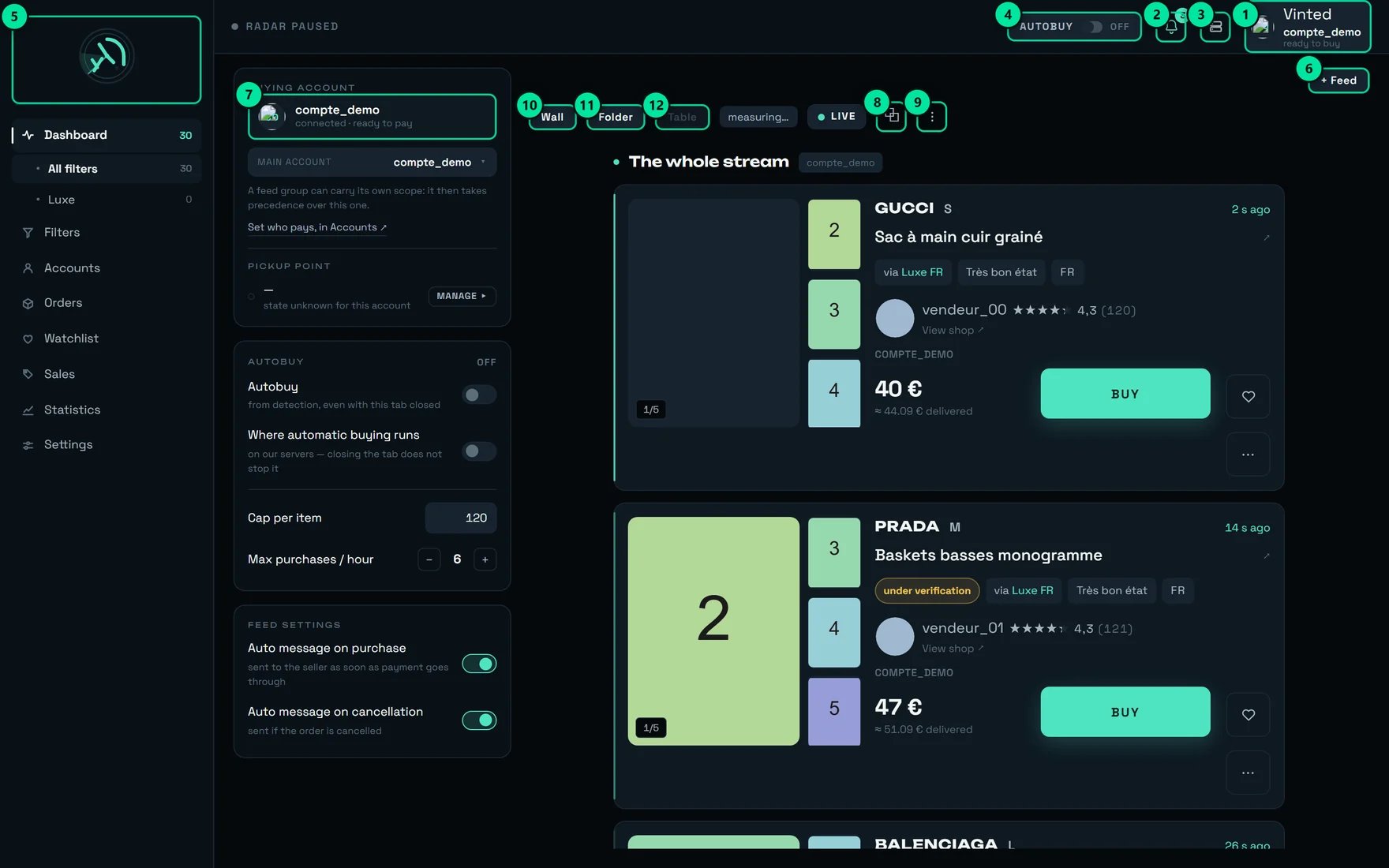
The dashboard’s 120 € « Cap per item » does not protect your automatic purchases. It only applies to automatic buying when it runs in the tab. And it does not run in the tab: it runs on our servers, exactly as the screen writes under « Where automatic buying runs » — « on our servers — closing the tab does not stop it ».In that configuration the 120 € field and the « Max purchases / hour » stepper at 6 have no effect on what goes out. And since they are kept in this browser only, another machine, another browser or a private window brings them back to 120 and 6.
The dashboard's AUTOBUY panel. « Cap per item 120 » and « Max purchases / hour 6 » are right there, plainly visible — and they are not what bounds automatic buying.
#
Control
What it does
1
The paying account — here compte_demo, « ready to buy »
Says which Vinted account will pay for the next purchase.
3
Administration
REGA staff only — this button does not appear on your account.
4
The AUTOBUY badge
The switch that arms automatic buying. Here OFF: « Automatic buying disarmed ».
A filter’s « € max »: the only one bounding what actually goes out
It lives in each filter’s panel, under the hint « Cap per item — leave empty to impose no cap ». Left empty, the screen warns you once, in red:
« No cap: this filter will buy whatever the price. »
Once the panel is closed, all that remains on the filter’s row is a discreet « no cap ». This is why the « Autobuy first » sort on the Filters screen is the most useful control gesture in the product: it brings every armed filter to the top, and you read the cap column in one glance.When you arm a filter, the confirmation reads the value back to you: Autobuy armed — {nom} followed by · ≤ 40 €, or by · no cap. Read that suffix. It is the last time the product tells you unprompted.
« Purchase ceiling » (Settings → BUYING): the universal net
This is the only one that applies to everything — including a human click on BUY. Its description: « Above this amount, the purchase is refused and you are told. Empty = no ceiling. » It shows « none » until it is set.
Once set, it refuses a price it cannot read — a price that is there, but unusable. An item that arrives with no price at all is a different case, and this ceiling lets it through. A filter’s « € max » is stricter on exactly that point: with a cap set and no price to check it against, the purchase is refused, not attempted.
On a shop account this field is a readout, not a control. You can type in it; it goes back to its previous value with the message Setting not saved — {cause}. The reason is simple: a shop account is not allowed to set this one. Your real cap is each filter’s « € max ».
The dashboard’s left panel says so bluntly when it is not: « no account to buy with — sort this out in Accounts ». With no buying account, automatic buying drops everything, silently: the badge stays on ARMED and nothing ever happens.
2
Set a « € max » on every armed filter
Filters screen → « Autobuy first » sort → open each filter at the top of the list and fill in « € max ». Set it to the item price you accept, not to your total budget (see the next section).
3
Leave « Automatic pick-up point » on
Settings → BUYING. Turned off, the purchase fails — it does not pause, and it does not ask you anything.
4
Check that a card is saved and set as default on every Vinted account
At Vinted, rega never asks for a card number and stores none: it selects the card already saved at Vinted. With no usable card the payment is refused cleanly — no debit, but the item is lost. On Vestiaire the rule is not the same; it is set out further down.
5
Arm, then check against a real detection
Arm the AUTOBUY badge (confirmation: « Autobuy armed »), wait for a matching detection, and check that a purchase row appears. The ARMED badge on its own proves nothing.
Where automatic buying runs, and what really stops it
The AUTOBUY panel carries two lines to be read as statements, not as settings:
« Autobuy » — « from detection, even with this tab closed »
« Where automatic buying runs » — « on our servers — closing the tab does not stop it »
That second line states a fact, it does not change it. Its switch looks off in the capture while our servers are indeed the ones buying: there is nothing to toggle there. The line underneath is what tells you the truth.
Everything stops. This is the only clean gesture. Confirmation: « Autobuy disarmed ».
Untick AUTOBUY on a filter
That filter only
Deactivate a filter
That filter only
Leave a filter as a draft
That filter only — and there is no way around it: an unconfirmed filter never buys, whatever you tick
Empty the feed’s account group
Nobody pays any more — this is a deliberate refusal, not a fallback onto some other account
Close the tab, close the browser, shut the machine down
No effect. Buying carries on.
Reboot, come back the next day
No effect. The armed state is kept.
An AUTOBUY badge left on ARMED on a Friday evening buys all weekend. That is the intended behaviour — it is the whole point of the product — but it has to be a decision you made.
Two stops come from Vinted, not from you:
If Vinted blocks one of your accounts from buying, rega disarms automatic buying for your whole workspace, deliberately — not just that one account. The block lifts by itself, at the scale of a day. Read the disarming message, let the day pass, and arm again the next day rather than trying to carry on elsewhere.
If Vinted slows one of your accounts down for a while, rega leaves it alone until it recovers and buys with your other accounts meanwhile. That is one of the reasons to attach more than one.
On a brand-new workspace handed over by link, arming is temporarily refused until the workspace has been handed to its owner; the filters, on the other hand, are already in place. Disarming is always possible.
Nothing in this table applies to Vestiaire Collective, because that path stops before the money. Automatic buying there is semi-automatic by design: rega fills the basket, holds the account and tells you — then waits. You have 15 minutes to answer your bank, and if you do nothing, nothing is charged and the purchase is dropped. It is armed filter by filter, one tick box at a time; arming in bulk is refused. Buying on Vestiaire is the page for it.
Three numbers travel through rega and they do not mean the same thing.
The number
What it contains
Where you see it
The price
The item alone, in the listing’s currency
In bold on the card
The estimate
Item + buyer protection + the real postage, as soon as Vinted has returned both. While the postage is still missing: the item plus a flat 3.50 €, and nothing else
The « ≈ … € delivered » line, under the price
The total debited
The real one: item + delivery + buyer protection
On the purchase row, under the label « total debited »
The « Spend » tile
Purchases actually charged, added up — plus money spent outside an item, such as preparing a carrier
Statistics screen, the tile at the top
On our demo account, the first two cards in the stream show 40 € → « ≈ 44.09 € delivered » and 47 € → « ≈ 51.09 € delivered ». That is +4.09 € in both cases.
A ceiling, and prices climbing towards it without touching it: what every cap in rega measures is the block, never the distance left above it.
The practical rule: count on roughly 4 € above the price on show, every time (measured: +4.09 €). The estimate adds a deliberately modest delivery — better to under-estimate by a euro than to inflate the total. What has been measured: real postage at 2.89 €, and buyer protection taking an item from 10.00 € to 11.20 €.And all three caps compare the ITEM price, never the total: a cap set at 100 € therefore lets through a purchase charged at around 104 €. Set your caps to the item price you accept, not to your total budget.
The estimate’s tooltip says it itself: « Estimated total price: item + delivery (about €3-4). The exact postage depends on the carrier chosen at purchase. » And the final amount’s tooltip: « Amount actually debited (item + delivery + buyer protection). »
Two readouts on the Statistics screen are called « Spend », and they do not count the same thing. Check which one you are reading before you take a figure off that screen.
The tile at the top adds up what was actually charged. Its tooltip: « Purchases actually charged, plus spending outside the item itself. Simulations are excluded. »
The one inside the « Account comparison » block is a different number: « Sum of the ITEM PRICES of every order, whatever its state. Postage and buyer protection are not included. » That one under-states your statement on every order, and it also counts cancelled orders.
For a total you can hold against your bank, the safest reading is still the « total debited » values on your purchase rows, added up.
rega never converts a currency — it does not have the day’s rate. A British listing’s amount stays in pounds, and the total debited stays in the currency of the account that paid. Two numbers in two currencies on the same row is correct: they are not two versions of the same amount.
Nothing in this calculation carries over to Vestiaire. There, the price on show already contains the marketplace’s buyer fees, but carriage and customs duties are added on top and are only announced in the basket. On the item measured at 34 €, the basket came to 102.12 €: 45.00 € of carriage and 23.12 € of duties. There is no « about 4 € » rule on that marketplace, and no proportional one either — an item at 20 € came out at 86.52 €, another at 21 € at 25.90 €. On another order, delivery alone more than doubled between the two modes: 4.90 € at a pick-up point against 10.90 € to your door. Buying on Vestiaire works that basket out line by line.
On a card in the stream, the purchase row first shows « item price — total not confirmed yet », then switches to « total debited » as soon as Vinted has returned the real amount. Here is what can happen in between.
An interrupted payment is NEVER replayed. When the connection drops exactly while paying, nobody knows whether Vinted debited or not. Replaying would risk a double debit — rega never does. That is why the « Retry » button does not appear on a row with an unknown outcome, and why the sentence shown is: « Outcome unknown: tracking stops here. Check in Orders BEFORE retrying — a payment may still go through. »
A 3-D Secure confirmation that never happens is not a failure, and costs nothing. After a quarter of an hour without confirmation the purchase is simply not valid: the item is lost, no euro left your account. The notification goes out the very moment the link exists — title « Bank confirmation required », body « Your bank is asking for a confirmation — without it, the purchase will not complete. » Keep it enabled and accept the alert on your phone.
Both carry the words « pick-up point ». One is mandatory and free, the other is optional and paid for.
« Automatic pick-up point »
Settings → BUYING. On from the start. Leave it on.Its description: « rega chooses the collection point during the purchase. Turned off, the purchase fails for want of a pick-up point — leave it on. »Turned off, the purchase FAILS — it does not pause, and nothing asks anybody anything. The refusal you get is: « No pick-up point could be selected for this order. »
« PREPARE THIS CARRIER »
Accounts screen. A REAL purchase of a few euros. Optional.The note under the button hides nothing: « A real purchase of a few euros, once. » And the panel explains why: « No point kept. Vinted only keeps one after a first purchase actually paid with this carrier — once, a few euros. »Without it, the purchase still goes through — simply ~1.3 s slower on the items shipped by that carrier, out of the six to nine seconds a purchase takes.
The gain from preparing is not additive — and that is counter-intuitive. It is the seller who chooses which carriers are offered, not you. Preparing a second carrier does not make your purchases faster still: it widens the share of your purchases that gain that head start. One account, one prepared carrier, and you already have most of the benefit.Two gestures to do in the right order: rank your pick-up points before an account’s first paid purchase. That purchase is what fixes the point every later purchase will reuse without a second thought.
The « Preferred carrier at the pick-up point » setting warns you itself: « A carrier other than the default one may cost a little more. » A preference, on the other hand, never makes a purchase fail: if the seller does not offer your carrier, rega takes what is available.
The verification queue buys on its own, up to 96 hours later
When you click BUY on an item Vinted is still checking, the card shows « Under verification — the purchase starts as soon as it is verified ». The item joins the queue, and the purchase goes out on its own the moment Vinted clears it — possibly days later, with no further click from you.Giving up is set at 96 hours, adjustable in Orders under « Give up after », and each row shows the time remaining. Empty this queue before a weekend if you do not want a surprise on Monday.
« PREPARE THIS CARRIER » really debits
It is not a simulation. It is a real purchase, bounded to a few euros, from a real seller, leaving you a real parcel to collect. Once per account and per carrier, and that is all.
Two purchases can go out at the same time on a single account
The limit is 2 simultaneous purchases per account. With several buying accounts, your simultaneous spending window is therefore 2 × the number of accounts. This is not a queue: they are parallel spends.
A workspace handed over by link can arrive already armed
The armed state is copied along with the workspace. That is exactly why arming is refused until the workspace has been handed to its owner — but the first thing to do after the handover is still to check the AUTOBUY badge, and every filter’s « € max ».
« Retry » starts a real purchase
The button replays the original purchase, on the next account in your rotation. It is deliberately absent in every ambiguous case: unknown outcome, bank confirmation still open, item already gone. When it is not there, it is because it should not be.
A failed purchase has still used up its turn in the rotation
The account is committed on click, so before the outcome is known. The tooltip says it: « Account committed on click: it is reserved before the purchase completes. In rotation, a failed purchase has therefore already used its turn. » This is intended — an account that has just failed is the worst placed to try again.
Everything above this line is money leaving for a marketplace: rega presents a card, and the amount lands at Vinted or at Vestiaire. Reshipping is the one part of the product where we are the ones billing you. It deserves a reading of its own, and it is short: there are only two moments when money leaves your card for us — and that bill arrives weeks after the purchase that caused it, on our payment provider’s page, not at the marketplace.
What we take
How much
When
« Consolidation fee »
10.00 € per parcel — the same ten euros for one item as for twelve
Inside that parcel’s quote, settled when you pay it
Opening a dispute
5.00 €
On its own, at the moment you ask — and nothing at all if the time to claim has already passed: reporting is then free, and recorded all the same
Read the other way round, that flat fee is the guarantee: grouping can never turn out to be the expensive choice.
The consolidation fee is flat, and that is what makes waiting pay. Six items shipped separately are six parcels, so six times 10.00 € — and six carriages. The same six grouped are 10.00 €, once. The product announces the saving as you tick the box: « About {amount} saved ».
No cap on this page has ever heard of a reshipping bill. A filter’s « € max », the Settings « Purchase ceiling » and the dashboard’s « Cap per item » all read one number: the price of an item, at the marketplace, at the moment of buying. Carriage, packing options, insurance, storage, the consolidation fee and the payment provider’s cut are decided later, by you, on screens those caps never reach. Budget for them separately.
A parcel quote can carry seven lines, and never an eighth: carriage, packing options, the consolidation fee, insurance, storage, a discount if we give you one, and our payment provider’s share. Three of them decide almost the whole total:
Carriage. The only line with no rate card in advance: it is entered parcel by parcel, once yours has been weighed and measured. That is why you get a quote per carrier rather than one single price.
Storage. Your purchases wait 60 days at no charge, per item, then a meter runs at 0.20 € a day per item up to day 90, 0.50 € a day beyond, and never more than 50.00 € per item whatever happens. An item still unshipped on day 180 is written off. Nothing is ever taken from your card for storage alone: the amount joins the quote of the parcel that takes the item away.
Insurance. Optional, and off until you switch it on: 3 % of the value you declare, never less than 2.00 €, never more than 60.00 €.
You do not learn those deadlines at the last minute: three reminders go out before the free period ends — 15 days, 7 days and 1 day before — and three more, on the same rhythm, before an item is written off on day 180.Our payment provider’s share is the one line on a quote that is not ours: the screen shows you its amount, never its rate — « These are the fees taken by our payment provider, passed on unchanged. » It is one of only two lines a quote displays even when it is zero, the other being « Shipping »: it is never hidden from you, so it should not be a surprise either.
One whole bill, for scale. Three items in one parcel, one of them 75 days on the shelf, 6.50 € of packing options, insurance on a declared value of 207.00 €, and 34.50 € of carriage: the total comes to 62.33 €. Consolidation and quotes works that figure out line by line, and explains why the payment provider’s share is not simply a percentage added on top.
Customs duties and taxes are never a line on our bill. They are paid on arrival, by whoever receives the parcel, to the destination country. What the product shows you before shipping is an estimate, and it says so: « Indicative estimate, payable by the recipient. Customs alone decides. »
Three facts that spare you a bad surprise. A quote is frozen when it is issued and stays payable for seven days. Letting it expire costs nothing, and asking for another one costs nothing either: storage is billed when a parcel is paid for, never when a quote is issued. And everything on it is in euros, with no conversion.
Neither spending readout is a budget. The Statistics « Spend » tile counts what left for Vinted and nothing else — no reshipping, ever. Reshipping keeps its own, « Spent this month », which totals the parcels you have paid for. Both are readouts: neither compares anything to a threshold, and neither has ever refused anything.
What reshipping does for you
The two fixed fees said plainly, and the seven lines a bill can carry.
Consolidation and quotes
One quote read line by line, the seven days you have to pay it, and what happens on the eighth.
Storage and what it costs
When the meter really starts, the rate card step by step, and one bill to the cent.
Reshipping is not the only bill of ours that can reach you. When a service calls for it — reshipping, typically — we can add a monthly line to the subscription you already have. You do not add it yourself: the amount and its reason are written by us, and at your next visit the whole application is replaced by a single screen until you approve it.
On that screen
What it says
The title
“A line has been added to your subscription”
The reason
The words we wrote, shown as they are — they are not translated
The amount
“Monthly supplement: € per month.”
The rule
“Today you only pay for the days left in the current month. Your renewal date does not change: there will be no second charge on another date.”
The button
“Approve and pay” — or “Pay the invoice” once you have approved it, with “Due today: €.” above it as soon as that amount is known
The other button
“Sign out” — the only other thing the screen offers
The note
“Payment is handled by Stripe. We neither see nor keep your card number.”
1
What you pay today
Only the days left in the current period — the amount is worked out by our payment provider and invoiced on your existing subscription. Nothing else leaves your card that day.
2
What changes at renewal
Your plan and the line come on one invoice, on your usual date. There is no second charge on another date — the screen says so, and it holds. Once settled, your plan and its due date read as before in Settings → Subscription.
3
Where it is paid
“Approve and pay” takes you to the invoice page of our payment provider, outside rega. If a card is already saved there, the amount can be taken without leaving: the screen then simply reloads.
4
How you come back
No button brings you back: return to your rega tab yourself. The screen re-reads your state each time you come back to the tab, and disappears once the payment has been recorded. If it has not been yet, “Pay the invoice” reopens the same invoice — never a second line.
Never subscribe a second time to get past that screen. The offer page refuses it in so many words — “You already have a subscription, with a supplement still to settle on it. Settle it from your settings — subscribing again would create a second subscription, with two charges on two different dates.” — and despite what that sentence says, the place to settle it is not your settings: it is that screen. Come back into the application and click “Approve and pay”.
Three facts worth knowing. Nothing announces the line — no e-mail, no notification: you find it at your next visit. This is not a cut-off: your subscription is in order, and nothing of yours is scheduled for deletion. And the screen holds the interface, not the service — as the code reads, what you armed keeps running while you settle; that point has not been measured on a live account yet.
Open every armed filter and fill in « € max ». It is the only cap consulted by the automatic buying that actually runs, and the only one that follows you from one browser to another.
2 · Set it to the item price, not the budget
Caps compare the item price. Take ~4 € off your total budget to get the « € max » to type: budget 100 € → « € max » at 96.
3 · Use « Autobuy first » as a weekly review
Once a week: Filters screen, « Autobuy first » sort, and read the cap column. A « no cap » row is a decision, not an oversight — check that it really is one.
4 · Once armed, demand proof
The ARMED badge proves nothing. Wait for a matching detection and check that a purchase row appears. With no buying account attached, the engine drops everything silently.
5 · Empty the verification queue before you leave
Orders → « Being checked ». Remove what you no longer want: those items can buy themselves during the following four days.
6 · Stay reachable for a quarter of an hour after a purchase
A bank confirmation not done within 15 minutes loses the item. Keep purchase notifications on and accept the alert on your phone.
7 · Check which « Spend » you are reading
The tile at the top of Statistics adds up what was actually charged. The « Spend » inside « Account comparison » adds up item prices only, whatever the order’s state. Two names, two numbers — and for a total you can hold against your bank, the « total debited » values on your purchase rows.
8 · Prepare one carrier per account, not five
Each preparation costs a real purchase of a few euros and saves ~1.3 s on every later purchase shipped by that carrier. The head start does not add up: preparing a second carrier widens the share of your purchases that gain it, never the time gained. Prepare the carrier your sellers offer most often, and stop there.
9 · On an unknown outcome, go to Orders
Do not click again. A payment may still go through, and a second click would risk a double debit. Orders tells the truth; the card in the stream only follows.
10 · Do not switch browsers expecting your settings to follow
Only the AUTOBUY badge and your filters’ « € max » follow your account. « Cap per item » and « Max purchases / hour » stay in this browser — and vanish in a private window.
11 · If you must cancel, do it before the parcel leaves
An order can no longer be cancelled once the parcel is on its way. And two cancellations in the same day put you in the red zone at Vinted: rega warns you, it does not forbid it. Space them out, and never cancel as a matter of habit.
12 · Leave « Automatic pick-up point » on
It is the only setting in Settings which, turned off, makes a purchase fail — and it fails after the item has been reserved, so at the worst possible moment.
The badge says ARMED, and the switch right below looks off
Both are correct. The badge states your intent: “I authorise automatic buying.” The « Where automatic buying runs » line states who carries it out — our servers. It is not a handbrake.
An item detected more than two minutes ago will no longer be bought
This is not a failure, it is freshness. Past that delay the item is almost always gone: going ahead would burn one of your account’s buying attempts for nothing. rega prefers to refuse cleanly.
Arming a filter does not buy what is already on screen
Deliberate, and just as well: without it, ticking AUTOBUY would immediately buy everything you were looking at. Automatic buying only works on what is born after you armed.
A cap that is set can refuse an item you would have accepted
If the price cannot be read, the cap refuses. That is the plain sense of a guardrail: one that lets through what it does not understand protects nothing.
A card marked « under verification » will not be bought automatically
While Vinted has not finished checking a listing, automatic buying stays away from it. A human click, though, puts the item in the queue — and it is that queue that will buy later, on its own.
A purchase's progress bar is not proof of payment
It is capped and never reaches its end before confirmation. A purchase takes six to nine seconds, most of which is time spent at Vinted that nobody can shorten. Wait for the purchase row, not for the bar.
Most purchase « failures » are not failures at all
Sorted one by one, the failures we record turn out in their great majority to be races lost or items already gone, and not a fault of the tool. The screen files each failure under a readable verdict, including « Race lost, or the item had already gone ».
The account shown before the purchase is only a forecast
The account that counts is the one appearing on the purchase row, afterwards: it is the one that paid, and it is its address the parcel will go to.
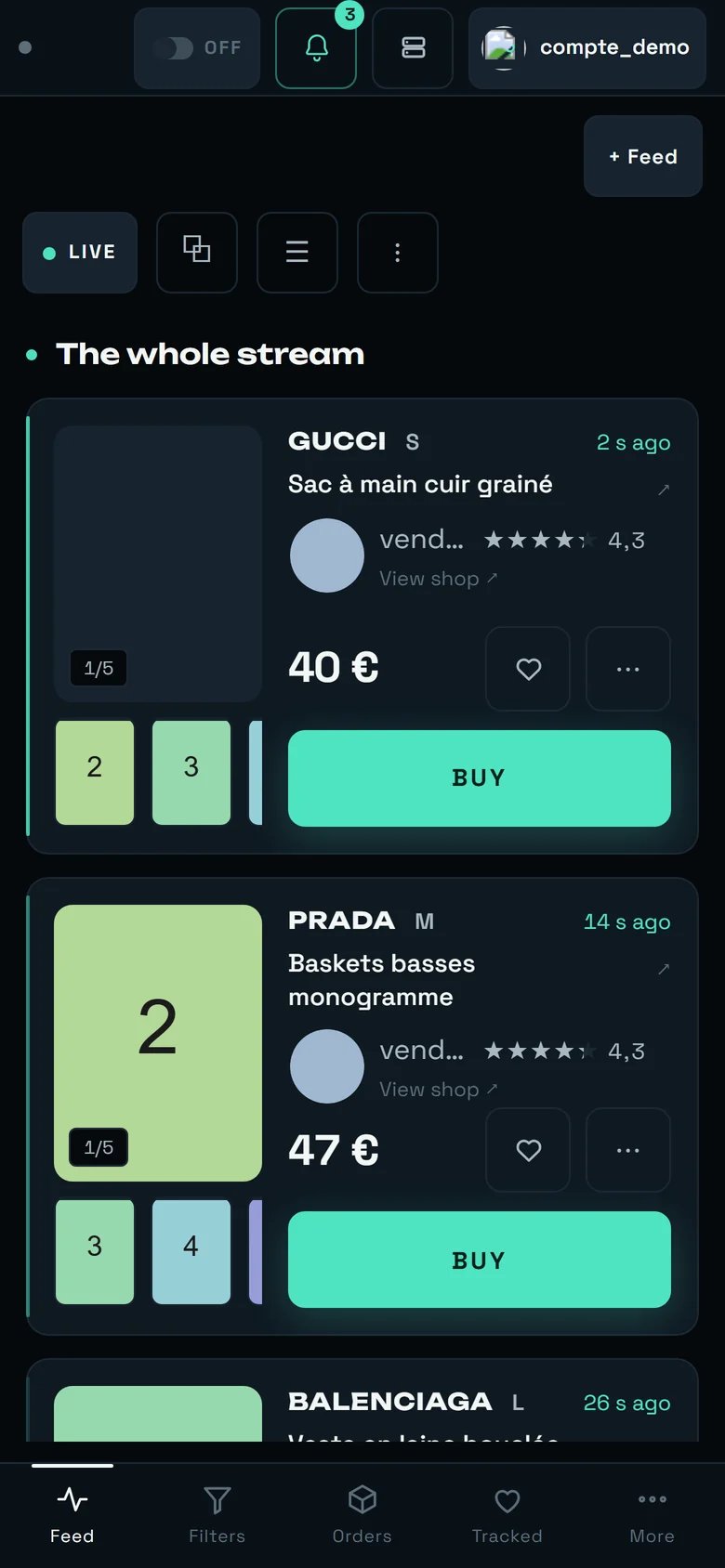
The stream on a phone: the AUTOBUY badge stays at the top left, here on « OFF ».
The AUTOBUY badge stays reachable: it is the first item in the header, to the left of the bell. So you can disarm from anywhere, and that is the single most important gesture on this page.
The left-hand AUTOBUY panel is not shown. Your filters’ « € max » values stay editable from the Filters tab in the bottom bar.
The « ≈ … € delivered » estimate does not appear on the phone card: only the item price is there, in large type. Add the ~4 € in your head.
The bottom bar replaces the sidebar: Feed · Filters · Orders · Tracked · More. « Orders » is the tab to open after a bank-confirmation notification.
There is no monthly budget and no cumulative spending alert. Nothing totals your debits to compare them against a threshold. Reshipping publishes a « Spent this month » figure of its own, and it is exactly that: a readout. The only usable cap is per item, filter by filter.
There is no account-wide cap in the interface. No cap shared by all your filters, and no server-side maximum number of purchases per hour.
There is no cap of any kind on Vestiaire Collective, and nothing there judges a price. What stands in its place is that no purchase on that marketplace is ever charged without you answering your bank.
The Settings « Purchase ceiling » is a readout on a shop account: it shows, it accepts typing, and it reverts.
The dashboard’s « Cap per item » does not bound purchases going out from our servers, and is only kept in the browser where you typed it.
Caps bound the item price, never the total debited. The gap is about 4 € per purchase at Vinted; on Vestiaire it was measured at 68.12 € on a single order, and it has no predictable size there.
No cap bounds a reshipping quote, and the three caps on this page never look at one.
The « Spend » inside « Account comparison » is not a statement: no postage, no buyer protection, and cancelled orders are counted in it. Neither it nor the tile at the top of Statistics counts anything from Vestiaire or from reshipping.
The message refusing to arm a workspace still being set up arrives in French, even when your interface is in English.
On Vinted, rega neither collects nor stores any card number. It selects the card saved at Vinted on the paying account — that is where, and only where, you manage it. On Vestiaire the rule is not the same: that account only opens its payment if a card is saved in rega — most often its security code alone, the number staying with the marketplace. That single code is what you entrust to us, and the screen says so before you agree to anything: read that sentence, and do not confirm if it does not suit you. A reshipping bill is settled on our payment provider’s own page, which we do not see either. Your Vestiaire accounts says what becomes of each of those secrets, and what deleting an account erases.