Give your marketplace accounts a delivery address in our warehouse, then pay for one parcel instead of ten: what we do with your goods, what appears on the bill, and the two fixed fees that are the only ones we charge.
Reshipping gives your marketplace accounts a delivery address at our warehouse. We receive what you buy, open it, photograph it, tell you what we see, and hold it until you say the word — then we put several purchases into a single parcel and send it wherever you live. Grouping is charged a flat €10.00 per parcel, whether that parcel holds one item or twelve.
Several purchases, each arriving on its own, ending as one parcel that leaves once.
There are two of them, and they are not the same problem.The first is a wall. A seller ships within their own country, or to a short list of countries, and yours is not on it. The listing exists, the price is right, and you cannot buy it. Our warehouse address turns that listing into an ordinary domestic delivery: the seller ships to us, we ship to you.The second is arithmetic. Ten finds bought over a month, sent one by one, are ten lots of postage and ten customs journeys. Grouped, they are one parcel, one carrier, one payment, one declaration.
Grouping never costs more than not grouping. The consolidation fee is a flat €10.00 per parcel, and it does not read the number of items in it: 1, 6 or 12 items all give €10.00.It was not always so. The earlier scheme billed a base plus an amount per item, which punished exactly the behaviour the service exists for. That is why it was replaced by a flat fee.
Three items sent as three parcels carry the grouping fee three times, €30.00. Grouped, they carry it once, €10.00. The warehouse screen writes that difference on the grouping suggestion itself — “About {amount} saved” — and the amount it shows is (number of items − 1) × €10.00.
That saving deliberately leaves postage out. Nobody can price a parcel before a person has weighed and measured it, so the figure on screen counts only the fee we control. Your real saving is larger — by however much nine extra postings would have cost — but we will not put a number on that, because we do not have one.
Reshipping is not on by default. It takes two switches, in this order, and the second one is yours.
1
We open the service on your workspace
This is a decision made with you, not a button you find. Until it is made, the service answers everywhere with the same sentence: “Reshipping is not open on your workspace yet. Write to us to get access.”
2
An entry appears in the sidebar, under Settings
It is labelled “Reshipping”. It appears only for workspaces the service has been opened for — on every other account, the word does not exist anywhere in the product.
3
You tick the accounts whose orders should come to us
On the screen titled “Accounts followed by reshipping”: “Tick the accounts whose orders should enter the warehouse. The others are unaffected.” Nothing is global — an unticked account carries on exactly as before. Ticking, on the other hand, draws no line in time: we read that account’s order list, and every order on it that we do not already know becomes an item in your warehouse, whatever its date.
4
You put our address on each ticked account
The reminder sits right under the switch: “Remember to set our warehouse address as the delivery address on this account.” A “Copy the address” button puts the whole block on your clipboard and turns into “Address copied”.
Copy the phone number as well. The warning is written above the button, and it is the one thing on this page that loses a parcel rather than money: “Copy the phone number too. Carriers use it for delivery notices: without it, a missed parcel goes back to the depot and nobody can be reached.”Every place that offers you the address copies the same lines, phone number included — the accounts screen, “How it works”, and the Warehouse screen. Paste the whole block, and change nothing in it. Your first parcel walks through it.
Reshipping has its own navigation, its own header and no settings screen of its own. That is why the language switch sits in the header, next to the brand: it is the only setting the service has, and it decides both what you read and the language of the emails we send you. A “Back to Rega” link takes you back to the main product.Always come in through the sidebar. A page that has sat open a long time, or one reopened from a bookmark, can refuse to let you in — clicking the entry again from Rega puts it right on the spot.
What you read
What it means
“Reshipping is not open on your workspace yet. Write to us to get access.”
The service has not been opened for you. Nothing you can tick will change it.
“Sign in to access reshipping.”
You are no longer signed in to Rega. Sign in on the main product, then click through again.
“This entry link is no longer valid. Go back to Rega and click again.”
Re-enter from the sidebar in Rega. This is not an address to bookmark: reopening it directly will not work.
“Entry did not go through. Try again.”
Click the entry in the sidebar again — the second attempt normally goes through.
“This workspace could not be found.”
The space named by the link no longer exists.
“The service could not be reached. Try again in a moment.”
Our side did not answer. Nothing was lost, and nothing was changed.
“You do not have access to reshipping.”
This account is not among those the service was opened for.
“The service is temporarily closed. Try again later.”
Maintenance. This is not the same as not being subscribed — you keep your access, the service is simply not accepting gestures right now.
Those last two sentences look alike and mean opposite things. Being subscribed and the service accepting gestures are two separate facts, and the product keeps them separate on purpose: one is about you, the other is about us.
Yes. Its orders are read from the marketplace and become items in your warehouse.
A Vinted account you have not ticked
No. Tick it, and its orders start coming in — including purchases already made, if they are still on the account’s order list.
Vestiaire Collective
No. Reshipping reads Vinted orders only. Goods bought there and delivered to us have to be entered by hand — write to us and we will put them on your shelf.
A purchase made anywhere else
Same answer: by hand, on request.
An item entered by hand follows exactly the same path as one that came in through a ticked account — same states, same inspection, same storage clock. The one thing it cannot have is a claim against the seller, because there is no marketplace order behind it. Its inspection sheet says so plainly: “The parcel has not been collected yet: the clock has not started.” Your warehouse says what else changes, and what does not.
Your delivery address, at the other end, has to be in a country we serve. An address in a country we do not is refused as you save it: “We do not serve this country yet.” The list is ours and it moves; ask rather than guess.
The service states its own contract on its “How it works” page. We repeat it here word for word, because these five sentences are the whole service.
1
“Tick an account”
“Choose the accounts whose purchases should come to us, and set our address as the delivery address.”
2
“We inspect”
“As soon as a parcel arrives, we open it, photograph it and tell you what we see.”
3
“You reply”
“You approve, or report an issue. The window is short: the platform allows only forty-eight hours after collection.”
4
“You group”
“Your items wait in the warehouse. Group them into a parcel whenever you like.”
5
“We ship”
“We offer you several carriers, you pay once, and you follow the parcel to your door.”
The page those five sentences come from — and, underneath them, the warehouse address with its phone number.
Step three is the only one that puts you on a clock. The forty-eight hours are the marketplace’s, not ours — that is how long Vinted leaves a buyer to raise a problem after a parcel is collected. Your own deadline is shorter, because we need time to write and file the claim inside that window, and it is shown to you as a live countdown on the item, with the exact date and time underneath.Your reply window is capped at 14 hours. It is a ceiling, never an allowance: if the inspection is published late in the marketplace’s window, you get less — sometimes much less. So you will never have more than 14 hours, often less, and the countdown on the sheet is the only exact answer: that is the one that binds you.
The inspection. Every parcel is opened by a person, not scanned by a machine. The inspection carries a verdict — “Matches the listing”, “Slight discrepancy” or “Major defect” — a written note of what was found, a list of defects with a numbered pin on the photo that shows each one, and at least three photos: an inspection cannot be published with fewer. Checks and photos goes through the whole report.Your reply. Two buttons, “Everything is fine” and “Report an issue”. Once you have answered, the answer replaces both buttons with an acknowledgement, and the item carries a badge for good: “Approved by you”, “Issue reported” — or “Approved without a reply”.Silence. If the deadline passes with nothing from you, the item is approved and enters the warehouse. The product refuses to read silence as a complaint, and says why: filing a claim would mean accusing a seller of a defect nobody has looked at, on the strength of a client who did not open their screen. A wrong approval is repaired with a conversation; a wrong claim is paid for in account reputation. The badge is deliberately “Approved without a reply” and never “Approved by you”. And you are told when it happens: the bell rings — “Item approved” — and a letter goes out. The countdown on the item is still what binds you, but you do not learn about the approval after the fact.A reported issue. The item does not move — it stays where it is, and only the claim advances. If a claim is still open, we file it with the seller using your photos and your description. If it is not, the report is still recorded, still shown on the item, and costs you nothing: “The claim window has closed. You can still report an issue, but with no recourse against the seller.” Either way the item waits for a person: it enters the warehouse — and only then do its free days start — when we settle the case, and until that moment it cannot go into a parcel. When something is wrong covers the outcomes, including the one where a full refund sends the item back to the seller instead of to you.The parcel. You tick items in the warehouse and group them. A parcel being prepared can be changed as much as you like: add items, remove them, tick packing options, choose the destination, declare a value for insurance, leave a note for the people packing it. Once it is paid, it is sealed: “This parcel is paid: its contents can no longer change. To modify it, cancel it and start a new one.”The quote. A person weighs the parcel, measures it, picks the carriers worth offering, and types in what each one charges. That is why a quote is not instant, and why nothing in this guide tells you how long it takes: there is no figure to give. The screen says only “We are preparing your quotes. You will get a message as soon as they are ready.”The payment. One payment, for the whole parcel, covering everything on the bill. The button that pays disappears while we are checking with your bank rather than greying out, so a second click cannot become a second charge.
This is the part people ask about first, so here it is without a preamble. Rega charges two fixed fees, and there is no third one hiding anywhere.
The fee
Amount
When it is due
Consolidation — putting your items into one parcel and preparing it to travel
€10.00 per parcel
Inside the quote, settled when you pay for the parcel. The line is called “Consolidation fee”.
Opening a dispute — us taking a claim to the marketplace on your behalf
€5.00
Paid separately, at the moment you ask, and only if a claim is still possible
There are only two moments in the whole service where money leaves your card. Paying a parcel’s quote, and asking us to open a dispute. Nothing else in reshipping charges you — not receiving a parcel, not the inspection, not the photos, not holding your goods for the free period, not a quote you decide not to take.
The consolidation fee is flat, and it is flat on purpose
It applies to every parcel, including a parcel with a single item in it. Read the other way round, that is the guarantee: since it never scales with the number of items, waiting and grouping can never be the expensive choice.
The €5 is only due while a claim can still be filed
If the claim window is still open
Asking to open a dispute stops on a request for payment, and the sentence names the amount: “Opening a dispute costs {amount}. Pay it so we can start the procedure with the platform.” A “Pay the fee” button takes you to our payment provider. You come back and click again — the report is not chained onto the payment, deliberately, so nothing goes out on your behalf while you were not looking.
If the window has already closed
Nothing is charged, and your report is recorded anyway: “The claim window has closed: there is no dispute left to open, and nothing to pay. You can still report the problem to us.” The item keeps the report on its sheet. We would rather know, and say we cannot act, than refuse to listen.
If you have already paid it once for that item
“The opening fee has already been paid for this item.” The payment is recorded once and cannot be asked for twice: the same item never carries that fee a second time.
The €5 is not marked up. Unlike a parcel’s quote, this one is charged at its bare amount: the payment provider’s cut on that line is absorbed by us. You are asked for five euros and five euros leave your card.
A quote can only ever be built from the lines below, plus the total. There is no eighth line.
The line
What it is
Who decides it
“Shipping”
What the carrier charges to move the parcel
Us, typed in by hand, once the parcel has been weighed and measured
“Packing options”
What you ticked on the parcel: extra protection, vacuum packing, bubble wrap, gift wrapping, removing tags…
You, on the parcel
“Consolidation fee”
The flat €10.00 above
Us, and it does not move
“Insurance”
3 % of the value you declare, never less than €2.00, never more than €60.00
You: it is off until you switch it on
“Storage fees”
Nothing for the first 60 days, then a per-day, per-item scale, capped at €50.00 per item
Time. Ship sooner and the line is not there at all
“Discount”
A commercial gesture, shown as a negative amount
Us
“Payment fees”
Our payment provider’s cut, passed on unchanged
The provider
“Total to pay”
The sum of the lines above
—
Why the payment line is not simply a percentage added on top. The provider takes its cut on the total collected, not on the sub-total. Adding a percentage to the sub-total would leave us a few cents short on every single parcel, so the line is worked out the other way round: the total is set so that what reaches us after the provider’s cut is exactly the sub-total. The screen explains itself under the line — “These are the fees taken by our payment provider, passed on unchanged.” — and shows you the amount, not the rate.
Four more rules govern that bill, and all four are worth knowing before you read your first quote:
A line worth zero is not shown, with two exceptions that are always there: “Shipping” and “Payment fees”. If you see no insurance line, you did not ask for insurance. If you see no storage line, you owe nothing for storage.
A quote is frozen the moment it is issued. The rates that built it travel with it. A quote issued yesterday keeps saying exactly what it said yesterday, whatever changed in between.
A quote expires, seven days after issue by default: “This quote has expired. Request a new one.” Asking for a new one costs nothing — storage is only ever charged when a parcel is paid, never when a quote is issued, so being quoted three times does not bill you three times.
Everything is in euros. Reshipping does not convert currencies and does not present a bill in anything else.
Customs duties and taxes are never a line on your Rega bill. They are payable on arrival, by the recipient, to the destination country. What the product gives you before you ship is an estimate, framed as exactly that: “Indicative estimate, payable by the recipient. Customs alone decides.” Where a country has no schedule on file, it says so instead of inventing one: “We have no schedule for this country. Check before shipping.” Customs and insurance is the page for this.And the €2,000.00 figure on the insurance line is not a promise to pay you €2,000.00. It caps the amount the premium is worked out on; no payout rule is written anywhere. Declare what your goods are really worth, and write to us before shipping if the stakes matter to you.
Read the price of a packing option on the quote, not on the checkbox. On the parcel screen today, every packing option is displayed as “Free” — including the ones that are not. The quote bills them correctly, and it is the quote that is right. Until this is fixed, the quote page is the only place where those prices are trustworthy.
Seven destinations in the navigation, three more screens you reach from a button, and one page that needs no account at all.
Screen
What it is for
“Dashboard”
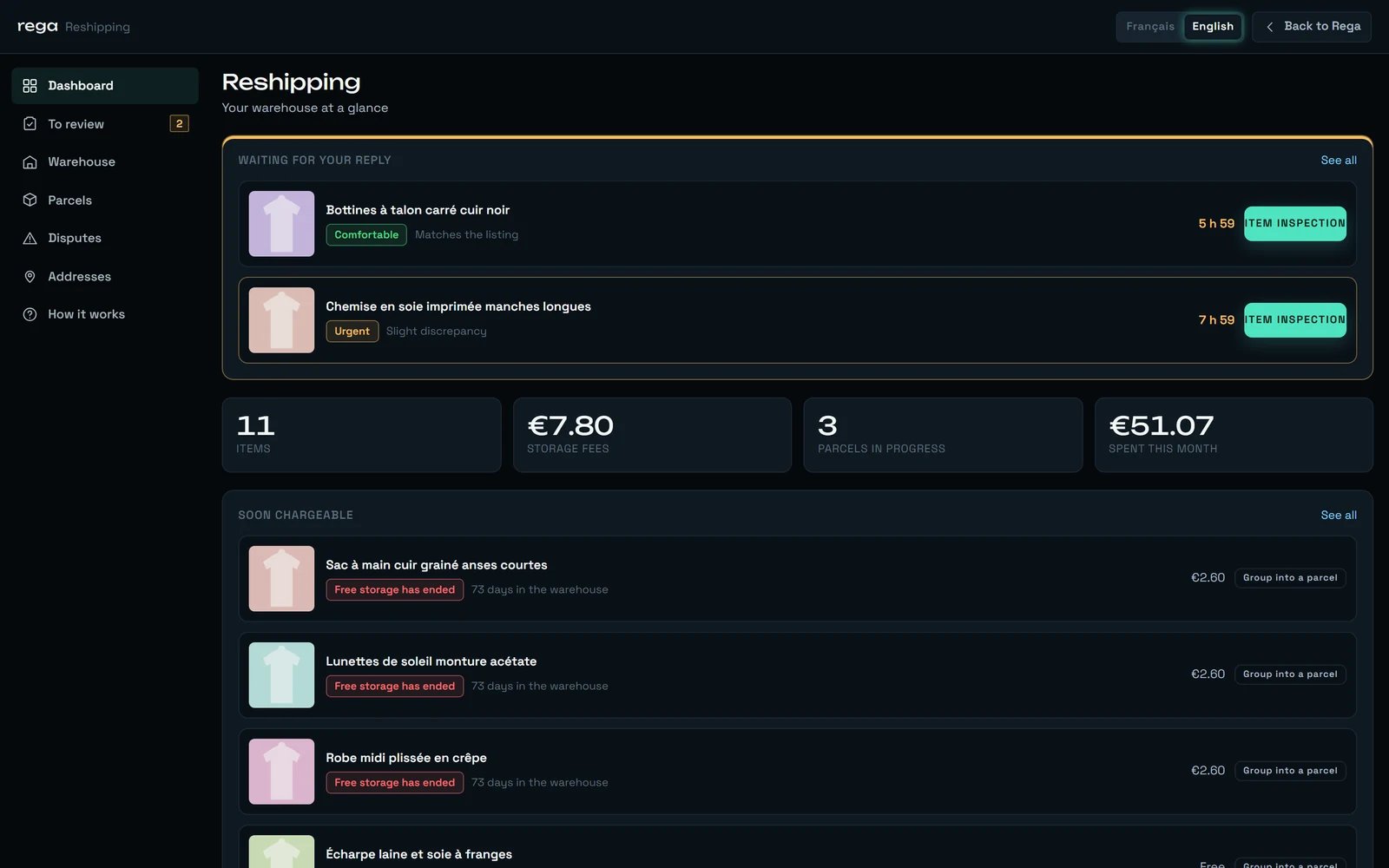
Four figures, and whatever is waiting for you. When something needs your reply, that block moves above the figures; when nothing does, the figures come back to the top.
“To review”
The queue of inspections waiting on you, most urgent first, with the countdown on each.
“Warehouse”
Everything we are holding, with search, filters by account, brand and size, and grouping suggestions.
“Parcels”
Parcels being prepared, quoted, paid, packed, shipped, delivered — grouped by state.
“Disputes”
Read-only. What has been reported, what has been filed, and what came back. The gesture that starts a dispute lives on the inspection, not here.
“Addresses”
Where your parcels go. One is marked “Default”.
“How it works”
The five steps, and the warehouse address with its phone number.
“Accounts followed by reshipping”
The per-account switches. It has no tab of its own: you reach it from the dashboard’s first screen or from “How it works”.
“Your quotes”
One parcel’s quotes: the customs declaration first, then the carriers on offer, the bill line by line, and the button that pays. You reach it from “View the quote” on a parcel.
“Tracking”
One parcel’s carrier events, its documents and its shareable link. You reach it from “View tracking” on a parcel that has shipped. It has an address of its own, so it can be bookmarked.
The public tracking page
A link you can hand to anyone — “A link you can give to someone: it only shows tracking, never the contents or the price.” It is the only page of the service that opens without signing in.
The dashboard on a day when something is waiting: the queue sits above the four figures, then “Soon chargeable” and the parcels in progress.
On a phone the four first destinations become a thumb bar, and the other three move into a “More” sheet. The “To review” tab is the one that carries a count — and it shows nothing at all when there is nothing to review, rather than a zero.
The free storage clock does not start when your parcel lands
It starts when the inspection is settled — by your reply, or by the deadline passing. The days we spend photographing your item and waiting for you to look at it are ours, not yours. Billing them would be charging you for the time we took.
A started day is a day, but it is counted in elapsed time
Not in calendar dates. An item that comes in at 23:50 and leaves at 00:10 pays for one day, not two.
Changing the rate card does re-bill what is already on the shelf
The rate card applied is the one in force on the day your quote is worked out, and it covers the whole of an item’s stay, days already spent included: bring the free period down from 60 days to 30, and pieces that came in 45 days ago become chargeable that same day. The free-storage date shown on an item’s sheet is the one written down the day it entered: it does not move on its own, but it is not a price guarantee. Ship rather than bank on a free window you think you have.
Nothing is ever thrown away by a machine
An item held long enough becomes a candidate for abandonment — 180 days, in the current settings — and a person then has to decide and write down a reason. You are warned by email first, and the warning gives the way out: “To keep it, simply ship it: put it in a parcel and request a quote.” The abandonment email is equally plain about the money: “Storage fees accrued up to that date remain payable. Your other items are not affected.”
An item with a claim in progress cannot leave
“A dispute is under way on this item: it cannot ship right now.” It cannot be put in a parcel while the marketplace still has something to say about it. Everything else in your warehouse ships as normal.
The shipping price is typed by a person
There is no carrier price grid inside the product, no weight-based calculator, no live carrier query. The only figure we work from is the chargeable weight — the greater of the real weight and the volume converted into weight — and the screen says so before you see a price: “The shipping price is not known yet.”
No button in this service is ever greyed out
A button that cannot act dims but stays clickable, and the reason is written beside it at all times, before any click: “Add at least one item.”, “Choose a delivery address.”, “Choose a carrier first.” Clicking it does nothing — the answer is already on the screen. A dead control that will not say why is the one thing the service refuses to show you.
A read that fails never wipes what is on screen
When a refresh does not come back, the page keeps the last version it received and puts a banner above it. Old is not the same as wrong — and an empty screen would say “you have nothing”, which would be a lie.
A missing value is a dash, a real zero is a zero
“—” means we do not know. “€0.00” means it is genuinely free. They are never used for each other.
We would rather write it here than let you find out halfway through.
Vinted orders only, automatically
Ticked Vinted accounts feed the warehouse on their own. Vestiaire Collective purchases, and anything bought elsewhere, have to be entered by hand on request. See Vestiaire Collective for what that marketplace does and does not share with Vinted.
New orders do not appear the instant you buy
A purchase does not appear the instant you pay for it: a short wait is normal, and a purchase made an hour ago may not be there yet. But a purchase still missing the next day is not normal — write to us.
We file claims by hand
The product records your report, notifies us, and holds the item. A person then files the claim with the marketplace. That is also why we cannot file one outside our working hours, and why an item whose deadline falls outside them says so instead of pretending.
Quotes are prepared by hand
Weight, dimensions, carriers and prices are all entered by a person. There is no automatic carrier pricing, and therefore no delay we can promise you between asking for a quote and getting one.
A paid parcel is sealed
Its contents cannot change. To alter it you cancel it — the items go straight back to your warehouse — and you build a new one. Cancelling gives you no money back: nothing in the product refunds a parcel that has been paid for, so the new one is paid in full, consolidation fee and carriage included. If a paid parcel is wrong, write to us before you cancel it.
Requested services are priced, but nothing charges them yet
An extra service is priced the moment you ask, and that price is frozen: the rate card may change tomorrow, what you saw when you clicked is what will stand. But nothing charges it today — no service appears on a parcel’s quote, and no payment path exists yet. Extra photos, exact measurements, weighing, tag removal and a smell check are free; video €3.00, light cleaning €4.00, authenticity check €5.00. Ask for what you need: the day a payment path exists, it is those recorded prices that will be called, and this page will say so.
Packing options all read “Free”
On the parcel screen, every packing option currently shows as “Free”, including the ones that carry a price. The quote bills them correctly. Read the quote.
“How it works” shows no deadlines
The page has a slot for the reply window, the free storage period, quote validity and the abandonment threshold. Those four lines do not appear at the moment. The figures that are live are the ones on your items and on your quotes.
An item's history is not shown
The item sheet has a “Details” section meant to carry its timeline. It reads “No tracking yet.” whatever the item has been through. What you can rely on is the state badge, the inspection, and the emails.
The warehouse list shows 50 rows
Beyond that a line tells you how many are left — “Showing {n} rows out of {total}. Narrow your search to see the rest.” — and search, or a filter on account, brand or size, is the way through. There is no page-two button.
Opening an item loses your filters
Opening an item’s sheet from the warehouse replaces the grid; coming back gives you the unfiltered list again. Worth knowing before you spend a minute narrowing it down.
Every amount and every threshold on this page is the setting in force today. They can be adjusted, and a figure agreed with you for your workspace takes precedence over the general one. What does not move is the shape of the bill: the lines listed above are all the lines there are, and the two fixed fees are the only two fees Rega charges.