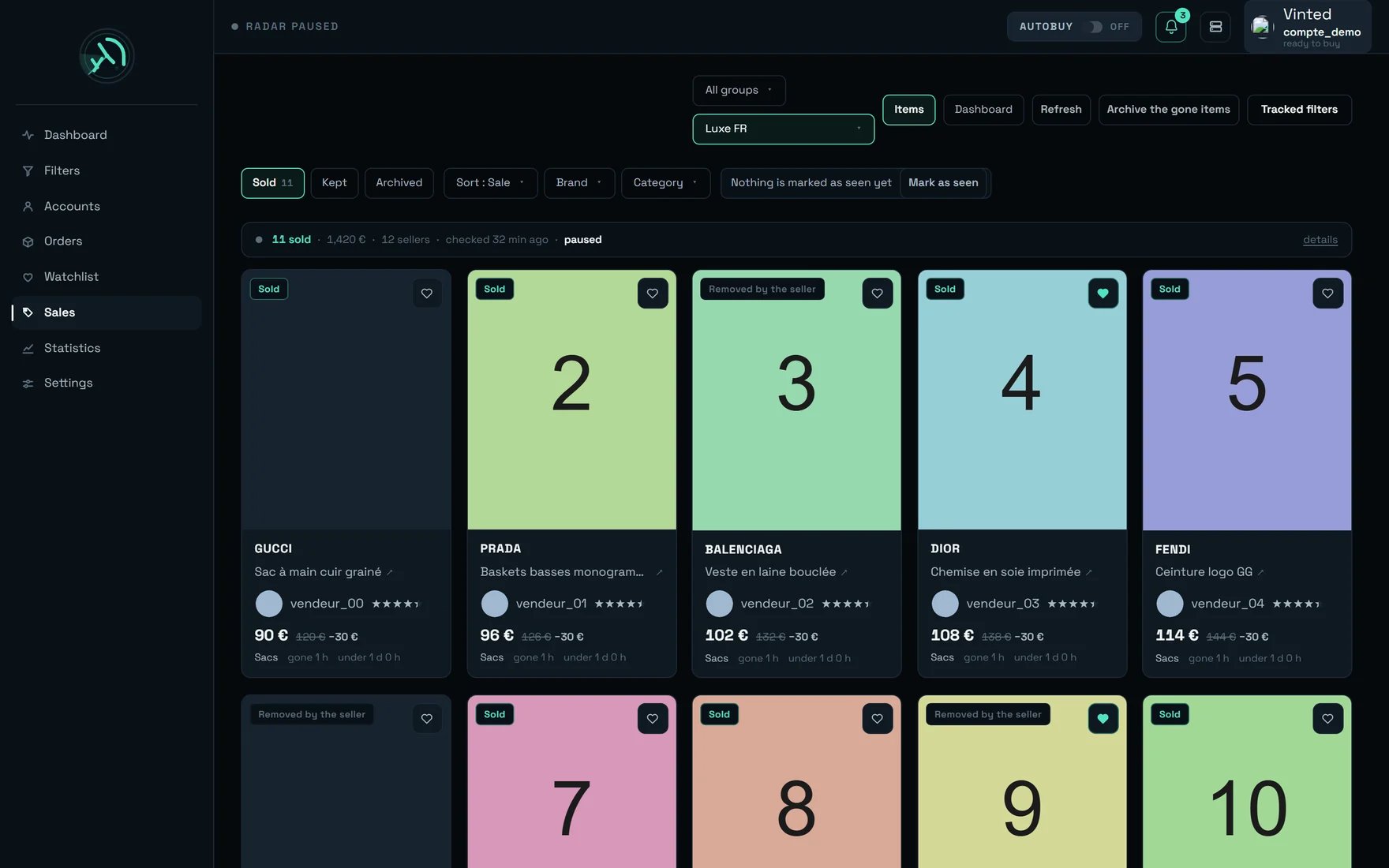
The Sales screen, “Luxe FR” view, “Sold” tab — eleven sales, 1,420 €, twelve sellers.
What you are looking at
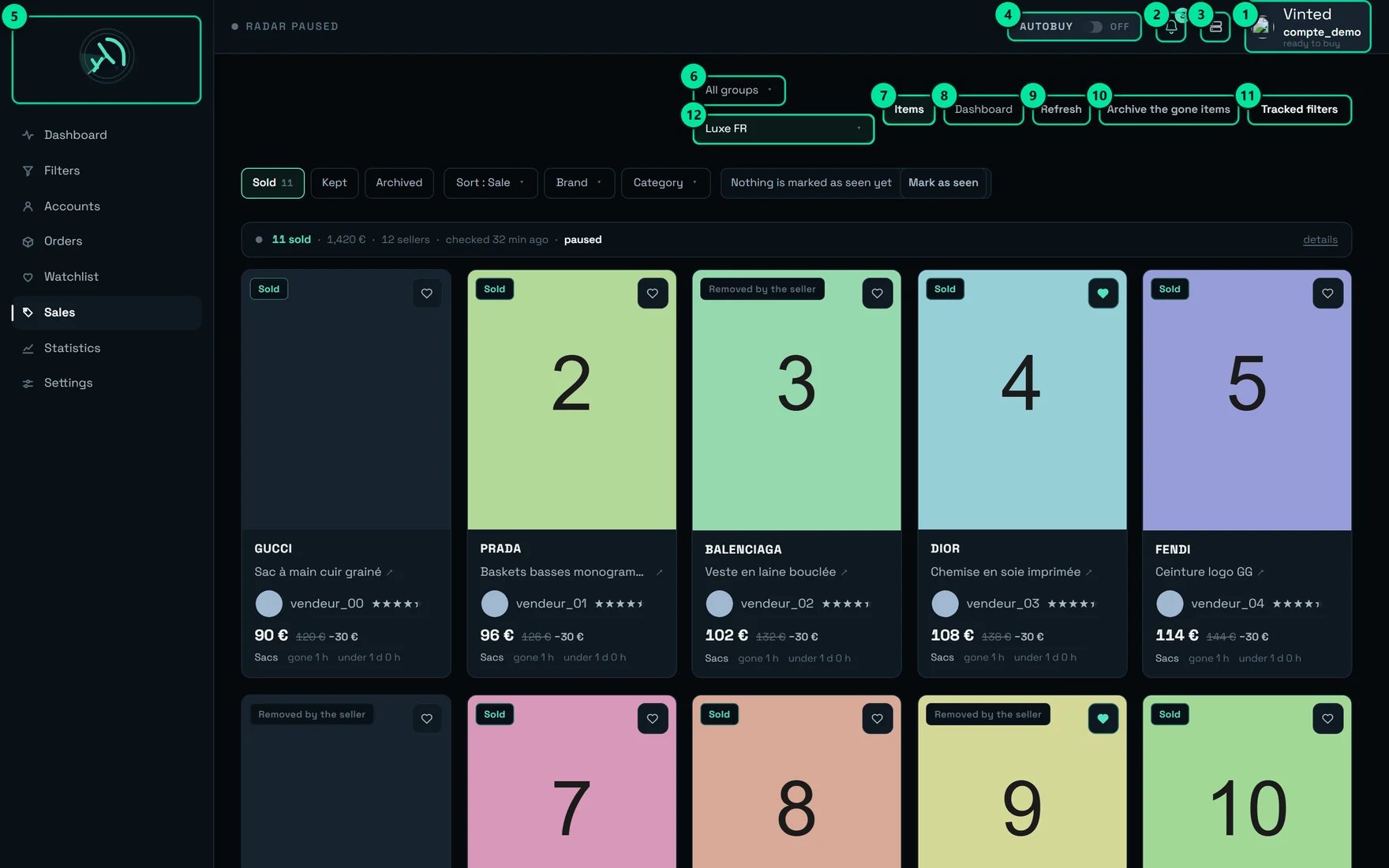
The screen's twelve controls, numbered.
The routine that works
Three different uses, three ways to open the screen. Take the one that matches your moment.- The daily glance
- The weekly review
- Before buying a piece back
- Open on “All tracked filters” — that is the default position, do not leave it to read.
- Read the news counter on the right of the tool row: “Nothing new since your last visit”, or the number of departures and sales since your last pass.
- Go through the fresh cards, ♥ anything you would want to buy back.
- Click “Mark as seen”. Without that click, the next visit cannot tell new from old.
The life of an item
This is the diagram that clears up most misunderstandings: “Sold”, “Removed by the seller”, “Removed” and “tracking stopped” are four different outcomes, and only one is a sale.How tight is “under X”?
A departure is always recorded at the next check, never at the moment it happened. So the width of “under X” is not a property of the item — it is the gap between the two checks that straddled the sale. The diagram below is the same sale read at two different ages. Read it with the “median ignorance” figure next to it — that number is exactly the width of these brackets, and it is the honest measure of how much of “under X” is us rather than the market. This is also why the card never says “held X”: we would be stating a majorant as a measurement.Putting a filter under tracking
Open the “Tracked filters” drawer
Pick a filter
Read the intake verdict BEFORE clicking
Between ~{bas} and ~{haut}., or Under ~{d} — too rare to measure over this window.) and the room available (Room left: {n} new items an hour.). While measuring: “Observing (~15 s)…”.Click “Track sales”
Sales tracked — {nom}.Set the alert
What can refuse the signup
The server judges the filter too wide
The server judges the filter too wide
The short measurement does not decide
The short measurement does not decide
The verdict is negative — and forbids nothing
The verdict is negative — and forbids nothing
Tracking a group fails
Tracking a group fails
Could not track the group — {raison}, the typical reason being “group unknown or empty”. If it was all in place already: “Every filter in this group was already tracked.”Choosing what you look at
Two triggers, side by side (markers 6 and 12): the group restricts the list offered, the second picks the view.None of the {n} filters in this group is under sales tracking. or Merging is available from 2 tracked filters — {n} out of {total} are. A 1/{n} marker (tooltip 1 filter out of {n} tracked in this group) tells you a group is showing on the left while a single filter is being read.
Reading a card
Every card is dense on purpose. Here is what each element tells you — and what it does not.The two views
- Items
- Dashboard
- Three view pills with their counters: “Sold”, “Kept”, “Archived”.
- Sorting, in a single menu (“Sort by”): Recently sold (default) · Recently detected · Oldest · Price ↓ · Price ↑ · Seller. The trigger shows the short form, “Sort : Sale”.
- Brand and Category, multi-select. Category shows as a tree, with the subtree count when the server publishes it. A “Category not resolved” box catches items with no category, and appears only if at least one real category exists.
- The news counter and its “Mark as seen” button.
The three pills do not read the same thing
Sold
Kept
Archived
Cleaning up
Keep what you want to hold onto, first
Archive
Delete the archive — two confirmations, on purpose
{n} items held in the archive will be permanently erased., warns “This action cannot be undone.” and lists what is NOT touched: items still tracked, and the items you have kept.
A single line rising and falling from one edge to the other. A month of sales reads the same way: a rhythm, not a run of accidents.
The context strip, and how to read it
Under the tool row, an always-visible strip:{n} sold in teal, the value sold, {n} sellers, checked {quand} — on the capture: “11 sold”, “1,420 €”, “12 sellers”, the time of the last check, and the state “paused”.
Then every admission, never folded away. The five that call for action from you:
observation: {obs} · tracking stops after {arret}.
Zero sales showing: what to check, in order
An item’s details panel
A click on a card opens the details: large photo and thumbnail rail, brand, title, chips for status / Under review / size / condition / category, the clauseTracking stopped — {motif}: its fate will stay unknown. where it applies, price and cut, seller (with stars if the source gave them — otherwise no stars at all, never “0 stars”), the time sentences and seen {d}.
Three actions:
View the listing on Vinted
Find the same piece
Message the seller
Messaging a seller
The composer warns you before sending: “The sold item can no longer be reached on Vinted. Your message will go out under another listing of this seller — they will see it in “…”.” It offers the sending account (from 2 accounts) and the carrying listing (from 2 listings), and the field is capped at 1,000 characters. Possible refusals, word for word:- “Write your message first.”
- “This seller has no listing online any more: Vinted offers no way to message them.”
- “This seller’s other listings cannot be read at the moment.” (with “Retry”)
- “Message not sent — try again in a few moments.”
The screen’s states
{n} shown (with out of {n} received and · {n} in total where they apply), {n} more are held in the archive — “Archived” tab., {n} kept items come from filters outside this view. with the “See all tracked filters” button, the “Load more” button, and at the ceiling: “Display ceiling — narrow by brand, category or status.”
Our tips
1. Read on “All tracked filters”, enter a filter to act
That is the default position, and for good reason: the screen used to open on the first filter by signup order — with 44 filters, that meant showing 1/44 of the sales, chosen by nobody. The page looked empty while everything was there. Keep the habit: the merge to read, the named filter to refresh, remove, adjust.2. The first figure on the dashboard is not the number of sales
It is the undecided rate, and its block sits before every aggregate on purpose. An undecidable departure is a listing that had already vanished when tracking came back: the more of them there are, the less your sales figures are worth. If that rate climbs, it is not the market changing — it is us coming back too late. The remedy is in 3 and 4.3. A minimum price, and nothing else, is your best lever
The lever that weighs the most, by far, is the filter’s MINIMUM PRICE — far more than a narrower category; it is the one the server itself points to when it refuses a filter. A 10 € floor already leaves out more than half of the flow, and at 30 € only a small fraction of it is left. Why it matters: a single luxury-brand filter, left too wide, slows down every one of your other filters, and it is they that lose freshness. Sales tracking is not a collection: it is an attention budget.4. “Under ~N/min” does not mean “dead filter”
Over 15 s of observation, a filter running at 2 listings/min has a 61% chance of showing nothing. That is exactly the regime of rare brands, which is what you hunt. Click “Refine over a long window” — and remember a refusal never forbids: “this measurement informs, it does not forbid”.5. Make it a habit: read, then “Mark as seen”
The teal outline that flags a fresh item lasts only 300 seconds, while re-check pacing is measured in hours: on a screen you open twice a day, it never shows anything. The news counter, on the other hand, never resets on its own — not on mount, not on load, not when you change filter. It is your only marker that survives from one visit to the next. Without the click, it will never tell you anything new.6. Keep before you clean up, and keep generously
The ♥ “Keep this item” puts the item in a separate list, with its own copy of the details. Emptying the archive does not reach it; archiving does not either. A photo outlives the listing by a good while, so a kept item stays consultable, illustration included, after it has disappeared from Vinted. Keep generously, it is free: nothing goes out to Vinted, no quota is consumed, the seller never knows.7. Filter instead of “Load more”
The list is not a download but a stream: it refreshes itself, and the longer it gets, the longer it takes to come back. A short list is a fresh list. A single brand filter is often enough to take a list of a hundred cards down to a dozen. At the 500 ceiling, the screen even tells you what to do: “Display ceiling — narrow by brand, category or status.”8. Compare “observation” and “tracking stops after” under “details”
This is the single most useful diagnostic on the screen. On the left, the age of the oldest item still tracked; on the right, the setting. When the first figure is far shorter than the second, the sale times you are reading are truncated by us, not by the market: remove filters from tracking, or tighten them.9. Read “BY BRAND” in two columns, never in one
Sell-through alone makes you buy volume that is worth nothing; Median sale alone makes you buy rare pieces that sit. Cross them: high sell-through and a short median = a supplier to restock from; low sell-through and a long median = a piece to take only at a broken price. And remember the median is an upper bound: the real sale time is always shorter than what is shown.10. Load before you filter, not the other way round
The Brand and Category menus only offer values already loaded — “Values seen so far — the list grows as you load more items.” If you are looking for a rare brand, click “Load more” once or twice before opening the menu, otherwise you will wrongly conclude it never sold.11. Do not confuse “Recently detected” with “Recently sold”
The default sort is Recently sold, on the departure date. Recently detected sorts on the detection date, never the sale date — useful to see what just came under watch, never to read a market. The screen says so in the sort tooltip; it is the most common misreading of the table.12. Archive as soon as the list gets unreadable — it is one tab away from reversible
The working views only read what is still under tracking, so archiving genuinely empties “Sold”. Nothing is lost: everything is found again under “Archived”, held without limit, and the foot of the list reminds you how many went there.13. Only stop tracking a filter after the hot phase
An item is checked at its tightest pace in its first half hour: that is where most verdicts are decided. Removing a filter from tracking during that window sacrifices its items still on sale — their sale will never be recorded. Let the hot phase run out, then remove.14. Check the sending account before you write, every time
Messaging shares its sending budget with your purchases, account by account: a message sent at the wrong moment from the wrong account costs you about twenty minutes of buying on it. The account selector only appears from two accounts: below that, look at which one is shown in the page header before pressing send.What surprises people
“Removed” does not mean “removed by the seller”
“Removed” does not mean “removed by the seller”
“Under review” is neither a departure nor a withdrawal
“Under review” is neither a departure nor a withdrawal
“Tracking stopped” is neither a sale nor a withdrawal
“Tracking stopped” is neither a sale nor a withdrawal
The pill counters do not move when you tick a brand
The pill counters do not move when you tick a brand
The “Archived” tab never reloads on its own, and its counter is smaller
The “Archived” tab never reloads on its own, and its counter is smaller
“Refresh” does not refresh the screen
“Refresh” does not refresh the screen
Refresh refused — {raison}, the most frequent reason being that a pass is already running.The “Kept” list is bounded to the current view
The “Kept” list is bounded to the current view
{n} kept items come from filters outside this view. and puts up the “See all tracked filters” button. And if you release a ♥ in this view, the card stays on screen with the heart switched off: the next load does the tidying.Every sale duration shown is an UPPER BOUND
Every sale duration shown is an UPPER BOUND
One price histogram can mix currencies
One price histogram can mix currencies
The dashboard's median price is not an average of departures
The dashboard's median price is not an average of departures
Some cards have no photo, or no category
Some cards have no photo, or no category
On a phone
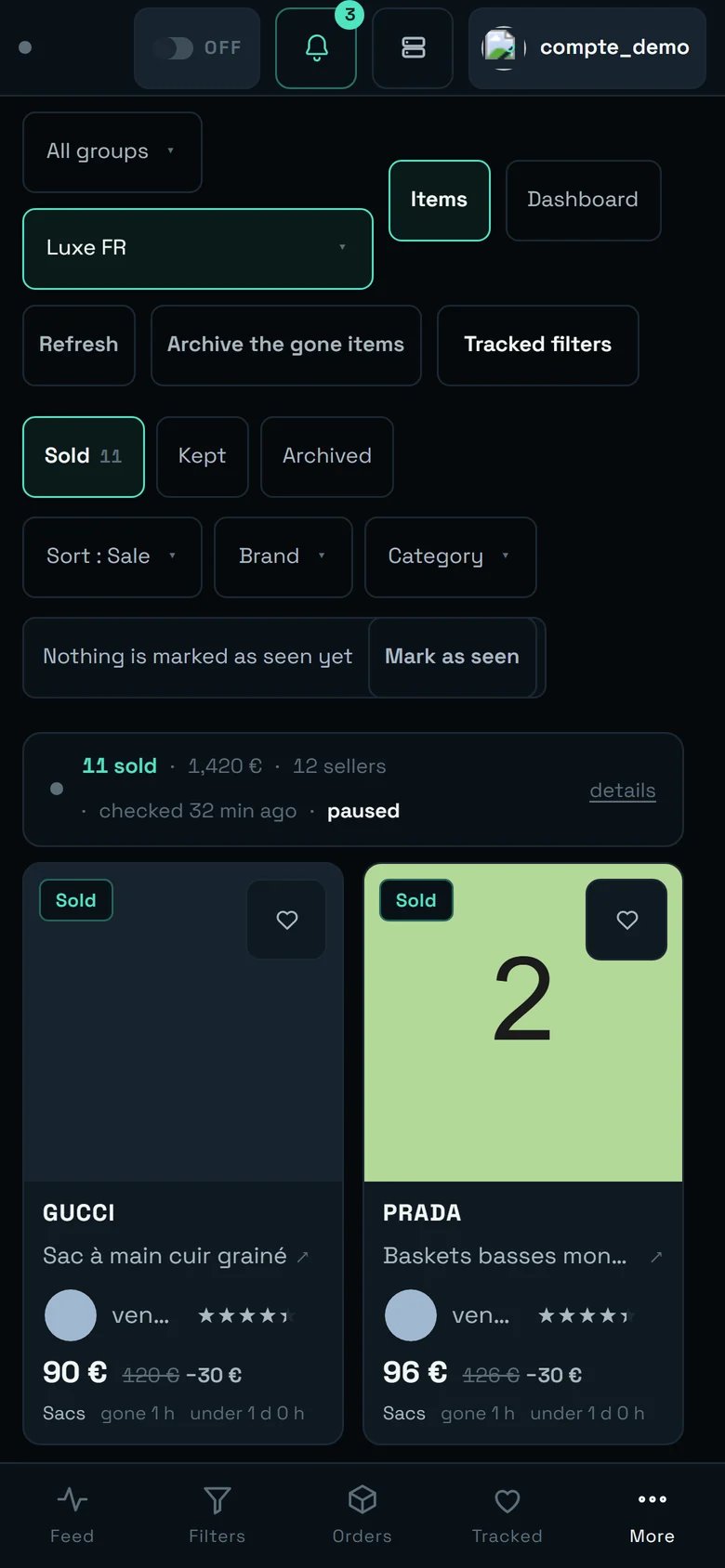
The Sales screen on a phone. This capture predates the handle: today the selectors, the status chips and the actions are folded behind it on arrival.
- Bottom tabs replace the sidebar: “Feed”, “Filters”, “Orders”, “Tracked”, “More”. Sales is not among them directly — you reach it through “More”.
- A handle folds the tools. A short bar, announced “Show the controls”, hides the selectors, the status chips and the actions on arrival; one tap brings them back (“Hide the controls” then), and the choice is remembered for this screen, on this device. The title itself is already gone on a narrow screen.
- Once shown, the selectors stack and the action buttons wrap over several rows; the order stays the same as on a large screen.
- Photos are swiped: the ‹ › arrows are not shown to a finger, you swipe the photo sideways instead. The “3/12” counter stays.
- The grid drops to two columns, and the promise held is that two whole cards are visible on arrival, without scrolling.
- The context strip folds onto two lines, but it keeps every admission: nothing is hidden to save space.
- The “BY BRAND” table scrolls sideways, and says so: “◂ the table scrolls sideways ▸”.
The limits, said plainly
- Vinted does not always distinguish a sale from a withdrawal. “Removed” departures without a verdict are a platform limit, not a product one. What we can do on our side is come back faster — hence tips 2 to 4.
- The “Withdrawn”, “No verdict” and “All” views no longer exist as tabs. The server still counts them; you now read them in the dashboard and the context strip. The reason: counting doubtful departures as sales inflated the number of sales shown, and a “sale” you cannot trust is worth less than no figure at all.
- You cannot remove a whole group from tracking on this screen: filters have to be removed one at a time, from a named filter’s view.
- Check pacing is not adjustable. The intervals were established by measurement: tight at the start, more and more spaced out afterwards.
- Automatic archiving and automatic deletion do exist, but they are set elsewhere: Settings → Sales. There is no “never” option.