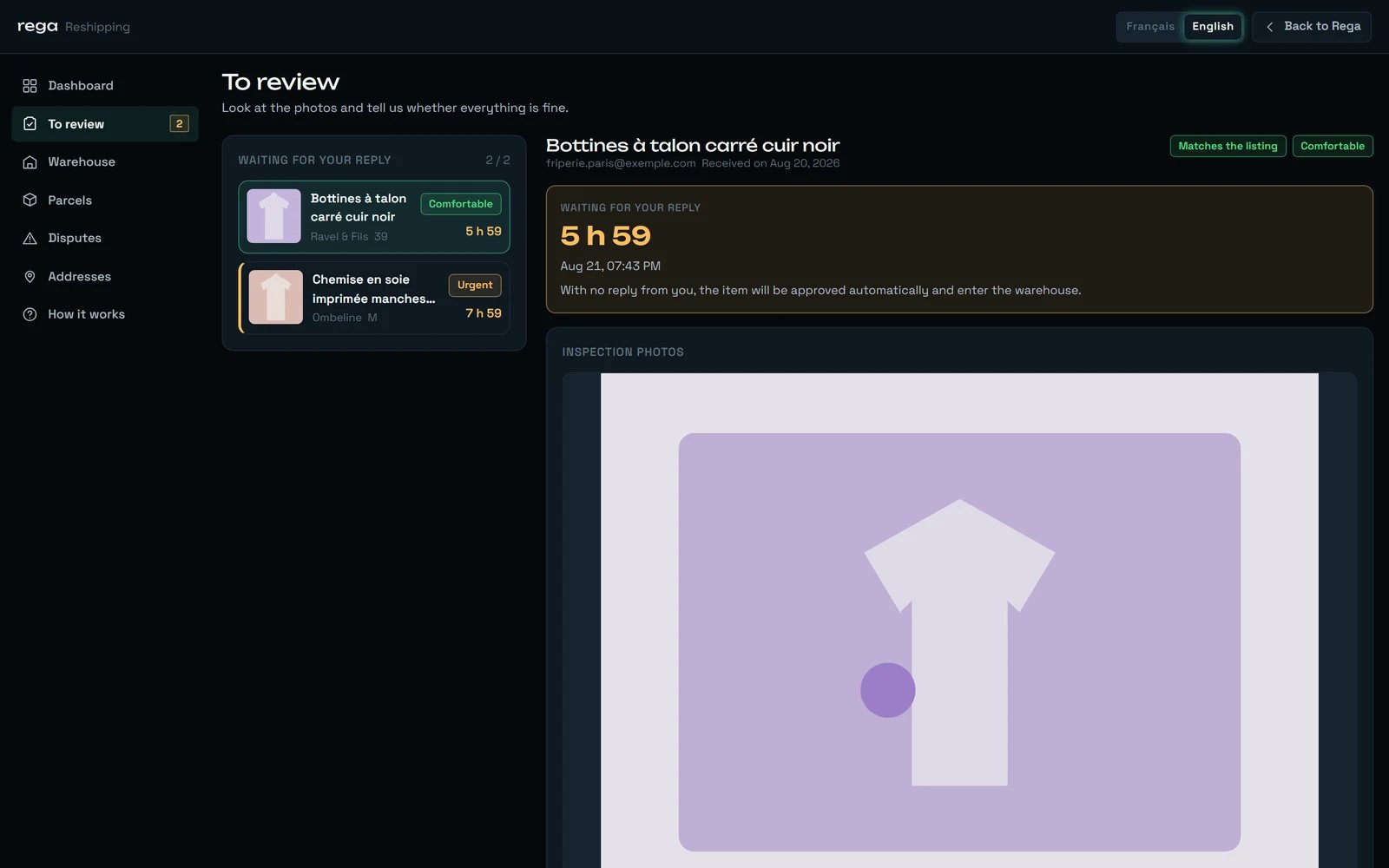
What we do to your parcel between the moment it arrives and the moment we ask you a question: the photos, the verdict, the typed defects, the clock you are running against, and the exact line where reporting an issue stops and a dispute begins.
Every parcel that reaches our warehouse is opened, photographed and written up before you are asked anything. An inspection cannot even be published with fewer than 3 photos, and it carries a verdict in one of three words, a note written by hand in both languages, and defects drawn from a fixed vocabulary of nineteen. Then a clock starts — and it is shorter than the one the marketplace shows.
One clean line sweeping the face of a matte cube: the inspection is a pass over the goods, not a formality.
Two facts explain this whole page.First, the inspection exists to build a file while the claim is still alive. Everything on this page — the number of photos, the typed defects, the deadline — is aimed at one thing: being able to go back to the seller with evidence before the marketplace’s window closes.Second, the window closes earlier than the marketplace says. REGA can only file a claim during opening hours; a deadline that falls at three in the morning is unreachable, and the claim is dead before the marketplace admits it. That is why we show you our deadline and never theirs.
The item’s own label follows that path: “Received” while it is in our hands, “Review pending” once the inspection is out, “In warehouse” once it is settled. “Review pending” is the one step where saying nothing is itself an answer: past your deadline the item is approved in your place. The step after it waits on you too — the line under “In warehouse” reads “It is waiting for you. Group it with others whenever you like.” — but there, no clock answers for you: an item nobody groups simply stays, and past the free days it starts costing storage.
The parcel is opened, the item is weighed, measured, given a shelf, and the item’s state moves from “Expected” to “Received”. A letter goes out at that instant — subject “{item} has arrived at our warehouse”, body “We received {item}. It is registered, weighed and stored.” — and it deliberately promises nothing about timing: “Our inspection follows: you will get the photos and our report, and you will then have a window to tell us whether everything is fine.”
We do not announce a delay between arrival and inspection, and you will not find one anywhere in the product. We would rather say “the inspection follows” than print a number we would sometimes miss. What is bounded is the other end: once the inspection is out, your reply window is stated to the minute.
What is recorded on arrival
Do you see it?
Weight
Yes, in one place — on the sheet of a parcel that can no longer be changed
Length, width, height
No — a finished parcel shows its own, never an item’s
Where the item sits in the warehouse
Never — it stays with the warehouse team
The pick-up code used to collect the parcel
Never — it is a retrieval secret
Which warehouse holds it
No
The pick-up code never leaves our administration, and that is not an oversight. In anyone else’s hands, that code is enough to collect the parcel. The shelf location does not reach you either. The two are the only fields of an arrival that are deliberately withheld from you.
Nothing forces us to fill every field, and re-recording an arrival is normal
Weight, dimensions, shelf and pick-up code are all optional at that step — someone weighs before measuring, and a missing field must never erase the one recorded next to it. Recording the arrival a second time on an item already marked “Received” is not a new step in the journey: it is a correction — a weight fixed, a shelf changed — and it is allowed on purpose.
There is no weight or size limit — but bulk is billed like weight
Nothing in the service turns a parcel away for being heavy or bulky. What those four numbers do is end up in a shipping quote, where the billable weight is the greater of the real weight and the volumetric one. A light but bulky item is therefore quoted on its volume, not on the reading of a scale — worth knowing before you decide what to group it with.
An item's weight shows up in one place, its dimensions in none
Both are recorded and both feed your quotes. The weight surfaces once a parcel is locked: on that parcel’s sheet, each line prints the item’s weight where the button to remove it used to be. An item’s own length, width and height are printed nowhere — a finished parcel shows the parcel’s measurements, not the pieces’. If you need either before that, ask: “Weighing” and “Exact measurements” are both free requests, and the answer comes back written by a person, in words — see “What you can ask for on top” further down.
There is no tick-list. An inspection is not a form with boxes for seams and buttons: what it produces is photos, one verdict, and defects drawn from a closed vocabulary. That vocabulary is the honest answer to “what do you look at”, because it is the only thing an inspector can write down.
Something is off, and it is not worth a claim you would lose.
Amber
“Major defect”
Something is wrong enough to go back to the seller.
Red
Three values, not two, and it is deliberate. “Matches” and “Major defect” would be enough to decide; they are not enough to say. A missing tag is worth telling you about without pushing you towards a claim that would be refused. The middle verdict exists so that a small thing can be reported as a small thing.
An inspection cannot be published without a verdict, and it cannot be published with fewer than the minimum number of photos. Nothing about that is negotiable at the desk: an inspector who has not chosen one of the three words above cannot send anything to your screen.
Each defect carries a type from this list, a severity, an optional pin on a photo, and a note written in both languages.
The nineteen types
Stain
Hole
Snag
Discolouration
Pilling
Wear
Smell
Broken zip
Missing button
Damaged lining
Worn sole
Size differs from the listing
Colour differs from the listing
Item differs from the listing
Authenticity in doubt
Visible repair
Missing part
Damp
Other
A type, not a sentence. A defect written in free prose cannot be counted, cannot be searched, and cannot be translated. Picking from a closed list is what lets the same defect read identically in French and in English, and lets us tell you afterwards how often it happens.
A defect can be pinned to a point on a photo, and the pin lands on the same spot whatever the size of your screen — the same photo is smaller on a phone than on a laptop, and the mark follows it. On your side, every defect in the list is clickable and takes you to its own photo: naming a defect without showing where it is would leave you hunting through ten pictures.
No pin is not a pin in the corner. When a defect has no coordinates, none are stored — nothing is rounded to zero. A false pin reads exactly like a true one, and a client sent to the wrong corner of the right photo trusts the file less, not more.
Four small marks around a matte cube: a defect is not described, it is pointed at.
Only our warehouse team takes them. You never upload a file — there is nowhere in the product that would let you, and that is a decision, not a gap. The file that defends your claim has to come from the party that held the goods.
Value
Minimum to publish an inspection
3 photos
Maximum in one inspection
10 photos
These two are settings, held per workspace, and REGA can change them for you. The figures above are the ones the service starts from. The reason for the floor is written into the setting itself: “Below this, the inspection cannot be published: a thin file defends no dispute.”
The queue of inspections waiting for you, most urgent first, with the full sheet behind each one
The inspection sheet
A large photo, the defect pins, the thumbnails, and a full-screen viewer
The item’s sheet in the warehouse
The same gallery, without the decision
“Download the photos”
Every photo of that item, in one archive, free
The viewer takes arrow keys, closes on Escape, and takes a swipe on a phone. Its one unusual behaviour: it zooms at the point you clicked, not at the centre of the image — a centred zoom forces you to drag the picture around to find the mark you were looking at.The section headings, so you recognise them: “Inspection photos”, and, when there are none yet, “No photo yet.” The large photo is the one that always announces itself as “Enlarge”; a thumbnail announces its own caption instead, and falls back to “Enlarge” only when that photo has none. On a well-filled file, a thumbnail saying “Enlarge” is the exception.
The original file name is thrown away, on purpose
Two separate reasons. One is plain safety. The other is privacy: a camera names its files with a date, a phone sometimes writes a place into them, and a file name sometimes carries the seller’s own name. None of that belongs in your file, so the name is replaced before anything is stored.
Your photos are visible only inside your workspace
They are never public. Opening one means being signed in to the workspace that owns it — a photo that belongs to another workspace is not yours to open.
The order of the photos is meaningful
The first photo is the one that represents the file. The rest follow the order the inspector gave them, and that is the order you meet in the gallery, in the viewer and inside the archive.
The archive is named after the item, never after the listing
Inside it the files are renumbered in order, 01, 02, and so on. The archive itself carries the item’s reference, not the title of the listing: that title describes a purchase, not a piece of evidence. And a photo whose file has gone missing does not break the archive — you get everything that exists rather than nothing at all.
A photo that no longer opens says so differently
If the record exists but the file has gone, the screen says “The image was not found.” rather than “could not be found”. The two are not the same event and do not call for the same gesture: one means it never existed here, the other means write to us.
The ordered gallery, each with its own caption in both languages
The defects
Type, severity, pin, and a bilingual note
The deadlines
Your reply deadline, and the marketplace’s
An inspection sheet, whole: the countdown, the verdict, the written note, and the defects pinned onto their photos.
We write both languages ourselves; nothing here is machine-translated. A note is an observation — “the lining is intact, look at photo 3” — not a phrase from a catalogue, and a machine rendering of it would be a machine’s opinion of what an inspector saw. Filling only one language is a normal case, and an empty English note falls back to the French one: an English reader facing a French sentence understands it; facing a blank, they cannot tell whether nothing was found or the screen is broken.
A blank is never filled with a reassurance. The sentence “No defect found.” is shown only when the defect list is genuinely empty. When defects exist and the note is blank, the screen shows the verdict there instead — it will not tell you nothing was found on an item where something was.
The headings on the sheet, in the order you meet them: “Inspection photos”, “What we found”, “Defects found”.
The clock, and why it is shorter than the marketplace’s
This is the part nobody can guess, so here it is in full.
1
The marketplace opens a claim window when the parcel is collected
On Vinted it runs 48 hours from collection. That is the outer bound, and it is the only one the marketplace shows.
2
Ours closes earlier, because a claim is written by a person
There is no button that files a claim on its own. A deadline that falls in the middle of the night is unreachable, and a claim nobody could file is dead before the marketplace admits it.
3
The time it takes to write and file is held back
Drafting a claim from your description and our photos takes time, and that time is taken off the end rather than out of your hands. It is not yours to spend.
4
What is left is the countdown on your sheet
That countdown is the only deadline that binds you. It is always earlier than the marketplace’s, sometimes by a long way — answer against it, never against the 48 hours.
The two clocks do not add up, and that is the trap. The marketplace can still be displaying hours that are no longer usable to anyone: its window can outlast ours by many hours. It is precisely to make that visible that we show our deadline instead of theirs.
Your reply window is capped at 14 hours. It is a ceiling, never an allowance: if the inspection is published late in the marketplace’s window, you get less — sometimes much less. So you will never have more than 14 hours, often less, and the countdown on the sheet is the only exact answer: that is the one that binds you.
The deadline on the sheet is the very one the automatic approval acts on — the number you are shown and the moment we act on it cannot drift apart. One consequence is worth knowing: if we change the length of the reply window, items already published follow the new rule, not the one in force the day their inspection went out.
The “To review” queue is ordered by deadline, the shortest first, and each line carries a label. That label is not read on the countdown beside it. It is measured on our own clock — the moment REGA loses the ability to file a claim at all — which sits further out than your reply deadline.
Time left before we can no longer file
Label
More than 24 hours
“Comfortable”
24 hours or less
“Normal”
12 hours or less
“Urgent”
4 hours or less
“Critical”
None
“Time is up”
“Comfortable” next to a countdown of thirteen hours is the ordinary case, not a fault. Your reply window is capped at 14 hours, so the number you read never goes above that cap, while the label is measured on a clock that can still run much further out. The order of the queue and the colour of the countdown follow your deadline; the label follows ours. When they disagree, the countdown is the one that binds you.
An empty queue says “Nothing to review. All caught up.” A long one says “{n} checks shown out of {total}. The most urgent are first.”
If you follow a link from one of our e-mails and land on the list instead of an item, you will read: “The item this link pointed to no longer needs your reply. Pick one from the list — we do not open a different one in its place.” That is deliberate. Opening a different item under a link you clicked for a specific one is exactly how somebody approves the wrong thing.
The main button. It is followed on screen by what it does: “The item goes to the warehouse and waits for you.”
The item leaves “Review pending” and becomes “In warehouse”, marked “Approved by you”.
Your free storage starts at that instant, and the date it ends is written down there and then — 60 days by default. See Storage and what it costs.
It costs nothing.
Approving is irreversible. It closes the claim: the marketplace will treat the transaction as accepted, and there is no gesture anywhere in the product that reopens it. The most it can do afterwards is refuse to do it a second time.
You can only approve from “Review pending” — deliberately stricter than the rest of the machinery. An item can otherwise move from “Received” straight to “In warehouse”, but only our team may do that, so that you can never approve an inspection you have not seen.
The second button. It opens a window headed “What is wrong?”, with a text field labelled “Describe the issue” and, under it, the only piece of advice that changes the outcome: “The more precise you are, the better the claim’s chances.” The send button reads “Send the report”.At least one reason is required. With none ticked, the screen refuses before anything is sent, and writes above the button: “This field is required.”
The nine reasons
Not as described
Undisclosed defect
I doubt it is authentic
Wrong size
Wrong colour
This is the wrong item
Something is missing
Bad smell
Other reason
The description field holds 1,000 characters on screen.
Reporting does not move your goods. The item stays exactly where it is, still labelled “Review pending”, and picks up a second label — “Issue reported”. Nothing is sent back, nothing is put aside, nothing is thrown away.
An item with a live report cannot leave in a parcel. If you try to add it to one, you will read: “A dispute is under way on this item: it cannot ship right now.” A return to the seller is still on the table, and shipping it to you would take that option away.
Past your deadline, an inspection with no answer is approved automatically. The item enters the warehouse and carries the label “Approved without a reply”, whose help text reads “The deadline passed with no reply: the item went into the warehouse.”
You are told when silence approves an item. The bell rings — “Item approved” — and a letter goes out. The countdown on the sheet is still what binds you, but you do not learn about the approval after the fact.
Silence approves; silence never files a claim. The two mistakes are not symmetrical, and that is the whole argument. Approving wrongly leaves you everything — the goods, the photos, the record, and a commercial conversation with us. Filing wrongly accuses a seller of a defect nobody observed, on the strength of somebody who simply did not open their screen. We only file claims we can defend.
Three guarantees around that automatic approval, all of them deliberate:
A report is never overwritten. It only ever touches items with no answer at all. Silence is the absence of a reply, not a reply we did not like.
An item whose parcel has not been collected yet is never approved automatically. With no start, there is no deadline to pass.
If you answer at the very moment the deadline passes, your answer wins. The human always beats the clock.
This is the border the page exists to draw.Reporting is you telling us something is wrong. It is a gesture on your screen, it is recorded on the item, and it takes a few seconds. Disputing is us going to the marketplace with your description and our photos — and that is filed by hand, by a person at REGA. There is no button anywhere that files a claim on its own, and there will not be one: a claim is written from your description and our photos, and it has to hold up in front of the seller. That is a person’s work.
Once we open the dispute, a letter goes out to you saying so. Without it, “I reported it” and “REGA is dealing with it” look identical from your side, and waiting turns into doubt. The rest of that path — the fee, the window, the outcomes — is on When something is wrong.
The parcel has not been collected yet — the clock has not started
€5.00
A claim is no longer possible, for any of the reasons below
Free — and recorded all the same
We do not charge for a procedure we cannot carry out. That rule holds everywhere the question comes up, and it is not a courtesy: charging for a claim REGA physically cannot file would be indefensible. And your report is still worth something without a claim — it is a commercial conversation with us, a seller to avoid, and a line in your own record.
The sentence you meet when the fee is due: “Opening a dispute costs €5.00. Pay it so we can start the procedure with the platform.” with a “Pay the fee” button next to it. If you have already paid: “The opening fee has already been paid for this item.” If you try to pay when there is nothing left to open: “The claim window has closed: there is no dispute left to open, and nothing to pay. You can still report the problem to us.”
The fee is a setting, like most amounts in this service, and €5.00 is what the service starts from. The amount you are asked for always comes from us, never from your screen — which is also why the “Pay the fee” button appears only on that exact refusal, and never on a network error. A “pay” button on a connection glitch would take money for nothing.
Paying does not send the report.“Pay the fee” takes the tab you are in to the payment page, and once it is settled you land back on the reshipping home rather than on the item. Open it again from “To review” and click “Send the report”. We deliberately do not chain the two: assuming the payment worked would print “it is on its way” over a card that was declined.
They are shown to you before the photos, at the top of the sheet — never after. Somebody who spends ten minutes describing a defect and only then learns no claim is possible has wasted that time through our fault.
What you read
What it means
“The parcel has not been collected yet: the clock has not started.”
Not “impossible” — not yet started. This one still carries the fee, because the claim is still ahead of us.
“The platform deadline falls outside our opening hours: we will not be able to file a claim for this item.”
The 48 hours end at an hour when nobody can file. Free.
“The claim window has closed. You can still report an issue, but with no recourse against the seller.”
The usable deadline is behind us. Free.
“The inspection came after the claim window had closed.”
The parcel reached us too late for the inspection to serve a claim. Free.
When a claim is impossible, the second button changes its name: it reads “Report without recourse”, and the banner above it says “We record the issue and it stays on the item, but no claim can be filed with the seller.” The same warning is repeated inside the reporting window, because that window covers the screen and you would otherwise be reading it from memory.
A button that promises what it cannot deliver is the expensive version of a dead button. That renaming is the reason your report is never a surprise: by the time you press it, the screen has told you twice what it will and will not do.
Reading the inspection, the photos, the defects, the note
Free
Downloading the archive of photos
Free
Approving
Free
Reporting when no claim is possible
Free, and recorded all the same
Reporting when a claim is possible
€5.00
The acknowledgement reads what was recorded, not the clock re-read. If you report while the window is open and reopen the page an hour after it closed, you will still read that we are attempting a claim — because that is what was true when you pressed the button, and it is what we are doing. A screen that re-ran the clock would tell you “no recourse” about a claim being drafted at that very moment.
Anything on this list can be asked for on an item while it is physically with us. The request goes on the item’s sheet, under “Request a service”.
Service
Price
“Extra photos”
Free
“Exact measurements”
Free
“Weighing”
Free
“Remove the tags”
Free
“Smell check”
Free
“Video of the item”
€3.00
“Light cleaning”
€4.00
“Authenticity check”
€5.00
The list of services is a setting, not a fixed menu. New ones appear by being priced, so the grid on your screen is the authority on what exists today — and these prices are what the service starts from.
The rules around a request, all of them for a reason:
The item has to be in the warehouse. Once it is shipped, delivered, returned or written off, nobody can photograph it any more, and the answer is “This item is not in the warehouse.” Accepting the request would book a service nobody can carry out.
The same request twice is refused, with “This request is already under way on this item.” The double click is the normal case here, not the exception — two people in the same company looking at the same item — and an authenticity check recorded twice cannot be defended.
The price is frozen the moment you ask. The rate card may change tomorrow; what you saw when you clicked is what will stand. But nothing charges it today — no service appears on a parcel’s quote, and no payment path exists yet. Ask for what you need: the day a payment path exists, it is those recorded prices that will be called, and this page will say so.
You can cancel while nobody has touched it, and not once the work has started.
A request reads “Requested”, then “Done” or “Declined”. Cancelling is your gesture; declining is ours — they are never the same word.
The answer is written by a person, in both languages — and here both are required. The inspection note and the photo captions are typed by hand too, but either of them may be left in one language; a service answer filled in one language only is refused. The reason is that the reply is written by a human for a human — “the lining is intact, look at photo 3” — and half of it in the wrong language is a French sentence in the middle of an English screen. A refusal with no explanation is rejected outright.
A letter goes out when the answer carries text.
“Extra photos” is free, and it is the request to use. If the gallery does not settle a doubt — a seam, a serial number, the inside of a shoe — ask before you decide. It costs nothing, it happens while the item is still in our hands, and a decision made on a photo you asked for is a better decision than one made on a deadline.
You answer an inspection that is no longer waiting — already approved, approved by silence, or handled in another tab
“This item is no longer waiting for a reply.”
You report without ticking a reason — the screen refuses before sending anything
“This field is required.”
The item changed while your page was open
“This item changed in the meantime. Reload the page to see its current state.”
The item does not exist in your workspace
“This item could not be found.”
The photo does not exist in your workspace
“This photo could not be found.”
You download the archive of an item that has no photo
“No photo was sent.”
The record exists but the file has gone
“The image was not found.”
The service is closed for the moment
“The service is temporarily closed. Try again later.”
Almost every one of these is a second tab or a second click, not a fault. The product treats them that way: it refuses cleanly and tells you to reload, rather than pretending the first gesture never happened.
The inspection letter is subject “Your item has arrived — tell us if everything is fine”, headed “Your item’s inspection”, and its body says “We received {item} and inspected it. The photos and our report are waiting for you.” followed by one of two sentences — “You have until {deadline} to reply. With no reply from you, the item will be approved automatically and enter the warehouse.”, or, when no claim is possible, “The claim window with the seller has already closed for this item: you can still report an issue, but it cannot lead to a claim.” The button reads “See the inspection”.The bell says “Quality check awaiting your approval”, and underneath: “{item} — reply before {deadline}, otherwise approval is automatic.”
Deadlines in a letter are written in Paris time, and the letter says so — a letter cannot know the time zone of the person opening it, while your screen can and does. And a letter that fails to send never blocks the inspection: the report is published either way, and it is waiting for you on the “To review” tab.
This service writes to you in English by default, and in your language if you have chosen one. It is a decision, not an accident of configuration. The full list of what we send, and when, is on The emails we send you.
An item carries three separate labels at once, and they are not stages of one thing
Where the goods are, what you answered, and what we obtained from the marketplace are three independent facts. “In warehouse” · “Issue reported” · “Dispute rejected” is a perfectly ordinary combination: the item is with us, you did flag something, and the claim did not succeed. Reading them as one progress bar is the fastest way to misread a sheet.
Reporting an issue does not send anything back
Nothing is returned, put aside, or destroyed. The goods stay on our shelf throughout, and the only thing that moves them back to the seller is a claim we win in full.
An inspection is published even when the claim is already dead
You paid for photos and a written report. Withholding them because REGA can no longer file would take away the one thing you still have — the evidence, the record, and the ability to avoid that seller next time.
“Not collected yet” is the one impossible-looking case that still carries the fee
Three of the four sentences mean “this is over”. That one means “this has not started”. Confusing them once made the screen write “no recourse” on items whose clock had never even begun — so they are now written, and priced, as the different things they are.
The countdown you see is ours, never the marketplace's
The marketplace’s own deadline exists in the file, and it is not what the sheet shows you. Showing it would be showing you time you do not have.
Approving is the same gesture whether you clicked it or not
The item ends in the same place. What differs is the label — “Approved by you” against “Approved without a reply” — and we keep them apart so we can say “you did not answer, so we approved for you” rather than let you believe you had clicked.
Free storage starts at approval, not at arrival
The days spent waiting for you to see an inspection are ours, not yours. Counting them would mean charging you for the time we took to publish the report.
Only “Deal-breaking” argues for a claim
A “Minor” or even a “Major” defect can be worth reporting to us without being worth a claim you would lose. The severity is our reading of what the marketplace is likely to accept, not a measure of how annoyed you are allowed to be.
The photo captions can be in one language only
Each caption is typed by hand in French and in English, and filling only one is normal. What you will never get is a machine translation of an observation, presented as ours.
A defect with no pin is not a defect in the corner of the picture
It simply has no position. We would rather leave a defect unpinned than point at a place nobody looked.
We would rather write it here than let you find out halfway through.
Disputes are filed by a person, not by a button
Your report reaches us in a second; the claim itself is written and filed by hand. It is deliberate — a claim has to hold up in front of the seller — but it means a claim is not instant.
An item's sheet shows no history
The “Details” section of an item currently reads “No tracking yet.” at all times. It is meant to carry the item’s own timeline; today it carries nothing, and we would rather say so than let you assume the item has had a quiet life.
You cannot send us a photo
Every photo in an inspection comes from our warehouse. There is no way for you to add one to the file, however useful yours might be.
No refund if the window closes under you
If you pay the opening fee while a claim is possible and report after the window has shut, the report goes through free — and nothing gives you the fee back on its own. Write to us.
No announced delay between arrival and inspection
We say “the inspection follows”, and we do not print a number. What is bounded is your reply window, not our turnaround.
No stated retention for the photos
Nothing removes them on a schedule, and we do not announce how long they are kept either. If you want a copy of your own, “Download the photos” is there and it is free.
Only some item states carry an explanation
“Expected”, “Received”, “Review pending” and “In warehouse” each explain themselves in one line. The later ones show their name and nothing else — falling back on another state’s sentence would tell you an item already delivered is “waiting for you”.